Are AI Meeting Notes Encrypted? E2E vs Encryption at Rest
If you read the security page of an AI meeting notetaker, you will find AES-256 encryption at rest and TLS in transit. Both are real, and neither is end-to-end encryption. They protect the data from someone who steals a disk or listens on the wire. They do not protect it from the provider, because the provider is the one holding the key.
The short answer: as of 17 August 2026, the major cloud notetakers do not claim end-to-end encryption for meeting content, and that is not an oversight. A service that transcribes your call and writes the summary has to read the call. The two things are mutually exclusive by construction, which is why every major meeting platform switches its AI features off the moment you turn real end-to-end encryption on.
That leaves a decision that is worth making deliberately rather than by default: which machine is allowed to see the plaintext. This article is about what each answer costs, and how to check what a vendor actually built.
What "encrypted" means on a security page
Three examples, all checked on 17 August 2026 on the vendors' own pages.
Otter documents server-side encryption with AES-256 on AWS S3, and says it encrypts the key itself with a root key that it rotates regularly. Its privacy and security page makes no mention of end-to-end encryption. On model training it says it uses a proprietary method to de-identify user data before training, and that imported customer data is excluded from training entirely.
Fireflies lists 256-bit AES encryption for meeting notes and transcripts at rest and TLS for data in transit, along with SOC 2 Type II, GDPR and — on Enterprise, with a BAA — HIPAA. Enterprise also offers Private Storage, letting a customer keep meeting data in a location of its choosing. The security page does not claim end-to-end encryption.
Granola states that notes are stored in its US-hosted AWS Virtual Private Cloud, encrypted at rest and in transit, and that it does not store the audio: transcription happens in real time on macOS and Windows. It does not allow third parties such as OpenAI or Anthropic to train on customer data, and org-wide training opt-out is an Enterprise control. No end-to-end claim either.
None of that is a criticism. Server-side encryption, SOC 2 audits and training opt-outs are meaningful controls, and a vendor that documents them precisely is being more honest than one that writes "bank-grade security" and stops. The point is narrower: these are controls over what the provider chooses to do with data it can read. End-to-end encryption is a control over what it can do.
The line between the two
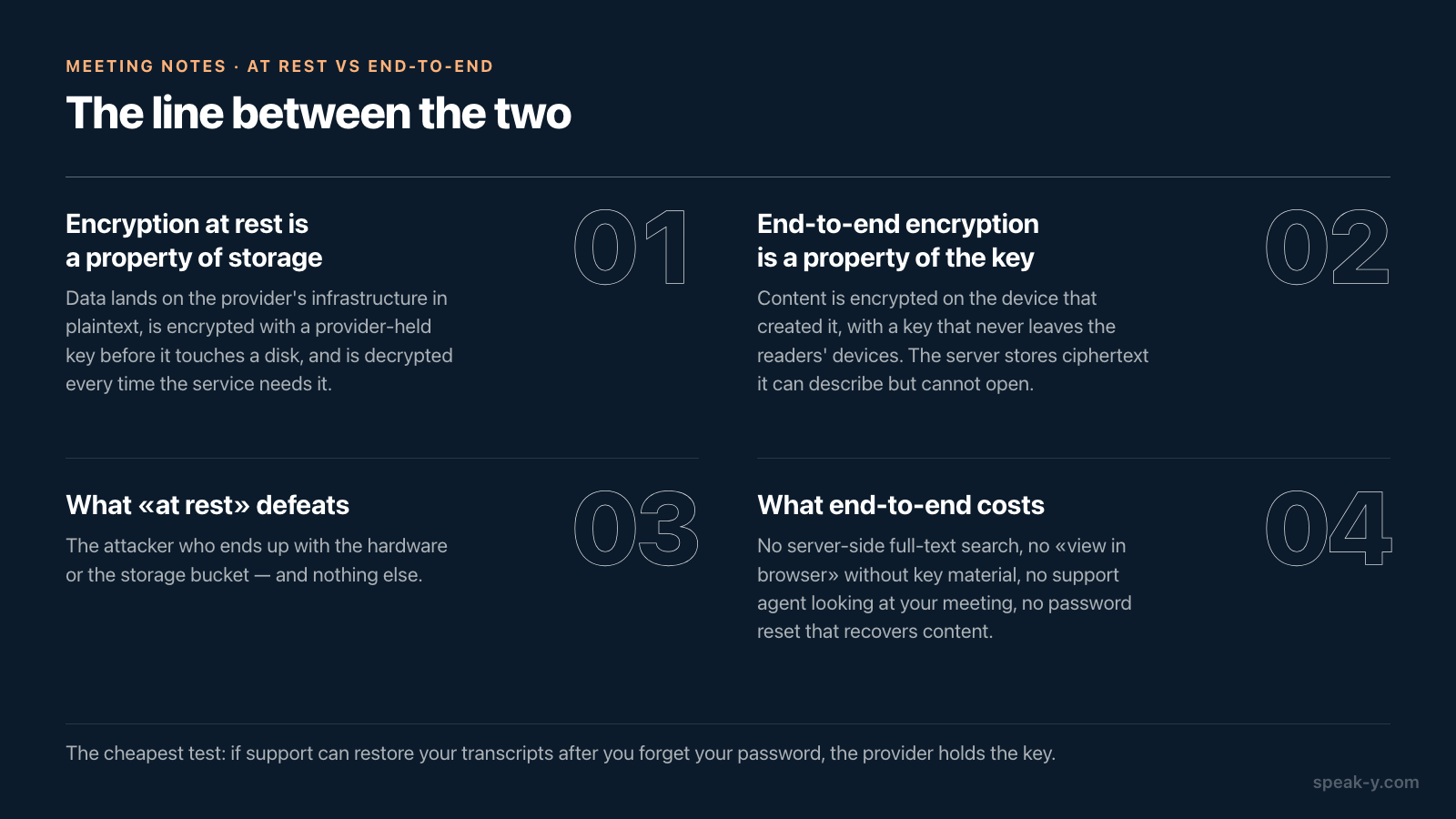
Encryption at rest is a property of storage. Data lands on the provider's infrastructure in plaintext, gets encrypted with a provider-held key before it touches a disk, and is decrypted again every time the service needs it — to render your notes in a browser, to run a search, to feed a model that writes the summary. The attacker it defeats is the one who ends up with the hardware or the storage bucket and nothing else.
End-to-end encryption is a property of the key. Content is encrypted on the device that created it, with a key that never leaves the devices of the people entitled to read it. The server stores ciphertext and can describe it — size, timestamps, who it belongs to — but cannot open it. The practical consequence is a list of things that stop working: no server-side full-text search, no "view in browser" without key material, no support agent who can look at your meeting to see why it failed, and no password reset that recovers content.
That last one is the cheapest test there is, and it is discussed in more detail below.
Who can read a transcript that is encrypted at rest
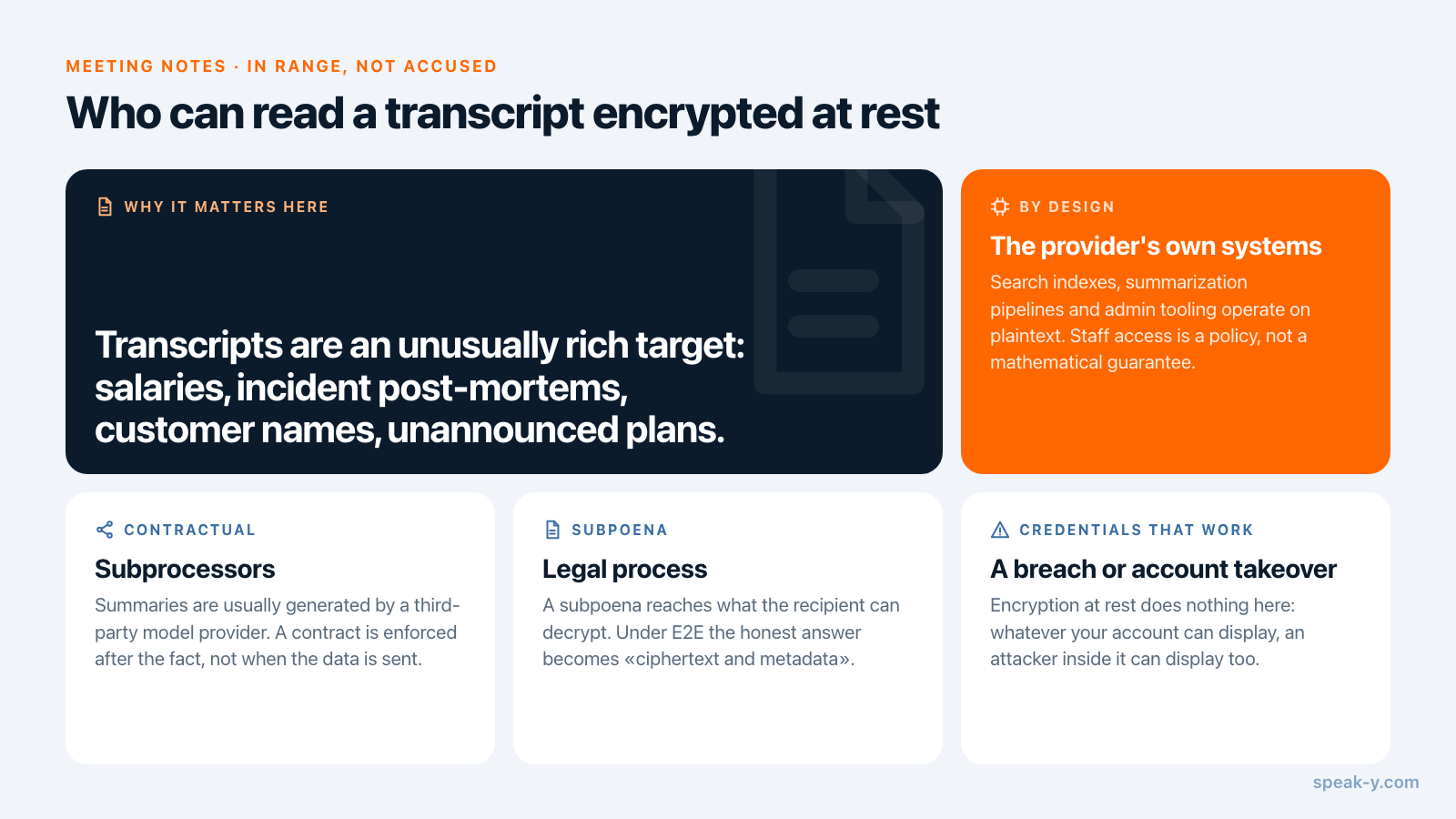
Not a list of accusations — a list of the parties the architecture puts in range:
- The provider's own systems. Search indexes, summarization pipelines and admin tooling operate on plaintext. Whether staff can read a given meeting is a matter of internal access control, which is a policy, audited periodically, rather than a mathematical guarantee.
- Subprocessors. Summaries and action items are usually generated by a third-party model provider. The protection here is contractual — Granola states that third parties are not allowed to train on customer data — and a contract is enforced after the fact, not at the moment the data is sent.
- Legal process. A subpoena reaches what the recipient is able to decrypt. Under end-to-end encryption the honest answer becomes "we can produce ciphertext and metadata", which is a materially different conversation.
- A future breach or account takeover. Encryption at rest does nothing against credentials that work. Whatever your account can display, an attacker inside your account can display too.
- A future change of policy. Retention windows, training defaults and acquisition terms are all revisable. Keys that never left your devices are not.
Meeting transcripts are an unusually rich target for all five: salary discussions, incident post-mortems, customer names, unannounced plans, and the sentences people say before they realize they are being recorded.
Why AI features and end-to-end encryption cancel out
This is the part that settles the argument, and it comes straight from the platforms' own documentation.
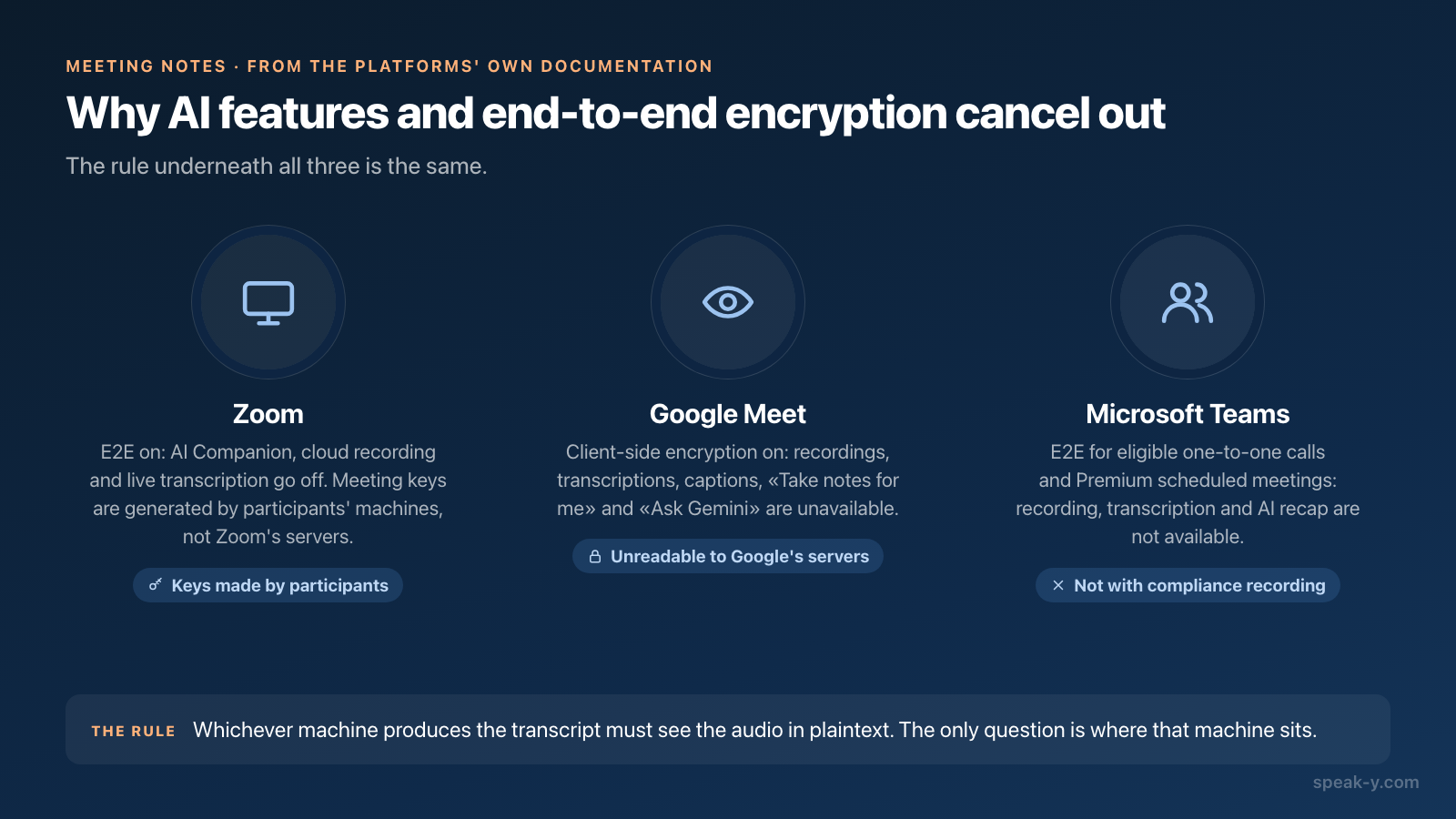
Zoom. Turning on end-to-end encryption disables AI Companion features, cloud recording, live transcription, meeting chat before and after the meeting, live streaming, polls and surveys, Zoom Apps, Zoom Notes and Zoom Whiteboard. Zoom's explanation is the mechanism itself: the keys for each meeting are generated by participants' machines, not by Zoom's servers.
Google Meet. With client-side encryption on, recordings, transcriptions, captions, "Take notes for me" and "Ask Gemini" are all unavailable, along with phone audio, breakout rooms and livestreams. Google's wording is explicit — media is encrypted by each participant's browser using keys only made available to the participants, and remains unreadable to Google's servers.
Microsoft Teams. End-to-end encryption covers eligible one-to-one VoIP calls, and scheduled meetings with a Teams Premium license. Recording, transcription and AI recap are not available while it is on, and organizations using compliance recording cannot use it at all.
The rule underneath all three: whichever machine produces the transcript must see the audio in plaintext. There is no clever protocol that avoids this. So the design question is not "is it encrypted" but "where does that machine sit" — in the vendor's cloud, or on the desk of someone who was in the meeting anyway.
The local-first answer
If transcription happens on your own computer, the trade-off dissolves. The plaintext exists on a machine that already had the audio, nothing has to be uploaded for the summary to be written, and everything that leaves afterwards can be end-to-end encrypted, because no server needs to read it.
That is the shape Speak-Y is built in. Calls are recorded locally with no bot joining the meeting — a difference that is visible to everyone else in the call, and one we covered separately in recording meetings without a bot. Transcripts stay on the device by default, audio is deleted after processing, and sync between your own devices is end-to-end encrypted. Sharing into a team knowledge base works the same way: channel keys exist only on the team's devices, and removing a member rotates them immediately. When an AI assistant reads your meetings over the built-in MCP server, it reads them off the library on your machine rather than from a cloud copy. The full data handling is in the privacy policy.
The honest cost of this model is the mirror image of the cloud one. Search runs on your devices, not on a server that has indexed everything. A colleague cannot be given access to a channel they were removed from by flipping a flag back. And a device you lose is a device with plaintext on it, which is why disk encryption on the endpoint stops being optional.
Four questions that test an E2E claim
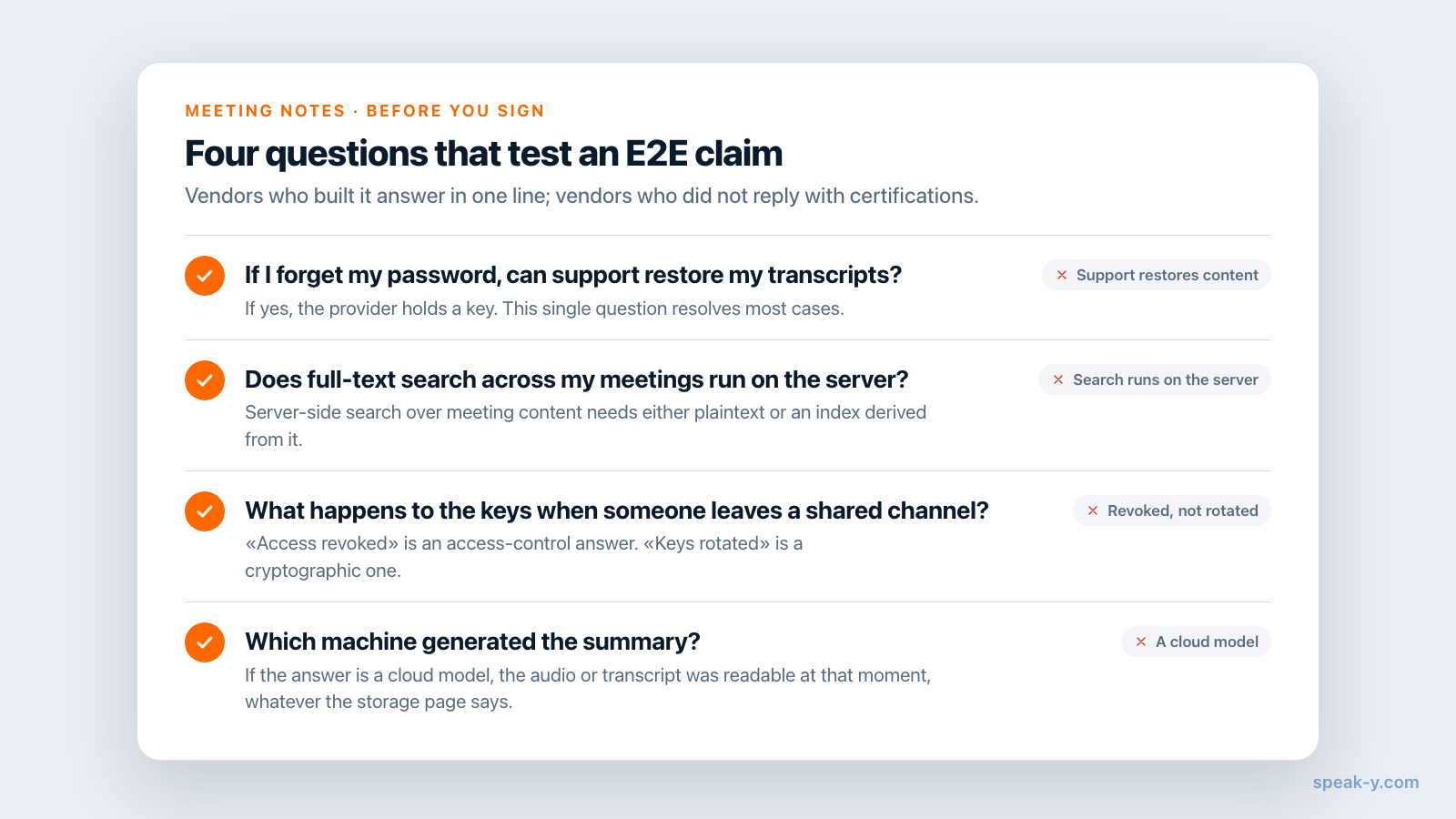
- If I forget my password, can support restore my transcripts? If yes, the provider holds a key. This single question resolves most cases.
- Does full-text search across my meetings run on the server? Server-side search over meeting content needs either plaintext or an index derived from it.
- What happens to the keys when someone leaves a shared channel? "Access revoked" is an access-control answer. "Keys rotated" is a cryptographic one.
- Which machine generated the summary? If the answer is a cloud model, the audio or transcript was readable at that moment, whatever the storage page says.
Vendors that have actually built end-to-end encryption answer these quickly, because the answers are consequences of the design. Vendors that have not tend to reply with certifications, which are answers to a different question.
What end-to-end encryption does not do
It does not protect you from the other people in the room. Anyone with the key can read, copy and forward the content; sharing a transcript into a team channel means the team has it. It does not protect a compromised endpoint, since the plaintext is right there. It does not hide metadata — who recorded what, when, and how large it was.
And it says nothing about whether you were allowed to record in the first place. That is a consent question, decided by jurisdiction and by the participants: some places require one party's consent, others require every party's. It is being litigated right now — a consolidated class action against Otter over its notetaker's recording practices was argued on a motion to dismiss in May 2026, and no court has yet ruled on whether the practice is lawful. Encryption is not a defence there, and the announcement you make at the start of the call is not optional because your storage is encrypted. (General information, not legal advice.)
If you are choosing a tool, treat "encrypted at rest" as the floor rather than the answer, and ask where the transcription happens. That single fact determines everything else — including whether end-to-end encryption is available to you at all, or merely a phrase on a page. The team knowledge base guide walks through what shared, encrypted meeting notes look like in day-to-day use.
FAQ
Are AI meeting notes end-to-end encrypted?
Almost never. The security pages of the major AI notetakers describe AES-256 encryption at rest and TLS in transit, which means the provider holds the keys and its systems can read your transcripts. End-to-end encryption means the keys exist only on the participants' devices — checked on 17 August 2026, Otter, Fireflies and Granola do not claim it for meeting content.
What is the difference between encryption at rest and end-to-end encryption?
Encryption at rest protects data on the provider's disks: if a drive or a storage bucket is stolen, the contents are unreadable. The provider still holds the key and decrypts your data whenever it serves a page, runs a search or generates a summary. End-to-end encryption removes the provider from the loop — it stores ciphertext it cannot decrypt, because the key never leaves your devices.
Why can't I have end-to-end encryption and AI meeting summaries at the same time?
Because whichever machine writes the summary has to read the audio in plaintext. Zoom disables AI Companion, cloud recording and live transcription in E2EE meetings; Google Meet drops recordings, transcripts, captions and Take notes for me under client-side encryption; Microsoft Teams turns off recording, transcription and intelligent recap for end-to-end encrypted calls. The only way to get both is to do the transcription on your own device.
How do I check whether a vendor's encryption claim is really end-to-end?
Ask what happens if you forget your password. If support can restore your transcripts, the provider holds a key and the system is not end-to-end encrypted. The same test applies to server-side full-text search, web access to notes without any key material on the device, and support staff who can open your meeting to debug it.
Does end-to-end encryption make meeting recording legal?
No. Encryption governs who can read a recording; recording law governs whether you were allowed to make it. Consent rules differ by jurisdiction — some require one party, others all parties — and they apply the same way to an encrypted transcript. This is general information, not legal advice.