How End-to-End Encrypted Team Sharing Works: Keys, Joins, Removals
End-to-end encrypted team sharing rests on one idea: content is locked with keys that only the team's devices hold, and the server's job is to deliver sealed copies of those keys to the right people without being able to open them. Everything else — inviting someone, removing someone, recovering a lost password — is a question of who seals a new copy of which key for whom.
The short answer to the question most people actually have: when a member is added, someone who already has the channel key seals a copy of it for the newcomer. When a member is removed, the server deletes their copy, and a remaining member's app generates a new version of the key that the removed person never receives. That second step, called key rotation, is what separates cryptographic removal from simply hiding a folder in the interface.
This article walks through the concepts at the level a team lead or a security reviewer needs. It uses Speak-Y Teams as the worked example, because it is the design we can describe precisely, and compares it with other published designs where they differ.
Three layers of keys, and why there are three
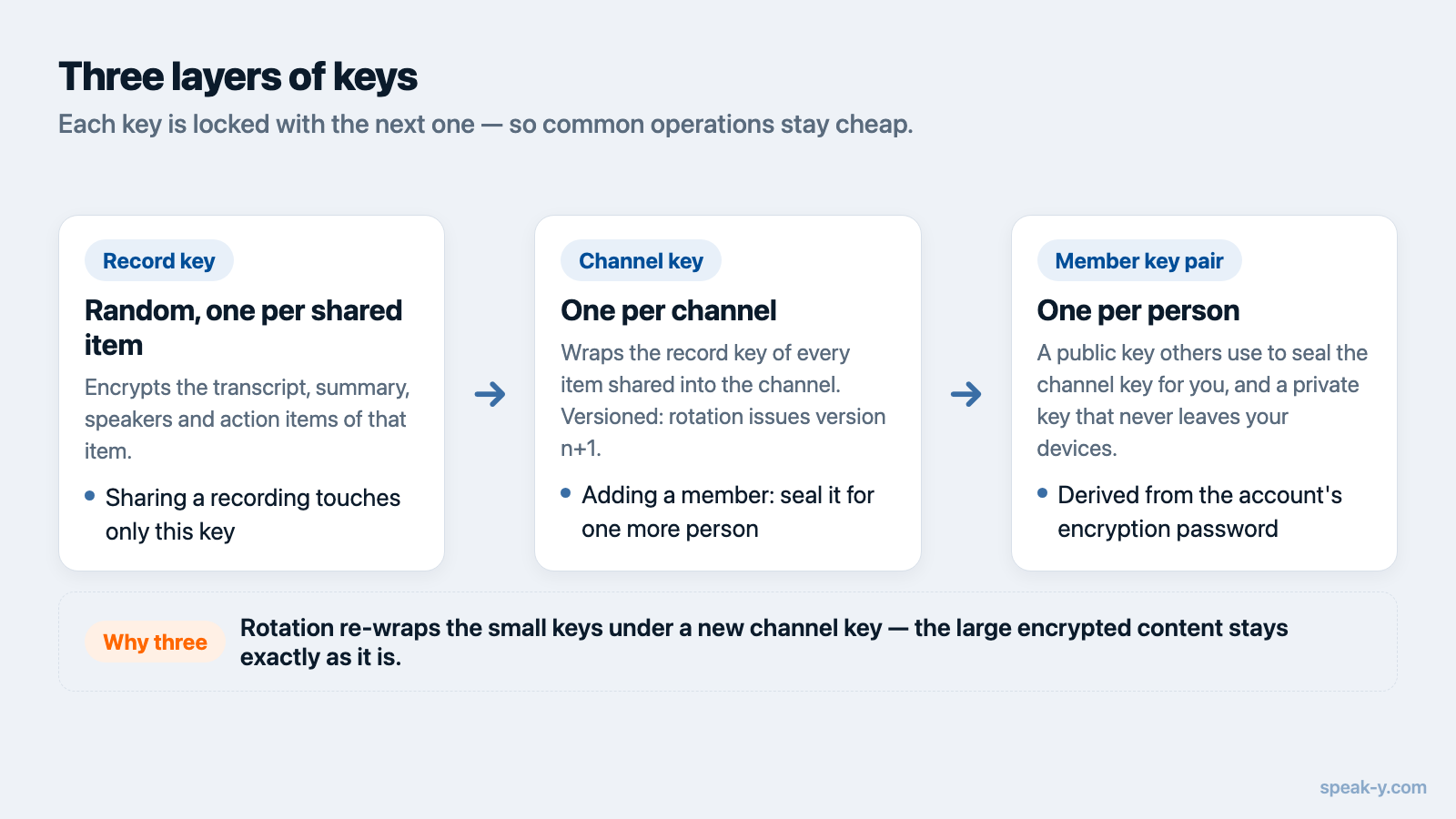
A shared meeting transcript in an end-to-end encrypted team space is protected by a chain of keys rather than a single password:
- A record key. Every shared item gets its own random key, which encrypts the transcript, summary, speakers and action items.
- A channel key. The record key is wrapped — encrypted — with the key of the channel the item was shared into. One channel key covers every item in the channel.
- A member key pair. Each person has a public key that others can use to seal things for them, and a private key that never leaves their devices. The channel key is sealed separately for every member with that member's public key.
The layers exist so that common operations stay cheap. Sharing a new recording touches only one record key. Adding a member means sealing one channel key for one more person, not re-encrypting every transcript. Rotating a channel key after a removal changes one key and re-wraps the small record keys underneath it, while the large encrypted content stays as it is.
In Speak-Y the member key pair is derived from the account's encryption password, so the same password produces the same keys on every device. The building blocks are standard public-key "sealed boxes" and authenticated encryption, not custom cryptography.
What the server stores and what it cannot see
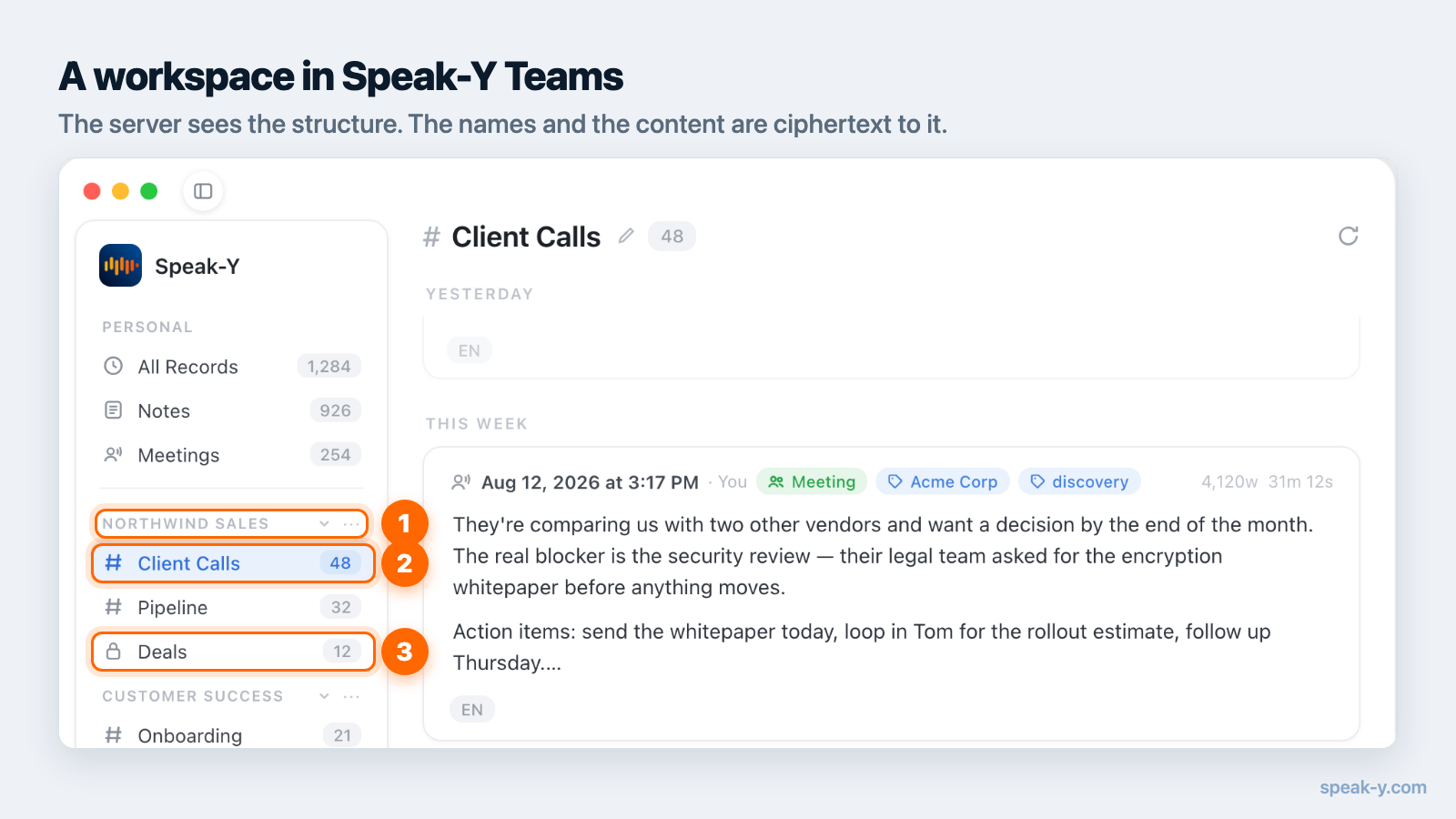
The server is a mailbox for ciphertext. It holds encrypted items, the sealed copies of channel keys addressed to each member, and enough structure to route them.
It can see the structure of the team: how many workspaces and channels exist, who is a member of which, whether a channel is public or private, when a key was issued or revoked, and basic metadata about each item — size, duration and time. It cannot see the content of transcripts and summaries, and in Speak-Y it also cannot see the names of workspaces and channels, which are encrypted with the same keys as the content. A channel called "Acquisition — Project Falcon" is itself information.
Being precise about metadata is part of an honest end-to-end claim. The glossary entry on E2EE covers why no design hides everything.
What happens when someone joins
The difficulty with adding a member is that the server cannot hand over a key it cannot read. Only a client that already holds the key can seal a copy for the newcomer's public key, and the newcomer's public key only exists once they have accepted the invitation.
There are two ways around this. The first is to wait until someone on the team opens the app and seals the keys for the new member, which works but leaves a gap if the inviter is on holiday. Speak-Y shows that gap as its own state, Waiting for the channel key, rather than as a network error.
The second is to make the invitation carry what the newcomer needs. A Speak-Y
invite link contains the workspace key in the fragment, the part of the URL
after #, which is never sent to the server. Channels keep a copy of their key
locked under the workspace key, so a new member can open the workspace's
channels as soon as they accept, without anyone else being online. The cost is
that the link itself grants access, which is why invites are single-use,
expire, and should be sent the way you would send a password.
Private channels add one more rule: they are not opened by the workspace key. A member of the private channel adds someone by sealing that channel's key for them directly.
What happens when someone is removed
This is where designs differ most, and where the question "is it really end to end?" gets a concrete answer.
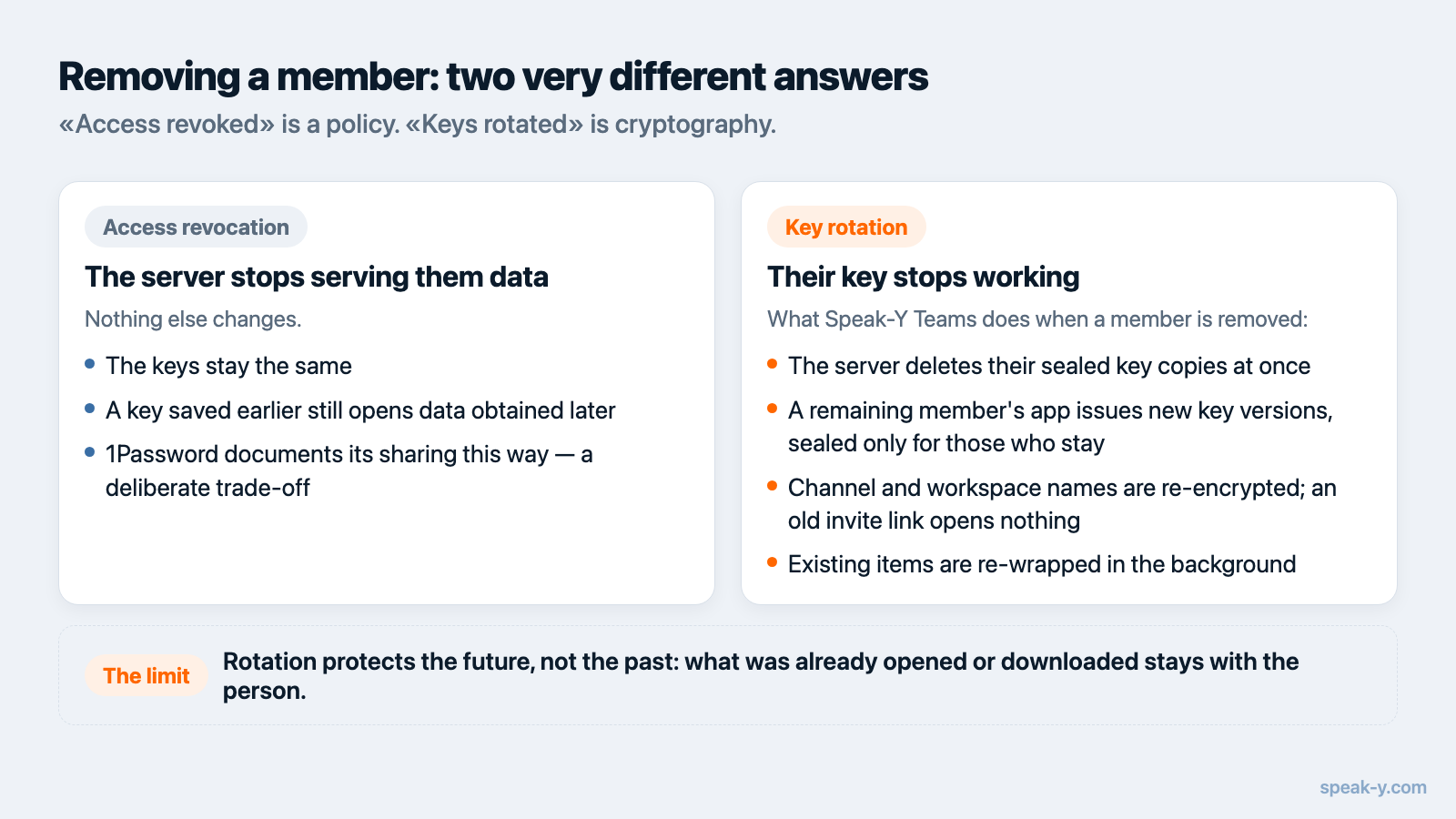
Access revocation means the server stops serving data to the removed person. It is enforced by the server's policy, and the keys do not change. 1Password's security white paper describes its own sharing this way, stating plainly that removing someone from a vault, group or team is not cryptographically enforced and that the keys are not changed. That is a documented, deliberate trade-off; a person who saved the key beforehand could still read vault data they later obtain.
Key rotation means the removed person's key stops working. In Speak-Y, when a member is removed from a workspace:
- The server deletes that person's sealed copies of the keys immediately.
- The app of the member doing the removal generates new versions of the channel keys and the workspace key, and seals them only for the people who remain, plus the workspace Recovery Kit.
- Channel and workspace names are re-encrypted under the new versions.
- The copies of channel keys locked under the old workspace key are re-locked under the new one, so an old invite link opens nothing.
- Existing items are re-wrapped to the new key version in the background.
Removing someone from a single private channel rotates that channel's key in the same way.
Messaging protocols follow the same principle. WhatsApp's encryption overview (February 2026 edition) says that whenever a group member leaves, all participants clear their group key and start over. The IETF's Messaging Layer Security standard, RFC 9420, published in July 2023, moves a group to a new epoch on removal, with new key material that the removed member does not know.
What rotation cannot take back
Rotation protects the future, not the past. Anything the removed person already opened, downloaded or copied on their own device stays with them — no encryption scheme can reach into someone's memory or their disk. What rotation guarantees is narrower and still valuable: new recordings shared after the removal are unreadable to them, and the old key does not open anything they might fetch from the server later.
Two consequences for how a team works:
- Share into a channel what everyone in that channel may keep. A channel is closer to sending an email than to lending a folder.
- Rotation does nothing against a member who is still on the team and forwards content elsewhere. That is a trust question, not a cryptography one.
The team knowledge base guide covers how to decide what goes into which channel.
When someone forgets their password
In a system where the provider holds no keys, "forgot password" cannot be solved by support — that is the point. It has to be solved by someone on the team.
Speak-Y does this with a Recovery Kit: when a workspace is created, the owner saves a file with a recovery key, and every channel key is also sealed for it. If a member loses their password and sets a new one, the holder of the Kit can re-issue channel keys to their new key pair. The Kit restores access to team channels only; it never covers anyone's personal recordings. It is also the most sensitive file the team has, and belongs wherever the team keeps its other critical secrets.
Sharing with someone outside the team
Sometimes a transcript has to reach a client or a colleague without an account. A Speak-Y public share link encrypts a separate copy of the item with its own fresh key and places that key in the URL fragment. Anyone holding the full link can read the item in a browser; the server holds only ciphertext. Revoking the link deletes it on the server. Like an invite, the link is the secret, and a copy someone already opened is not recalled.
Four questions to ask any vendor
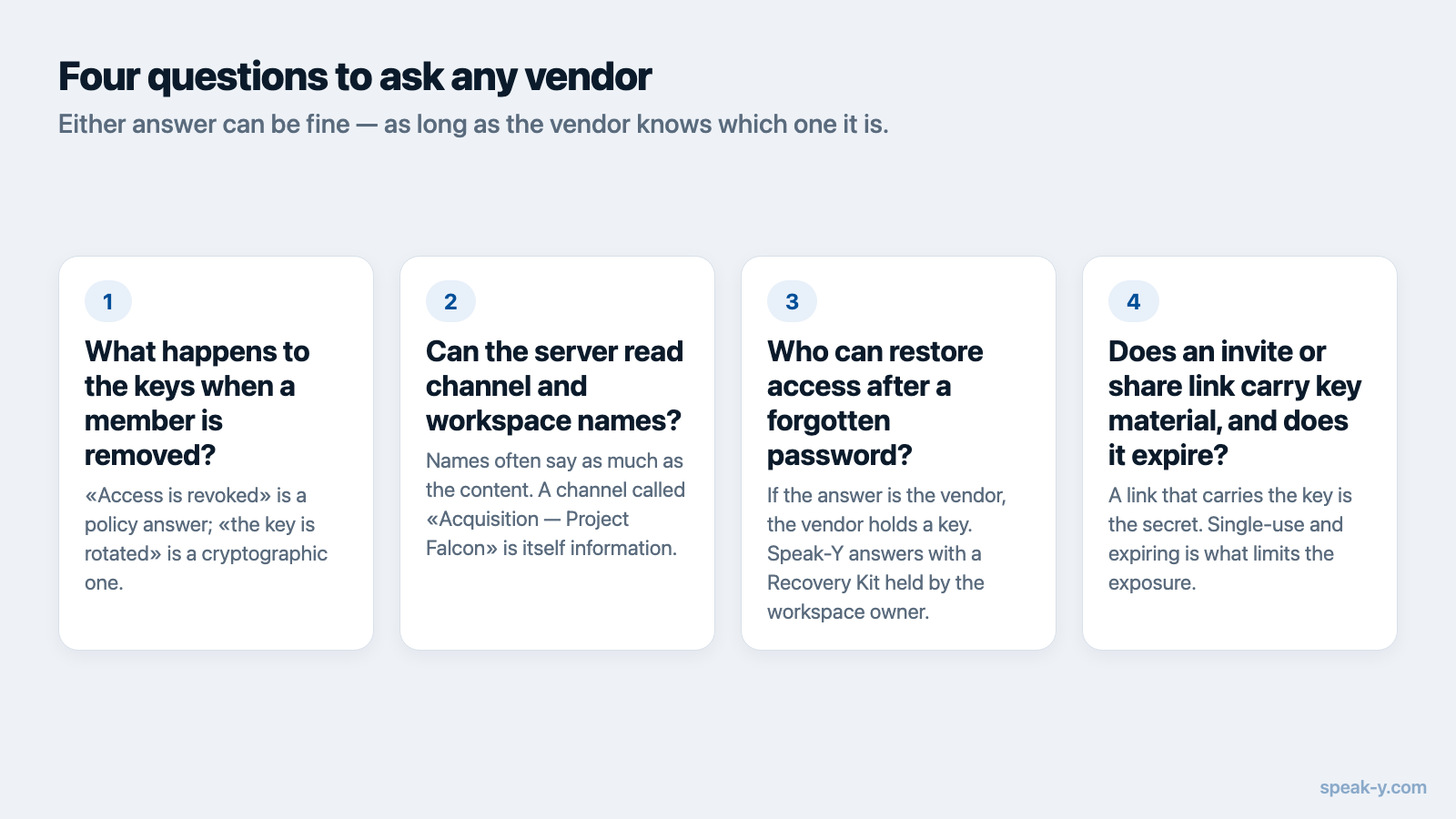
- What happens to the keys when a member is removed? "Access is revoked" is a policy answer; "the key is rotated" is a cryptographic one.
- Can the server read channel and workspace names? Names often say as much as the content.
- If a member forgets their password, who can restore access? If the answer is the vendor, the vendor holds a key.
- Does an invite or share link carry key material, and does it expire? Either answer can be fine, as long as the vendor knows which one it is.
In Speak-Y, team sharing is available in the macOS app. Creating a workspace starts on the Pro plan, and teammates join free on any plan. The Speak-Y Teams page shows how shared channels look in day-to-day use, and why meeting notes need end-to-end encryption explains why the transcription has to happen on your device for any of this to be possible.
FAQ
How can a team share end-to-end encrypted files if the server cannot read them?
Each shared item is encrypted with its own random key, and that key is locked with a channel key. The channel key is then sealed separately for every member with that member's public key. The server stores only these sealed copies, so it can deliver them to the right people but cannot open any of them.
What happens to the encryption keys when someone is removed from a team channel?
In a design that enforces removal cryptographically, the server deletes the removed person's copy of the channel key, and a remaining member's app generates a new version of the key and seals it only for the people who stay. Older items are then re-locked under the new version. Speak-Y Teams works this way; some well-known products only revoke server access and keep the same keys.
Can a removed team member still read what was shared before?
Anything the person already opened, downloaded or copied stays with them. No encryption scheme can take back plaintext that has already been on someone's screen. Key rotation protects what is shared after the removal and stops the old key from opening content fetched from the server later.
What if a team member forgets their password in an end-to-end encrypted workspace?
The provider cannot restore access, because it never held the keys. Speak-Y handles this with a Recovery Kit: a file the workspace owner saves when creating the workspace, which can re-issue channel keys to a member who set a new password. The Kit does not cover anyone's personal recordings.
Is an invite link to an encrypted workspace sensitive?
It can be. In Speak-Y the invite link carries the workspace key in the part of the URL after the #, which browsers and apps never send to the server. Invites are single-use and expire, and removing a member rotates the workspace key, but until it is used the link should be handled like a password.