Public Link to a Meeting Transcript: Share It Outside Your Team
Sometimes the person who needs a meeting transcript is not on your team: a client who missed the call, a contractor, a candidate you interviewed with a colleague. Inviting them into a workspace for one document is too much, and pasting the whole transcript into an email loses the speakers and timestamps.
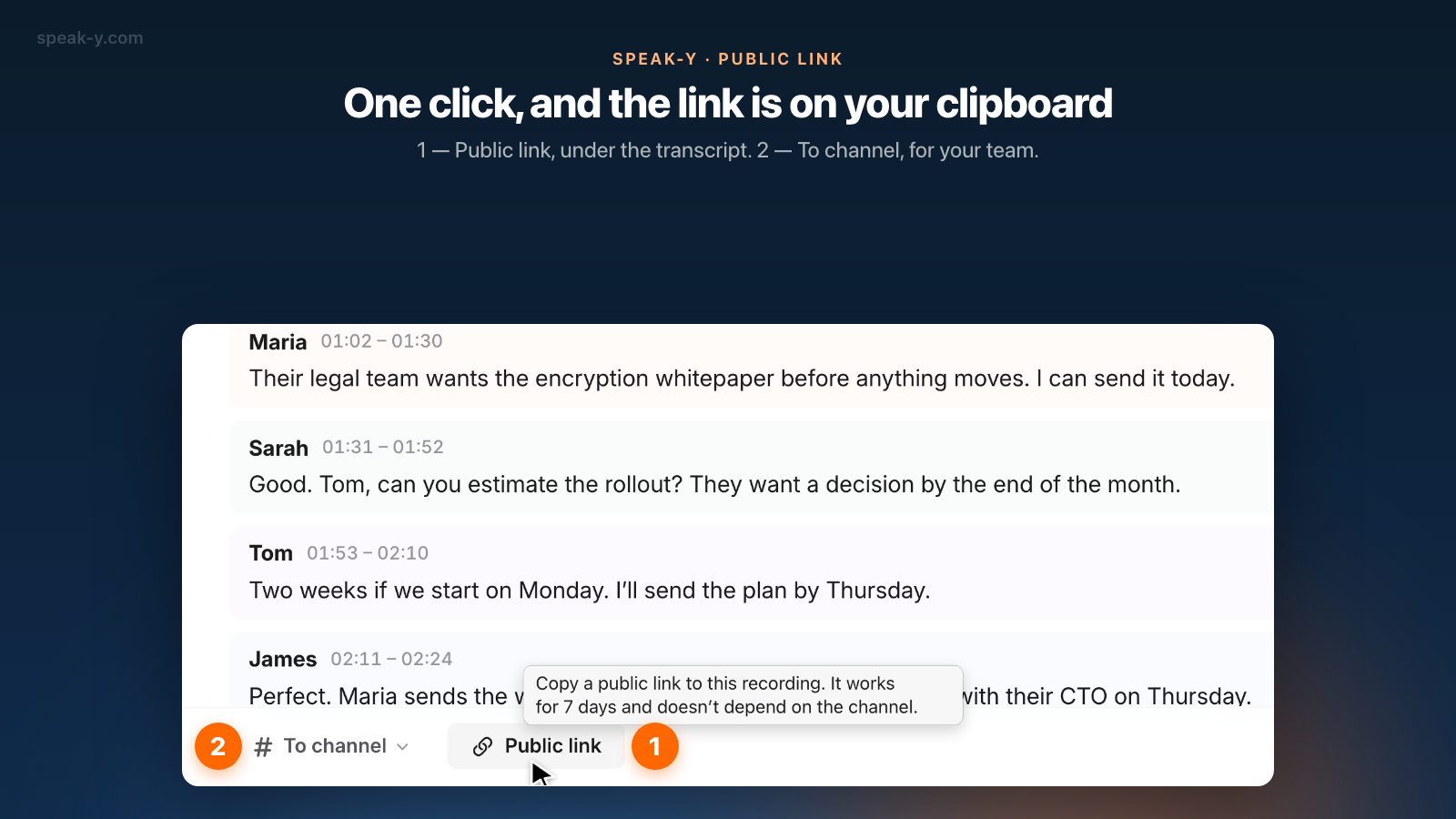
In Speak-Y the answer is a public link. Open the recording on your Mac, click Public link in the action bar under the transcript, and a link is already on your clipboard. Whoever receives it opens it in any browser without an account and sees the summary and the transcript by speaker. The link works for 7 days, does not depend on any team channel, and the server that hosts it cannot read what is behind it.
Below: how to create the link, what the recipient sees, why it expires, and when a channel is the better choice.
How do I create a public link to a recording?
The button lives on the recording itself, not in the team settings:
- Open the recording in the Speak-Y app on your Mac — a meeting or a dictation, as long as it has been transcribed.
- In the action bar under the transcript, click Public link. If you are in a team workspace, it sits right after To channel.
- The button changes to Link created and copied for a few seconds. The link is on your clipboard; paste it into an email or a direct message.
- Click the button again later and it reads Link copied: you get the same link rather than a new one, as long as the recording has not changed and the link has more than a day left.
There is no dialog. You do not need a team workspace: any of your own recordings can get a link as long as you are signed in to Speak-Y. A recording opened from a channel feed has no link button — links are created by the author, from their own copy in All Records.
What does the recipient see?
The link opens a plain read-only page in the browser. There is nothing to install and no sign-up. The page shows:
- the summary, if the recording has one;
- the notes you placed during the meeting — only if you chose to show them to others (more on that below);
- the transcript, split by speaker with timestamps, using the speaker names you set;
- a line saying when the link expires, with buttons to copy or download the summary and the transcript.
The audio is not part of the link. The page is marked noindex, so search engines do not list it, and
link previews in messengers show a fixed product card rather than the meeting
title or speaker names.
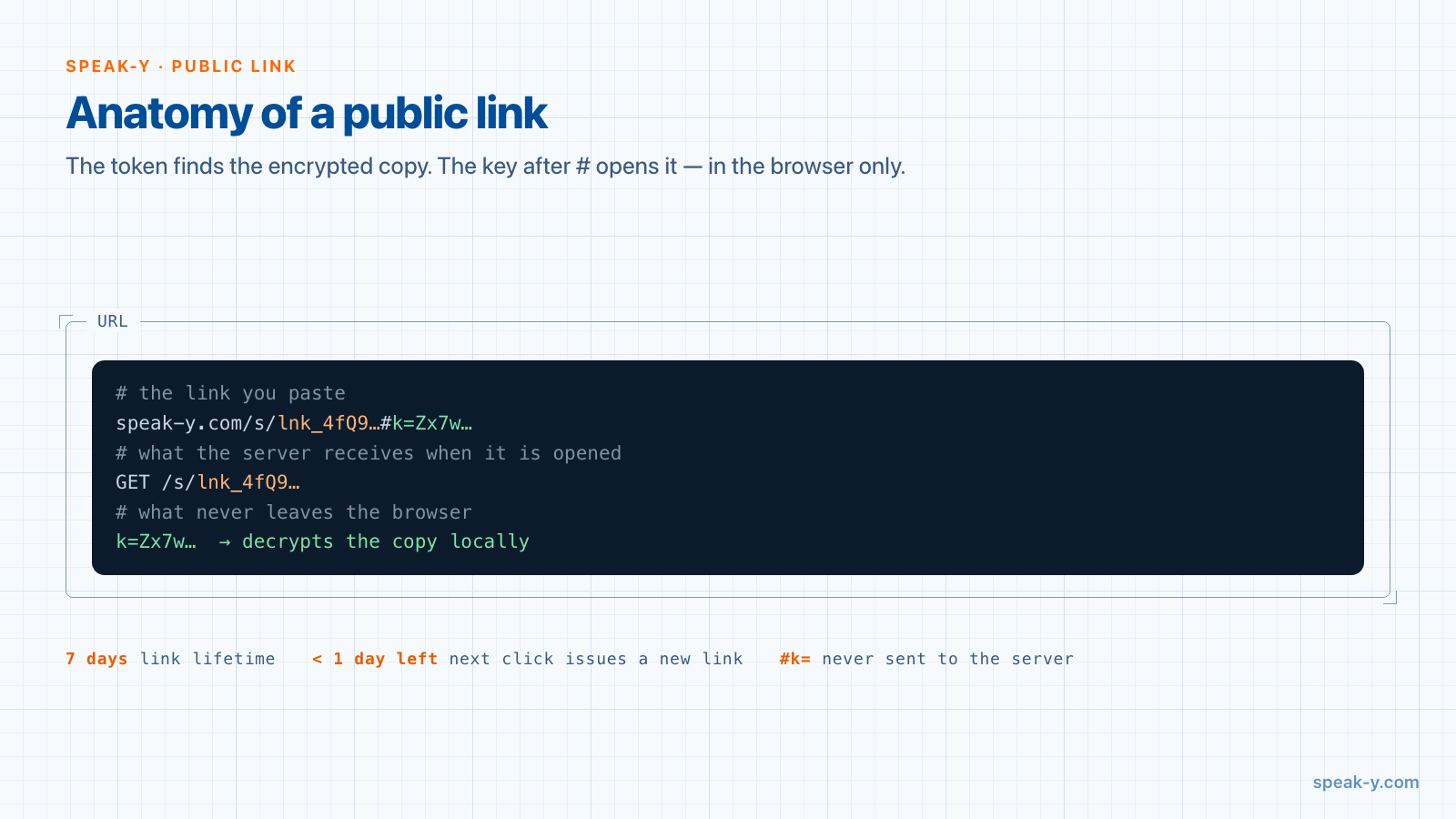
What happens under the hood matters for privacy. When you click the button,
the app encrypts a separate copy of the recording with a fresh random key.
The server stores that ciphertext under a token, and the key is placed in the
part of the URL after the # — the fragment, which browsers never send to any
server. The recipient's browser downloads the ciphertext and decrypts it
locally. Speak-Y keeps an encrypted blob it has no key for, the same principle
as in end-to-end encrypted team channels.
Why does the link expire after 7 days?
Every public link lives for seven days, and there is no "never expires" option. That is deliberate. Keeping the key in the fragment protects the content from the server, but not from people: if the recipient forwards the link or pastes it into a public chat, anyone holding the full address can open it. A bounded lifetime is what caps that exposure.
After seven days the page says the link has expired. Within hours the server deletes the ciphertext entirely, and from then on the address simply does not exist. The expiry line on the page tells the recipient to copy or download anything they want to keep before then. If they need it again after a week, click Public link again and send the new link: when the old one has less than a day left, the app quietly issues a fresh one instead of handing out a link that is about to stop working.
A link is a snapshot, not a live view
A public link captures the recording as it was when you created it. If you later rename a speaker, regenerate the summary, or edit the title, tags or text, the old link keeps showing the old version. The next click on Public link notices the change and gives you a new link with the current content. The previous link is not revoked automatically, because you may already have sent it to someone; it simply expires on its own schedule.
Two actions do take links back early:
- Deleting the recording revokes every live link to it. The Mac that created the links tells the server, which wipes the ciphertext immediately, and the page reports the link as revoked. If that Mac is offline at that moment, the link stays until its seven days run out.
- Making meeting notes private revokes the links that carried those notes. Notes are private by default; they can be shown to others only on a recording you sent to a team channel. If you then switch them back to Private, the app revokes each link created while the notes were visible.
There is currently no button to revoke one particular link while keeping the recording, and only the Mac that created a link remembers it — one more reason to send a link deliberately, to a specific person.
Public link or team channel?
Both put a recording in front of other people, but they answer different questions.
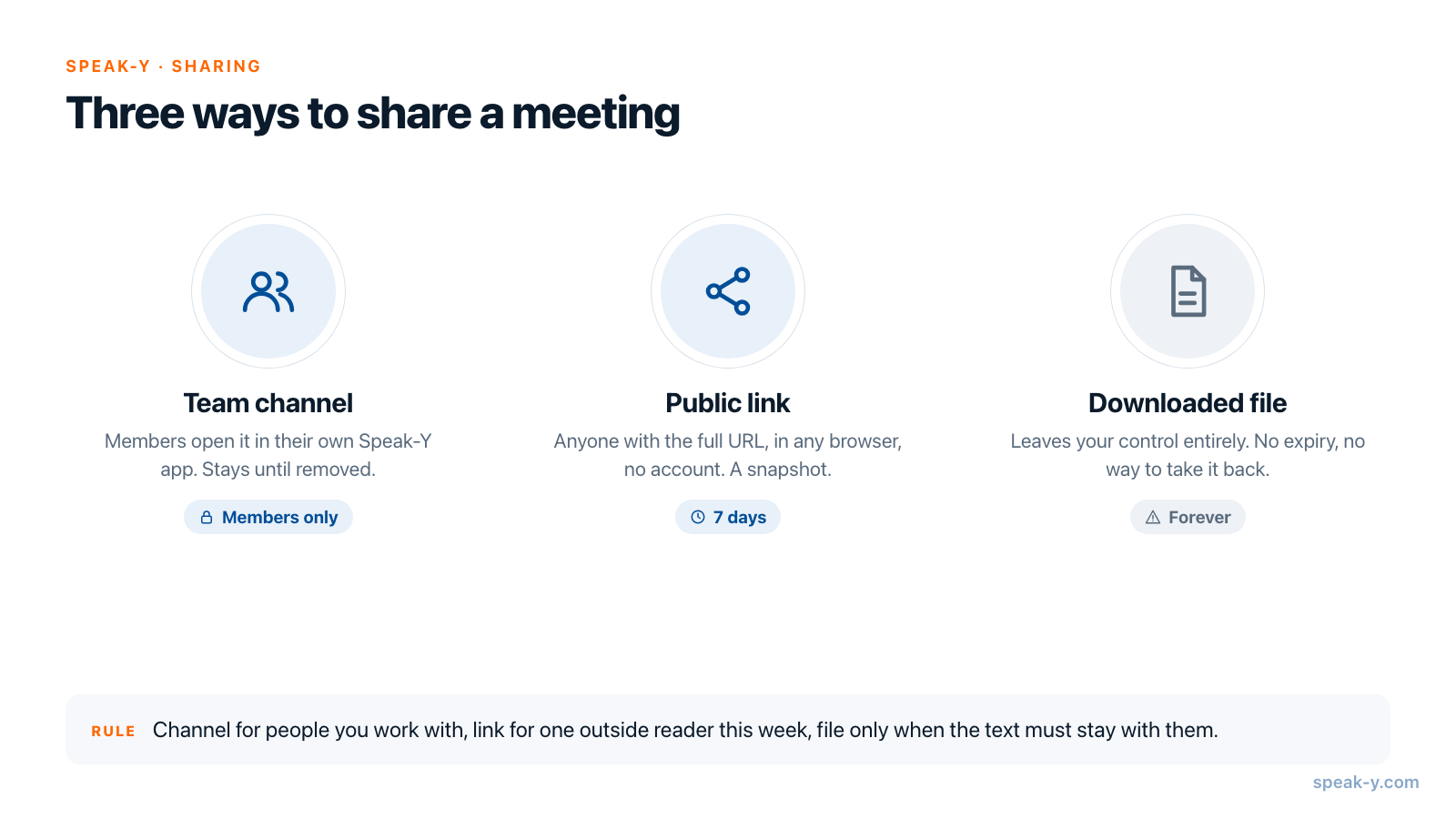
A team channel is for people who work with you. Members see the recording in their own Speak-Y app, it stays there until someone removes it, and access is enforced with keys held only by members' devices: removing a person rotates the channel key. Channels and workspaces are part of Speak-Y Teams.
A public link is for one person outside the team, for a short time. It needs no account on their side, it is tied to no channel, and it ends by itself in a week. The trade-off is that access belongs to whoever holds the URL, not to a named person.
A downloaded file leaves your control entirely: no expiry, no revocation. Use it only when the recipient needs to keep the text for good.
| Team channel | Public link | Downloaded file | |
|---|---|---|---|
| Who can open it | Channel members | Anyone with the full URL | Anyone who gets the file |
| Needs an account | Yes, Speak-Y | No, any browser | No |
| How long | Until removed | 7 days | Forever |
| Can be taken back | Remove the recording or the member | Delete the recording, or make notes private | No |
| Server can read it | No | No | Not stored |
How other meeting tools handle public links
Most meeting tools offer an "anyone with the link" option; they differ in how long it lasts and who can read the content. As of 2 October 2026, according to each vendor's help center:
- Zoom cloud recordings let the owner choose who can view — from "Everyone with the recording link" to signed-in users or specific people — and add an optional expiration date, a passcode and a download toggle.
- Otter has an "Anyone with the link" permission: whoever holds the link can view and play back the transcript without signing in, as a viewer.
- Fireflies uses "Teammates & Anyone with Link" as the default privacy setting for meeting recaps. On Free and Pro plans a guest sees the transcript and audio; the summary and video without signing in need Public Meeting Access, available on Business and Enterprise.
These are more flexible, and some let you revoke a single link, which Speak-Y does not yet do. The difference in Speak-Y is structural: the lifetime is fixed at seven days rather than left to a setting you may forget, and the service storing the link holds only ciphertext.
Before you send a link
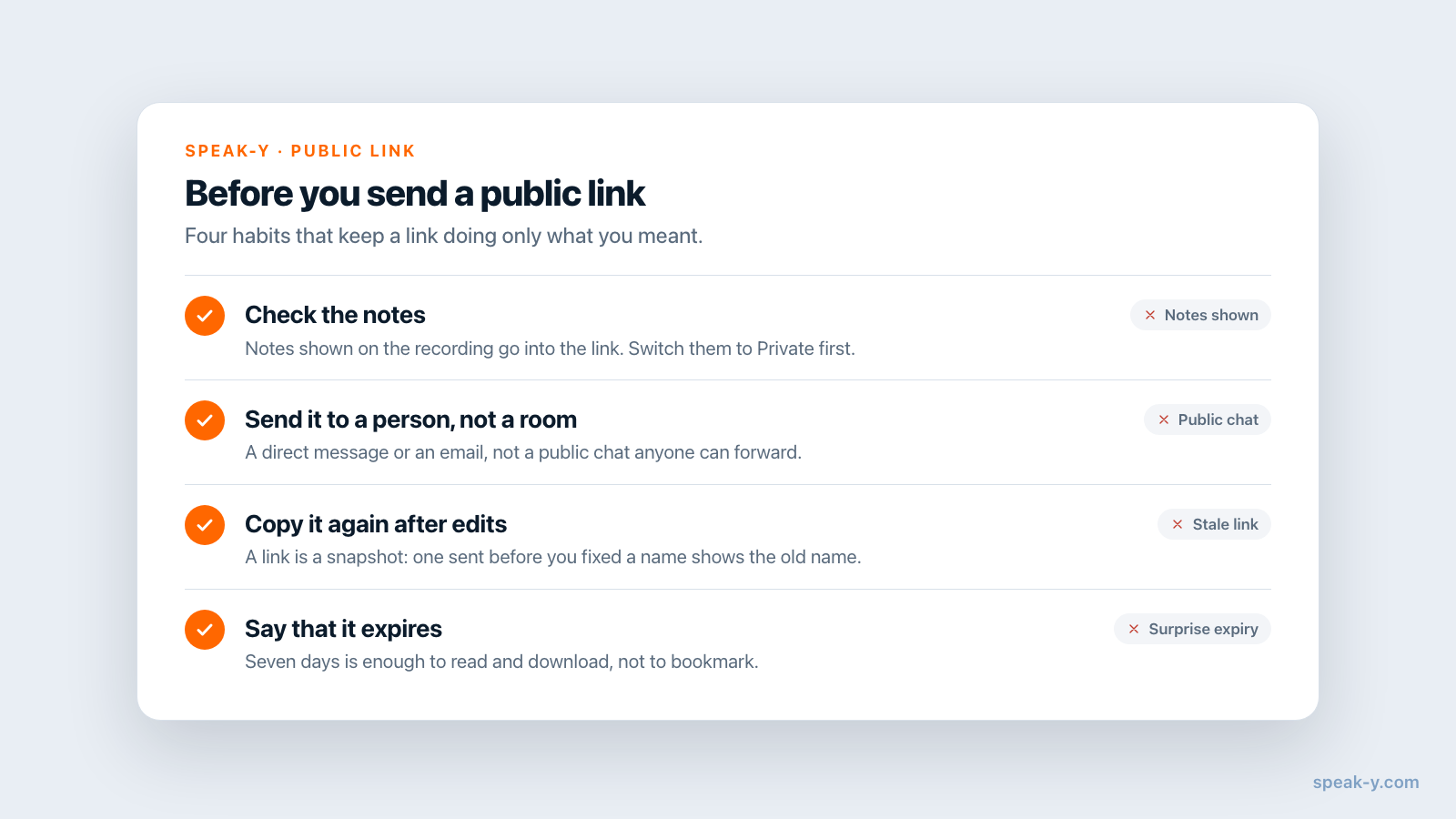
A few habits keep a public link doing only what you meant:
- Check the notes. If the recording is in a channel with its notes shown, they go into the link too. Switch them to Private first if they were meant for you.
- Send it to a person, not a room. A direct message or an email, not a public chat or a shared document that others can forward.
- Copy it again after edits. A link sent before you fixed a speaker name still shows the old name.
- Tell the recipient it expires. Seven days is enough to read and download, not to bookmark.
If the same people need your meetings week after week, a link is the wrong tool: that is what a shared channel is for. The next step is to see how channel keys, invites and removals work, and what the privacy policy says about the data Speak-Y keeps.
FAQ
How do I share a Speak-Y meeting transcript with someone who has no account?
Open the recording in the Speak-Y app on your Mac and click Public link in the action bar under the transcript. The link is copied to your clipboard at once, and the recipient opens it in any browser without signing up. It works for 7 days.
How long does a Speak-Y public link work?
Seven days from the moment it is created. There is no option for a link that never expires: a limited lifetime is what caps the exposure if the link is forwarded or pasted somewhere public. After seven days the page says the link has expired.
Can Speak-Y read a meeting shared through a public link?
No. The app encrypts a separate copy of the recording with a fresh key, and that key travels only in the part of the URL after the #, which browsers never send to the server. The server stores ciphertext it cannot open, and the recipient's browser decrypts it locally.
Does a public link need a team workspace or a channel?
No. Any of your own recordings can get a public link once it has been transcribed, with or without a workspace, and moving the recording between channels does not affect the link. You only need to be signed in to Speak-Y.
What happens to a public link if I edit or delete the recording?
A link is a snapshot of the recording at the moment you created it. After you edit the summary, speakers or notes, the next click on Public link gives you a new link with the new content, while the old one keeps showing the old version until it expires. Deleting the recording revokes all of its live links.