Local vs Cloud MCP Servers: What Your AI Can Actually See
The words local and cloud get used for MCP servers as if they settled the privacy question. They do not. They answer one question precisely — where the server process runs — and leave the question most people actually care about untouched: who ends up able to read your data.
The short version: a local MCP server keeps your data off the vendor's infrastructure; it does not keep it out of the conversation. Whatever your assistant reads through any MCP server, local or cloud, is sent to whichever model you are chatting with. Local changes who stores and who can reach your data. It does not change what the model sees.
This article separates those two things. If the protocol itself is new to you, what an MCP server is covers the basics first.
What "local" and "cloud" mean technically
The MCP specification, revision 2026-07-28, defines exactly two standard transports, and they map cleanly onto the two words.
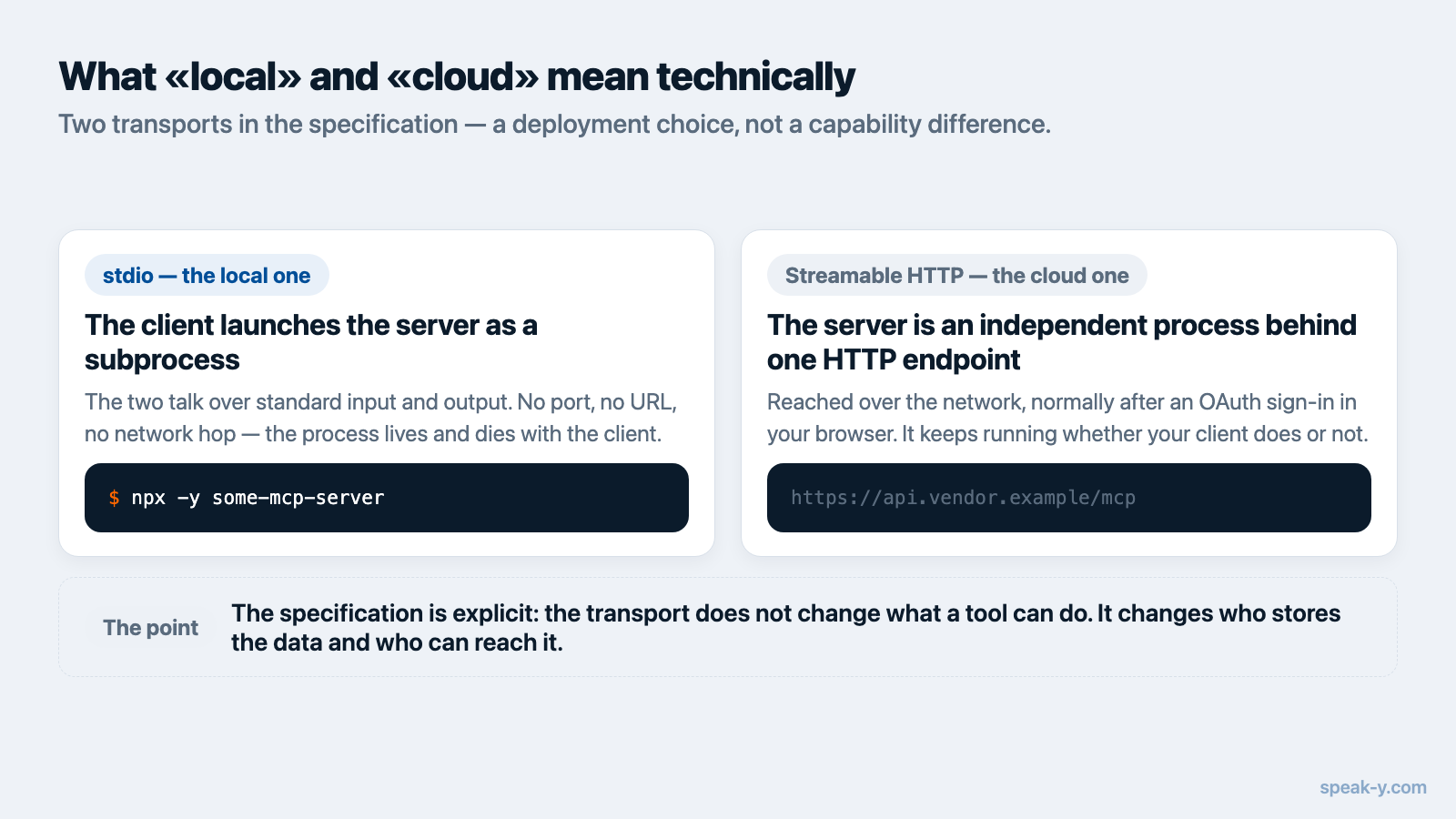
stdio — the local one. The client launches the MCP server as a subprocess and the two talk over that process's standard input and output, one newline-delimited JSON-RPC message per line. There is no network connection and no port. When the client exits, it closes the server's input stream and the process shuts down. This is what "runs on your machine" means in concrete terms.
Streamable HTTP — the cloud one. The server is an independent process
exposing a single HTTP endpoint, and every message is an HTTP POST to it. The
client reaches it over the network at a URL such as https://mcp.example.com/mcp.
This is the transport behind every "connect your account" button.
The distinction is a deployment choice, not a capability difference. The spec is explicit that protocol semantics are identical on every transport: a transport defines how messages are framed and delivered, not what they mean. A tool that reads your meeting transcripts does the same job either way.
Who can see your data in each setup
This is the question the two words are usually standing in for, and it has more than two answers. Four parties can potentially read what flows through an MCP connection.
| Who | Local server (stdio) | Cloud server (HTTPS) |
|---|---|---|
| The MCP vendor | Does not receive the data | Stores it and serves every request |
| Your model provider | Sees everything the assistant reads | Sees everything the assistant reads |
| Your AI client app | Reads it locally to build the prompt | Same |
| Anyone holding the token | No token exists to steal | Can reach the same data until it is revoked |
The middle row is the one that surprises people, and it is the same in both columns. An MCP server does not give the model a private side channel. It retrieves text and hands it to the client, which puts it in the prompt. From that point the data has left your machine regardless of where the server ran.
The first and last rows are where local genuinely wins. With stdio there is no account, no stored copy on someone else's disk, and no credential that can be stolen or leaked in a breach — because there is nothing to authorise.
Local process, cloud data: the shape that gets blurred
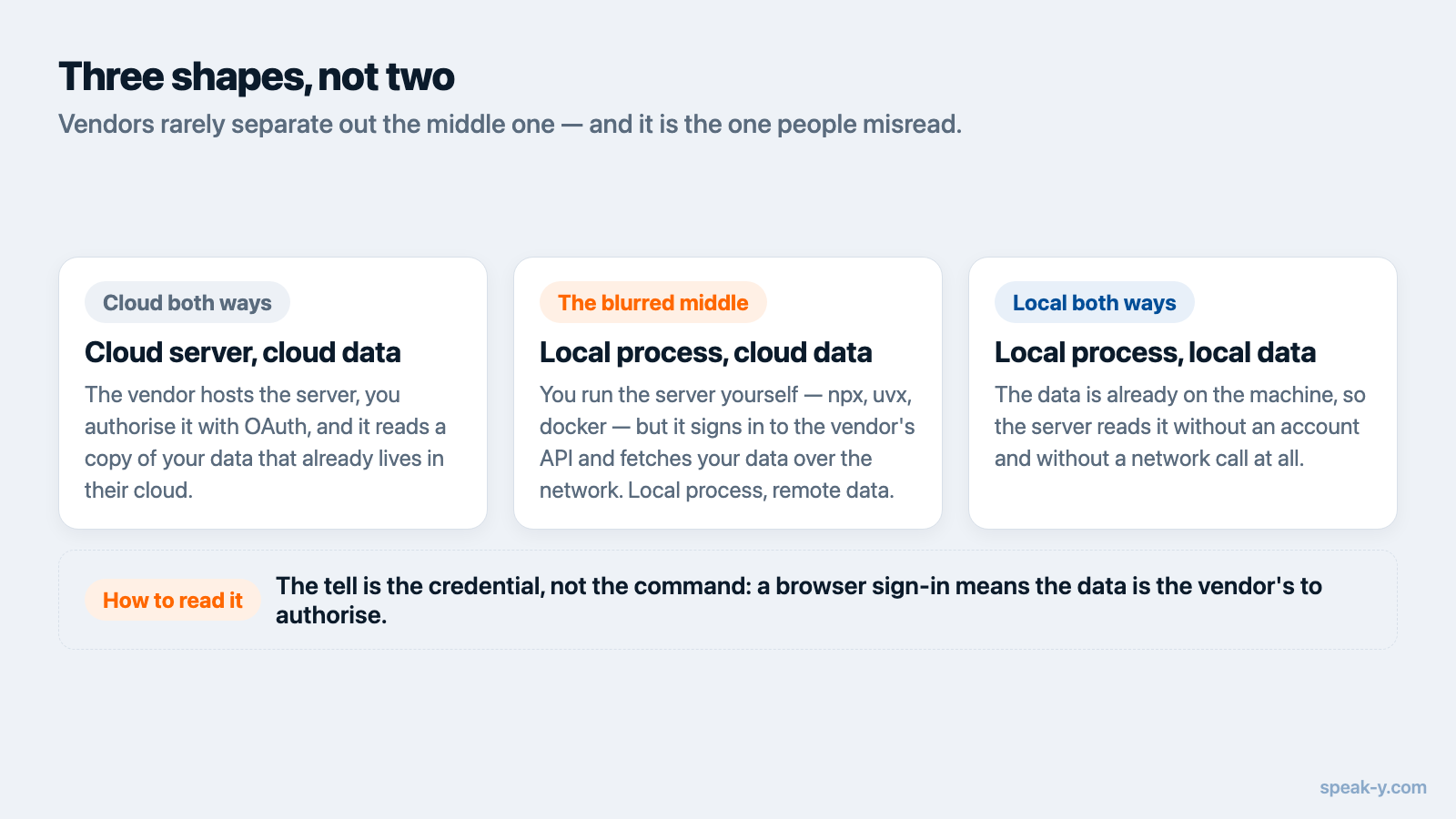
There are three shapes here, not two, and vendors rarely separate the middle one out.
Cloud server, cloud data. The vendor hosts the server, you authorise it with OAuth in a browser, and your client makes an HTTPS call whenever it needs something. The natural shape when your data already lives in that vendor's cloud.
Local process, cloud data. The vendor ships a server you run yourself — an
npx, uvx or docker command started by your AI client, holding an API key.
Nothing about that makes the data local. The process runs on your laptop and
then calls the vendor's API over the network for every request. This is the case
worth ruling out when someone tells you their MCP server is local.
Local process, local data. The data is already on the machine, so the server reads it without a network call at all. This is the only shape where "local" describes the data and not just the process.
The tell is the credential, not the command. A browser sign-in means the data is the vendor's to authorise. An API key pasted into a config file means a local process is calling their API on your behalf. Neither of those is local data.
What a cloud authorisation actually grants
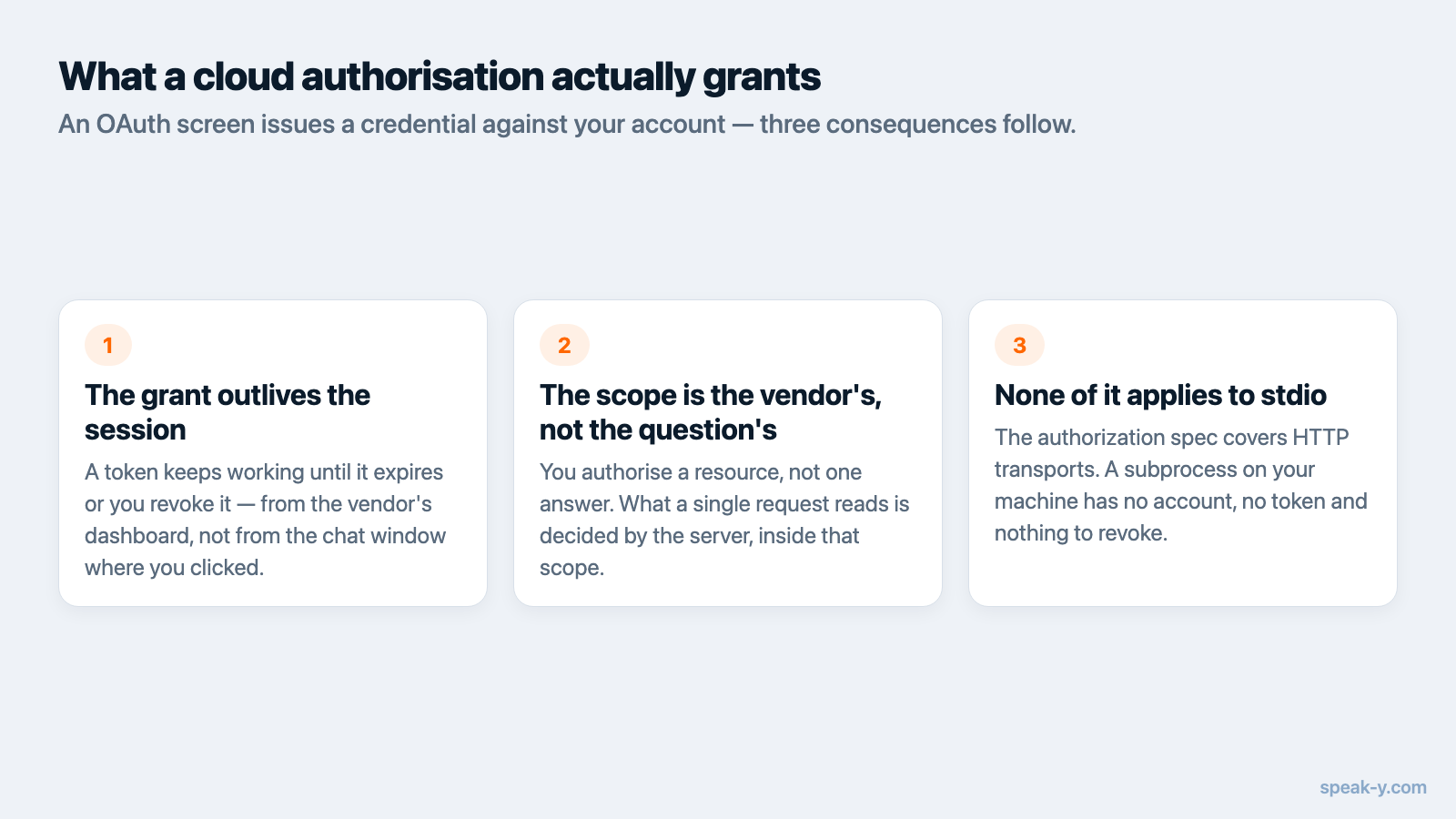
When you click through an OAuth screen for a cloud MCP server, you are issuing a credential against your account, and it is worth knowing what that credential can do.
The MCP spec builds this on OAuth 2.1. Clients must send the resource parameter
from RFC 8707 so the token is
bound to one specific server, and servers must validate that a token was issued
for them and must not accept or forward anything else. That machinery exists to
stop a token issued for one service being replayed against another.
Three practical consequences:
- The grant outlives the session. A token keeps working until it expires or you revoke it, from wherever it is held.
- Scopes are the real permission boundary. The spec tells servers to advertise the minimum scopes needed and clients to request only those, escalating later if required. What you approved on the consent screen is what the connection can reach.
- Revocation is on the vendor's side. Disconnecting a cloud MCP server means revoking access in that vendor's account settings, not deleting a config file.
None of this applies to stdio. The authorization spec is explicit that it covers HTTP-based transports, and that implementations using stdio should not follow it, retrieving credentials from the environment instead.
What a local server gives up
Local is not a synonym for safe, and the honest version of this argument has to say what you trade away.
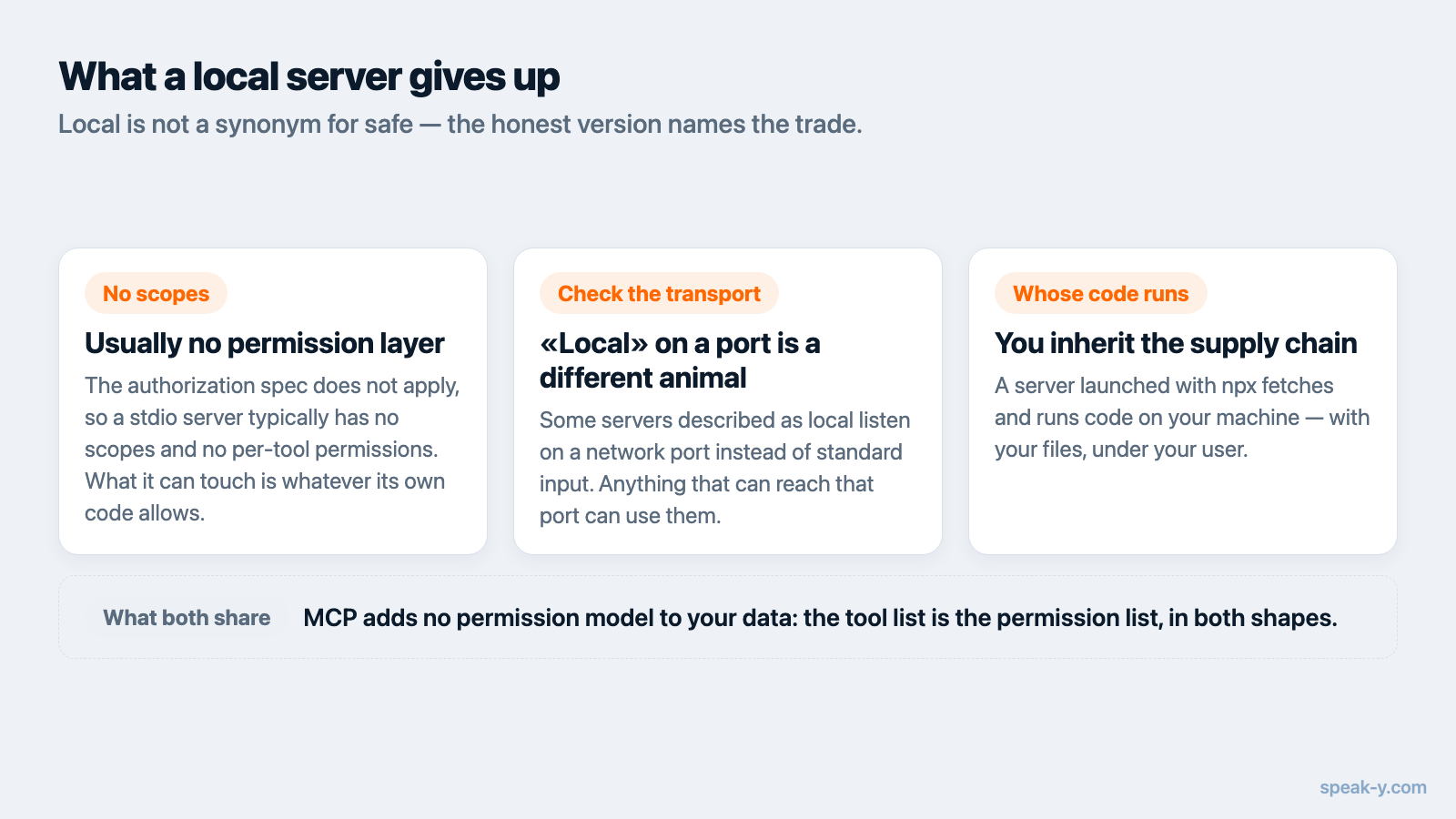
There is usually no permission layer. Because the authorization spec does not apply, a stdio server typically has no notion of users or scopes. Anything running as your user account can generally start it and call its tools. On a shared or managed machine that matters.
A local server on a port is a different animal. Some servers described as
local actually listen on HTTP. The spec addresses this directly: servers must
validate the Origin header to prevent DNS rebinding attacks, and when running
locally should bind only to 127.0.0.1 rather than 0.0.0.0. Without those
protections, the spec warns, attackers could use DNS rebinding to interact with
local MCP servers from remote websites.
You inherit the supply chain. A server launched with npx fetches and runs
code on your machine with your permissions. The OWASP MCP Top 10,
in beta as of 2026, lists supply chain attacks and dependency tampering
(MCP04:2025) and tool poisoning (MCP03:2025) among its ten categories — risks a
local install carries and a hosted endpoint does not. The spec is blunt about the
general case: tools represent arbitrary code execution, and descriptions of tool
behaviour should be considered untrusted unless they come from a trusted server.
The rule both shapes share
MCP does not add a permission model to your data. It standardises how tools are described and called; what any given tool is allowed to touch is a decision the server author made. Two things follow, regardless of transport:
- The tool list is the permission list. Names and counts on a setup page are concrete. "AI-powered intelligence" is not. If read-only matters to you, the tool list is where that is either true or not.
- Everything read becomes prompt content. Retrieval through MCP is not a private lookup. It is text on its way into a conversation with a model provider, subject to that provider's retention terms.
How to tell which one you have
Four questions, answerable from any vendor's setup page in about a minute.
- What does the client connect to? An
https://URL is a cloud server. Annpx,uvxordockercommand is a process on your machine. - What credential does it want? A browser sign-in means the vendor's cloud. An API key in a config file means a local process calling their API. No credential at all means the data was already on the machine.
- Where does the data live without MCP? If your notes are in a vendor's cloud today, no MCP transport moves them out of it.
- Which client are you using? Claude Desktop runs local servers directly, installed as desktop extensions. ChatGPT connects to remote HTTPS endpoints in developer mode, so reaching a local stdio server means putting a tunnel in front of it. The same server can be local on one client and remote on another.
When cloud is the better answer
Plainly, because the choice is not one-sided:
- Your data is already in that cloud. If your calls live in a hosted notetaker, a cloud MCP server adds no new exposure — it is a second door into a building you already rent. Otter, for instance, lists "MCP server integration for AI assistants" on every plan including the free Basic tier, checked 11 August 2026.
- You want it on your phone. A stdio server only exists while your desktop client is running. Cloud endpoints answer from anywhere.
- You are a team with central control. Scoped tokens, per-user revocation and audit logs are things a cloud server can offer and a local process generally cannot.
- You are not on the right OS. Local servers ship per-platform; hosted ones do not care what you run.
Cloud loses on one axis only, but it is the axis this article is about: a copy of your data sits on someone else's infrastructure, reachable with a credential.
Where this leaves you
Ask two questions instead of one. Where does the server run tells you who stores your data and who can reach it with a token. What does the assistant read tells you what goes to your model provider — and that answer is the same either way.
If the shape you want is local process on local data, that is what the
Speak-Y MCP server does: it is part of the desktop app, installs from
Settings → Integrations in a click, and reads the recordings already on your
machine with no account, no API key and no hosted copy. Reading works with the
app closed; the tools that change something go through the app and ask first,
and a --read-only flag pins a client to reading. The server is free on
every plan.
The MCP documentation covers manual setup, the
privacy policy states what is stored and where, and if you want to
see how other notetakers answer the same question, we
compared their MCP servers side
by side.
FAQ
What is the difference between a local and a cloud MCP server?
A local server is a program your AI client launches on your own computer and talks to over the process's standard input and output — no network is involved. A cloud server is a web service the client reaches over HTTPS, authorised with OAuth. The MCP specification calls these the stdio and Streamable HTTP transports.
Does a local MCP server keep my data private from the AI?
No. A local server keeps your data off the vendor's servers, but everything the assistant reads through it is sent to your model provider as part of the conversation, exactly as if you had pasted it in. Local controls storage and access, not what the model sees.
Is a local MCP server more secure than a cloud one?
It is more private but not automatically more secure. The MCP authorization spec applies to HTTP transports only; stdio servers are told to take credentials from the environment instead, so a local server usually has no permission layer of its own. Anything running as your user can typically reach it.
How can I tell whether an MCP server is local or cloud?
Look at the setup instructions. An https:// URL and a browser sign-in mean the vendor's cloud. A command such as npx, uvx or docker means a process on your machine. A local process holding an API key still calls the vendor's API, so the command alone does not tell you where the data lives.
Can ChatGPT and Claude both use local MCP servers?
Claude Desktop runs local servers directly, installed as desktop extensions. ChatGPT connects to remote HTTPS endpoints in developer mode, so a local stdio server has to be exposed through a tunnel first. The same server can therefore be local on one client and remote on another.