How MCP Clients Ask Before AI Changes Your Data: 2026 Comparison
Every MCP client that matters in 2026 asks before an assistant runs a tool that changes something. That part of the answer is boring and reassuring. The useful part is what happens after the first prompt, because nobody clicks "Allow" forty times a day for long: each client offers a way to stop being asked, and the clients differ sharply in how narrow that way is.
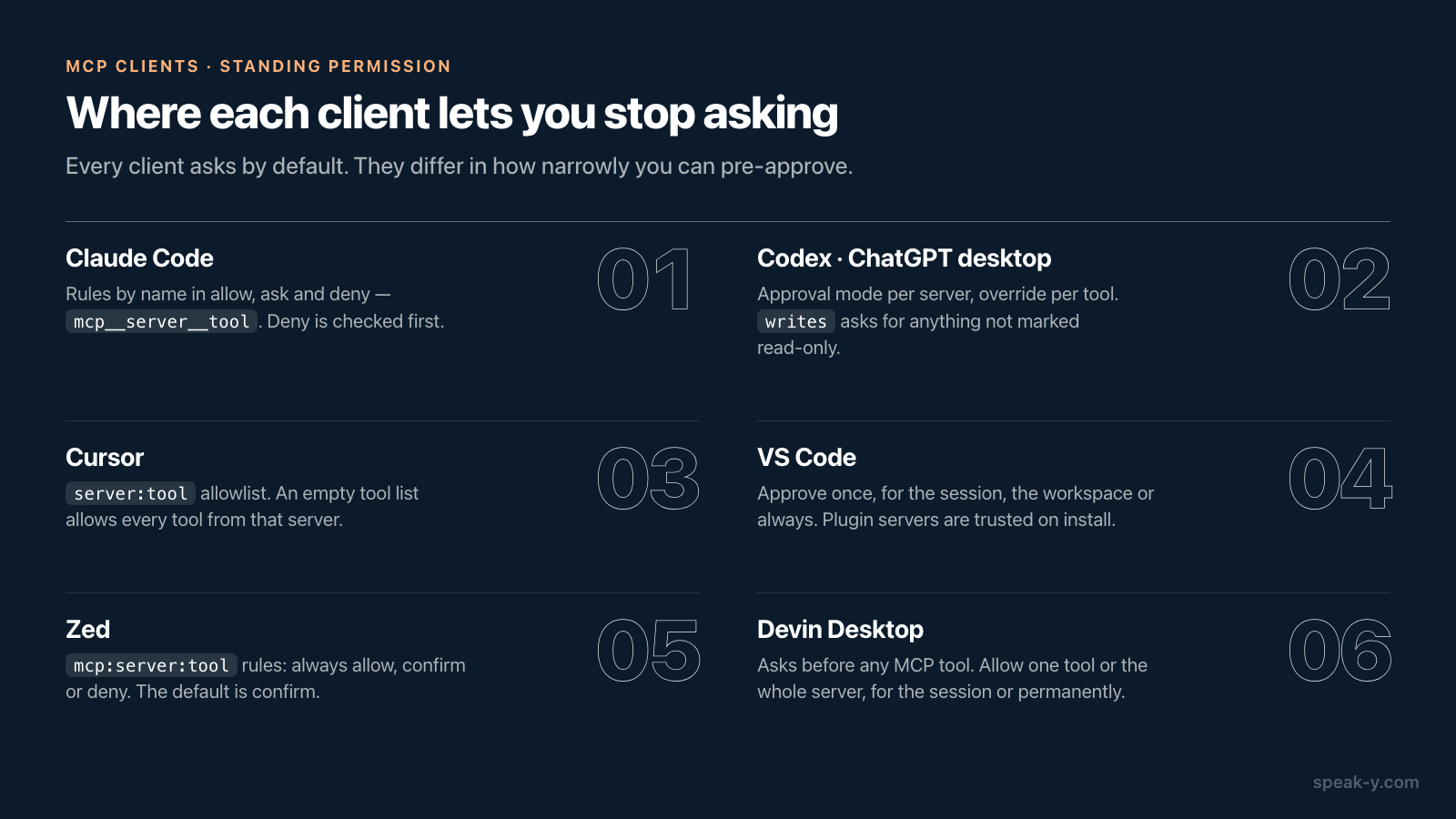
Short version: Claude Code, Zed, Cursor and Devin Desktop let you pre-approve individual MCP tools by name. Codex, the engine behind the ChatGPT desktop app, can instead decide from the server's own labels — ask for anything not marked read-only. VS Code does both at the dialog level and adds workspace-wide switches. None of these designs is wrong, but they fail in different ways, and the failure you should care about depends on who wrote the server.
This comparison sits next to our survey of which MCP clients can run a local server. That one answers "will it start"; this one answers "what will it do when the assistant decides to change something". Everything below was checked against each vendor's documentation on 29 September 2026.
The short answer
| Client | Default for MCP tools | Finest standing permission | Decides from annotations? |
|---|---|---|---|
| Claude Code | Asks (Manual mode) | Per tool: mcp__server__tool in allow, ask or deny |
Not documented |
| Claude Desktop connectors | Asks | Per tool or category: Always allow, Needs approval, Blocked | Groups tools into read-only and write/delete |
| Codex CLI, IDE, ChatGPT desktop | Depends on mode | Per server, overridden per tool | Yes: writes mode, destructive hints |
| ChatGPT on the web (developer mode) | Asks for writes | Per tool, for one conversation | Yes: readOnlyHint |
| Cursor | Asks | server:tool allowlist |
Not documented |
| VS Code | Asks (Manual permissions) | Per tool or server; session, workspace or always | Not documented |
| Zed | Asks (confirm) |
mcp:server:tool rule |
Not documented |
| Devin Desktop | Asks before any MCP tool | Per tool or whole server; session or permanent | Not documented |
Two columns carry most of the meaning. "Finest standing permission" tells you
whether you can trust search without trusting share. "Decides from
annotations" tells you whether the client makes that split for you — using
labels the server wrote about itself.
Codex and the ChatGPT desktop app: four modes and a label
Codex has the most explicit design, and because the ChatGPT desktop app, Codex
CLI and the IDE extension share one configuration file, it covers all three.
Each MCP server gets a default_tools_approval_mode, and any tool can override
it with tools.<tool>.approval_mode. The documented values are auto,
prompt, writes and approve.
The interesting one is writes. In OpenAI's words, it "prompts for tools that
aren't marked read-only". Searching runs silently, anything else stops and asks,
and a tool with no annotation at all counts as a write — the safe default when a
server says nothing. On top of the modes, Codex's approvals documentation says
destructive MCP tool calls always require approval when the tool advertises a
destructive annotation, unless it also advertises a read annotation.
One change worth knowing if you have an older config: Codex no longer supports
approval_policy = "untrusted", and the retired setting can stop the client
from starting. Trust for a project is now set with the project's trust_level
instead.
ChatGPT on the web works on the same principle. In developer mode, available on
Pro, Plus, Business, Enterprise and Education accounts, "write actions by
default require confirmation"; ChatGPT respects readOnlyHint and treats any
tool without it as a write. A choice can be remembered per tool for the rest of
a conversation, and no longer than that.
Claude Code and Claude Desktop: rules you write by name
Claude Code does not read annotations to decide. It uses permission rules in
three lists — allow, ask and deny — evaluated in that fixed order: deny, then
ask, then allow. MCP tools are named mcp__<server>__<tool>, so
mcp__notes__search allows one tool, mcp__notes__get_* allows a family, and
mcp__notes or mcp__notes__* covers the whole server. The default mode is now
labelled Manual; the looser modes include acceptEdits, auto, where a
classifier reviews actions instead of you, and bypassPermissions.
Two details lean towards safety. Servers from a project's committed .mcp.json
need your approval before they connect at all. And a server author can mark a
tool with _meta["anthropic/requiresUserInteraction"], after which Claude Code
shows its prompt on every call — even in acceptEdits, auto and
bypassPermissions.
Claude Desktop's connector settings, under Customize → Connectors, group a server's tools into categories such as read-only and write/delete, and each category or individual tool can be set to Always allow, Needs approval or Blocked.
Cursor, VS Code, Zed and Devin Desktop: the editors
Cursor states it plainly: "Cursor asks for approval before using MCP tools
by default." MCP follows the same Run Modes as terminal commands. In
Auto-review, allowlisted calls run immediately and everything else goes through
a classifier model; Run Everything runs every tool call without asking. The
allowlist takes server:tool entries with wildcards. One trap: leaving a
server's tool allowlist empty allows every tool from that server.
VS Code calls its default level Manual permissions: anything not auto-approved needs confirmation. The dialog lets you approve a single use or grant approval for the session, the workspace or all future invocations, and per-tool approvals can be set for each MCP server. Allow all removes prompts entirely, and Assisted permissions, where a model judges each call, is marked experimental. One exception deserves attention: MCP servers that come inside an agent plugin "are implicitly trusted when you install the plugin" and skip the separate startup trust prompt. Installing the plugin is the trust decision.
Zed has the most readable rule system. agent.tool_permissions.default is
confirm unless you change it, with allow and deny as the alternatives.
Rules name MCP tools as mcp:<server>:<tool_name> and can be set to always
allow, always confirm or always deny, with deny taking precedence. The prompt
itself offers "Allow once", "Deny once" and "Always for" the tool; for MCP
tools, only the tool-level option exists.
Devin Desktop, the former Windsurf, changed model along with its name. Its agent, Devin Local, "replaces auto-execution levels with a more fine-grained permissions system", and by default it prompts before calling any MCP tool. From the prompt you can allow one tool or every tool on that server, for the session or permanently, and Deny rules outrank everything. Enterprise admins can pre-approve specific servers or tools for the whole organisation.
What annotations can and cannot do
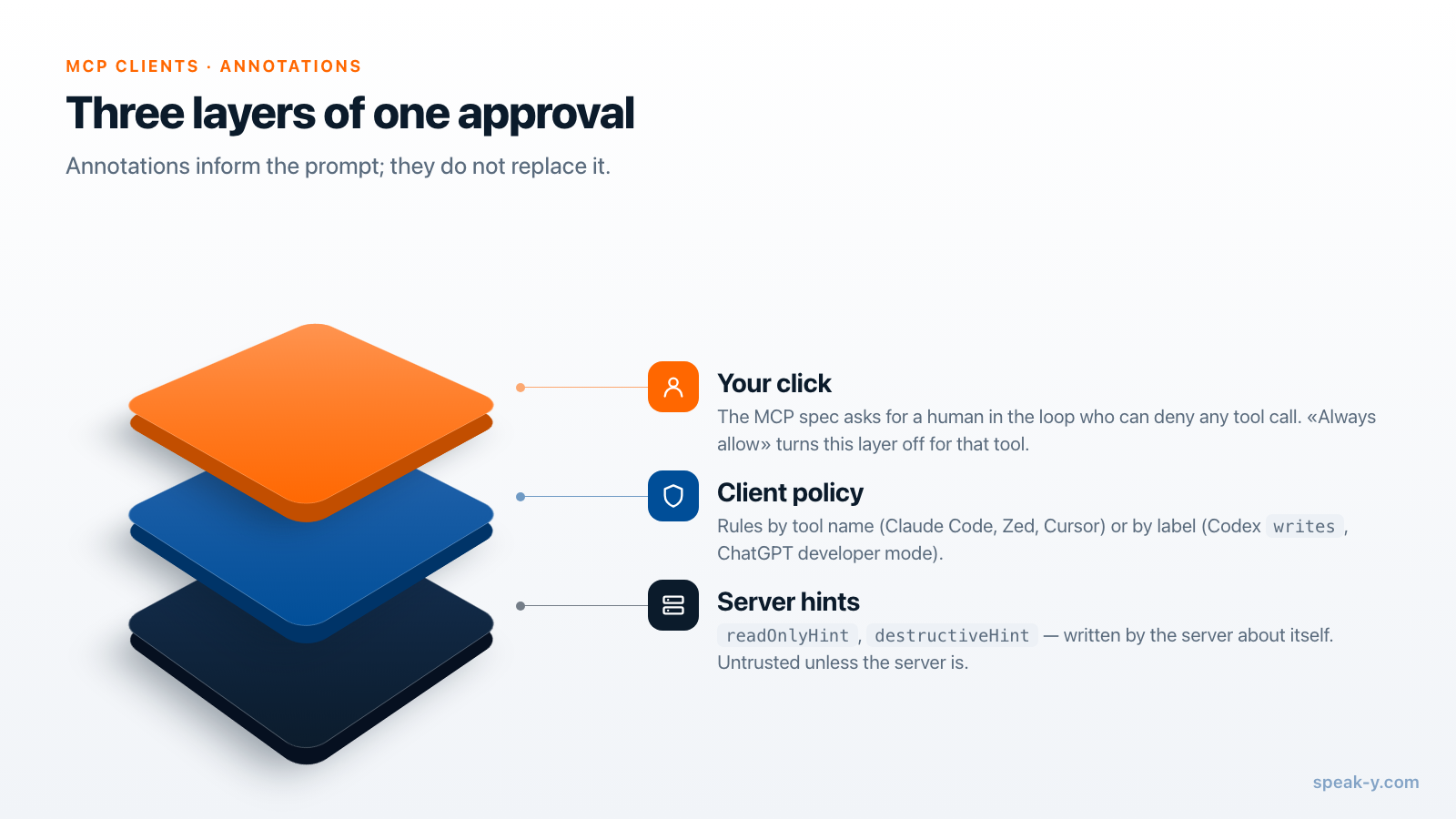
The MCP specification gives servers a vocabulary for describing their tools:
readOnlyHint, destructiveHint, idempotentHint, openWorldHint. It also
tells clients how far to believe them: clients "MUST consider tool annotations
to be untrusted unless they come from trusted servers". And it asks for a human
in the loop with the ability to deny any tool call.
That puts the two designs above in perspective. A client that decides from
annotations, like Codex's writes mode, is convenient with a server you trust:
you configure one line, and every new writing tool the server adds is asked
about automatically. With a server you do not trust, it is exactly as safe as
the server's honesty. A tool that changes data and calls itself read-only runs
without a prompt.
A client that makes you name tools, like Claude Code or Zed, fails the other way. It does not care what the server claims, but a new writing tool added in an update is covered only if your rule was broad enough to catch it — or narrow enough to miss it and fall back to asking. Name-based rules are safest written as "allow these reads", not "allow this server".
A sensible setup for a server that reads and writes
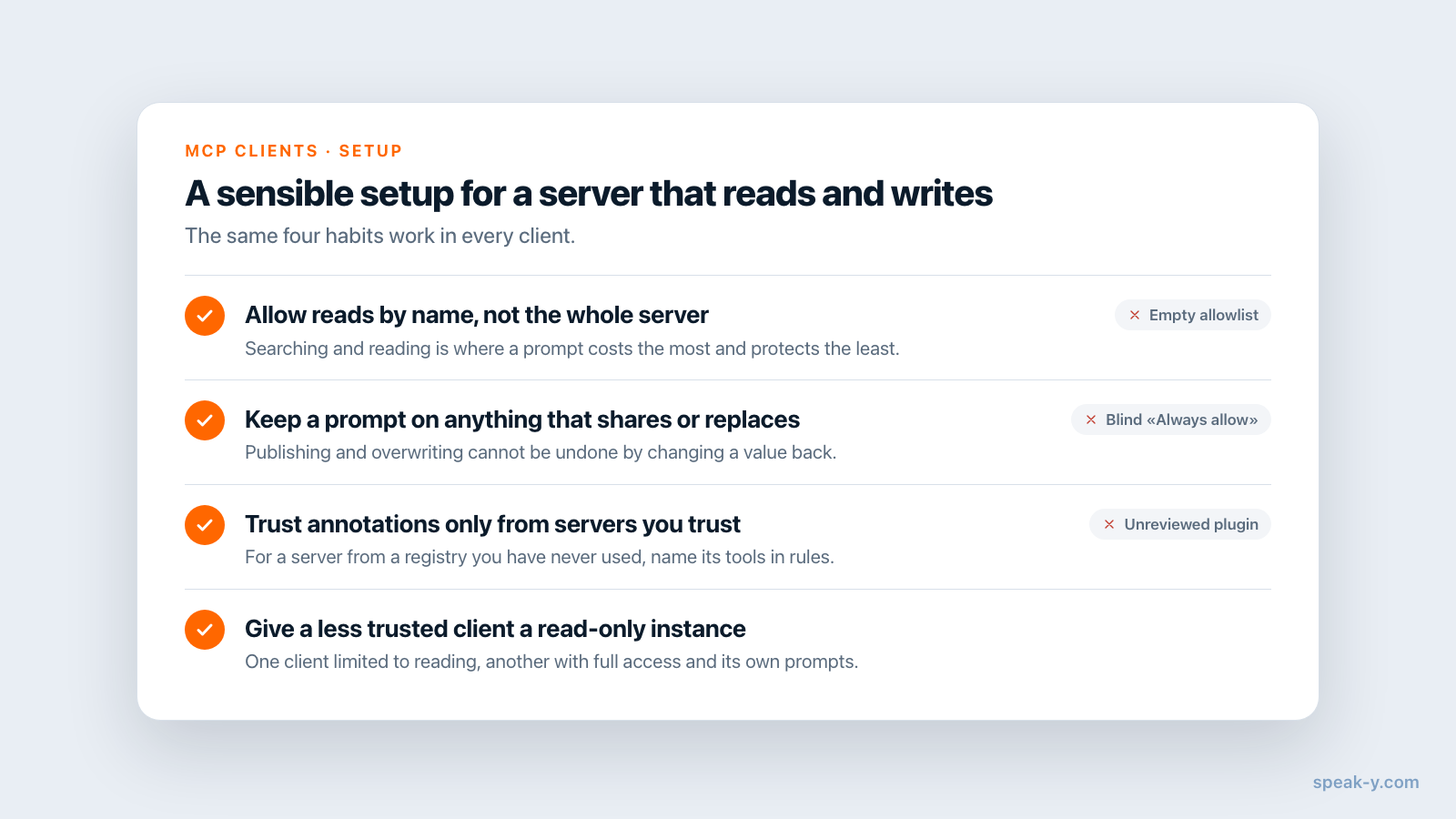
Whatever the client, the same four habits cover most of the risk:
- Allow reads by name, not the whole server. Searching and reading transcripts is what an assistant does all day; that is where a prompt costs the most and protects the least.
- Keep a prompt on anything that shares or replaces. Publishing to other people and overwriting text are the two kinds of change you cannot undo by changing a value back.
- Rely on annotations only for servers you trust. For a server from a registry you have never used, name its tools in rules instead.
- Give a less trusted client a read-only instance. If the server supports a read-only mode, one client can be limited to reading while another keeps full access.
Red flags: a Cursor allowlist entry for a server with an empty tool list, a VS Code plugin nobody on the team reviewed, and "Always allow" clicked on a tool whose name you did not read.
How this looks in Speak-Y
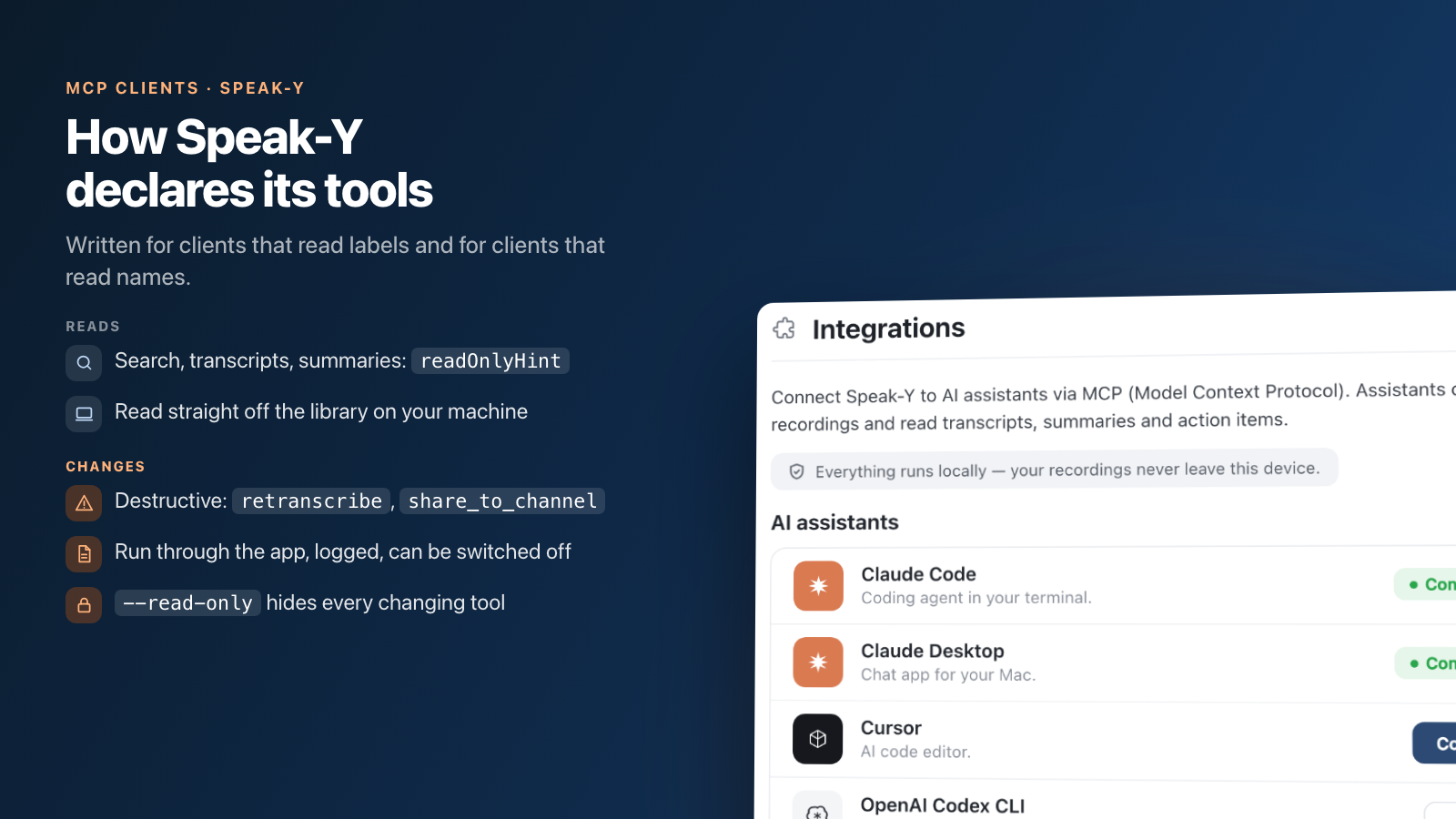
The Speak-Y MCP server is written for both kinds of client. Reading
tools — searching recordings, reading transcripts, summaries and action items,
listing tags and channels — carry readOnlyHint and read the library straight
off your machine. Tools that change something — tags, titles, speaker names,
re-transcription, sharing into a team channel — are declared as data-changing
and go through the running Speak-Y app, where every call is logged and where
they can be switched off.
Two of them are marked destructiveHint on purpose: retranscribe, because it
replaces the current text of a recording including hand-made corrections, and
share_to_channel, because colleagues may read a recording before you take it
back. In Codex's writes mode those prompts happen without any configuration;
in Claude Code or Zed, allow the reading tools by name and leave the rest on
ask.
If you would rather a client could only read, start the server with
--read-only in that client's config: the changing tools are not published to
it at all, so there is nothing to approve by accident. Setup is one click from
Settings → Integrations, and the MCP server is free on every plan, including
Free.
The approval prompt is only one of the controls that make a writing assistant safe to use. The others — which changes are reversible and what the log keeps — are covered in what makes MCP write access safe, and the MCP documentation has the per-client setup.
FAQ
Do MCP clients ask before running a tool that changes data?
Every major client asks by default. Claude Code, Cursor, VS Code, Zed and Devin Desktop all prompt before an MCP tool runs until you pre-approve it, and ChatGPT's developer mode requires confirmation for every tool not marked read-only. What differs is how narrowly you can pre-approve afterwards: per tool, per server, per session or for good. Checked 29 September 2026.
Which MCP clients use the readOnlyHint annotation to decide when to ask?
Codex and ChatGPT do so explicitly. Codex's writes approval mode prompts for tools that are not marked read-only and always asks before a tool that declares itself destructive, and ChatGPT developer mode treats any tool without readOnlyHint as a write action. Claude Code, Cursor, VS Code and Zed do not document annotations as an input to approval; you write the rules yourself, by tool name.
Can I auto-approve reading tools and still be asked before writes?
Yes, in every client in this comparison, but the mechanism differs. In Claude Code, Zed, Cursor and Devin Desktop you allow the reading tools by name, such as mcp__server__search in Claude Code or mcp:server:search in Zed. In Codex the writes mode does it in one line, relying on the server to mark its reading tools honestly.
Are tool annotations like readOnlyHint a security guarantee?
No. The MCP specification says clients must consider tool annotations untrusted unless they come from trusted servers. A server that marks a writing tool as read-only defeats any client policy built on that hint. Treat annotations as a convenience for servers you already trust, and name tools explicitly in rules for the ones you do not.
What is the safest way to connect a meeting-notes server to an AI assistant?
Pre-approve only the reading tools, keep a prompt on everything that changes data, and give clients you trust less a read-only instance. With Speak-Y, starting the server with --read-only in one client's config removes the changing tools from that client entirely, while another client keeps full access with its own prompts.