Speak-Y Delivery: Email and Webhook Alerts for Team Meetings
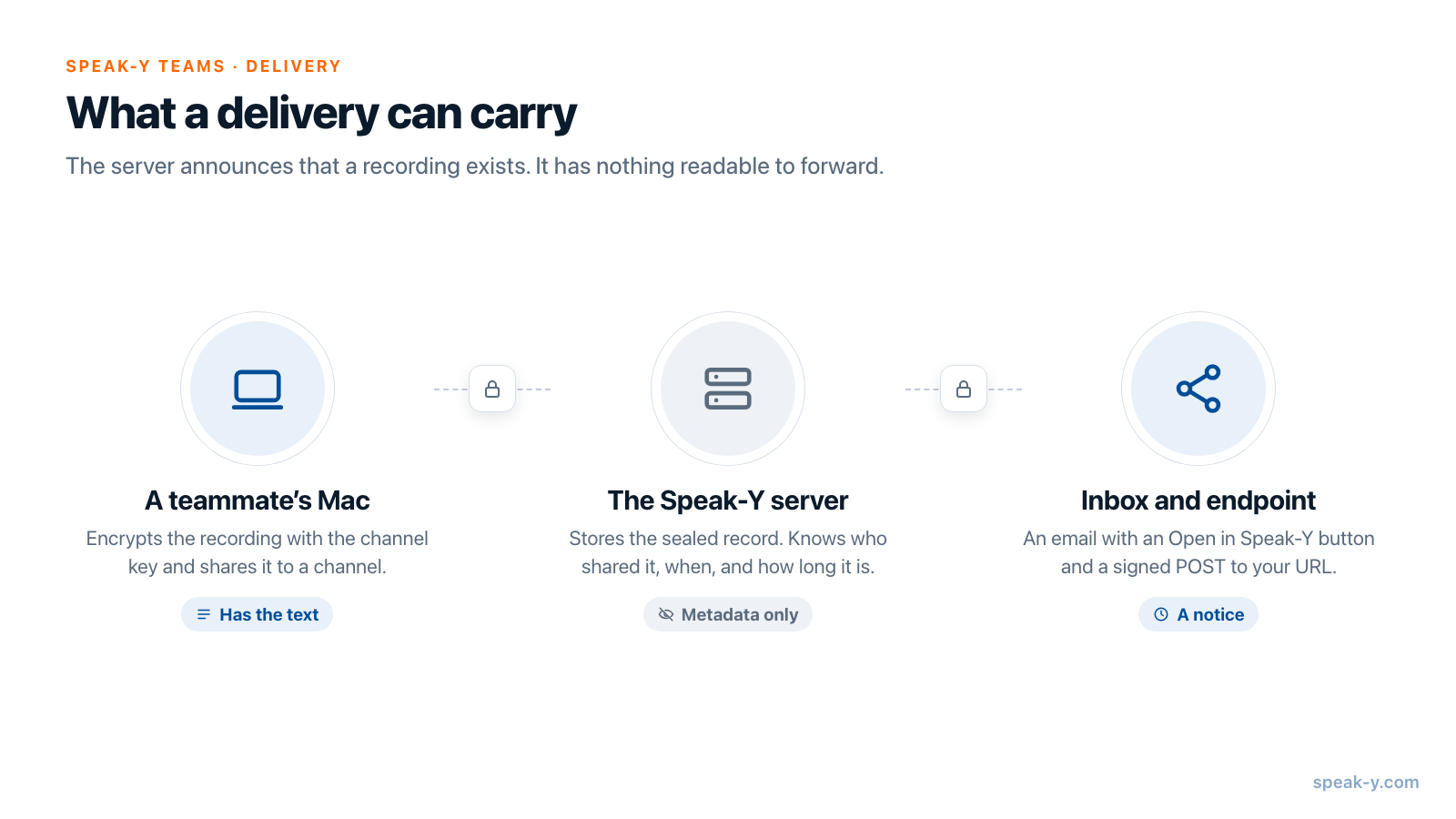
The Delivery tab of a Speak-Y team workspace does two things when a recording is shared to a channel: it emails the addresses you list, and it sends a signed POST request to a URL you choose. Both carry the same small set of facts — who shared, how long the recording is, when, and which record it is. Neither carries the summary or the transcript.
That is not a missing feature. Channel content is end-to-end encrypted, so the
server that sends the email and the webhook has never seen the text. This
guide shows how to set up both, exactly what arrives in the inbox and at your
endpoint, how to verify the X-Speaky-Signature header, and which channels
are covered. Everything here was checked against the app and the server on
October 9, 2026.
What does the Delivery tab do?
It announces new recordings to people and systems outside the channel feed. A teammate shares a meeting to a channel; the server stores the encrypted record and then notifies two destinations, if they are configured:
- Email delivery — up to 10 addresses receive a short email with an Open in Speak-Y button.
- Webhook — your URL receives a JSON POST, signed with HMAC SHA-256 in the
X-Speaky-Signatureheader.
The settings belong to one workspace, not to your account: each workspace has its own recipients and its own webhook. Only the workspace owner or an admin can change them. Members see the tab read-only, with the note "Only an owner or admin can change integrations."
How do you set it up?
You need the macOS app and an owner or admin role in the workspace.
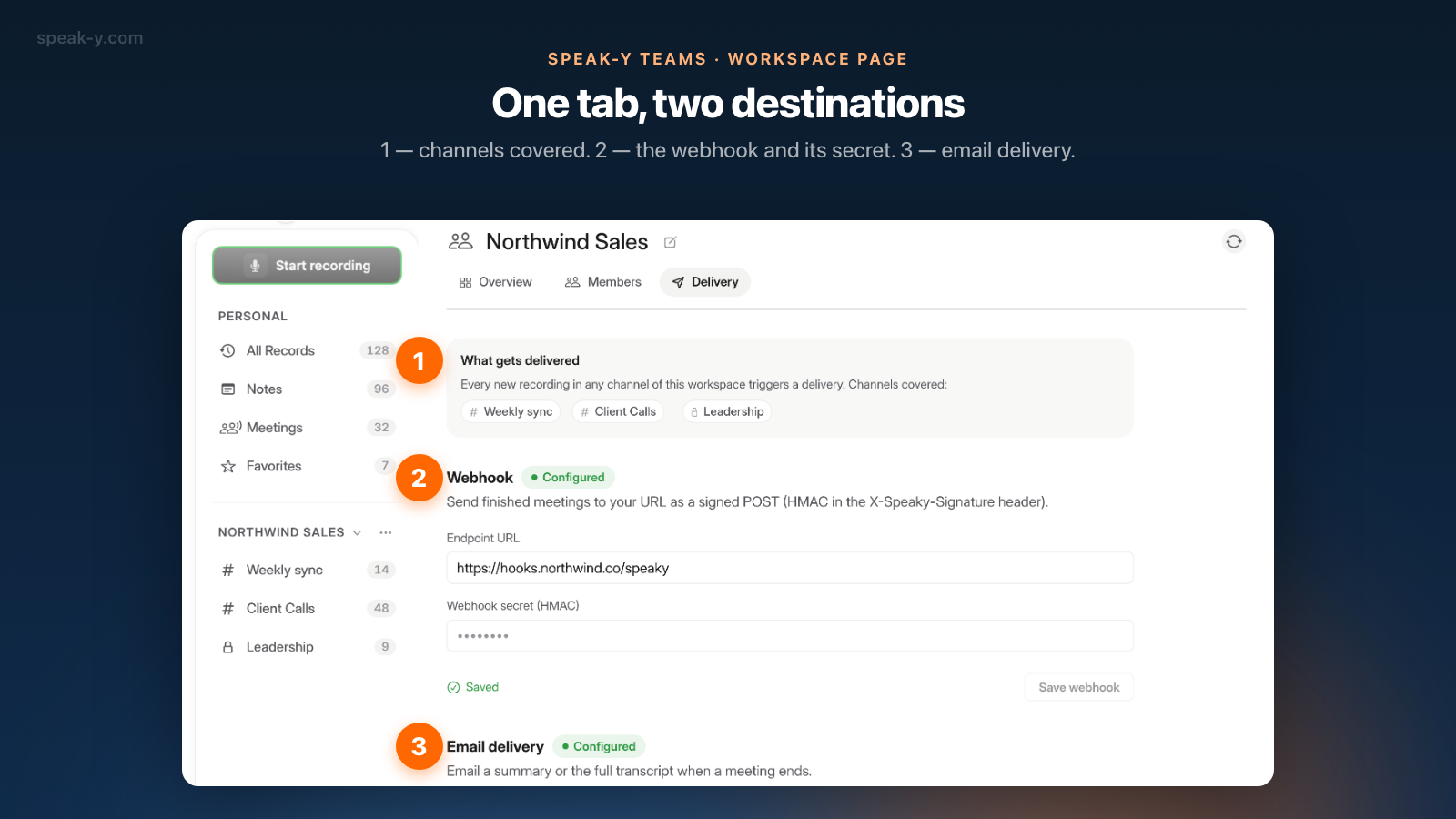
- Open the workspace page. Click ⋯ next to the workspace name in the sidebar and choose Edit workspace.
- Go to the Delivery tab. It is the third tab, after Overview and Members.
- Read the What gets delivered card. It lists the channels of the workspace, so you see the scope before you save anything.
- Fill in Webhook. Paste your address into Endpoint URL and type a secret of at least 8 characters into Webhook secret (HMAC). The Save webhook button stays inactive until the secret is long enough. After saving, the status reads Saved, the heading gets a Configured badge and the secret field is cleared: the app never shows the secret again.
- Fill in Email delivery. Type the addresses into Recipients, separated by commas, and press Save email delivery.
Either block works without the other. To change the webhook later, enter the URL and a secret again — the secret is not prefilled, because the server does not return it.
What exactly arrives by email?
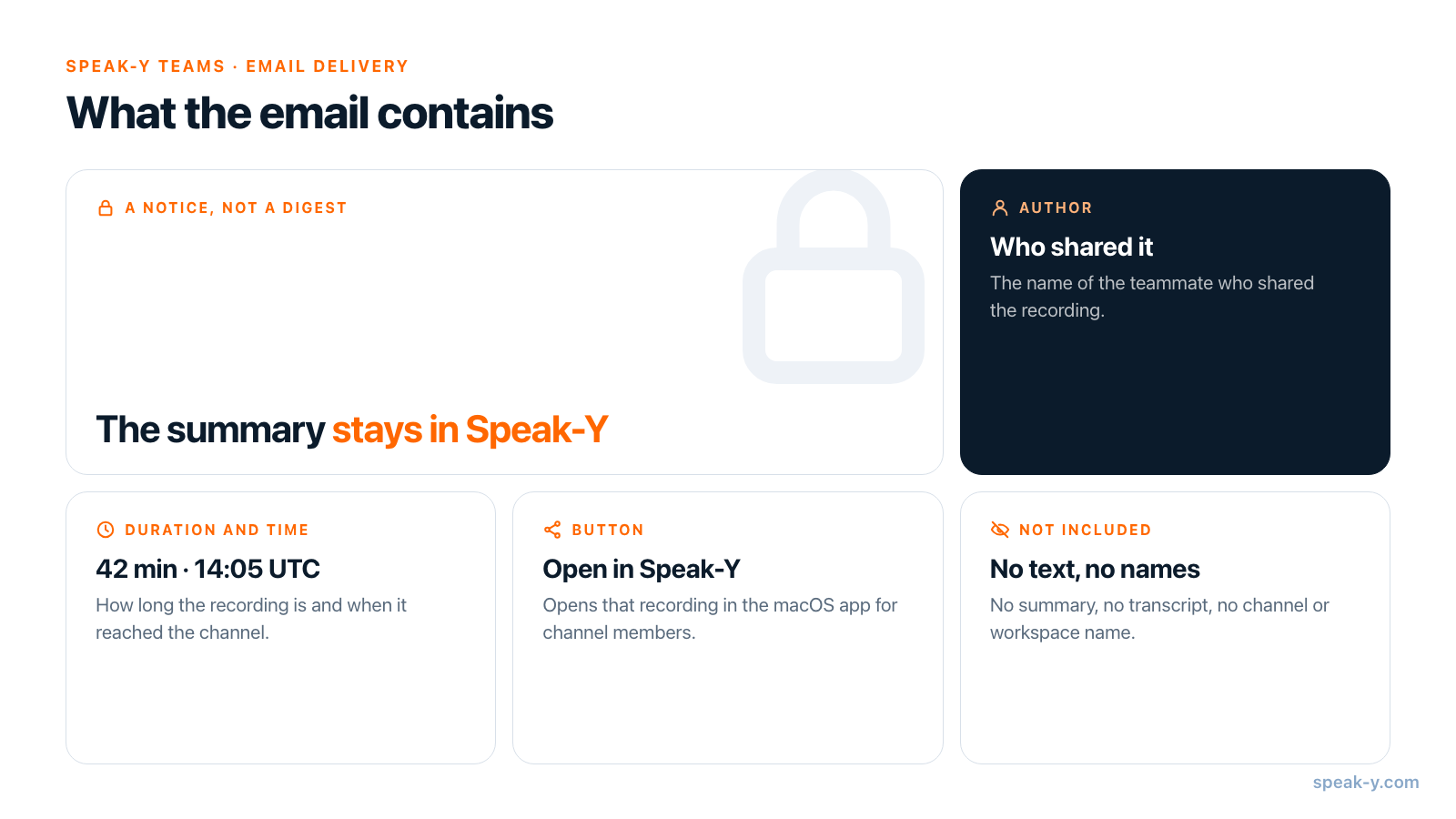
A notice, not a digest. The subject is "New meeting in Speak-Y" (or "New dictation in Speak-Y" when a dictation was shared), and the body has three rows and one button:
| In the email | Example |
|---|---|
| Author | The name of the teammate who shared the recording |
| Duration | 42 min |
| When | Oct 09, 2026 at 14:05 UTC |
| Button | Open in Speak-Y — opens that recording in the macOS app |
Under the button the email says it plainly: "Recordings are end-to-end encrypted, so this notification carries metadata only." The channel name and the workspace name are not in the email either — they are encrypted as well, so the server does not know them.
Two details are worth knowing before you promise this email to the team:
- The description line in the app is ahead of reality. The block is headed "Email a summary or the full transcript when a meeting ends." The accurate part is the note under the recipients field: "the digest carries metadata only". There is no switch between a summary and a full transcript.
- Recipients do not need a Speak-Y account to get the email, but the button only helps people who are members of the channel. Recipients who do have an account receive the email in their interface language.
What does the webhook send?
One POST per new recording, with Content-Type: application/json, the header
X-Speaky-Event: team_record.created and this body:
{
  "event": "team_record.created",
  "workspace_id": "5b0e7c1e-2f4d-4a57-9d0a-6f1b2c3d4e5f",
  "channel_id": "c1a2b3c4-d5e6-47f8-9a0b-1c2d3e4f5a6b",
  "record_id": "8F2C1D7A-3B4E-4C5D-9E6F-0A1B2C3D4E5F",
  "created_by": "0d9c8b7a-6e5f-4d3c-2b1a-0f9e8d7c6b5a",
  "meta": { "duration_s": 2520, "kind": "meeting" },
  "server_created_at": "2026-10-09T14:05:12+00:00",
  "protocol_version": 2,
  "sent_at": "2026-10-09T14:05:12.480113+00:00"
}
meta.kind is meeting or dictation, and meta.duration_s is the length
in seconds. Everything else is an identifier or a timestamp. There is no
title, no speaker list, no summary and no channel name: your endpoint learns
that something happened and where, not what was said.
That is enough for the usual jobs — a line in the team chat, a row in a
tracker, a counter of meetings per channel. Keep your own table that maps
channel_id to a readable name. Note that a chat's incoming webhook cannot
take this request directly: Slack's incoming webhooks, for example, expect a
JSON body with a text field, so you need a small relay that verifies the
signature and reformats the message.
How do you verify the signature?
The X-Speaky-Signature header has the form sha256=<hex>. The value is the
HMAC SHA-256 of the raw request body, keyed with the secret you typed on
the Delivery tab. A receiver in Python:
import hashlib
import hmac

def is_from_speaky(secret: str, raw_body: bytes, header: str) -> bool:
    digest = hmac.new(secret.encode(), raw_body, hashlib.sha256).hexdigest()
    return hmac.compare_digest(f"sha256={digest}", header)
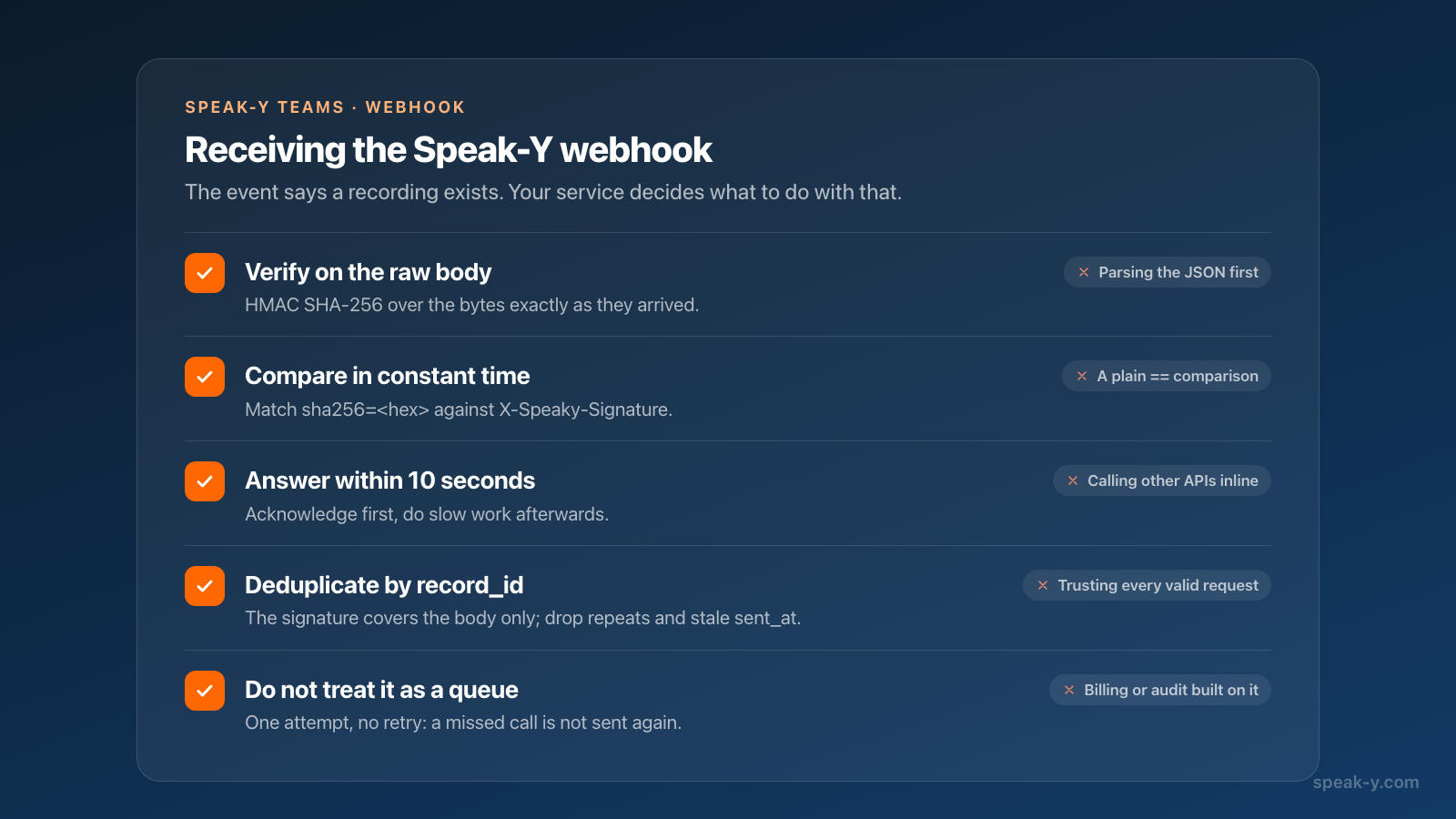
Sign the bytes exactly as they arrived. If your framework parses the JSON and you serialize it again, key order and spacing change and the signature will not match.
A few properties of the sender shape how the receiver should be written:
- One attempt. A delivery that fails or times out is not retried. The timeout is 10 seconds, so acknowledge the request first and do slow work afterwards. Treat the webhook as a signal, not as a queue: do not build billing or an audit trail on it.
- No replay protection in the signature. The signature covers the body
only. Use
record_idto ignore a request you have already processed, andsent_atto drop stale ones. - The secret is yours to rotate. Save the webhook again with a new secret and update the receiver.
Which channels are covered?
The whole workspace, with one exception. The coverage card says "Every new recording in any channel of this workspace triggers a delivery", and there is no per-channel filter. In a workspace with busy client channels, the weekly sync will not be the only thing announced.
The exception is private channels: a recording shared to a private channel is announced nowhere — no email, no webhook. The card lists the channels you can see, including private ones with a lock, but the server skips them. The reason is that delivery is set up by an owner or admin who may not be a member of that private channel; even the fact that something was recorded there is not theirs to receive. How to split channels into public and private is covered in who sees what in meeting channels.
Personal recordings are outside all of this. Nothing leaves your library until you share a recording to a channel yourself.
Why not the summary itself?
Because the server would have to read it. In Speak-Y the recording is encrypted on the Mac with a channel key before it is uploaded, and channel keys exist only on members' devices — how end-to-end encrypted team sharing works walks through the mechanics. A server that could put the summary into an email would be a server that could read every channel.
Tools built the other way do send content, and that is a fair reason to choose them when a summary in the inbox matters more than end-to-end encryption. Checked on October 9, 2026:
- Otter. When a recorded meeting is tied to a synced calendar event with auto-share enabled, the owner and the calendar guests get a Meeting Summary email after the meeting.
- Fathom. Its webhook can include the summary, the transcript and the action items in the payload; the sender configures which.
- Fireflies. Its webhooks follow the same notify-then-fetch pattern as
Speak-Y — the
meeting.transcribedevent carries a meeting ID, signed with HMAC SHA-256 — but the content is then fetched from the Fireflies API, because the provider stores it in readable form.
If you need a readable copy outside the app, make it on purpose rather than by notification: weekly meeting notes for a team shows the export to Confluence or Google Drive, and the Speak-Y MCP server lets an AI assistant on a member's Mac read the recordings that member can already open.
Team workspaces are available in the Speak-Y macOS app: creating one starts on the Pro plan, and teammates join free on any plan. The Speak-Y Teams page shows how shared channels work.
FAQ
Does Speak-Y email the meeting summary or transcript after a meeting?
No. Email delivery sends a notice that a new meeting was shared to a channel: the author, the duration, the time and an Open in Speak-Y button. Channels are end-to-end encrypted, so the server has no summary or transcript to put into an email. The text is read in the app.
What does the Speak-Y webhook send?
A JSON POST with the event team_record.created and identifiers only: workspace_id, channel_id, record_id, created_by, the record kind and duration in meta, and two timestamps. It contains no transcript, no summary and no channel or workspace name.
How do I verify the X-Speaky-Signature header?
Compute HMAC SHA-256 over the raw request body with your webhook secret, hex-encode it and prefix it with sha256=. Compare the result with the X-Speaky-Signature header using a constant-time comparison, and do it before parsing the JSON.
Which channels trigger a delivery?
Every new recording shared to any public channel of the workspace. There is no per-channel filter. Private channels are never announced, by email or by webhook, and personal recordings never leave your library.
Who can set up email delivery and the webhook?
The workspace owner or an admin, on the Delivery tab of the workspace page in the macOS app. Members see the same tab read-only.