Remote MCP Servers: What to Check Before You Connect One
A local MCP server and a remote one look identical once running: same tool list in the client, same conversation, same result. The difference is what you handed over to get there. A local server is a program on your machine that the client launches and talks to over standard input and output, and what you hand over is a command line. A remote server is somebody else's HTTPS endpoint, and what you hand over is a credential — along with everything it unlocks, for as long as you leave it alive.
So the useful question before pasting a URL into a connector dialog is not "is this server trustworthy", which nobody can answer from a listing page. It is three narrower ones that do have lookup-able answers: what the token is scoped to, where you go to take it back, and what the catalogue you found the server in actually checked. Answers below are against the MCP specification and vendor documentation as they stood on 16 August 2026.
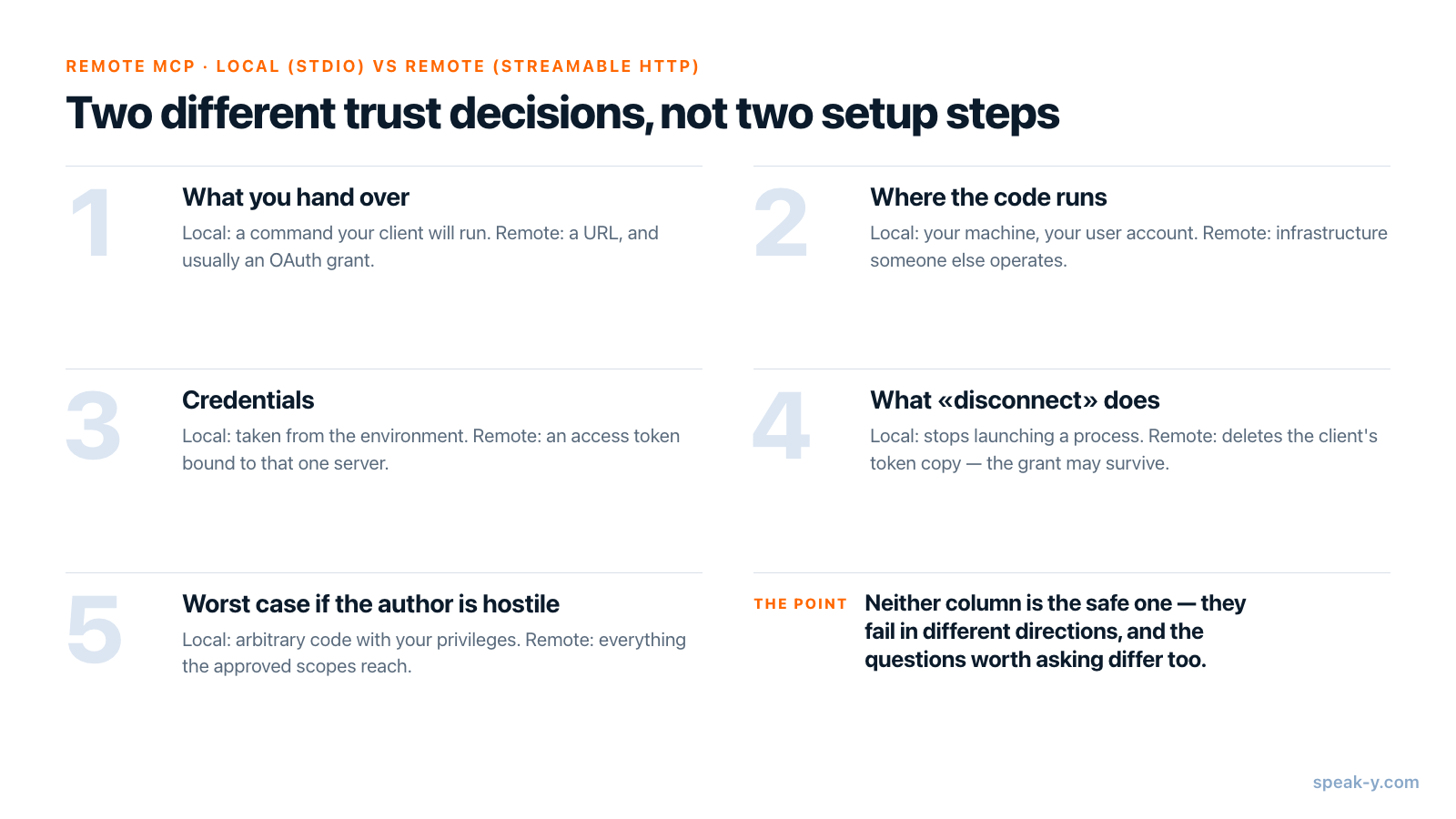
Local and remote are different trust decisions, not different setup steps
The current specification revision, 2026-07-28, treats the two transports as different security contexts. Authorization is optional in MCP, and where it applies is explicit: implementations using an HTTP transport should conform to the OAuth specification, while stdio implementations should not follow it at all and instead retrieve credentials from the environment. HTTP+SSE, the older remote transport, is deprecated; Streamable HTTP is the one to expect.
| Local (stdio) | Remote (Streamable HTTP) | |
|---|---|---|
| What you hand over | A command your client will run | A URL, and usually an OAuth grant |
| Where the code runs | Your machine, your user account | Infrastructure someone else operates |
| Credentials | Taken from the environment | Access token bound to that one server |
| What "disconnect" does | Stops launching a process | Deletes the client's token copy; the grant may survive |
| Worst case if the author is hostile | Arbitrary code with your privileges | Everything the approved scopes reach |
Neither column is the safe one. A local server is arbitrary code running as you — which is exactly why the specification requires that a client offering one-click local configuration show the exact command it will execute, without truncation, and get explicit approval first. A remote server puts no code on your machine, but it moves your data to an operator and leaves an access path that outlives your attention. The two fail in different directions; our comparison of what each kind can see goes through that in more detail.
What the token actually allows
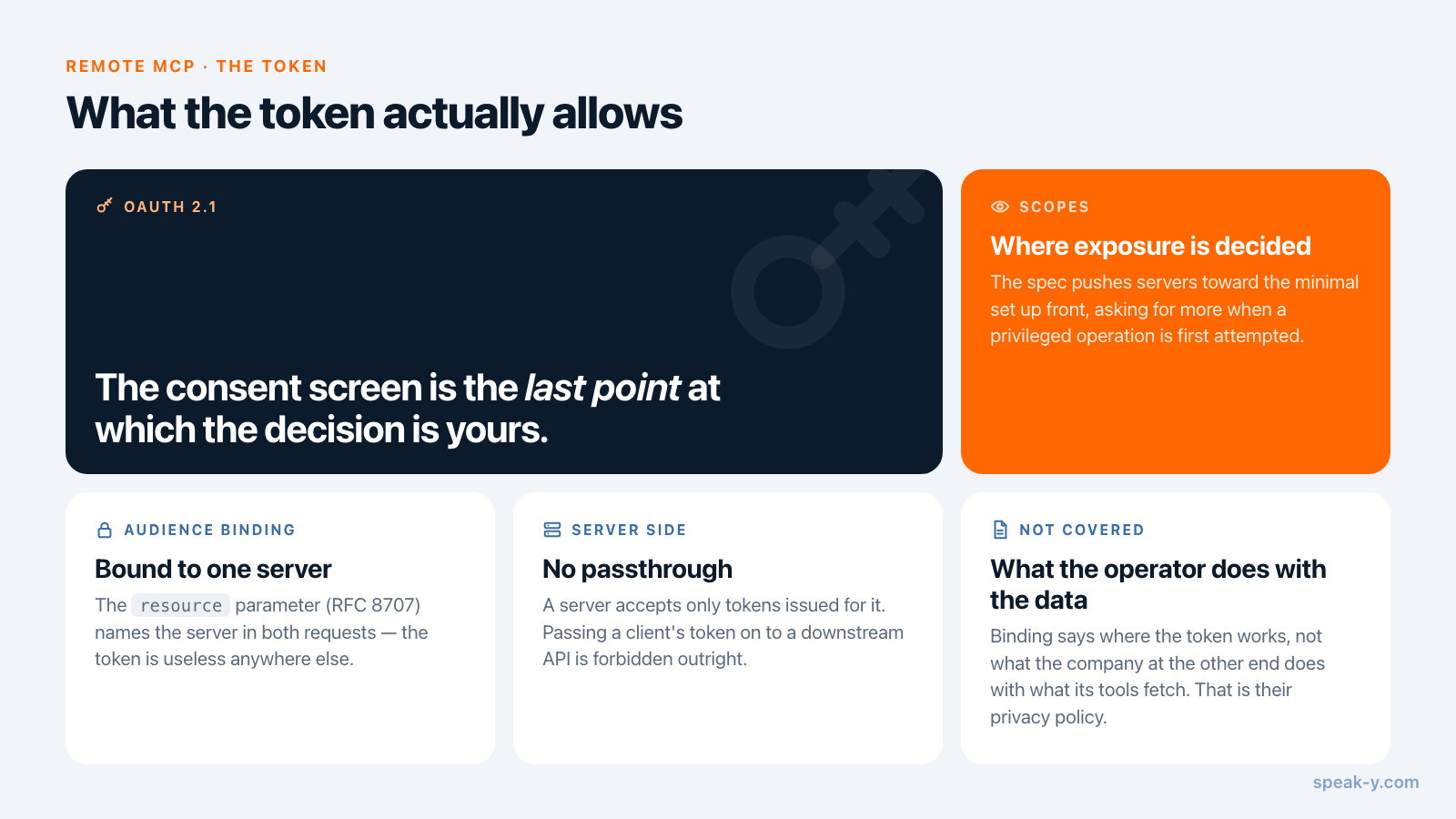
The authorization model is OAuth 2.1, and the part worth understanding as a user
is audience binding. Clients must implement Resource Indicators for OAuth 2.0
(RFC 8707): the resource parameter must be sent in both the authorization and
the token request, naming the specific server the token is for. Servers must
validate that tokens were issued for them, accept only tokens valid for their
own resources, and must not accept or transit any others. Passing a client's
token through to a downstream API — "token passthrough" — is forbidden outright.
So a correctly implemented token is useless at a different server. That closes off replay, credential reuse across services and a class of confused-deputy attacks — and nothing at all about the operator themselves. Audience binding says where the token works, not what the company at the other end does with what its tools fetch on your behalf. That is answered by their privacy policy, not by the protocol.
Scopes are where your exposure is actually decided. The specification pushes
servers toward least privilege: scopes_supported is meant to be the minimal
set needed for basic functionality, with anything more requested incrementally
when a privileged operation is first attempted. Servers that follow this ask for
little up front; servers that do not show one consent screen listing everything.
That screen is the last point at which the decision is yours.
Where you actually revoke it
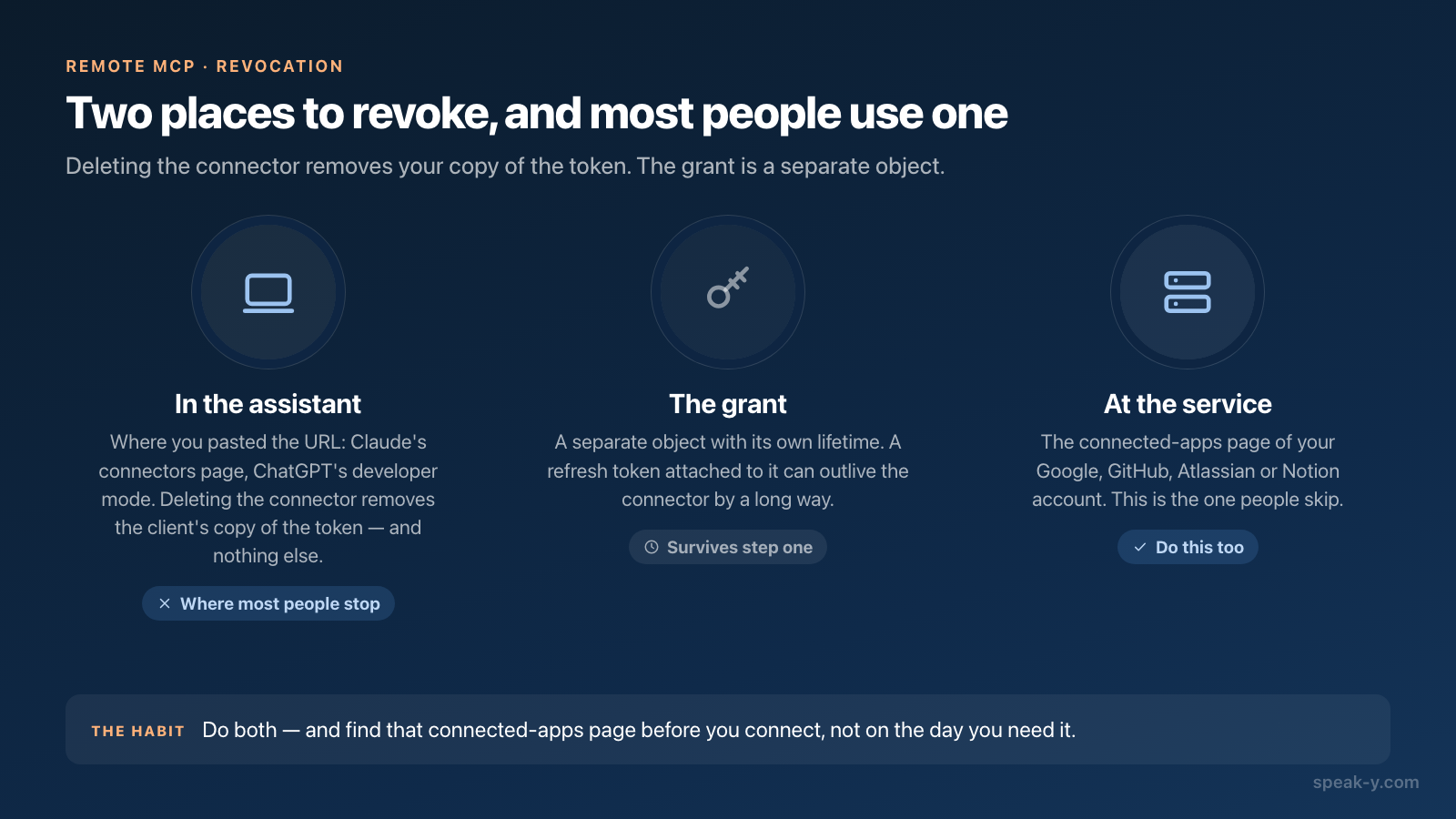
There are two revocation surfaces, and most people only use the first.
In the assistant. In Claude, custom connectors live under Customize > Connectors, where you add one by pasting the server URL; Free users are limited to one. That same page is where you disconnect it, and where you enable or disable the server's individual tools rather than accepting all of them. Anthropic states the trust position plainly in its help centre: custom connectors let you connect Claude to arbitrary services that have not been verified by Anthropic. In ChatGPT, remote servers arrive through developer mode — Settings → Security and login, on the web, accepting SSE and streaming HTTP endpoints. OpenAI's own documentation calls it powerful but dangerous, names prompt injection and destructive write actions among the risks, and requires confirmation for write actions by default.
At the service you authorized with. This is the one people skip. Deleting the connector removes your client's copy of the token; the grant recorded in your Google, GitHub, Atlassian or Notion account is a separate object with its own lifetime, and a refresh token attached to it can outlive the connector by a long way. Anthropic's guidance says as much — revoke by disconnecting the connector in Claude's settings or in the third-party service's security settings. Do both, and find that connected-apps page before you connect.
The five-minute checklist
- Who operates this endpoint? Resolve the hostname to a company. If the URL's domain and the product's company do not obviously match, stop there.
- Is the hostname stable and HTTPS? A tunnel URL or a bare IP address for something you intend to keep says the service is not ready to be one.
- Which account are you authorizing with? The grant inherits everything that account reaches — a work Google account and a personal one are very different blast radii behind the same button.
- Do the requested scopes match the job? A meeting-notes tool asking for full mailbox write is not a nuance, it is the answer.
- Can you turn off tools you do not need? Do it before the first prompt.
- Where is the revocation page? Find it now, at the provider.
- What does the operator keep? Retention is a policy question, and the protocol has no opinion on it.
- Is there a local alternative? If the data already sits on your disk, a remote server adds an operator to a problem that did not have one.
What a registry listing tells you, and what it does not
The official MCP registry at registry.modelcontextprotocol.io is the natural
place to find servers, and it is easy to over-read what a listing means. Its
working-group charter is specific. Publishing and trust cover authentication
flows — GitHub OAuth, GitHub OIDC, DNS and HTTP verification — plus namespace
ownership, moderation tooling and community-driven flagging. Explicitly out of
scope: ranking or choosing between MCP server implementations on behalf of
clients or end users, and hosting, distributing or executing server code,
because the registry is a metadata catalog, not a package registry.
So a verified namespace proves whoever published the entry controls the GitHub organisation or the domain in its name. That is a real signal: it makes typosquatting harder and gives you someone to hold responsible. It is not a code review, not a security audit and not an endorsement — identity established, behaviour still unknown.
Even a well-behaved server is an input, not an authority
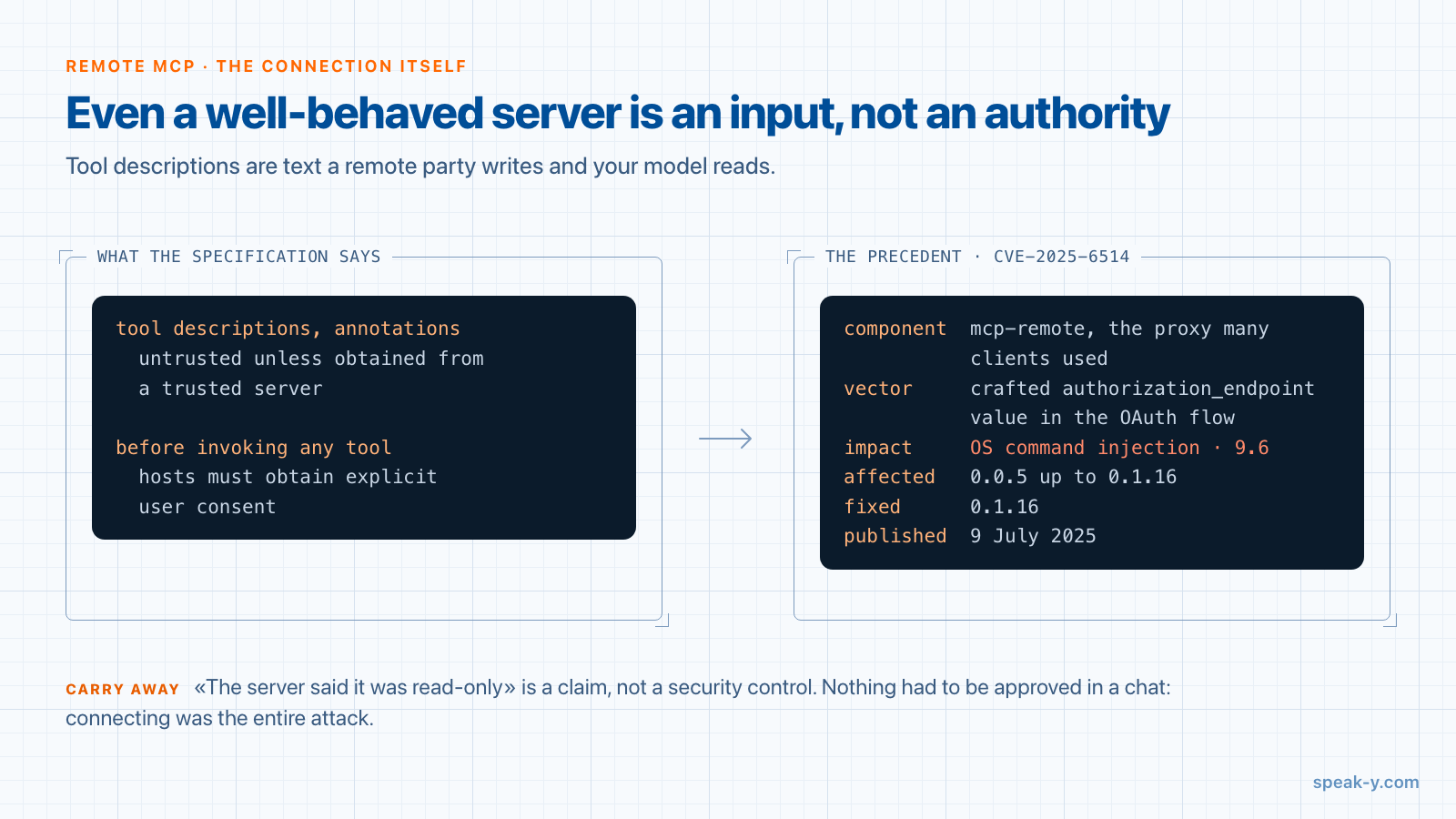
One principle from the specification is worth carrying into every connection: descriptions of tool behaviour, including annotations, should be considered untrusted unless obtained from a trusted server, and hosts must obtain explicit user consent before invoking any tool. A tool description is text a remote party writes and your model reads — the definition of an untrusted input, and the reason "the server said it was read-only" is not a security control.
The concrete precedent is CVE-2025-6514, published 9 July 2025 against
mcp-remote, the proxy many clients used to reach remote servers. Rated 9.6, it
let a malicious server achieve OS command injection on the connecting machine
through a crafted authorization_endpoint value in the OAuth flow — affecting
versions 0.0.5 up to 0.1.16 and fixed in 0.1.16. Nothing had to be approved in a
chat: connecting was the entire attack. Everything a remote server sends is data
your software parses, and the connection itself is part of your attack surface.
When the shorter answer is a local server
All of the above is the price of reaching something that genuinely lives in someone else's cloud — your issue tracker, your CRM, your calendar. It is a reasonable price for those and a strange one for files already sitting on your disk, which is why Speak-Y ships a local server rather than a hosted endpoint.
Its MCP server is a process your client starts on your machine. Reading needs
nothing else running: search results, transcripts, meeting summaries and action
items come straight off the library on the same computer, with no token issued
and no relay in between. Commands that change something — tagging a recording,
naming speakers, sharing into a team channel — go through the running app, are
declared to your client as data-changing so it asks first, and are logged where
you can switch them off. Adding --read-only to the server's arguments means
the changing commands are never published to that client at all — a stronger
guarantee than a description promising good behaviour. Installation is one click
from Settings → Integrations, free on every plan including Free.
The trade-off runs both ways: a local server cannot serve ChatGPT in a browser tab, and it only runs where the app runs. If that constraint matters, which clients can start a local server at all is the comparison to read next — and if the question is what an assistant should be allowed to change once connected, where the line sits on write access covers that. The MCP overview lists what Speak-Y's server exposes.
FAQ
What is the difference between a local and a remote MCP server?
A local server is a program on your own machine that the client starts and talks to over standard input and output — what you hand over is a command line, and no token is issued. A remote server is an HTTPS endpoint someone else operates: what you hand over is a credential, usually an OAuth 2.1 access token, and the data the tools touch travels to that operator's infrastructure.
What does the token I give a remote MCP server actually allow?
Under the MCP authorization specification, the token is bound to one server and one set of scopes. Clients must send an RFC 8707 resource indicator naming the server in both the authorization and the token request, and the server must validate that tokens were issued for it — it must not accept or forward any other token. That stops the token being replayed at a different service. It says nothing about what the operator does with the data its own tools fetch on your behalf.
How do I revoke a remote MCP server's access?
In two places, and most people only do the first. Removing the connector in your assistant deletes the client's copy of the token; the OAuth grant recorded at the service you authorized with is a separate object and usually survives. Anthropic's own guidance says to revoke permissions by disconnecting the connector in Claude's settings or in the third-party service's security settings. Find the provider's connected-apps page before you connect, not after.
Does a listing in the official MCP registry mean the server is safe?
No. The registry verifies namespace ownership — an io.github.* name through GitHub authentication, a domain-based name through DNS or HTTP verification — which proves the publisher controls that name. Its charter puts ranking or choosing between server implementations explicitly out of scope, and states that the registry is a metadata catalog, not a package registry: it does not host, distribute or execute server code.
Can a remote MCP server read data I never sent it?
Only what the scopes you approved reach. The risk is that scopes are broader than the task: a token granted for an entire mailbox or drive is available to every tool that server exposes, for as long as the grant lives. Read the consent screen rather than the marketing page, and use per-tool controls where the client has them — Claude's connector settings let you enable and disable individual tools, and ChatGPT's developer mode requires confirmation for write actions by default.