Architecture Review Records: Keep the Why Next to the Code
Every codebase has a part that looks wrong to the next person who reads it. A relay process nobody remembers adding, a table that is emptied every week, a queue where a direct call would do. The reasons were given out loud in an architecture review months ago, and the people who gave them have moved to other teams. The new engineer has two options: ask around for a week, or "fix" it.
There is a shorter path. Record the architecture review, press a hotkey when a decision, a trade-off or a rejected option is said, and share the recording to an Architecture channel. The marks stay on the sentences, with the time and the speaker's name. Right after the review an AI assistant in Claude Code, Cursor or Claude reads those marks over MCP and drafts the Architecture Decision Record for the repository. Months later the debate is still there for anyone who asks why.
This guide follows the Speak-Y macOS app as checked on 18 October 2026, for a tech lead whose team already shares meetings in a workspace. If you do not have one yet, set it up first.
Why does "why is it built this way?" have no answer?
The fix was described in 2011. Michael Nygard's post Documenting Architecture Decisions (checked on 18 October 2026) proposes a short record for each significant decision — title, context, decision, status, consequences — kept in the repository next to the code. His reasoning is the problem above: someone new to a project who does not know why a decision was made can only accept it blindly or reverse it blindly. The ADR community site calls the collection of these records a project's decision log.
Teams that adopt ADRs still lose the why, in three predictable places:
- The context is reconstructed. The record is written after the review, from memory, by whoever has time. The constraints that drove the decision are the first thing to fade.
- Rejected options shrink to one line. "We considered CDC" says nothing about why it lost, and that is exactly what the next person needs before proposing it again.
- The record never gets written. A review that ends at 4 PM competes with the code that is due tomorrow.
A recording keeps all three. The marks make them findable, and an assistant turns them into a draft before the details fade.
Set up once: three marks and an Architecture channel
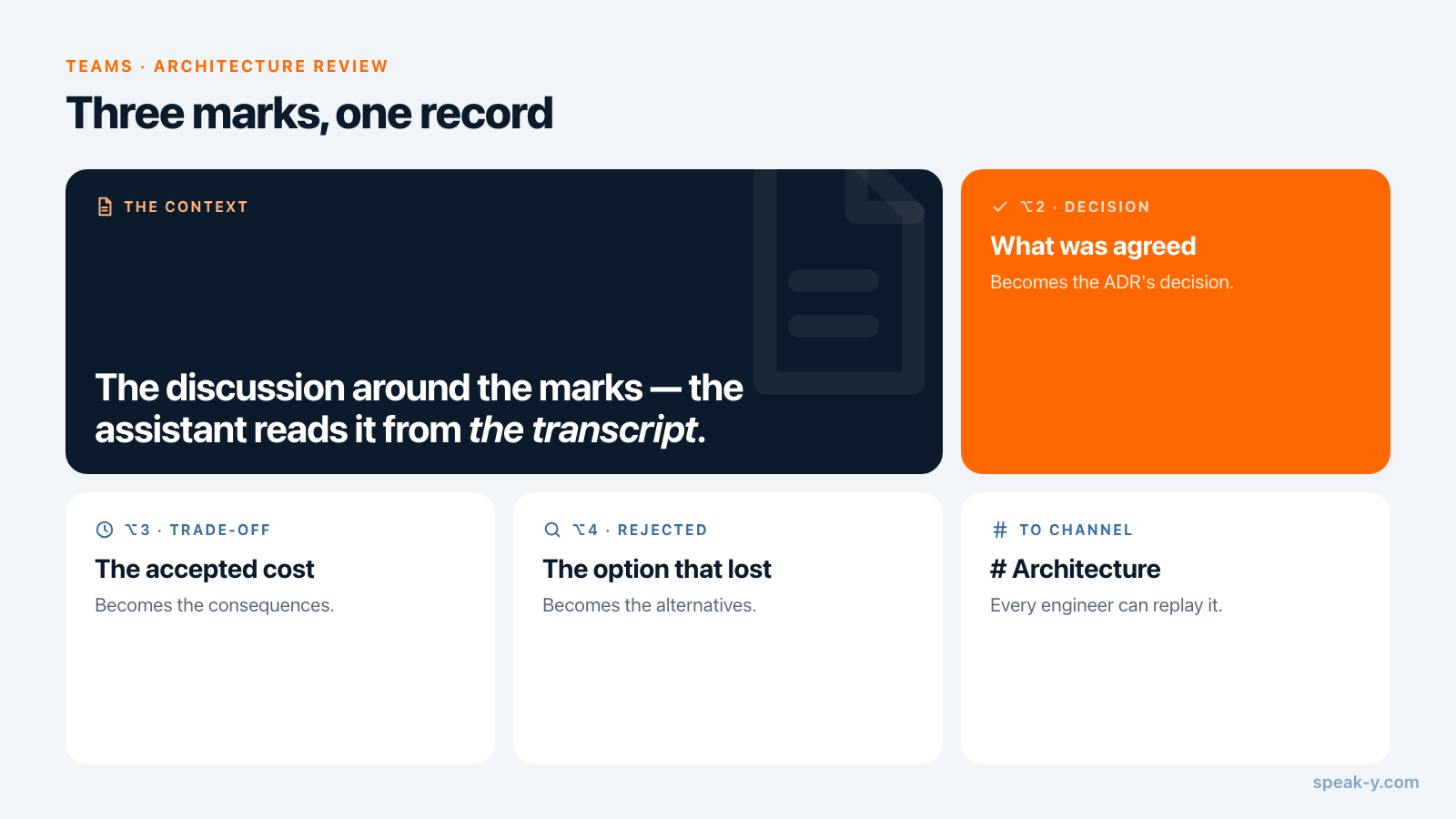
The marks. Speak-Y ships with one note type, Mark the moment on ⌥1.
Add three of your own in Settings → Notes: click Add note type, type
Decision into Type name, click Save, then Set hotkey and press
⌥2. Repeat for Trade-off on ⌥3 and Rejected on ⌥4. Each mark maps onto a
section of the record:
- Decision — what the team agreed to build. It becomes the ADR's decision.
- Trade-off — the cost the team accepted with it. It becomes the consequences.
- Rejected — an option that lost, with the reason. It becomes the alternatives considered.
The context is the discussion around the marks; the assistant reads it from the transcript. Nygard's format has no separate section for rejected options; the MADR template gives them one, Considered Options.
The channel. One public channel for architecture reviews, named Architecture, that every engineer can join. In the workspace's ⋯ menu, choose New channel. Reviews of security-sensitive designs — a threat model, an authentication flow — go to a private channel instead; the trade-offs are in who sees what in meeting channels.
During the review: name the component, then press the key
Start a meeting recording in Speak-Y when the review starts. No bot joins the call: Speak-Y records the microphone and the call's sound on your Mac, so it works the same on Zoom, Google Meet, Teams or in a meeting room. Tell everyone the review is recorded.
The transcript only knows what was said, so three habits pay off:
- Name the component before you discuss it. "The payment event publisher in payments-service" makes every mark after it findable by the name an engineer will search for later.
- Let the reason be said, then press. A mark covers the last 15 seconds of the transcript before the key, so the sentence with because in it lands inside the mark.
- Mark the losers too. A Rejected mark on "dual writes lose events when the service crashes between the two" is the line that saves the next review half an hour.
The tech lead running the review usually records and presses the keys. The hotkeys work from any app, with the diagram or the code still in front.
After the review: names, tags, To channel
Two minutes in the recording's window, while the room is still fresh:
- Name the speakers. Click Speaker 1, Speaker 2 and so on, and type the real names. A mark is only as useful as the name next to it.
- Tag it. Add the service name and the record number you are about to
write, such as
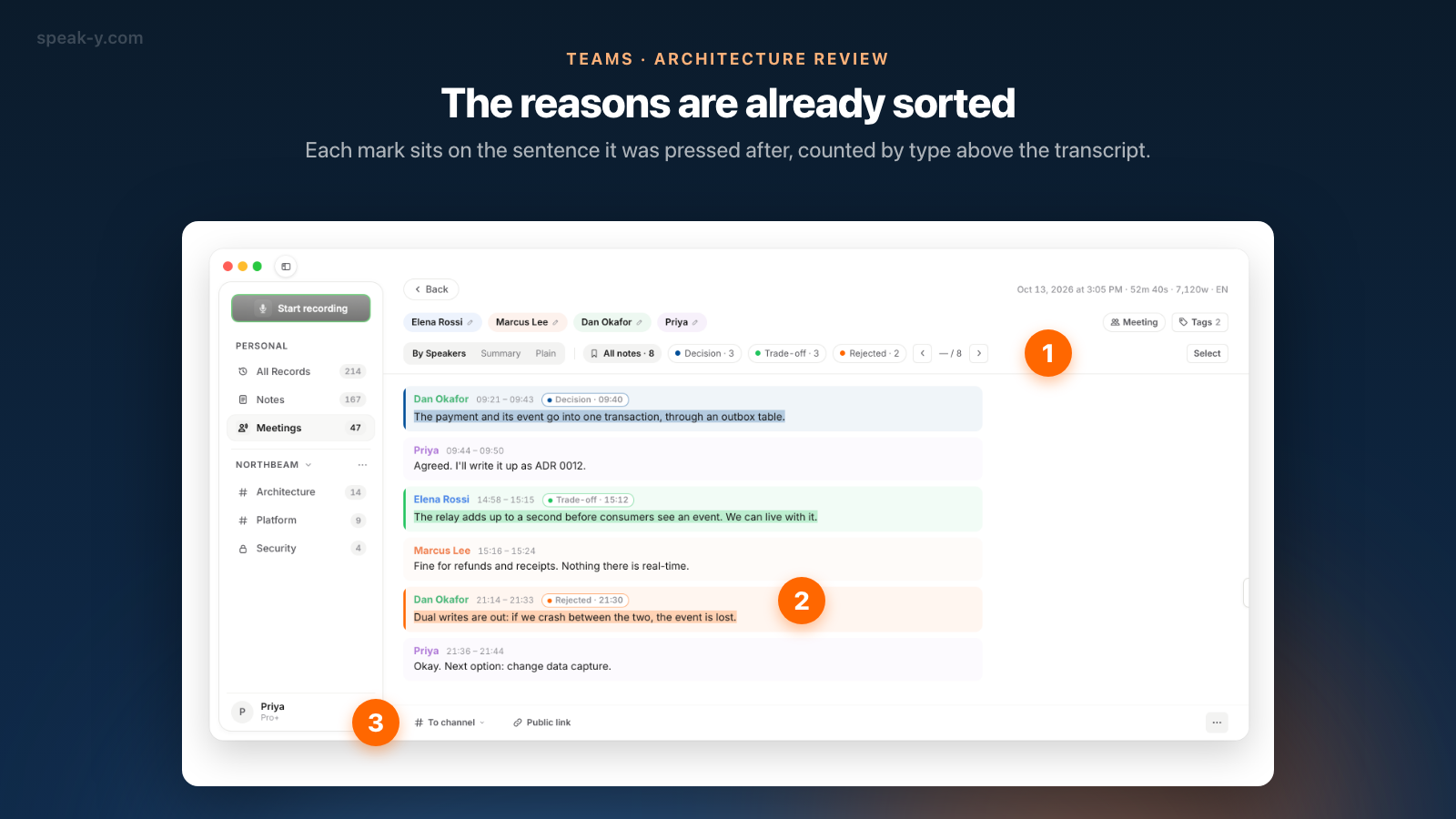
payments-serviceandadr-0012. The assistant and your teammates find the review by these tags. - Check the marks. The chips above the transcript count them by type: All notes · 8, Decision · 3, Trade-off · 3, Rejected · 2.
- Share it. Press To channel under the transcript and pick Architecture. The transcript with names and timestamps, the AI summary and the action items go into the channel, end-to-end encrypted; the audio stays on your Mac.
- Show the marks. Marks are private by default. Click the Private chip above the transcript and choose Show in # Architecture — channel members will see them, so the marks travel with the recording.
Draft the ADR from the marks
Connect your assistant to the Speak-Y MCP server once: open Connect AI assistant in the account menu at the bottom of the sidebar, or Settings → Integrations, and click Connect next to Claude, ChatGPT or Cursor. For Claude, one click sets up both Claude Desktop and Claude Code. The server is free on every plan.
Then, in the repository, ask:
Draft ADR 0012 from the payments-service review tagged adr-0012: context, decision, consequences and rejected options. Cite who said each point and when.
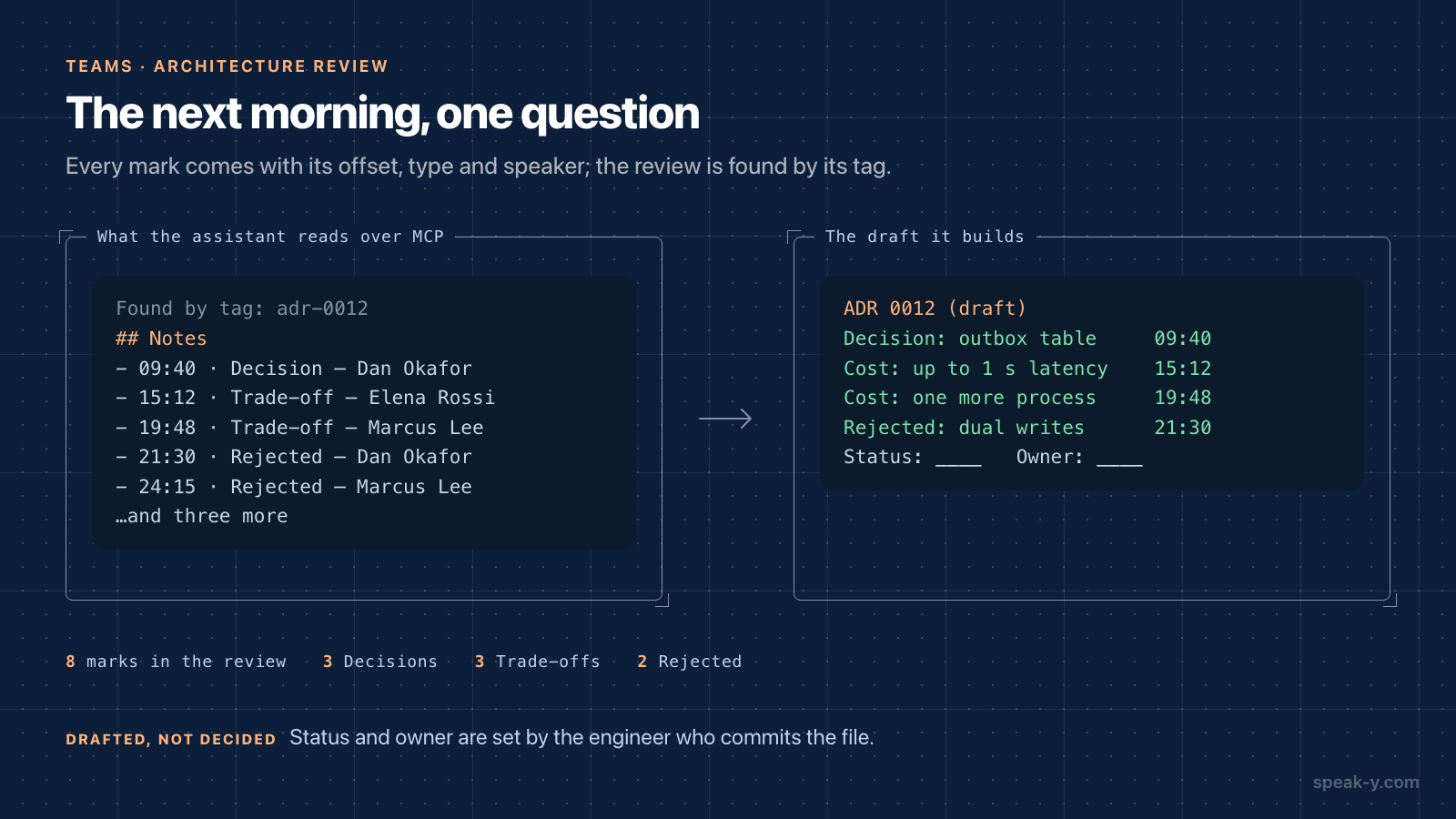
The assistant finds the review by its tag and reads it. Alongside the transcript, Speak-Y hands it the marks as a list — each with its offset in the recording, its type, the speaker and the first words of the sentence — so the draft comes back with three decisions, three accepted costs and two rejected options, each with a name and a time. In Cursor the assistant asks before it runs each tool, unless you change that.
Edit the draft before you commit it. Three fields are yours, not the assistant's:
- Status. Proposed or accepted is a team decision, not something a transcript can tell.
- Owner. Who answers questions about it next quarter.
- The pointer back. Write where the debate lives — the channel, the date and the tag — so the next reader can replay the reasoning. The recording is end-to-end encrypted in the channel, so the pointer works for teammates in the workspace, not for the public.
Months later: the new engineer asks why
The ADR in the repository answers what in a page. When it does not answer enough, the debate is one step away.
In the app. Teammates you invite join free on any plan. A new engineer who
joins the workspace sees the public Architecture channel with its history.
Open it, click the magnifier in the channel header and type the component
name, such as outbox. The search reads the transcripts of every review in
the channel and shows the matching lines with their times.
In the editor. In Cursor or Claude Code, with the code open:
Why does payments-service write events to an outbox table instead of publishing to Kafka directly? What was rejected?
The assistant searches the recordings the engineer can see, finds the review, and answers from it: the decision, who argued against dual writes and why, and what the team accepted in exchange. The same pattern for code questions in general is in meeting context for voice coding in Cursor.
What a review recording does not replace
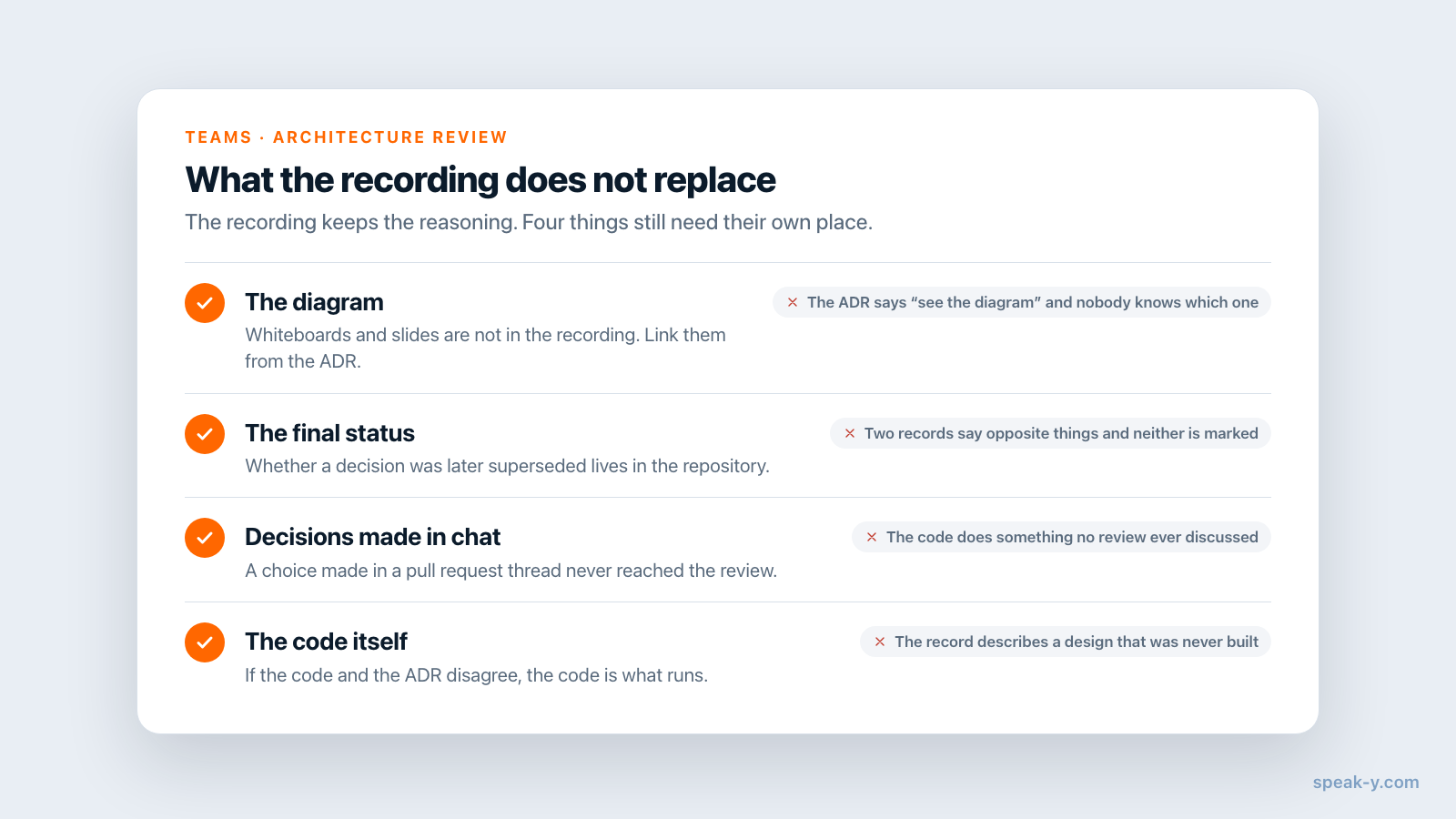
The recording keeps the reasoning. Four things still live elsewhere:
- The diagram. Whiteboards, slides and sequence diagrams are not in the recording. Link them from the ADR.
- The final status. A Decision mark records that the room agreed; whether it was later superseded is in the repository's records.
- Decisions made in chat. A choice made in a pull request thread never reached the review. Write it into the ADR directly.
- The code itself. If the code and the ADR disagree, the code is what runs. Update the record or the code — the recording only tells you what was intended.
Limits and costs
- Length. Checked on speak-y.com on 18 October 2026: Free stops a meeting recording at 30 minutes, Pro ($10 a month) at 60, Pro+ ($15) and Max ($30) at four hours. A long design session needs Pro+ or a break at the hour.
- One recorder. Two people recording the same review make two half-lists of marks.
- Channels on Mac. Workspaces and channels are in the macOS app. Creating a workspace needs Pro or higher; teammates join free on any plan.
The short version
Three note types — Decision, Trade-off, Rejected — on ⌥2, ⌥3 and ⌥4. During the review: name the component, let the reason be said, press the key. After it: names, tags, To channel → Architecture, show the marks. Then one question to the assistant in the repository, and you edit the ADR draft instead of writing it from memory. The Teams page covers workspaces and channels, and a decision log that keeps itself applies the same idea to product decisions.
FAQ
How do I keep a record of why an architecture decision was made?
Record the architecture review in Speak-Y and press a hotkey when a decision, a trade-off or a rejected option is said aloud. Share the recording to a team channel such as Architecture. The channel keeps the debate with names and timestamps, and an AI assistant connected over MCP can turn the marks into a draft Architecture Decision Record for the repository.
Can Claude Code or Cursor write an ADR from a meeting recording?
They can write a draft. Connected to the Speak-Y MCP server, the assistant finds the review by its tag, reads the transcript and the list of marks with their type, time and speaker, and fills in context, decision, consequences and rejected options. The status, the owner and the final wording stay with the engineer who commits the file.
How does a new engineer find out why a service is built a certain way?
Two ways. Open the Architecture channel in the Speak-Y macOS app and search it for the component name, or ask an assistant in the editor, such as Cursor or Claude Code, why the service does what it does. The assistant searches the recordings the engineer can see and answers with who said what and when.
Does Speak-Y record the whiteboard or the diagrams shown during the review?
No. Speak-Y records audio from the Mac that starts the recording: the microphone and the sound of the call app. Diagrams, slides and whiteboards are not in the recording. Name the component out loud before you discuss it, and link the diagram from the ADR.
What does this setup cost?
The MCP server is free on every plan. Creating a team workspace needs Pro or higher, and teammates join free on any plan. Checked on speak-y.com on 18 October 2026: Free stops a meeting recording at 30 minutes, Pro ($10 a month) at 60, and Pro+ ($15) and Max ($30) at four hours.