Client Call Notes for Law Firms: One Private Channel per Matter
A small law practice lives on client calls: the first interview, the call where the client explains what happened, the update before a hearing. What the client said on those calls matters to everyone working on the matter, and to nobody outside it. In Speak-Y you record each call on your Mac without a bot joining it, mark the sentences that matter, and send the transcript to a private channel for that matter, which only the matter team can see. A matter tag on every call lets you find what the client said months later.
This guide follows one firm: Dana is a partner at Marsh & Okafor, a five-lawyer commercial practice. Her matter for Brennan Logistics, a warehouse lease dispute, is run by Dana, an associate, Theo, and a paralegal, Priya. The firm and its clients are invented. Product details were checked against the Speak-Y macOS app, version 1.17.35, on 8 November 2026. Nothing here is legal advice: your jurisdiction's rules and your firm's policies decide.
Why one channel per matter
Lawyers have a duty to keep client information from people who should not have it. ABA Model Rule 1.6(c) asks a lawyer to "make reasonable efforts to prevent the inadvertent or unauthorized disclosure of, or unauthorized access to, information relating to the representation of a client", and ABA Formal Opinion 477R (2017) applies that duty to electronic communication: the more sensitive the information, the stronger the measures should be.
Inside a firm, need-to-know usually means the matter team. A shared folder of "all client calls" fails that test the first time a lawyer on another matter opens it, and it fails badly when the firm has an ethical screen: under Model Rule 1.10(a)(2), a lateral lawyer with a conflict can be screened from a matter, which means isolated from any participation in it. A private channel per matter makes the matter team, and only the matter team, the audience of every call.
Before the call: consent, marks and a matter tag
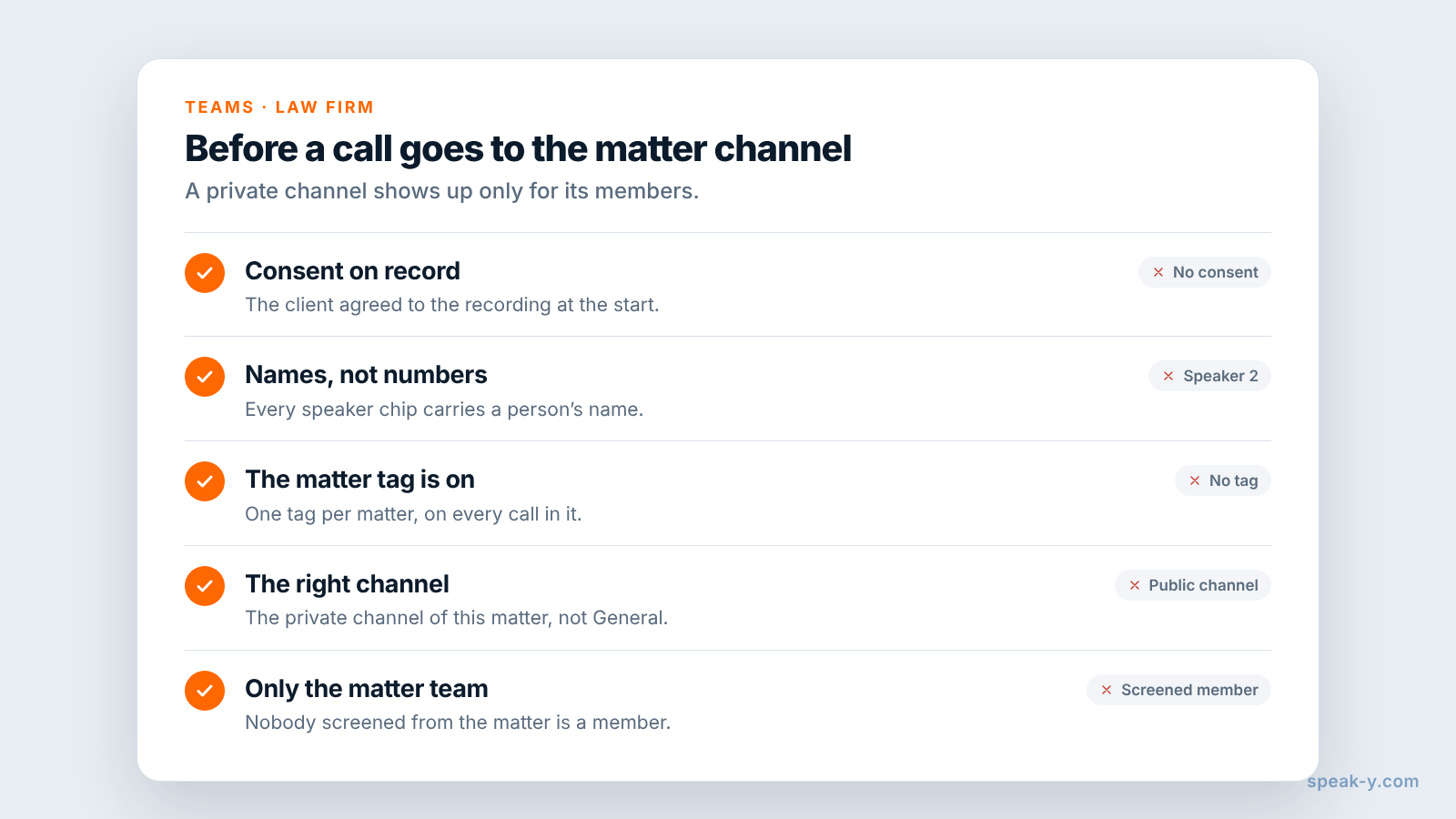
Ask the client first. Speak-Y records on your computer and never joins the call, so nobody announces the recording for you. ABA Formal Opinion 01-422 says that recording without consent does not by itself breach the Model Rules where the law allows it, but advises against recording a client without the client's knowledge, and some states require the consent of everyone on the call: under California Penal Code § 632, recording a confidential communication needs the consent of all parties. Say it in the first minute: the call is recorded, the matter team reads the transcript, and the audio stays with you. Is it legal to record meetings covers the rules by country.
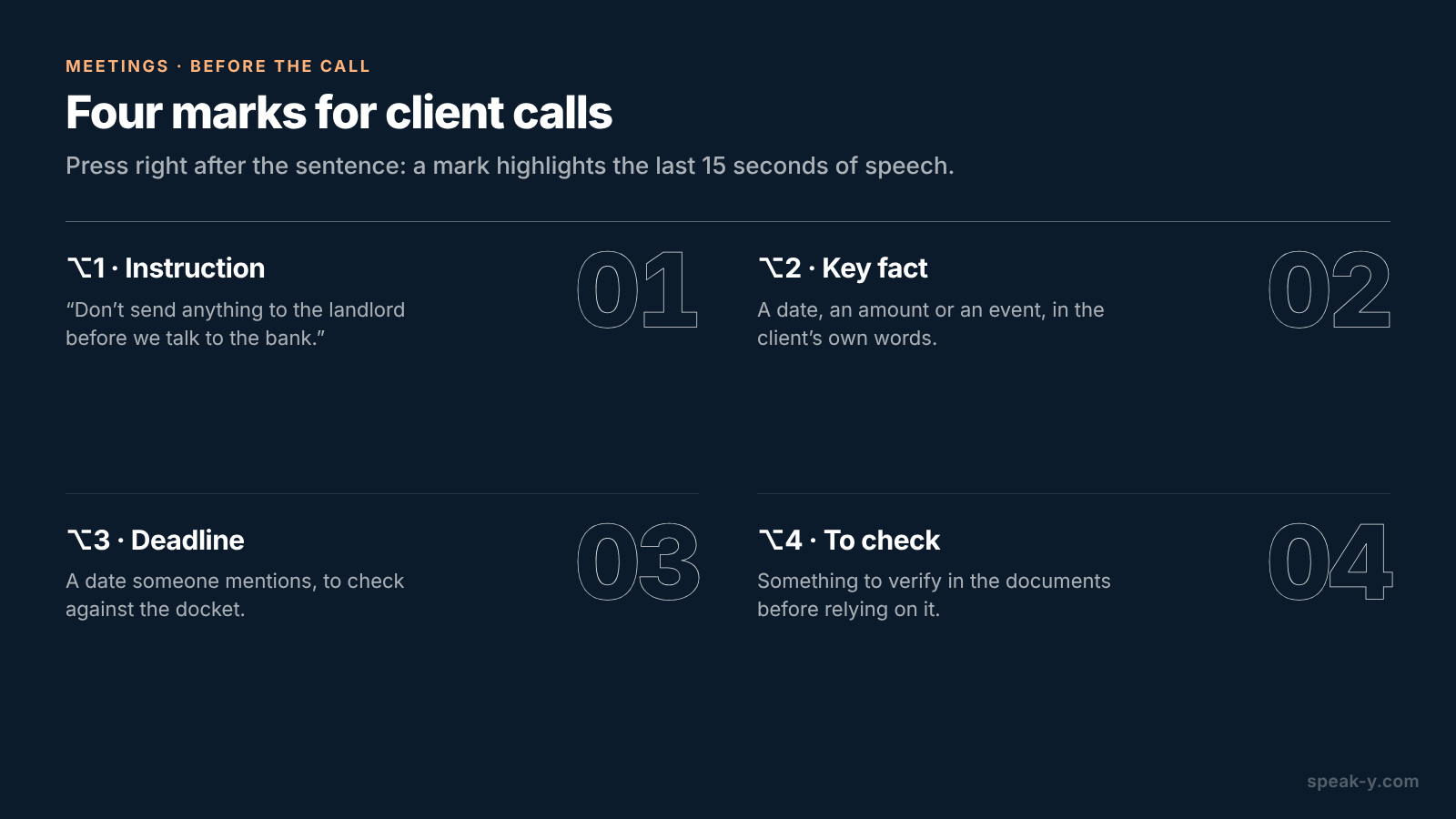
Name your marks. Open Settings → Notes. Under Note types, rename the default Mark the moment and click Add note type for the rest; Set hotkey gives each its own combination. Four types cover most client calls:
- ⌥1 Instruction — what the client wants done: "Don't send anything to the landlord before we talk to the bank."
- ⌥2 Key fact — a date, an amount or an event in the client's words: "The roof started leaking in March, I emailed them the same week."
- ⌥3 Deadline — a date someone mentions, to check against the docket.
- ⌥4 To check — something to verify in the documents before relying on it.
Each press pins a mark of that type to the transcript and highlights the words of the last 15 seconds, so you press right after the sentence, not before it.
Last, pick one tag per matter — Dana uses brennan-lease — and put it on
every call in the matter: with the client, with opposing counsel, internal.
On the call: one click, two keys
Zoom, Microsoft Teams, Webex and other call apps are recognised as soon as they are open: Speak-Y asks Record as Meeting? above the recording button and you click the check mark. A call in the browser, such as Google Meet, is recognised when your camera is on. If no question appears, start a recording with your Speak-Y hotkey in hands-free mode, point at the recording button and click the check mark on Record as Meeting?. For the question to appear, Settings → Interface & Behavior → Meeting mode must be Manual or Auto.
Then listen to the client. When they give an instruction, press ⌥1; when they state a fact you will need, ⌥2. Speak-Y records voices, not the documents on screen, so read key details aloud — "the lease, clause 14, says repairs to the structure are the landlord's" — and they land in the transcript next to your mark. Pro+ records meetings of up to 4 hours, enough for a long client interview.
After the call: names, the matter tag and the matter channel
Open the recording from Meetings. Speakers are numbered in the order they spoke; you are usually Speaker 1. If Speak-Y has already put a name on a speaker, check that it is right.
- Click each speaker chip, type the person's name and press Enter. The channel feed, copied quotes and what an AI assistant reads later all use this label, so "Ellen (client)" is clearer than a number.
- Click Tags and add the matter tag.
- Press To channel under the transcript and pick the matter's channel.
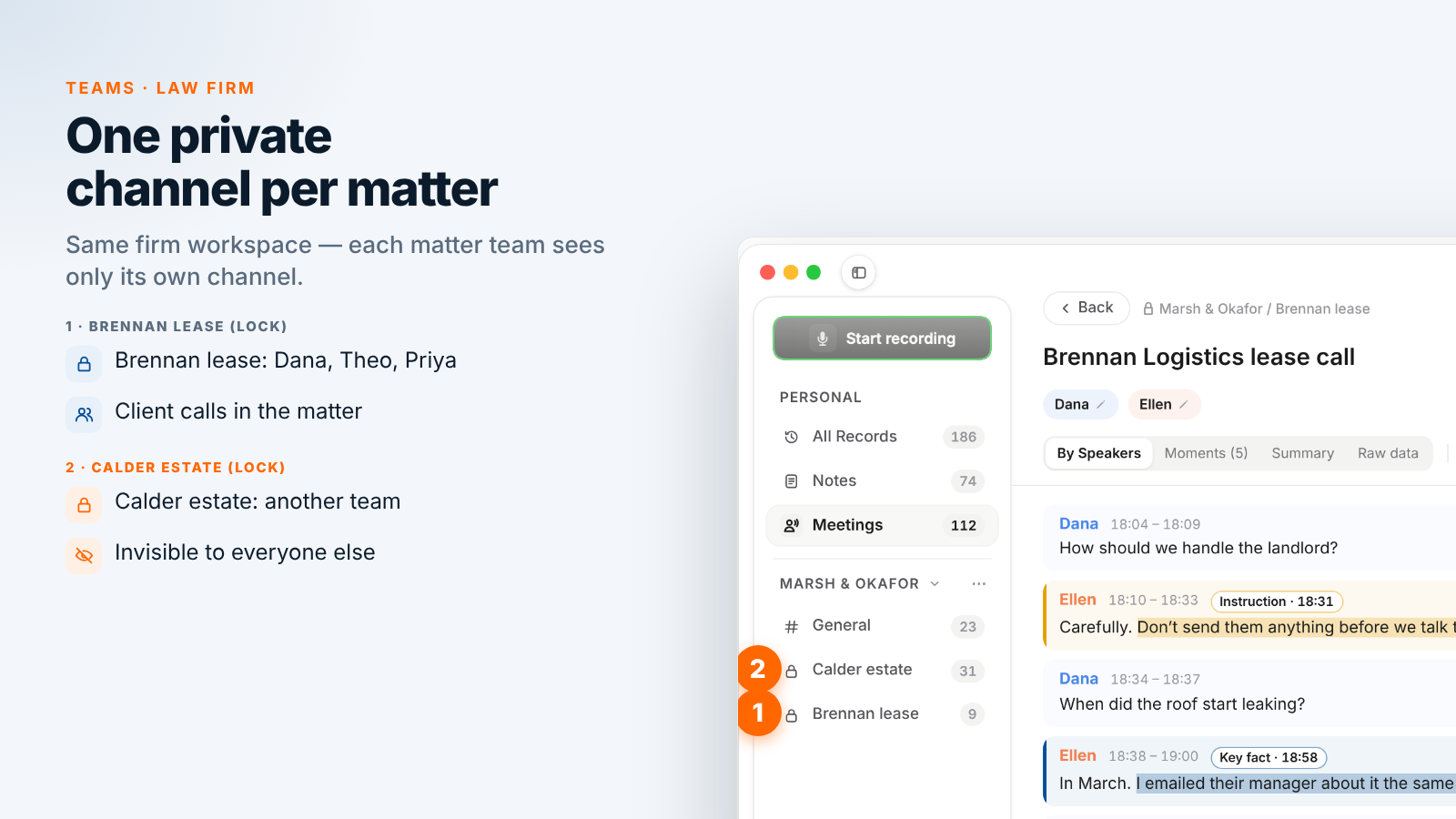
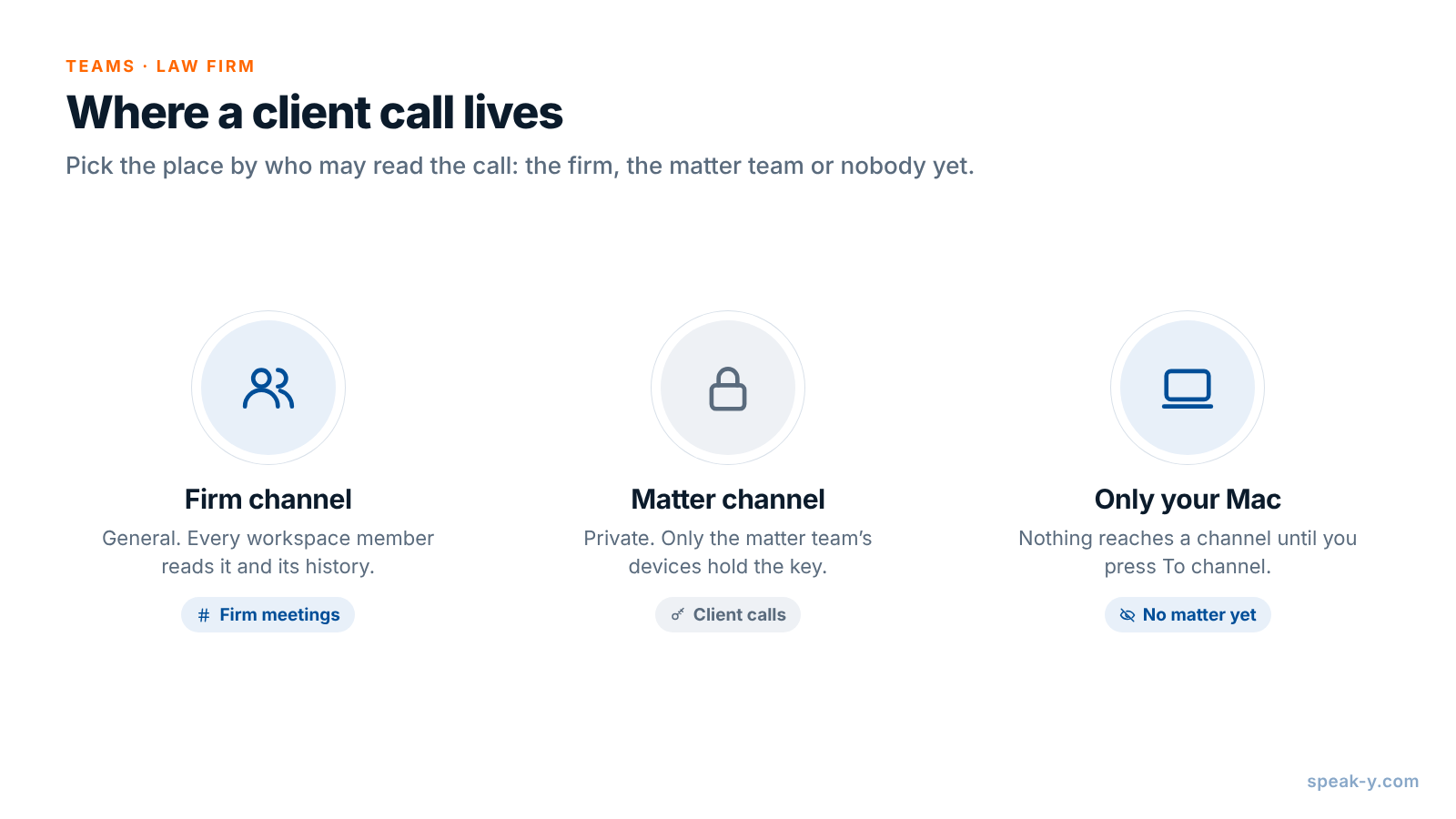
The Marsh & Okafor workspace has a public General channel for firm meetings and a private channel per active matter: Brennan lease for Dana, Theo and Priya, Calder estate for another team. Every member of a workspace sees every public channel and its history; a private channel shows up only for its members. Creating a workspace needs Pro or higher, and the colleagues you invite join on any plan, including Free. Setting up a team workspace covers the first steps.
Channel members get the transcript with speaker names and the summary; the audio stays on your Mac. Your marks stay private on a shared recording until you switch them to show in that channel.
Who can see a matter channel
Create the channel when you open the matter: in the workspace's ⋯ menu, choose New channel, switch the type to Private, tick the matter team under Who can see this channel and click Create channel. Three rules are worth knowing before you rely on it:
- Members only. A private channel does not appear for anyone else in the workspace, the owner included. Each channel is encrypted with its own key, held only by its members' devices; the server stores ciphertext and cannot read the transcripts or even the channel name.
- The creator controls membership. Only the channel's creator can remove a member or change its type later, and a public channel can never be made private, because everyone already has its history. Create matter channels as private from the start.
- The Recovery Kit is a key too. The workspace Recovery Kit, the file saved when the workspace was created, can re-issue a private channel's key to a member. Keep it with the managing partner, not on a shared drive, and never with anyone screened from a matter.
A recording reaches no channel until you press To channel, so a call that belongs to no matter yet, such as a first consultation before the conflicts check, can simply stay on your Mac.
Finding what the client said
Months later, before a deposition or a settlement meeting, the matter tag does the gathering:
- The recordings list filters by tag:
brennan-leasegives you every call in the matter, and the Moments tab in each one shows only the marked lines, each badged with its type, such as Instruction. - Search everything (⌘K) matches the text of every recording and the names of your tags, and shows each result with its date and the line around the match: "roof" finds the March leak in the client's own words.
- An AI assistant connected through the Speak-Y MCP server reads your recordings and the ones shared into your channels, filtered by tag and date. "List every Instruction and Key fact in calls tagged brennan-lease, with dates and times" gives the associate a chronology to check against the documents. Before you rely on a cloud assistant, check that its terms fit your duty of confidentiality, and play each moment before you quote it.
What Speak-Y does not replace
Speak-Y keeps the conversation, not the matter. Conflicts checks, the matter file, documents, the docket, time entries and billing stay in your practice management system; Speak-Y does not record time or send anything to it. Treat a recording like any other material in the matter: your firm's retention policy and any litigation hold apply to it, and a transcript is a record of what was said, not a substitute for the engagement letter or attendance notes your firm requires.
When a matter closes, decide what happens to the channel under your retention policy. When a lawyer leaves the firm, remove them from the workspace: the app rotates the channel keys, so new recordings never reach them. What their app had already downloaded stays on their Mac, as with any file someone has already opened. To delete a call, remove it in the channel feed, which takes it out of the channel for everyone, and delete your own copy in Meetings; it waits in Recently Deleted for 30 days, so clear it there as well.
One matter, one private channel, one tag: the matter team reads every client call, and nobody else in the firm does. The Teams page explains workspaces, private channels and encryption in one place.
FAQ
Can a lawyer record a client call without a bot joining?
Yes, on a Mac. Speak-Y records the call from your computer's audio and never joins Zoom, Microsoft Teams or Google Meet, so the client sees no extra participant. Nobody announces the recording for you, so ask for consent at the start of the call; ABA Formal Opinion 01-422 advises against recording a client without the client's knowledge.
How do I keep each client matter visible only to the people working on it?
Create a private channel per matter in your firm's Speak-Y workspace and tick only the matter team, for example the partner, the associate and the paralegal. A private channel does not appear for anyone else in the workspace, and its recordings are encrypted with a key that only its members' devices hold.
Can the Speak-Y server read privileged client calls shared to a channel?
No. Channel recordings are end-to-end encrypted on the sender's Mac; the server stores ciphertext it cannot open, and the audio never leaves the Mac that recorded it. The firm still decides who is in each channel and keeps the workspace Recovery Kit with a trusted partner, because the Kit can restore access to a private channel.
How do I find everything a client said about one issue?
Tag every call in the matter with one matter tag, such as brennan-lease, and mark key sentences with a hotkey during the call. The recordings list filters by tag, Search everything (⌘K) matches transcript text, and an AI assistant connected through the Speak-Y MCP server can list your marks by tag and date.
Does Speak-Y replace practice management or time tracking software?
No. Matter records, conflicts checks, documents, deadlines, time entries and billing stay in your practice management system. Speak-Y keeps what was said on the calls, by speaker and with times, so the matter team works from the client's own words.