Pre-Meeting Brief From Past Calls: Let Your AI Assistant Prep You
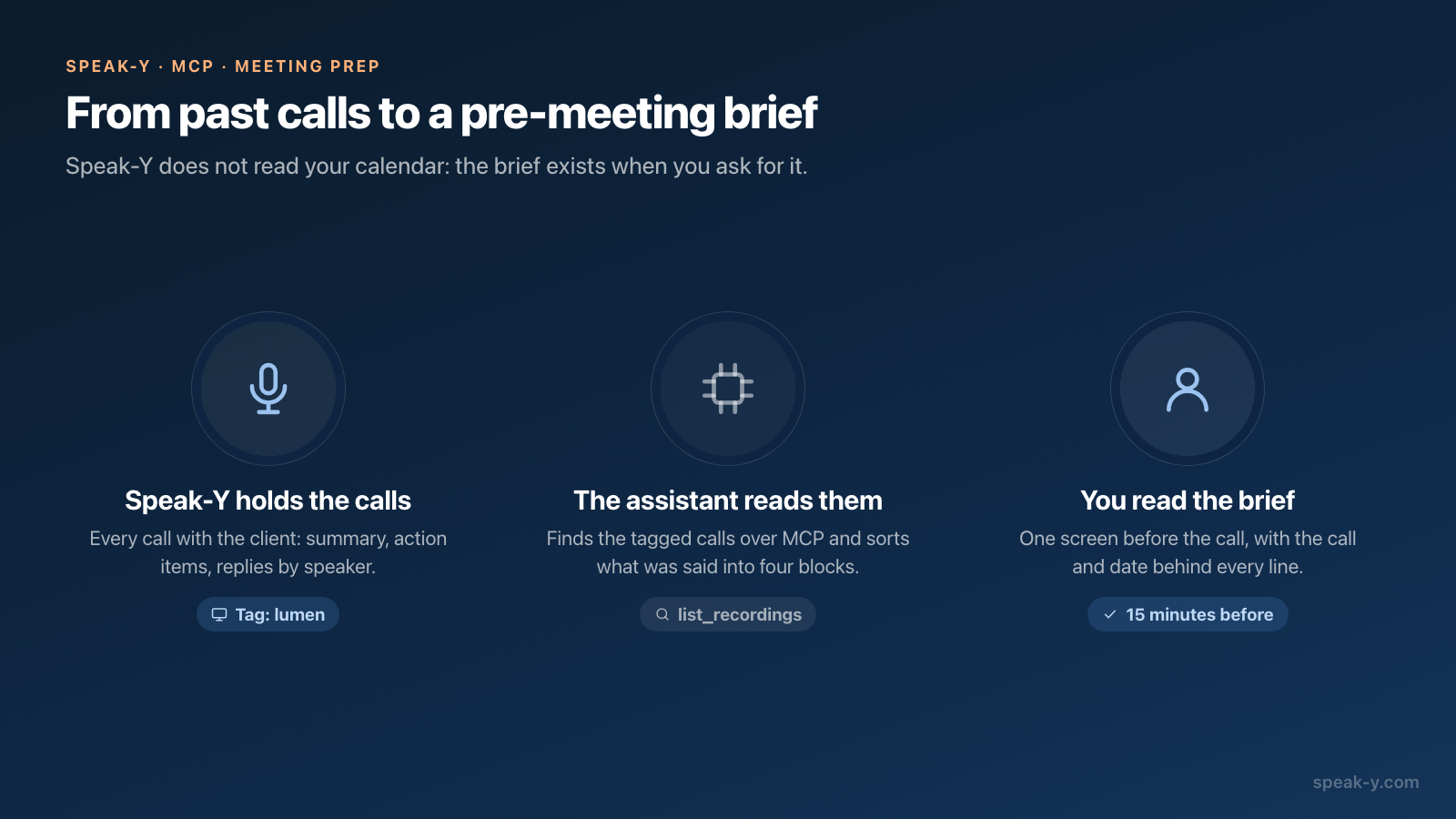
Fifteen minutes before a client call, an AI assistant connected to Speak-Y over MCP can read every past call with that person and give you a one-screen brief: what you agreed, what you promised, what they promised, and what is still open. You ask in one sentence; the assistant finds the calls by tag, reads their summaries and transcripts, and names the call behind every line.
Two habits make this work, and both take seconds after a call: put a client tag on the recording, and name the speakers. Without the tag the assistant has to guess which calls belong to the client; without names it cannot tell your promises from theirs. Everything below was checked against the macOS app and the vendors' documentation on October 14, 2026.
Where does the brief come from?
From the recordings on your Mac. The Speak-Y MCP server gives the assistant three tools for this job:
list_recordingswith atagfilter returns the calls carrying that tag, newest first;meetings_onlydrops short dictations.search_recordingsfinds calls by a word or a name in the transcript, the title, the summary or the action items.get_transcriptreturns one call as Markdown: date and tags, the AI summary with action items, the moments you marked, and the transcript by speaker with timestamps.
Reading is local and needs nothing else running. The server is included in every Speak-Y plan, Free too; connecting it is one click on Connect in Settings → Integrations, described in how to connect meeting notes to AI assistants.
Why do tags and speaker names decide whether the brief works?
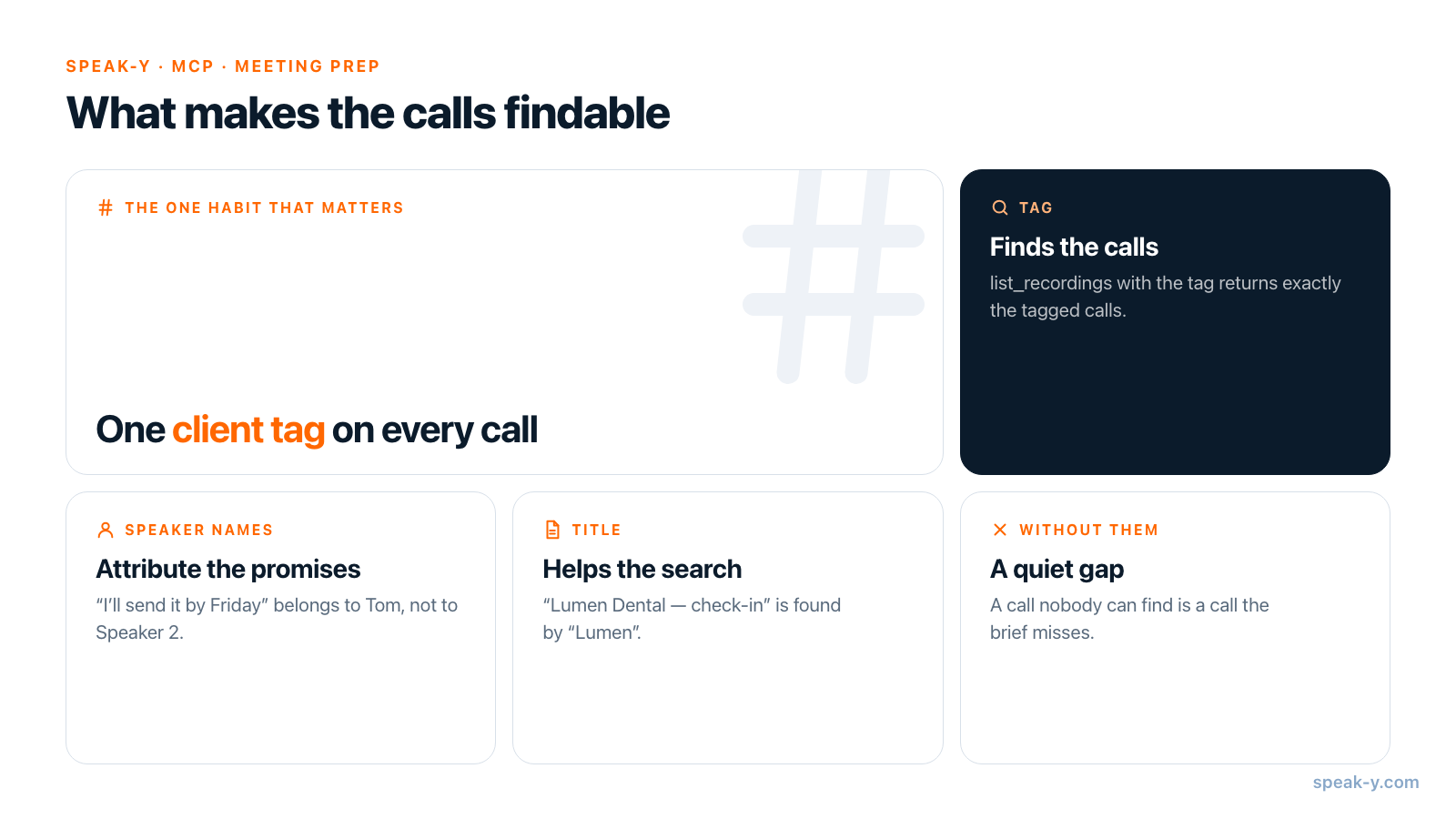
Because the assistant can only read what it can find and attribute.
The tag finds the calls. list_recordings with tag: lumen returns
exactly the calls you tagged lumen, whatever they were called and whoever
spoke. Searching by name is weaker: it matches only where the name appears in
the transcript text, the title or the summary. A call titled "Meeting 14:02"
in which nobody said "Tom" will not come up, and the brief will quietly miss
it. One tag per client, put on during or right after the call, removes the
guesswork. In the recording, click Tags and pick it — from the second call
on, it is one click.
Names attribute the promises. Speak-Y separates speakers on its own, but labels them Speaker 1 and Speaker 2 until you name them. Click the speaker chip in the recording and type the name; the name replaces the label everywhere in that call. Without it, "I'll send the numbers by Friday" in the transcript belongs to nobody, and the assistant either guesses or leaves the promise out.
A title helps the search. "Lumen Dental — October check-in" is found by
"Lumen"; "Meeting 14:02" is not. The assistant can rename a recording for you
with update_recording; more requests like this are collected in
prompts to ask AI about your meetings.
What should the brief contain?
Four blocks and one rule. The blocks follow what you actually need in the first minute of the call:
Brief me for my call with Tom Becker (tag: lumen).
Read every call with this tag, newest first.

Agreed: decisions that still stand
We promised: what we said we would do, with the date
They promised: what the client said they would do, with the date
Open questions: what was raised and not settled

Rules:
- After every line, name the call and its date in brackets.
- Promises from the last call: write "check status" —
  you cannot see what happened after it.
- If a block has nothing, write "nothing found".
- End with how many calls you read.
Keep it in your assistant's project instructions, so before each call you only type the name and the tag. The bracketed source is the rule that matters: a brief line you cannot trace back to a call is a line you cannot trust in front of the client.
How does it run fifteen minutes before the call?
Here is the routine for an account manager, Maya, before a 3 pm call with Tom
Becker, Marketing Director at Lumen Dental. She has three recorded calls with
him, each tagged lumen, with Tom named in each.
- Ask. In Claude, ChatGPT or Cursor: "Brief me for my 3 pm call with Tom Becker, tag lumen."
- The assistant finds the calls. It calls
list_recordingswith the tag and gets three: the kickoff on September 15, the campaign review on September 29, the October check-in on October 8. - It reads them. Three
get_transcriptcalls: summaries, action items, your marks and the replies by speaker. - It writes the brief to your template.
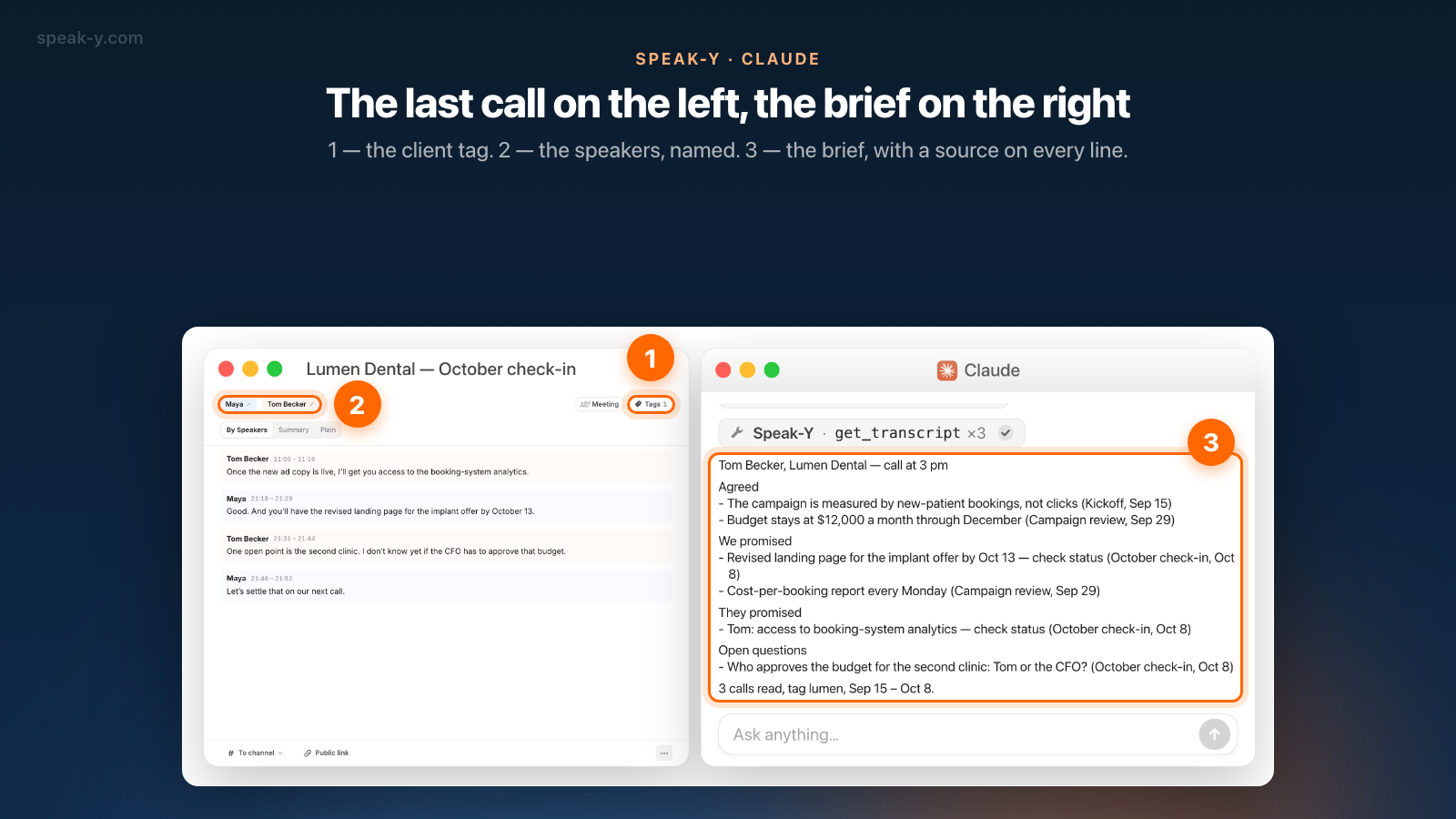
The brief for this call looks like this:
Tom Becker, Lumen Dental — call at 3 pm
Agreed
- The campaign is measured by new-patient bookings,
  not clicks (Kickoff, Sep 15)
- Budget stays at $12,000 a month through December
  (Campaign review, Sep 29)
We promised
- Revised landing page for the implant offer by Oct 13
  — check status (October check-in, Oct 8)
- Cost-per-booking report every Monday (Campaign review, Sep 29)
They promised
- Tom: access to booking-system analytics — check status
  (October check-in, Oct 8)
Open questions
- Who approves the budget for the second clinic: Tom or
  the CFO? (October check-in, Oct 8)
3 calls read, tag lumen, Sep 15 – Oct 8.
What can the assistant not know?
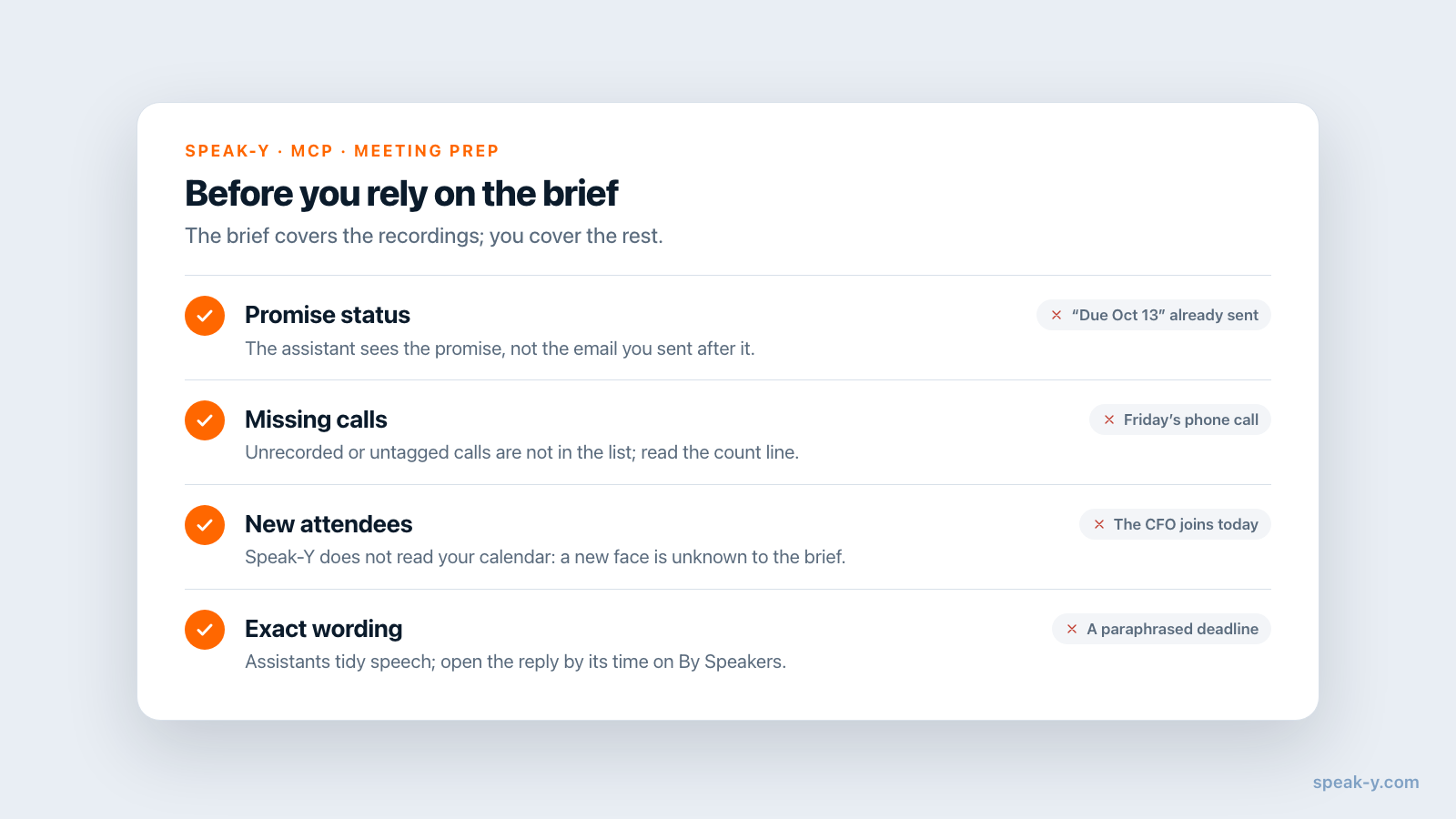
Anything that happened outside the recordings. That limit shapes how you read the brief:
- Whether a promise was kept. The landing page "due Oct 13" may have gone out yesterday by email. The assistant sees the promise, not the email; this is why the template marks promises from the last call "check status".
- Calls that were not recorded or not tagged. A quick phone call on Friday is not in Speak-Y, and an untagged call is not in the list. The closing line — "3 calls read" — tells you what the brief stands on.
- Who is on the other side today. Speak-Y does not read your calendar. If the CFO joins this time, the brief knows nothing about them unless they spoke in an earlier call.
- Exact wording. Assistants tidy spoken language. If a sentence matters — a price, a deadline, a commitment — open the call, find the reply by its time on the By Speakers tab and read it yourself.
What leaves your Mac?
The MCP server reads the recordings locally, and nothing is uploaded for it to do so. What the assistant reads becomes part of your conversation with the model provider — true of every MCP server, local or cloud. Three client calls contain the client's figures and plans, so it is the same decision you make for any AI drafting tool; for calls under an NDA, make it before you ask. Local vs cloud MCP shows where exactly the text travels.
When does another tool fit better?
When the brief should arrive on its own. Speak-Y has no calendar connection, so the brief exists only when you ask for it. Two cloud notetakers prepare one without being asked, as of October 14, 2026:
- Granola Briefs are generated overnight for upcoming external meetings and appear when you open the meeting note. They draw on earlier Granola notes with the same people or company, shared workspace notes, the web, the calendar event and, if connected, Gmail. Granola's documentation lists them for Business and Enterprise plans with Google Calendar connected.
- Fireflies Meeting Prep emails a brief an hour before each recurring meeting: key points, open action items and decisions from earlier meetings with the same attendees. It needs a connected calendar, is switched on in AI Skills and is billed in AI credits.
Both build on recordings in the vendor's cloud, usually made by a bot or a cloud app in the call. The route in this guide suits someone whose calls are recorded without a bot and stay on their Mac, and who would rather ask for a brief in their own format than receive a generic one. After the call, the same recording gives you the CRM note — from sales call to CRM entry covers that — and, for an account team, a shared client channel on the Speak-Y Teams side.
FAQ
Can an AI assistant prepare me for a meeting from my past calls?
Yes, if the calls are recorded in Speak-Y and the assistant is connected over MCP. It finds the calls with the person by tag or by name, reads their summaries and transcripts on your Mac, and writes a short brief: what was agreed, what you promised, what they promised and what is still open.
Why does the brief need tags and speaker names?
The tag is how the assistant finds the right calls: list_recordings with a tag returns exactly the calls you tagged. Speaker names are how it tells your promises from the client's: in a transcript with Speaker 1 and Speaker 2, 'I'll send it by Friday' belongs to nobody in particular.
Does the assistant know whether I already did what I promised?
No. It reads recordings, not your email or your task tracker. A promise from the last call is still listed as open even if you sent the file yesterday, so check the 'we promised' block yourself before the call.
Do I need a paid Speak-Y plan for this?
No. The MCP server is included in every Speak-Y plan, Free too. You need the macOS app, an MCP client such as Claude Desktop, ChatGPT or Cursor, and one click on Connect in Settings → Integrations.
Does the brief happen automatically before every meeting?
No. Speak-Y does not read your calendar, so you ask for the brief yourself, one sentence in your MCP client. If you want a brief to arrive on its own before calendar events, Granola Briefs and Fireflies Meeting Prep do that from their cloud recordings.