CRM Update After a Sales Call: Let Your AI Assistant Draft It
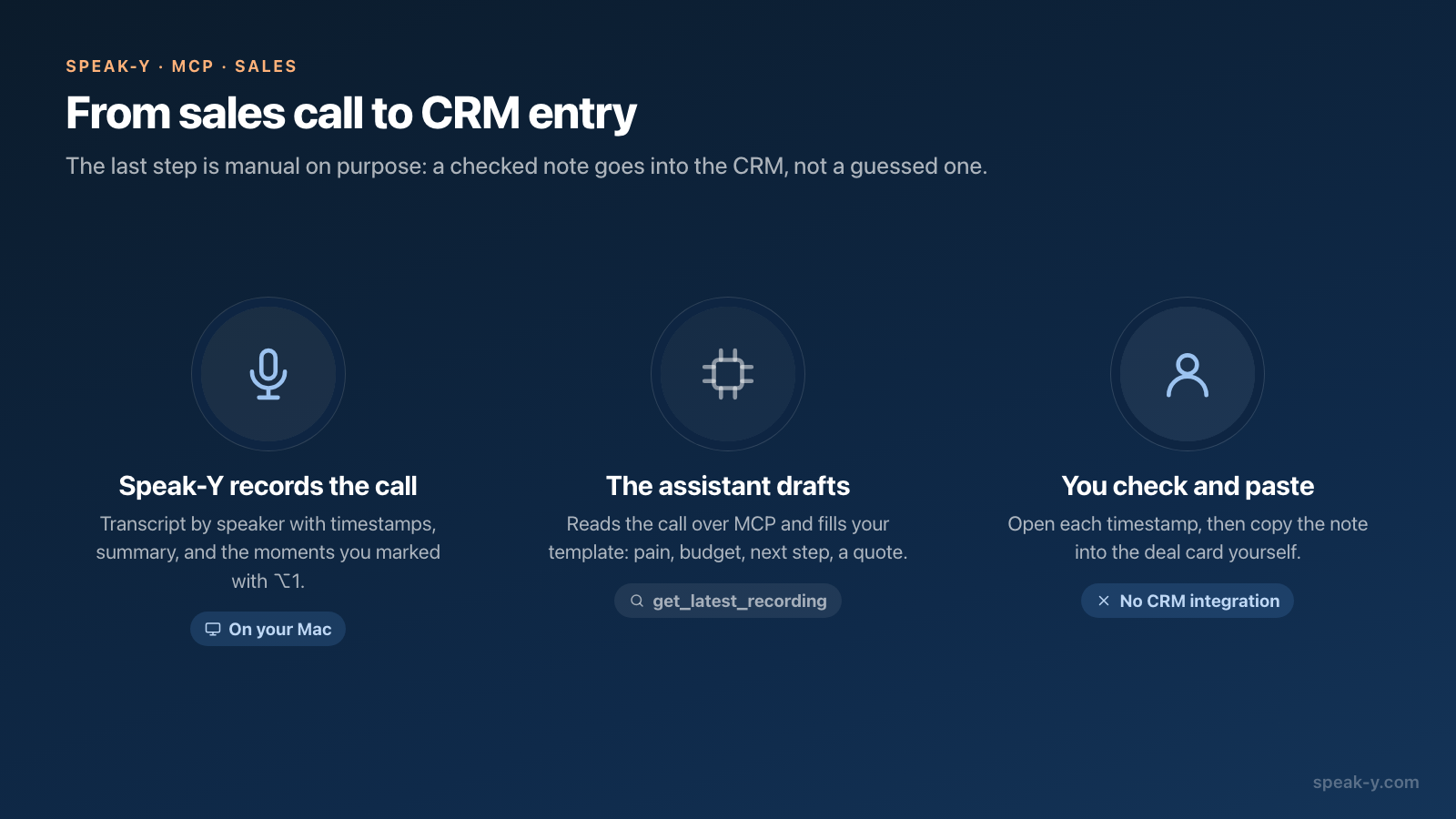
After a sales call, an AI assistant connected to Speak-Y over MCP can read the transcript and draft the CRM entry for you: contact, pain, budget, next step and one quote in the client's own words. You give it a template once, ask one sentence after each call, check the numbers against the timestamps and paste the result into the CRM.
The pasting is done by hand. Speak-Y has no CRM integration, and this guide does not pretend otherwise. What it removes is the fifteen minutes of reconstructing the call from memory at the end of the day — the part where budgets get rounded and next steps lose their dates. Everything below was checked against the macOS app and the vendors' documentation on October 12, 2026.
What does the assistant read after the call?
The recording as text, with enough structure to quote from. The Speak-Y
MCP server gives the assistant two tools that matter here:
get_latest_recording for "the call I just had" (with meetings_only it skips
short dictations) and get_transcript for a specific recording found through
search. Both return Markdown with four parts:
- A metadata line — when the call was recorded, its duration, the number of speakers, the tags.
- The AI summary, which opens with action items: who agreed to do what.
- A Notes section — every mark you placed during the call, as a line with its time, its type and the first words of the reply it is pinned to.
- The transcript by speaker, each reply with its timestamp.
The audio is not part of it. Reading happens locally, from the library on your Mac, and needs nothing else running. The server is included in every Speak-Y plan, Free too; connecting it is one click on Connect in Settings → Integrations, described in how to connect meeting notes to AI assistants.
What should the CRM template contain?
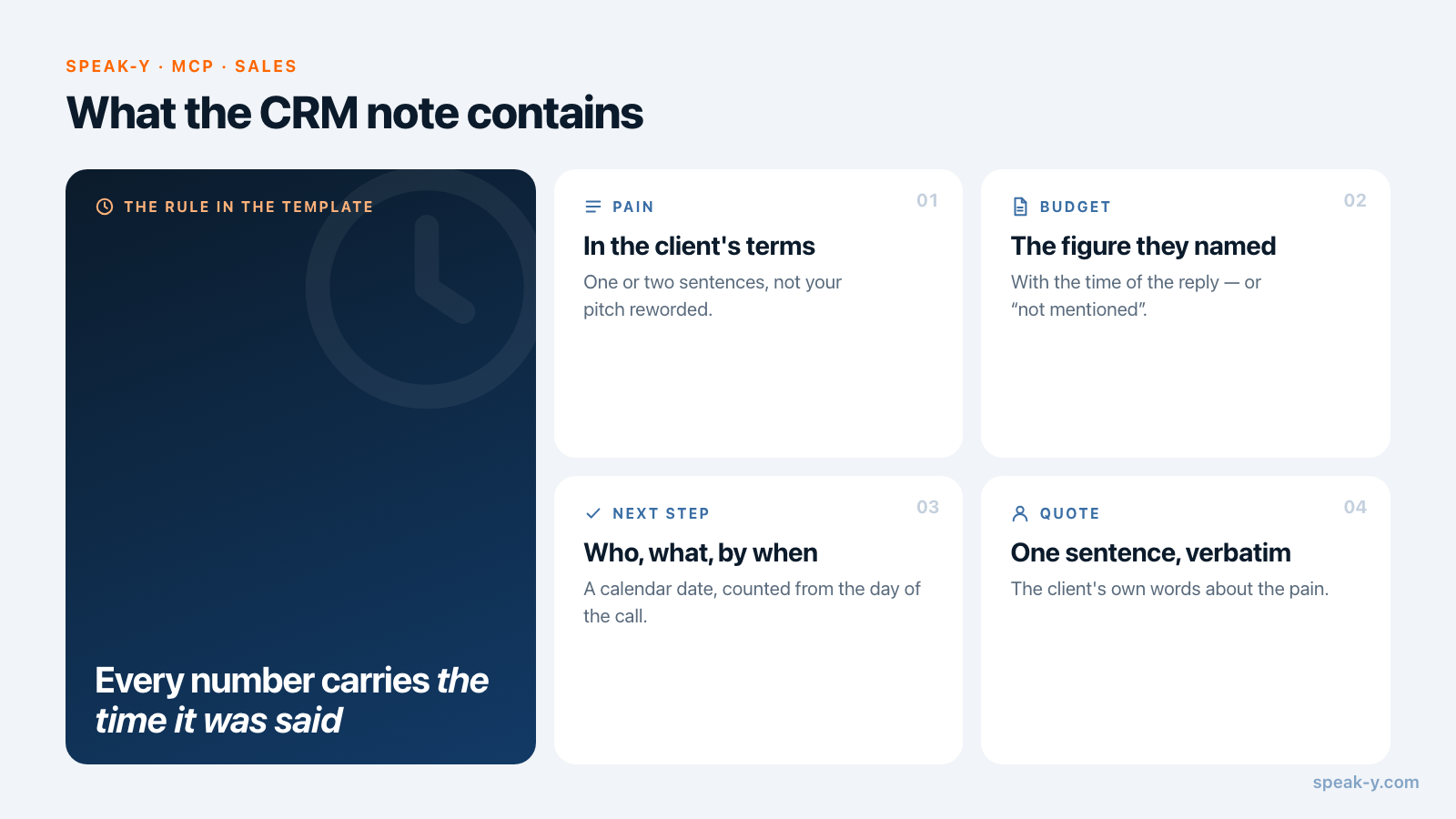
Whatever your CRM's deal card asks for, and nothing the call cannot prove. A template that works for a discovery or qualification call:
Draft a CRM note from my last sales call in Speak-Y.

Contact: name, role, company
Pain: the problem in one or two sentences, in the client's terms
Budget: the figure or range the client named
Timeline: when they want to decide or start
Decision: who else is involved in the decision
Next step: what happens next, who does it, by what date
Quote: one sentence from the client, verbatim, that states the pain

Rules:
- After every number, date and name, put the time of the reply it
  comes from, like (14:32).
- If the call gives no evidence for a field, write "not mentioned".
  Do not guess.
- Use the moments I marked first; they are in the Notes section.
- Plain text, no headings, under 150 words.
The first two rules do most of the work. A language model fills an empty field with something plausible unless told not to, and a plausible budget in a CRM is worse than an empty one: the forecast is built on it. "Not mentioned" is also useful information — it is the question for the next call.
Save the template where your MCP client keeps standing instructions — a project in Claude or ChatGPT, a rules file in Cursor — so that the request after each call shrinks to "CRM note from my last call". For a team that wants every manager's notes in the same shape, the template belongs in a shared skill file; see tool descriptions and skills.
How does it go, step by step?
Take a 30-minute qualification call with Helen Brooks, operations director at a freight company, about replacing a dispatch tool.
- Record the call as a meeting. Speak-Y notices the call and asks Record as Meeting?; nothing joins the call, and no bot appears in the participant list. Tell the client you are recording.
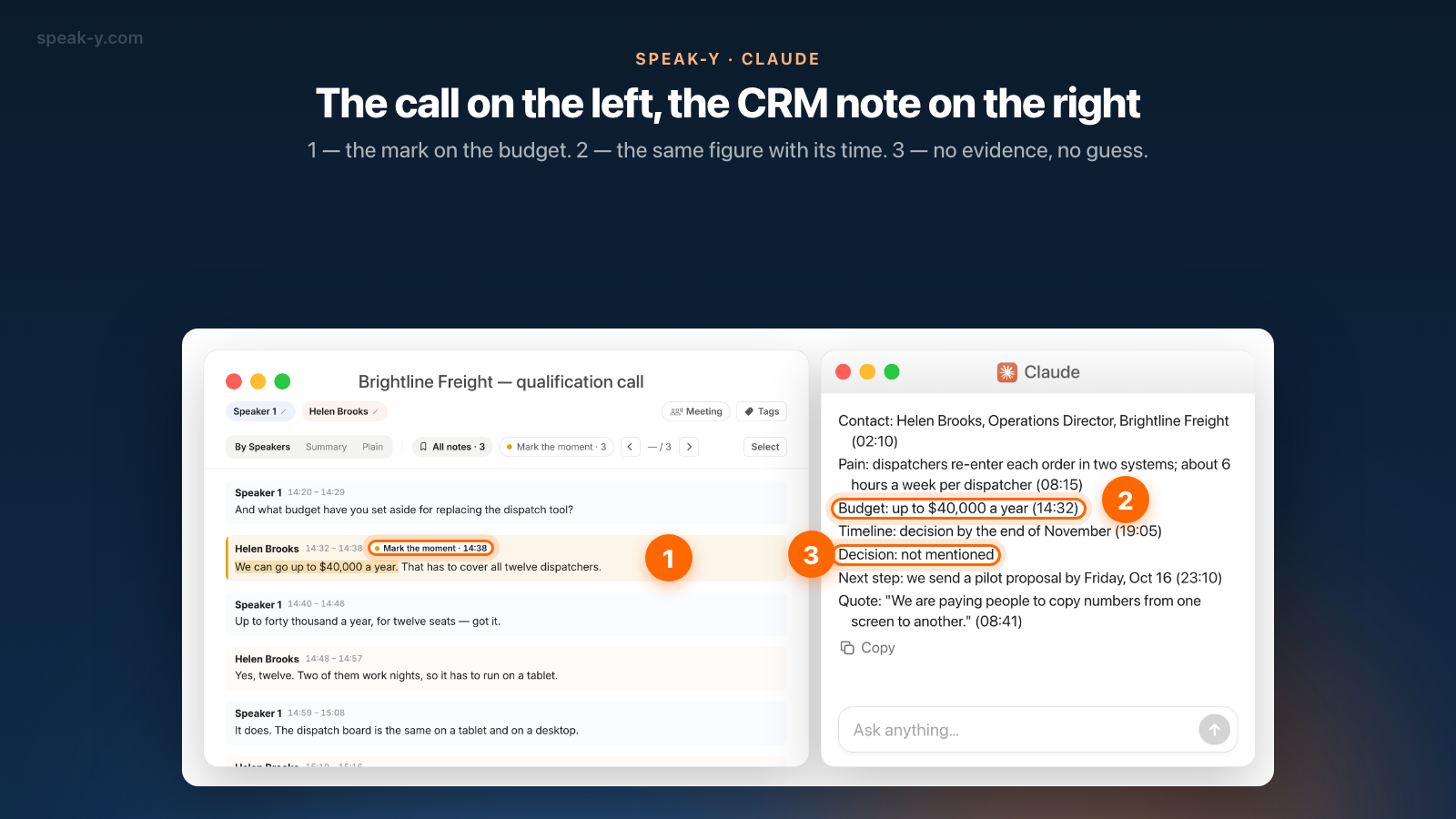
- Mark the numbers as they are said. When Helen names the budget, the team size or a deadline, press ⌥1. The last 15 seconds are marked, and the mark is pinned to the transcript at that point. Three or four marks per call are enough.
- Name the speakers. After the call, click the Speaker 2 chip in the recording and type "Helen Brooks". The assistant now reads "Helen Brooks" instead of "Speaker 2", and so does the note.
- Ask. In your MCP client: "CRM note from my last call." The assistant
calls
get_latest_recording, reads the summary, the marks and the transcript, and fills the template. - Check and paste. Verify the numbers (next section), then copy the note into the deal card in your CRM.
The draft for this call looks like this:
Contact: Helen Brooks, Operations Director, Brightline Freight (02:10)
Pain: dispatchers re-enter each order in two systems; about
  6 hours a week per dispatcher (08:15)
Budget: up to $40,000 a year (14:32)
Timeline: decision by the end of November (19:05)
Decision: not mentioned
Next step: we send a pilot proposal by Friday, Oct 16 (23:10)
Quote: "We are paying people to copy numbers from one screen
  to another." (08:41)
How do you check the numbers before pasting?
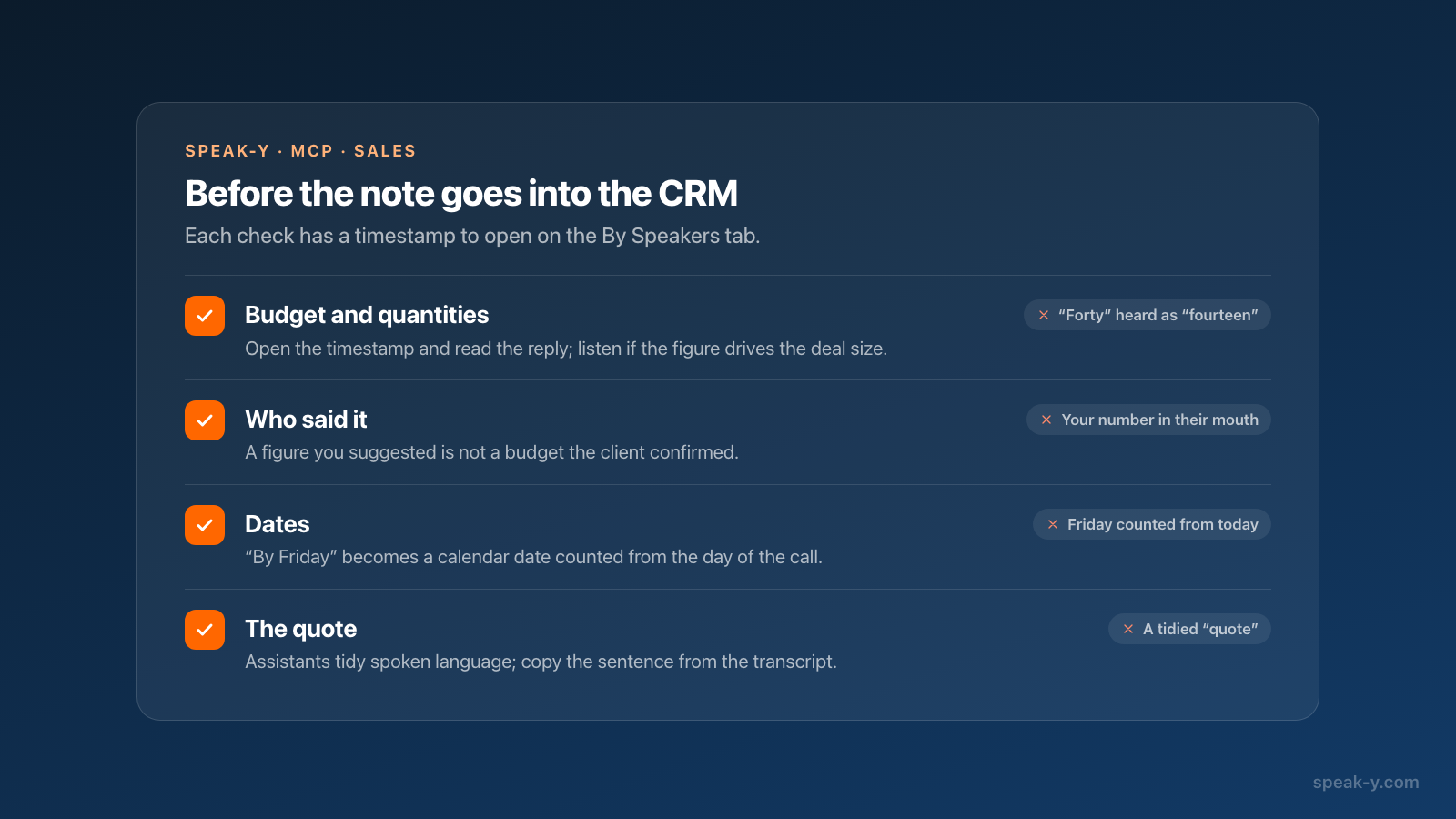
By the timestamps, which is the reason the template asks for them. Open the recording in Speak-Y, switch to By Speakers, find the reply at 14:32 and read it; click its time to play the call from that point if the wording matters. Three checks catch most errors:
- Budget and quantities. "Forty" and "fourteen" sound alike, and so do "fifteen" and "fifty". If the figure drives the deal size, listen to it.
- Who said it. A budget named by you as a suggestion is not a budget the client confirmed. The speaker name next to the reply settles it.
- Dates. "By Friday" in the call needs a calendar date in the CRM; make sure the assistant counted from the day of the call, not from today.
The quote deserves the same look. Assistants tidy spoken language, and a tidied sentence is no longer a quote. If it is going into a proposal later, copy it from the transcript itself.
Can the assistant write to the CRM itself?
Not through Speak-Y. The Speak-Y server reads recordings and organises them — tags, speaker names, team channels — and has no tool that reaches a CRM.
An MCP client can hold several servers at once, though, and the large CRMs now publish their own. As of October 12, 2026:
- HubSpot documents a remote MCP server with read and write access to contacts, companies and deals, and to engagements such as notes and tasks.
- Salesforce documents Hosted MCP Servers; one of them, SObject Mutations, lets an agent create and update records but not delete them, within the signed-in user's permissions.
- Pipedrive describes an official MCP server, available on every plan, that can create and update deals, contacts and activities.
With one of these connected next to Speak-Y, the request becomes "draft the note, show it to me, then add it to the Brightline deal". That second half runs on the CRM vendor's connector, under its permissions and its approval prompts — not on anything Speak-Y controls. Keep the "show it to me" step: a wrong number in a draft costs a correction, a wrong number in the CRM costs a forecast. How clients ask before a write is compared in MCP client approval modes.
What leaves your Mac?
The MCP server reads locally, and nothing is uploaded for it to do so. What the assistant reads then becomes part of your conversation with the model provider — true of every MCP server, local or cloud. A sales call contains the client's figures and names, so the question "may this go to an AI provider" is the same one you answer for email drafts and CRM copilots. For calls under an NDA, decide before you ask. Local vs cloud MCP shows where exactly the text travels.
When does another tool fit better?
When nobody should have to press anything. If the requirement is "every call is logged in the CRM without the manager touching it", a cloud notetaker with a native CRM sync fits better: Fireflies, for example, lists HubSpot and Salesforce integrations that sync meeting notes on their own. The trade is a bot in the call and transcripts in the vendor's cloud.
The route in this guide suits a manager who wants the note in their own template, checked by them, from a call that no bot joined. The same marks and the same recording also give you the client email — from client call to follow-up email covers that half — and, for a team, the call itself in a deal channel on the Speak-Y Teams side.
FAQ
Can Speak-Y update my CRM automatically after a sales call?
No. Speak-Y has no CRM integration. An AI assistant connected over MCP reads the call transcript on your Mac and drafts the CRM note from your template; you paste it into the CRM yourself. If your CRM offers its own MCP server, the same assistant can write the note there, through the CRM vendor's connector and its permissions.
What does the assistant read from a sales call in Speak-Y?
The get_transcript and get_latest_recording tools return the recording as Markdown: date, duration and tags, the AI summary with action items, a Notes section listing every mark you placed with its time, and the transcript by speaker with timestamps. The audio is not exposed to the assistant.
How do I stop the assistant from inventing a budget or a deadline?
Put two rules in the prompt: every number, date and name must carry the time of the reply it came from, and a field with no evidence in the call is filled with 'not mentioned'. Then open the recording in Speak-Y and check each timestamp on the By Speakers tab before you paste.
Do I need a paid Speak-Y plan to use the MCP server?
No. The MCP server is included in every Speak-Y plan, Free too. You need the macOS app, an MCP client such as Claude Desktop, ChatGPT or Cursor, and one click on Connect in Settings → Integrations.
Does the call transcript leave my Mac when the assistant reads it?
The MCP server reads the transcript locally, from the library on your Mac. What the assistant reads then becomes part of the conversation and is sent to your model provider, as with any MCP server. For calls under an NDA, decide beforehand whether an assistant should be pointed at them.