Sprint Planning to Task Drafts in Claude Code, from the Recording
Sprint planning produces two things: a plan the team agreed on, and a backlog that somebody has to write afterwards. The second one is where the plan gets thinner. The acceptance criteria discussed for ten minutes become one line, the "not this sprint" items disappear, and the person who said "I'll take the endpoint" is not the one written down as the owner.
A shorter route: record the planning in Speak-Y, press a hotkey when a task, a done-when criterion or a "not this sprint" is said, and right after the meeting ask Claude Code or Cursor to draft the tasks from the recording over MCP. The assistant writes one draft per task into a file in your repository — title, what and why, acceptance criteria, the owner if someone said it, and the time in the recording for each point. You review the file and move the tasks into Jira, Linear or GitHub Issues yourself: Speak-Y has no export to a tracker, and this guide does not pretend otherwise.
This guide follows the Speak-Y macOS app and its MCP server as checked on 18 October 2026, with one example: the planning of sprint 42 for a web team.
What gets lost between planning and the tracker?
The Scrum Guide (2020 edition, checked on 18 October 2026) gives Sprint Planning three topics: why the sprint is valuable, what can be done, and how the chosen work will get done. It timeboxes the event to a maximum of eight hours for a one-month sprint and notes that the "how" is often worked out by breaking backlog items into work items of one day or less. That is a lot of talk to turn into text.
What usually goes missing on the way:
- Done-when criteria. "An expired card is greyed out and can't be picked" was agreed in the room and never reached the ticket.
- Scope cuts. "Apple Pay is a separate integration, not this sprint" is the line that stops the same debate next week.
- Who said they would do it. The owner in the tracker is whoever created the ticket, not whoever volunteered.
- The reason. A ticket says what. Why it was split that way lives only in the meeting.
A recording keeps all of it; marks make it findable.
Before the planning: three marks and a tag
Speak-Y ships with one note type, Mark the moment, on ⌥1. Add three of
your own in Settings → Notes: click Add note type, type Task into
Type name, click Save, then Set hotkey and press ⌥2. Repeat for
Done when on ⌥3 and Not this sprint on ⌥4. Each mark maps onto a part of
the drafts:
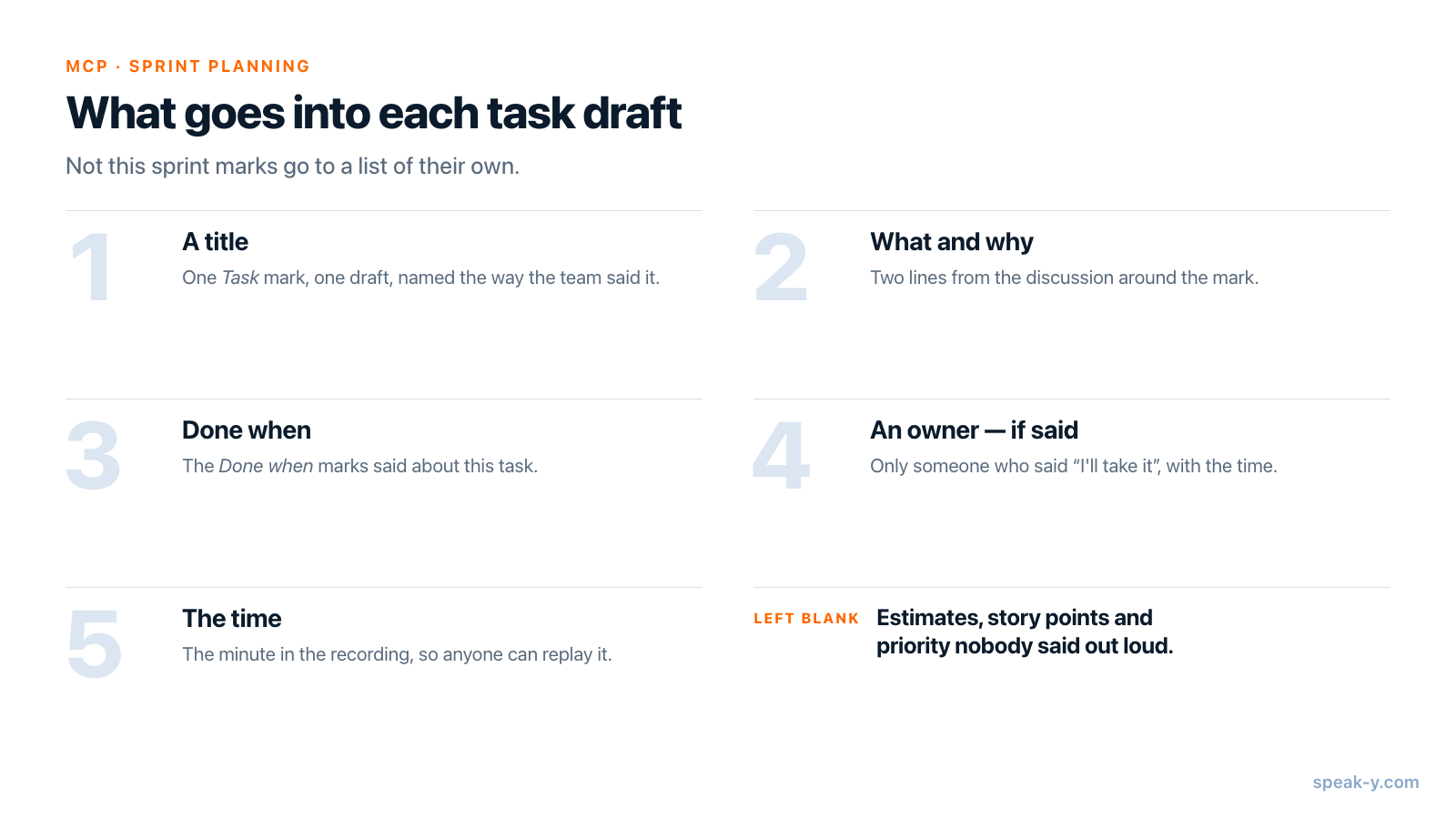
- Task — a piece of work the team agreed to take. It becomes one draft.
- Done when — an acceptance criterion. It goes under the task it was said about.
- Not this sprint — something cut from the scope. It goes into a separate list, so the cut is written down too.
Pick the tag now as well: the sprint number, such as sprint-42. Every
recording of the sprint — planning, refinement, review — gets the same tag,
and that is what the assistant searches by.
During the planning: say the item, then press the key
Start a meeting recording when the planning starts. No bot joins the call: Speak-Y records the microphone and the call's sound on your Mac, so it works the same in Zoom, Google Meet, Microsoft Teams or a meeting room. Tell the team the planning is recorded.
Whoever runs the planning usually records and presses the keys. Three habits help:
- Name the item before you discuss it. "The saved-cards endpoint in payments-api" makes every mark after it findable by the name the team will use in the tracker.
- Press after the sentence. A mark covers the last 15 seconds of the call before the key, so the sentence with the criterion in it lands inside the mark.
- Mark the cuts. A Not this sprint mark on "Apple Pay needs its own review" costs one key and saves a debate in the next planning.
After the planning: names, tag, To channel
Two minutes in the recording's window:
- Name the speakers. Click Speaker 1, Speaker 2 and so on and type the real names. A draft can only name an owner whose name is in the transcript.
- Tag it with
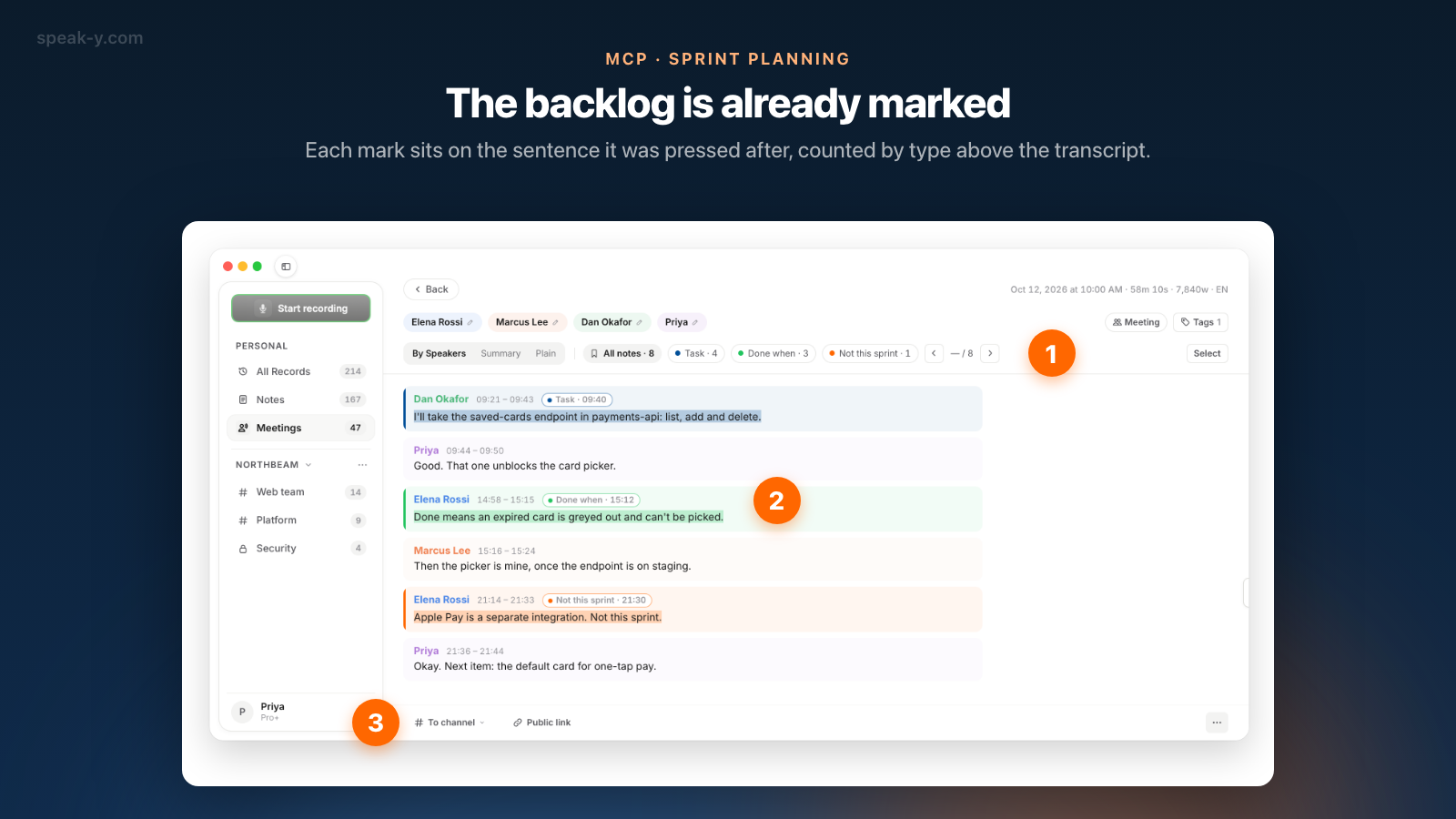
sprint-42. - Check the marks. The chips above the transcript count them by type, for example All notes · 8, Task · 4, Done when · 3, Not this sprint · 1. Click a chip to see only those replies.
- Share it. If the team has a Speak-Y workspace, press To channel under the transcript and pick the team's channel. The transcript with names and timestamps, the AI summary and the action items go into the channel, end-to-end encrypted; the audio stays on your Mac. Marks are private by default — click the Private chip above the transcript to show them to the channel. Sharing a meeting to a team channel covers what travels and how to take it back.
Draft the tasks in Claude Code or Cursor
Connect your assistant to the Speak-Y MCP server once: open Connect AI assistant in the account menu at the bottom of the sidebar, or Settings → Integrations, and click Connect next to Claude or Cursor. For Claude, one click sets up both Claude Desktop and Claude Code. The server is free on every plan and reads the library on your Mac.
Then, in the repository, ask:
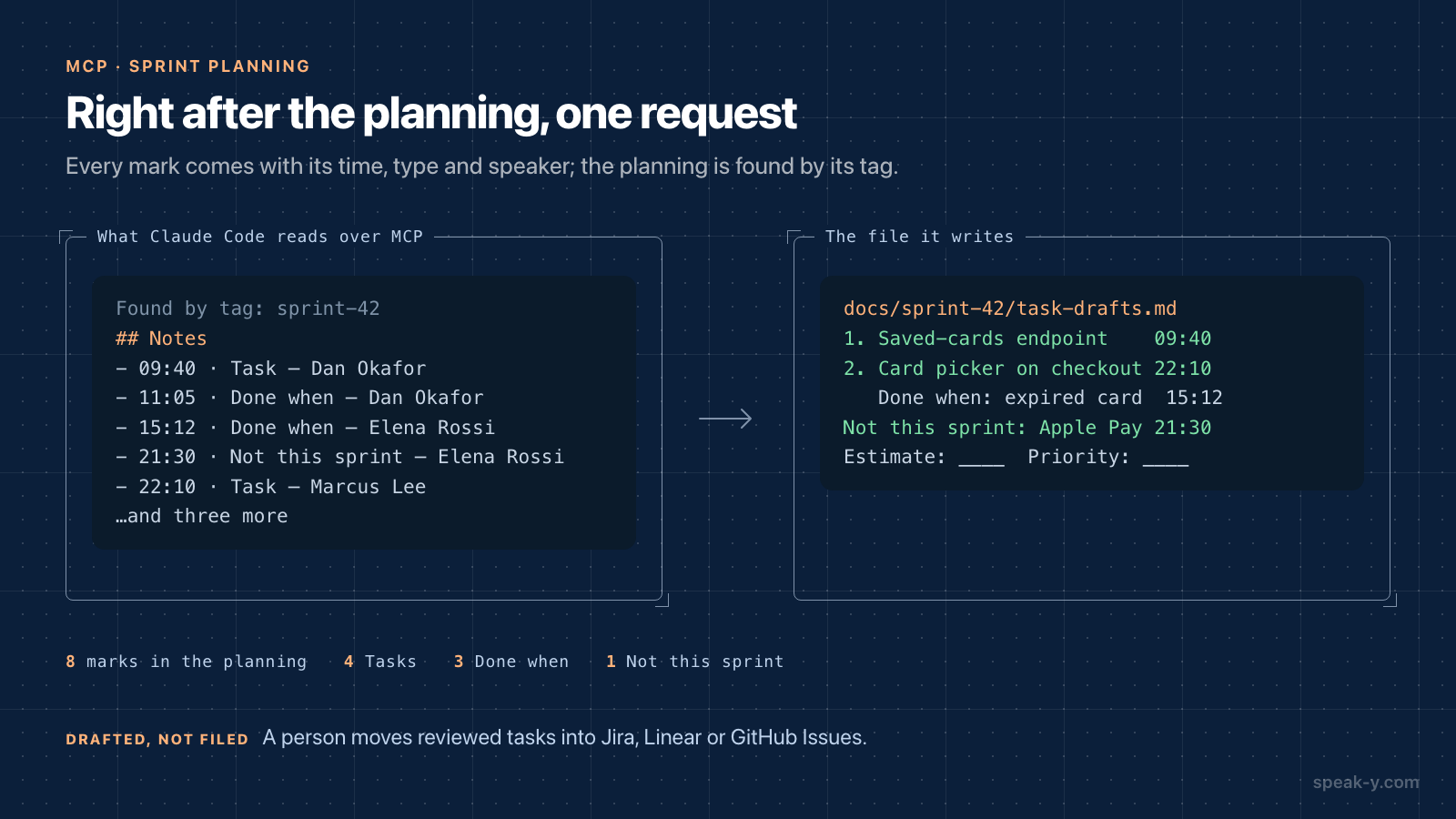
Draft the sprint 42 tasks from the planning recording tagged sprint-42. One task per Task mark: a title, what and why in two lines, acceptance criteria from the Done when marks, the owner only if someone said it, and the time in the recording. List Not this sprint items separately. Write it to docs/sprint-42/task-drafts.md.
The assistant calls search_recordings to find the planning and
get_transcript to read it. Alongside the transcript, Speak-Y hands it a
Notes list — each mark with its time in the recording, its type, the
speaker and the first words of the sentence — so the drafts come back as
four tasks, three criteria under them and one cut, each with a name and a
time. By default Claude Code asks before it calls the Speak-Y tools and again
before it creates the file; in Cursor the agent asks before each MCP tool
unless you change its run mode.
A file, not a chat answer, is the point: a teammate can review the drafts in a pull request before anything reaches the tracker.
Move the drafts to the tracker yourself
Speak-Y has no export to Jira, Linear or GitHub Issues, and the drafts are not tickets yet. Go through the file once, with the recording open:
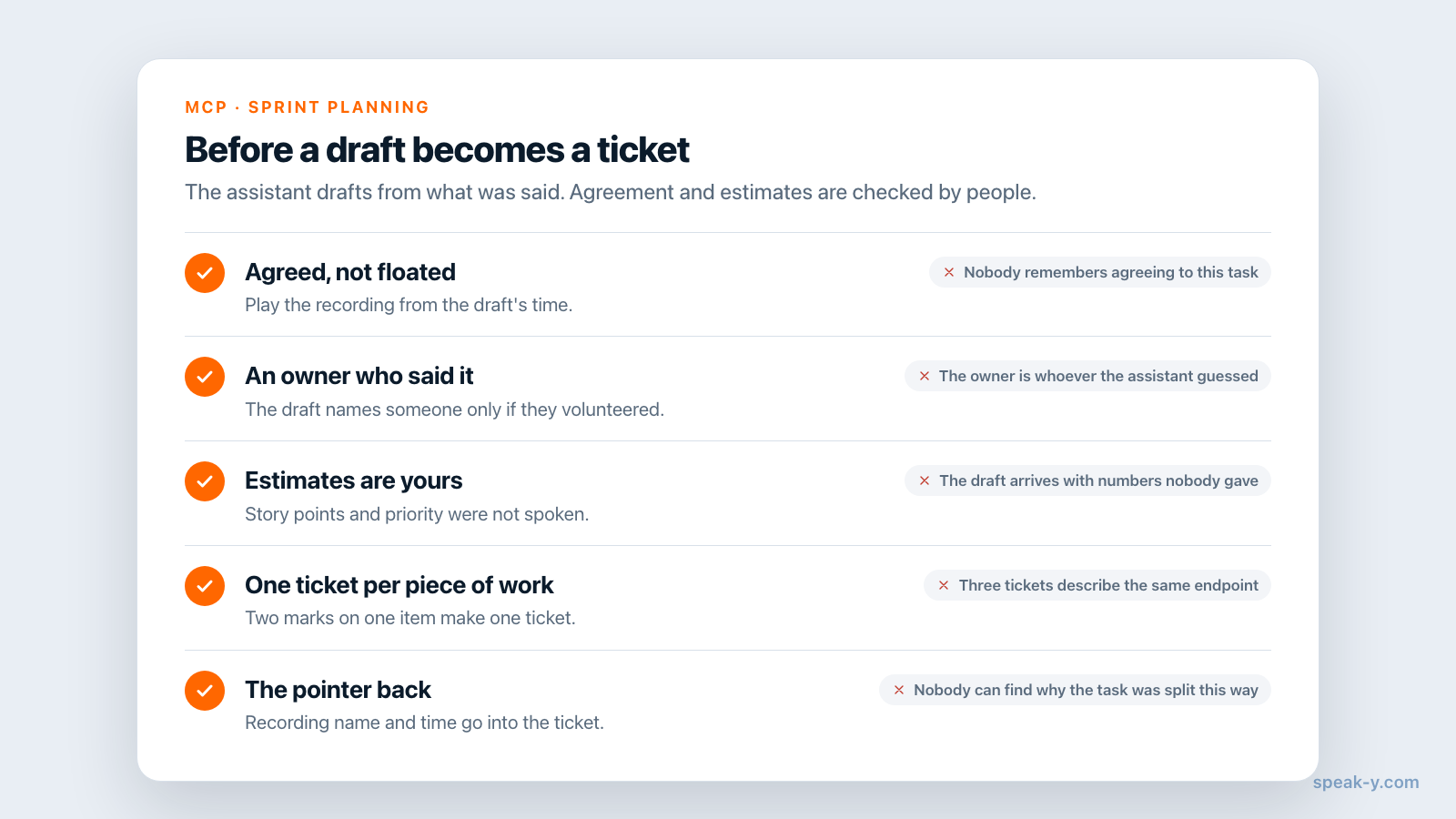
- Check each draft against its time. Click the time of a reply in Speak-Y to play the recording from that moment. A task that was floated, not agreed, does not go in.
- Keep estimates and priority human. The prompt asks for an owner only if one was said; story points and priority were not spoken, so the draft leaves them blank. Fill them in the tracker, where the team sees them.
- Split or merge. The assistant drafts one task per mark. Two marks on the same piece of work make one ticket; one mark on a big item may need three.
- Keep the pointer back. Paste the recording's name and time into the ticket description. Teammates in the channel can replay the discussion.
If your tracker runs its own MCP server, the same assistant can file the reviewed tasks. Atlassian's Rovo MCP Server and Linear's MCP server can both create issues from Claude Code and Cursor (checked in their documentation on 18 October 2026). That is a second connection, to the tracker, with its own permissions — do it after the file is reviewed, not instead of the review.
During the sprint: ask the planning again
The planning stays useful after the tickets exist. Teammates you invite join the workspace free on any plan, and recordings shared to their channels are readable by their own assistants over MCP. Marcus, building the card picker in Cursor, can ask:
What did we agree in the sprint 42 planning about expired cards on the checkout card picker? Quote it with the time.
The assistant finds the planning by the tag and answers with Elena's criterion and the minute it was said. More on this in meeting context for voice coding in Cursor; the end of the sprint is in retro action items, checked a month later.
Limits and costs
- Length. Checked on speak-y.com on 18 October 2026: Free stops a meeting recording at 30 minutes, Pro ($10 a month) at 60, Pro+ ($15) and Max ($30) at four hours. A two-hour planning needs Pro+ or Max, or two recordings with the same tag.
- Audio only. The board, the backlog on the shared screen and the estimates typed into a planning-poker tool are not in the recording. Say the item name out loud.
- Mac for marks and channels. Note types, marks, workspaces and channels are in the macOS app. Creating a workspace needs Pro or higher; teammates join free on any plan.
The short version
Task, Done when and Not this sprint on ⌥2, ⌥3 and ⌥4, one tag per sprint. Name the item, let it be said, press the key; then names, the tag and To channel. One request to Claude Code or Cursor gives a file of drafts, and a person fills the tracker. The MCP page covers the tools, and from feature discussion to PRD draft applies the same idea one step earlier.
FAQ
Can Claude Code write tasks from a sprint planning meeting?
It can write drafts. Connected to the Speak-Y MCP server, Claude Code finds the planning recording by its tag, reads the transcript and the list of marks with their type, time and speaker, and writes one draft per task — a title, what and why, acceptance criteria and the time in the recording — into a file in your repository. A person reviews the drafts and moves them into the tracker.
Does Speak-Y export tasks to Jira or Linear?
No. Speak-Y has no export to Jira, Linear or GitHub Issues. The drafts land in a markdown file in your repository, and a person moves the ones that survive review into the tracker. Atlassian and Linear run their own MCP servers that can create issues, but that is a separate connection to the tracker, not part of Speak-Y.
How does the assistant know which sentences are tasks?
From your marks. Add note types such as Task, Done when and Not this sprint in Settings → Notes and give each a hotkey. A press marks the last 15 seconds of the call. Over MCP the assistant receives a Notes list with each mark's time, type, speaker and first words, so it builds the drafts from what the team said, not from a guess.
Will the draft include estimates and owners?
Only what was said out loud. If someone said they would take a task, the draft names them with the time. Story points, estimates and priority that were never spoken are left blank on purpose, because an assistant filling them in would be inventing the team's commitments.
Which Speak-Y plan do I need to record a sprint planning?
The MCP server is free on every plan. Checked on speak-y.com on 18 October 2026: Free stops a meeting recording at 30 minutes, Pro ($10 a month) at 60, and Pro+ ($15) and Max ($30) at four hours. A planning session longer than an hour needs Pro+ or Max.