Sprint Retro Action Items: Check Them a Month Later
Most sprint retrospectives end with a good list: three or four things the team agreed to change. Most of those lists are never looked at again. The next retro starts from a blank board, and the same complaint comes back two sprints later.
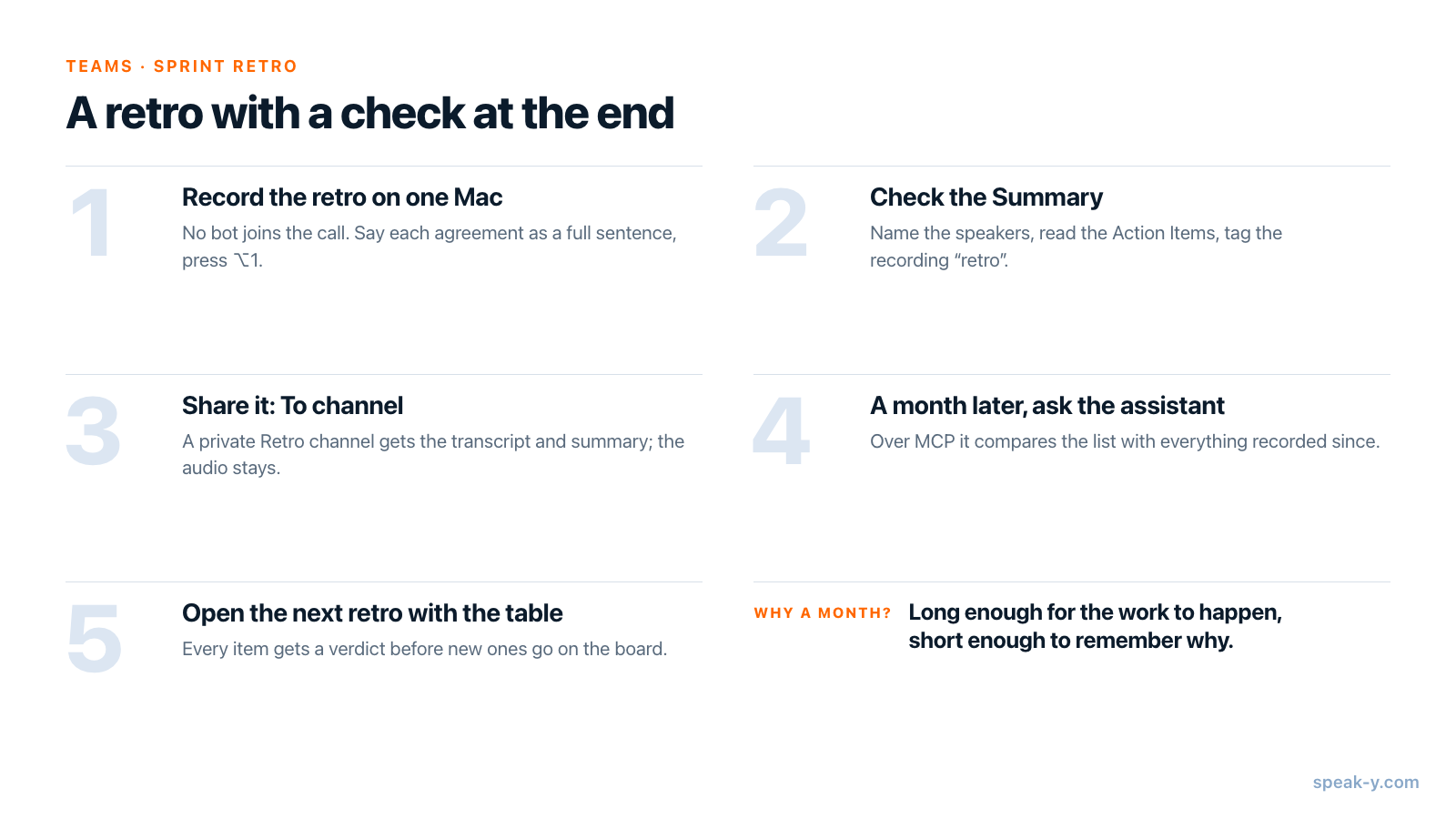
The fix is a loop with a check at the end. In Speak-Y it takes three steps. Record the retro on one Mac, with no bot in the call. Share the recording to the team's retro channel with To channel, so the Summary and its Action Items sit where everyone can read them. A month later, ask an AI assistant connected through the Speak-Y MCP server to compare that list with everything the team has recorded since, and bring the result to the next retro.
This guide follows the Speak-Y macOS app as checked on 2 October 2026, with one example: a retro on 4 September and the check on 2 October.
The loop at a glance
Writing the list was never the problem; nobody is assigned to read it again. So the routine moves the reading to a fixed date and gives the searching to the assistant. A month is long enough for the work to happen and short enough to remember why it mattered.
What do you set up once?
A workspace and a retro channel. If the team has no workspace yet, set one up first. Creating it needs Pro, Pro+ or Max, or the 7-day trial; teammates join free on any plan. Then create a channel named "Retro".
Private, not public. A retro works when people speak freely, and a public channel is readable by everyone in the workspace. Make the retro channel private, marked with a lock, and add only the team; any member can create one. Who sees what in team channels covers the difference.
One recorder with enough meeting time. The Scrum Guide (2020) caps the Sprint Retrospective at three hours for a one-month Sprint and says it is usually shorter for shorter Sprints. As of 2 October 2026, Pro records up to 60 minutes per meeting and 10 hours a month; Pro+ up to four hours per meeting and 40 hours a month. A one-hour retro every two weeks fits Pro. Free stops a meeting at 30 minutes.
A sentence at the start. No bot joins, so nobody sees a notetaker in the participant list, and saying "this retro is recorded for the team's notes" is the recorder's job. In a retro it is also worth saying who will be able to read it. The rules on recording consent explain the legal side.
Step 1. Record the retro without a bot
With Meeting mode on Auto in Settings, Speak-Y notices when Zoom, Microsoft Teams, Webex, FaceTime or another known call app starts a call and asks Record as Meeting? on the recording button. Calls in a browser, such as Google Meet, are detected while your camera is on. Speak-Y captures your microphone and the call's audio on your Mac; recording meetings without a bot explains how.
Two habits during the retro decide how good the list will be:
- Say each agreement as a full sentence. "Dana will add a flaky-test report to CI by 18 September" becomes an action item with an owner and a date. "Yeah, let's fix the tests" becomes nothing, or a line with no owner.
- Press ⌥1 when something is agreed. It marks the moment in the recording, so you can find and replay it later.
Step 2. Check the Summary and its Action Items
When the call ends, Speak-Y transcribes the retro by speaker and writes an AI summary. Open the recording from Meetings. Before anyone else sees it:
- Name the speakers. On the By Speakers tab, click a speaker chip, type the name and press Return. An action item owned by "Speaker 2" cannot be checked a month later.
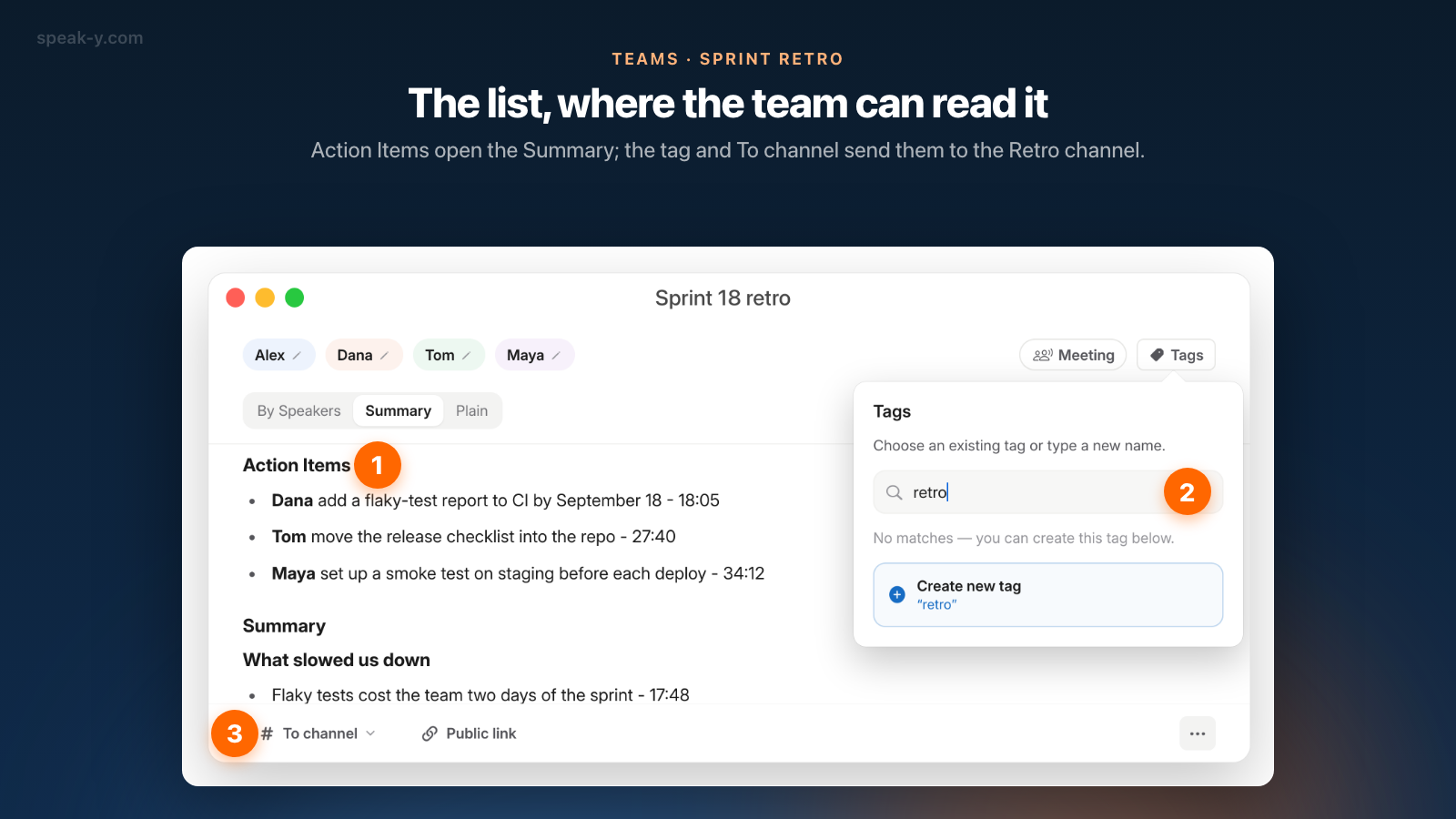
- Read the Action Items that open the Summary tab. Each line names a person, the task and the time in the recording where it was said. Check them against what the team agreed: the summary is an AI draft, and it can turn "we could try" into a task.
- Tag the recording. Click Tags, type "retro" in Search or create… and choose Create new tag. The tag travels with the recording into the channel, and it is how the assistant will find every retro later.
Action items are read-only text. Speak-Y has no checkboxes, due dates or reminders; the follow-through comes from the check in step 4.
Step 3. Share it with To channel
Press To channel in the bar under the transcript and pick Northwind / Retro. The status line confirms it with Shared to and the channel's name, and the button now shows that name too.
The channel receives an end-to-end encrypted copy: the transcript with speaker names, the Summary with its Action Items, the title and the tags. The audio is never shared and stays on the recorder's Mac. The copy is a snapshot taken when you share, which is why the tidying comes first; to correct something later, remove the recording from the channel in the same menu and share it again. Sharing a meeting to a team channel goes through the details.
From here the list has an address. Anyone on the team opens Retro in the sidebar, clicks the 4 September card and reads the Action Items, without asking who took notes.
Step 4. A month later, ask the assistant what got done
The Speak-Y MCP server, free on every plan, lets Claude, ChatGPT, Cursor or another MCP client read the recordings on your Mac: your own, plus the ones teammates shared into channels you belong to, marked read-only. Connect it once in Settings → Integrations; connecting meeting notes to AI assistants walks through it.
On 2 October, the day before the next retro, ask:
Find the recording tagged "retro" from 4 September and read its action items. For each one, search the recordings since then for evidence that it was done, is in progress, or was never mentioned. Give me a table: item, owner, verdict, and the recording and date the evidence comes from.
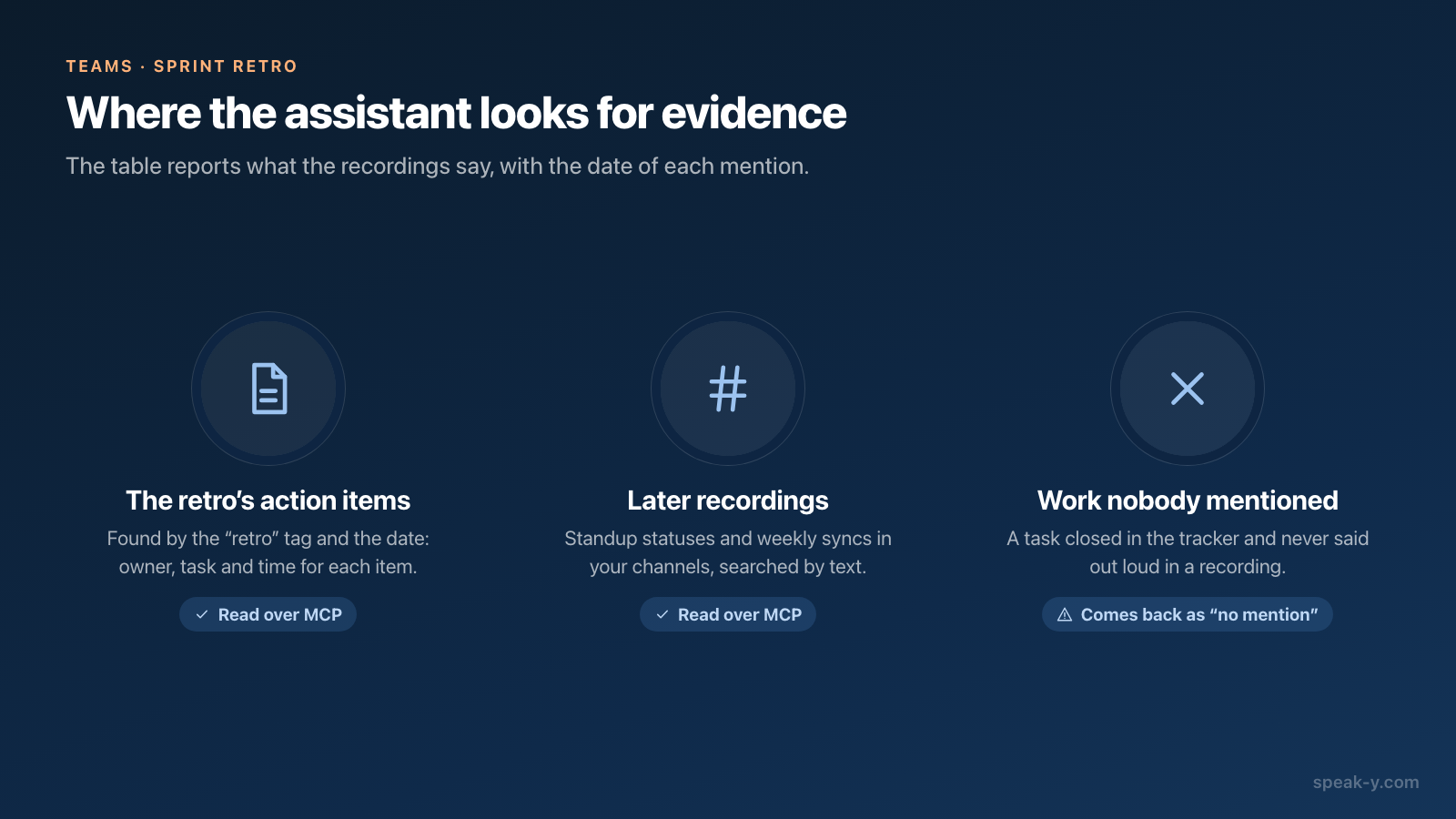
The assistant finds the retro by its tag and date, reads the Summary with its Action Items, then searches later recordings by text. That search covers transcripts, titles, summaries and action items, including standup statuses and weekly syncs shared into your channels. Reading happens locally, from the copy of the channels already on your Mac; if a recent recording is missing, ask the assistant to sync first. The assistant's model runs in the cloud, so what it reads goes to it.
What comes back is a table of evidence, and it is only as complete as your recordings:
- It sees what was said. If Dana mentioned the flaky-test report in a standup status on 16 September, the assistant finds it and cites the date.
- It does not see silent work. A task closed in the tracker and never spoken about shows up as "no mention", which is a question for the retro, not a verdict.
- It knows other authors by account ID. Names come from the text, so named speakers and statuses that open with a name give a readable table.
If the assistant is also connected to your tracker's own MCP server, ask it to check the "no mention" rows there. Daily statuses give it more to work with; an async standup by voice is the cheapest way to get them.
Step 5. Open the next retro with the table
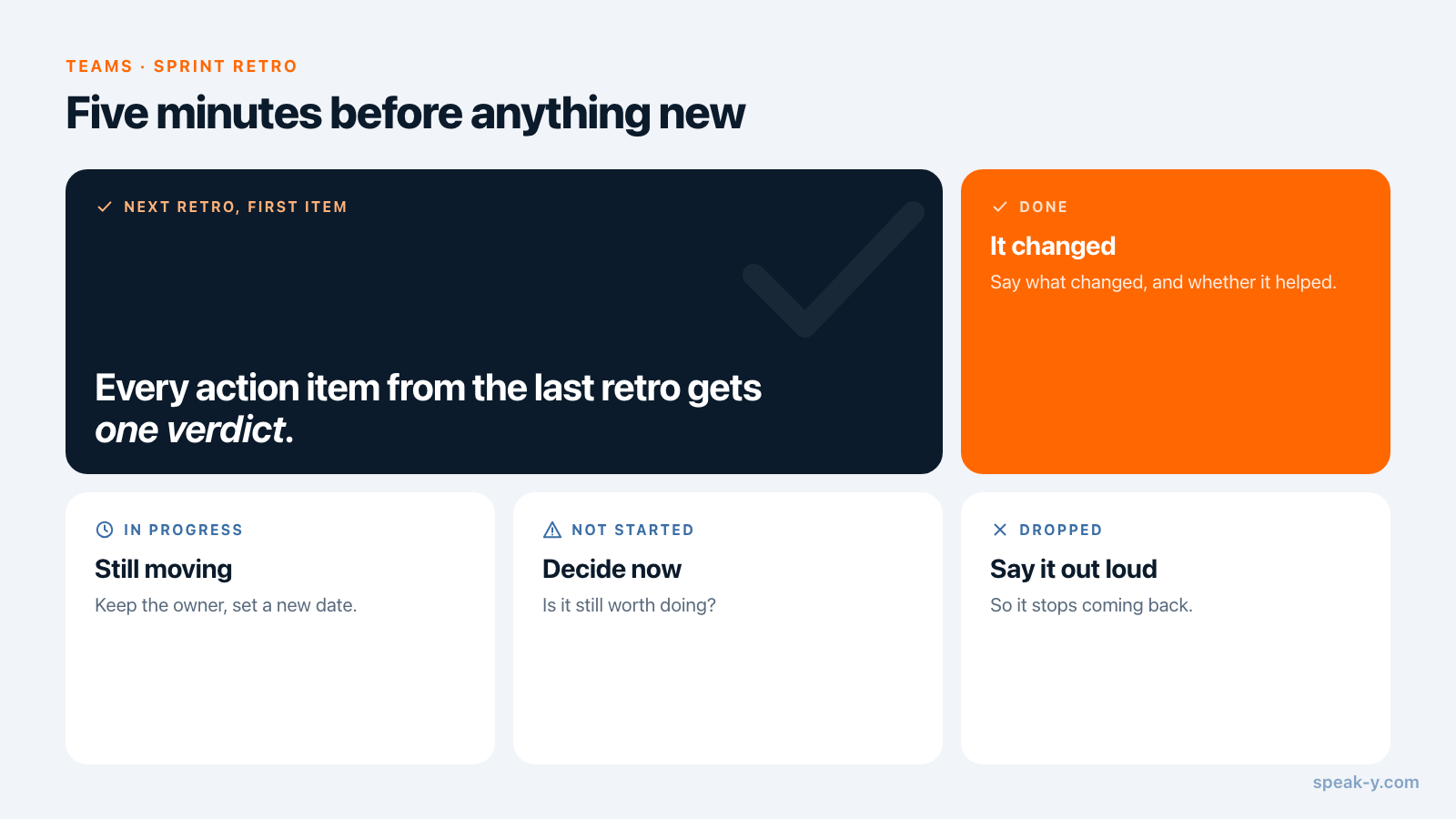
Start the next retro with five minutes on the table, before anything new goes on the board. Give every item one verdict:
- Done — say what changed, and whether it helped.
- In progress — keep the owner and set a new date.
- Not started — decide now: is it still worth doing?
- Dropped — say so out loud, so it stops coming back.
This retro is recorded too, so the verdicts land in its Summary and in the same channel. A month later the assistant can read two retros in a row and answer a harder question: "Which problems came up in more than one retro since July?"
What this routine does not do
- It does not replace your tracker. Speak-Y keeps what was said and drafts the list; it has no task statuses and no built-in export to Jira, Linear or Asana.
- It does not make the summary infallible. Check the action items against the recording before sharing: the time on each line takes you to the moment.
- It does not work on Windows or iPhone for the team part. Workspaces and channels are in the macOS app, which runs on macOS 14.2 and later.
The retro produces the list, the channel keeps it where the team can read it, and the assistant's table brings it back a month later. For the personal version of the same habit, see the 15-minute Friday review of action items; the Teams page covers workspaces, channels and encryption.
FAQ
Can Speak-Y record a sprint retrospective without a bot joining the call?
Yes. Speak-Y records on the Mac of one participant, capturing the microphone and the call's audio, so no notetaker appears in the participant list of Zoom, Microsoft Teams or Google Meet. Because nobody sees a bot, announcing the recording at the start of the retro is the recorder's job.
Can an AI assistant tell which retro action items were done?
It can tell what your recordings say. Through the Speak-Y MCP server, Claude, ChatGPT or Cursor reads the retro's action items and searches later recordings in your channels for each one, then reports which were mentioned as done, which are in progress and which never came up. Work nobody talked about in a recorded meeting or status is invisible to it.
Which Speak-Y plan fits a sprint retrospective?
The person who records needs the meeting time. As of 2 October 2026, Pro records up to 60 minutes per meeting with 10 hours a month, and Pro+ up to four hours per meeting with 40 hours a month. Free stops a meeting at 30 minutes. Teammates join the workspace free on any plan, and the MCP server is free on every plan.
Who can read a retro shared to a Speak-Y channel?
Only the members of that channel. A private channel is visible to the people added to it, a public one to everyone in the workspace. The channel receives an end-to-end encrypted copy of the transcript, summary and action items; the audio is never shared and stays on the recorder's Mac.
Does Speak-Y track the status of action items?
No. Action items are part of the AI summary, which is read-only text: there are no checkboxes, due dates or reminders. The follow-through check in this guide is a question to an AI assistant, and the verdicts live wherever your team tracks work.