Speak-Y Recovery Kit: What It Is and How to Restore Access
The Recovery Kit is a file that the creator of a Speak-Y team workspace saves once, at the moment the workspace is created. It holds the workspace recovery key. If a teammate forgets their encryption password, the person holding that file can give them back access to the team's channels. Nobody else can: channel content is end-to-end encrypted, and Speak-Y does not keep a copy of the file or of any key.
That makes the Kit two things at once: the team's insurance and its most sensitive file. This guide explains what is inside, when you need it and when you do not, how a restore works click by click, where to keep the file, and what happens if it is lost. The cryptography behind it is covered in how end-to-end encrypted team sharing works; here the focus is on what an owner should do.
What is the Recovery Kit file?
It is a small text file in JSON format. The app suggests a name like
Speak-Y-Recovery-Kit-Northwind-Sales.json and lets you choose where to save
it. Inside are the workspace identifier, its name, the creation date and a key
pair: the workspace recovery key.
Every time a channel gets a key — when it is created, and again each time the key is rotated — the app encrypts one more copy of that key for the recovery key. Those copies sit on the server, unreadable without the file. The private half of the recovery key exists only in the Kit: it is not stored in the app, not in the Keychain and not on the server.
Two consequences follow, and both are stated in the app itself:
- It is created once. The save dialog says "Shown once — save it now", and the workspace page later repeats that the recovery file "can't be regenerated here".
- The file is the credential. It is not protected by a password of its own. Whoever has the file and an owner or admin role in the workspace can open the key of any channel in it, private channels included.
The workspace page lets you check that a file belongs to this workspace without opening it: the Recovery Kit card on the Overview tab shows a Recovery key fingerprint, and a restore refuses a Kit from another workspace.
When do you actually need it?
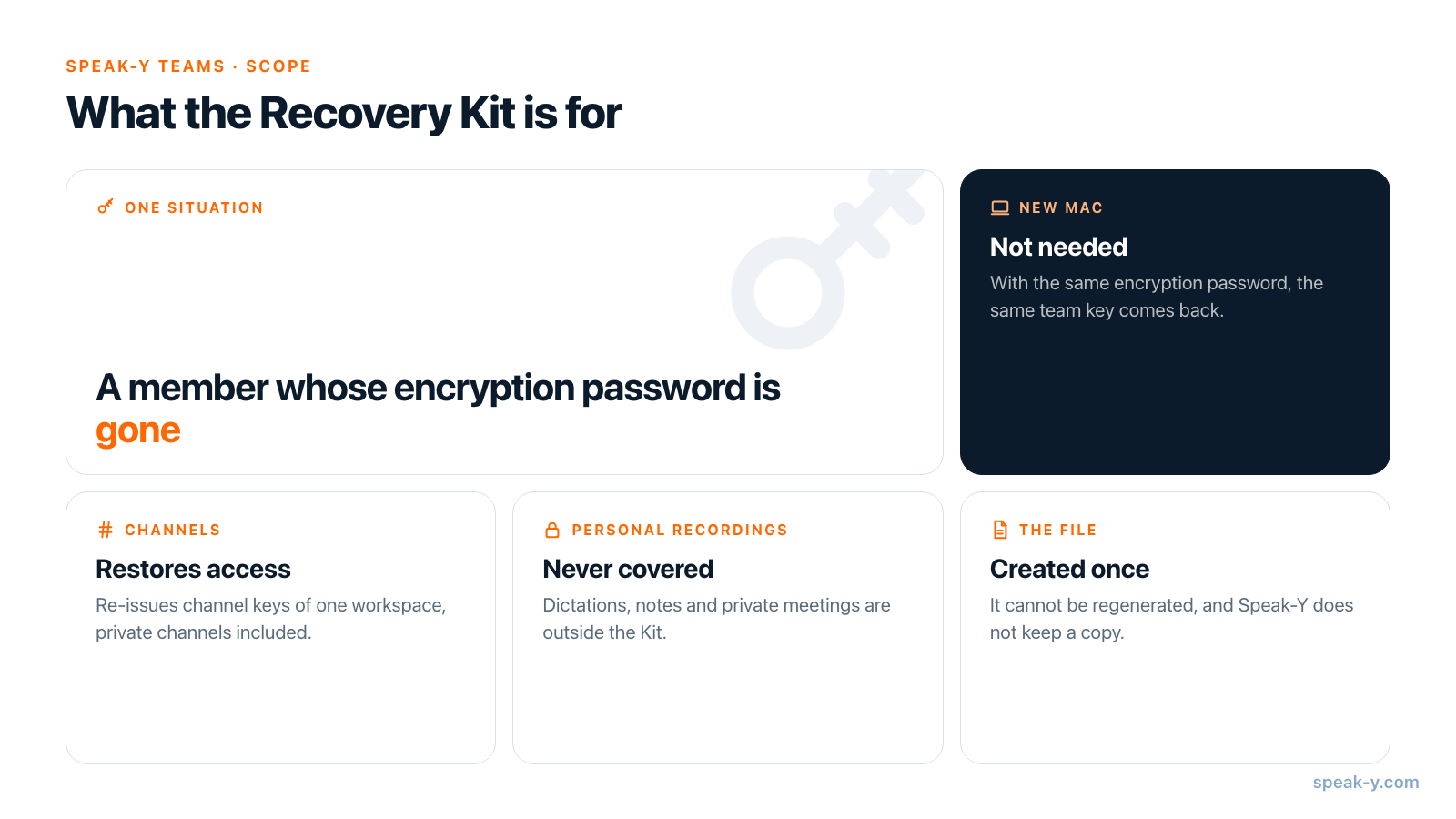
Less often than the name suggests. A member's team key is derived from two things: their account email and the encryption password they set when they first created or joined a workspace. The Mac remembers the result in the Keychain, so day to day nobody types the password.
| What happened | Kit needed? | What to do |
|---|---|---|
| New or replaced Mac, password remembered | No | Sign in and enter the same encryption password; the same key comes back |
| Signed out of the app, password remembered | No | Signing out removes the key from that Mac; the password brings it back |
| Password forgotten, old Mac still signed in | Not yet | The key is still in the Keychain; channels keep working until a sign-out or a new Mac |
| Password forgotten and the key is gone | Yes | The member sets a new password, the Kit holder restores access |
So a lost laptop alone is not a Recovery Kit case. A lost laptop plus a forgotten encryption password is. This is also why the workspace setup guide asks members to write the encryption password down: it is not the account password, and no "forgot password" email can reset it.
How do you restore a member's access?
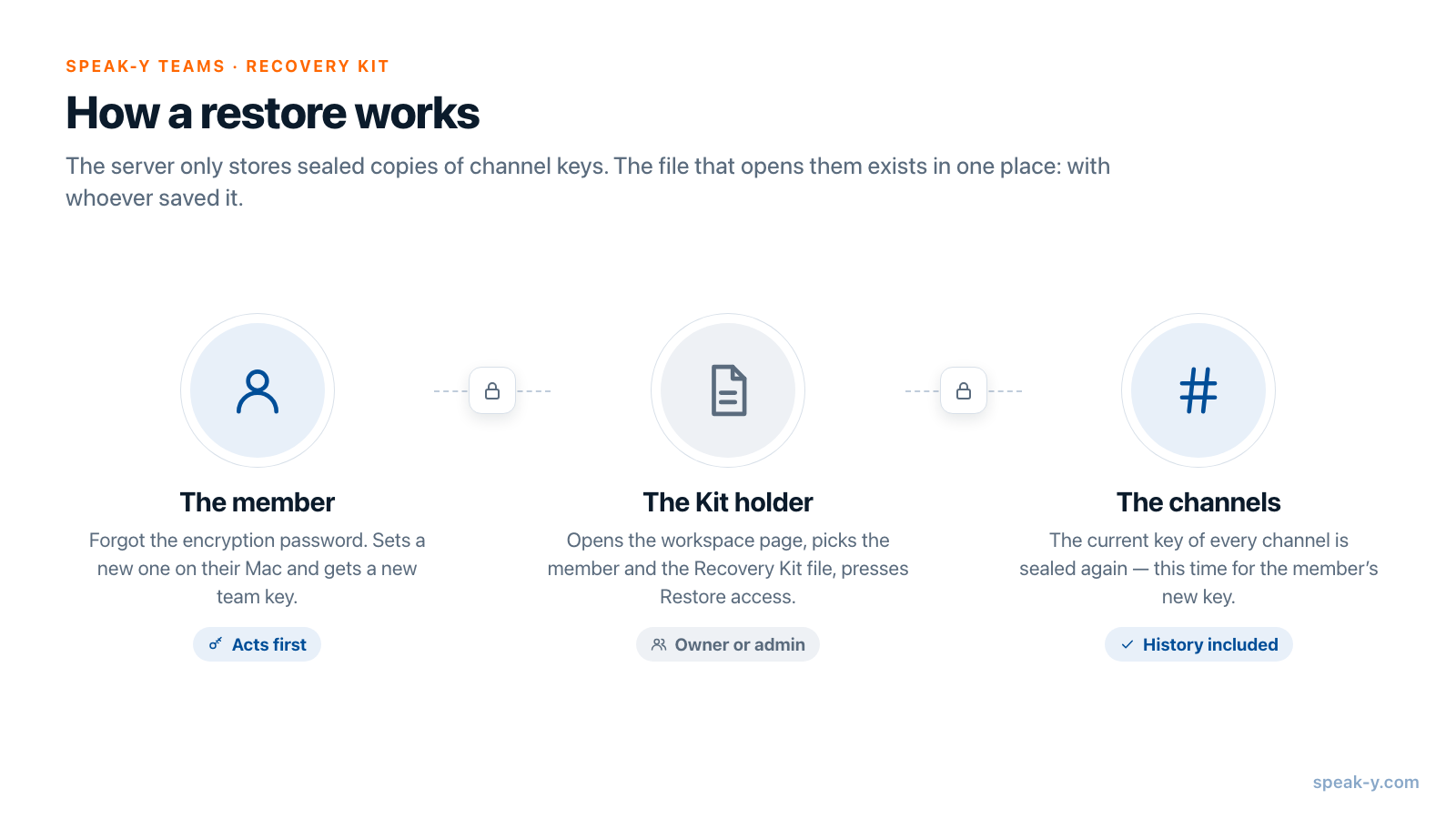
The order matters: the member acts first, the holder of the Kit second.
- The member creates a new team key. On their Mac they sign in, open the workspace and fill in the Team encryption key block with a new encryption password, then press Create team key. Until this is done there is nothing to restore to, and the app says so: "This member has not announced a team key yet."
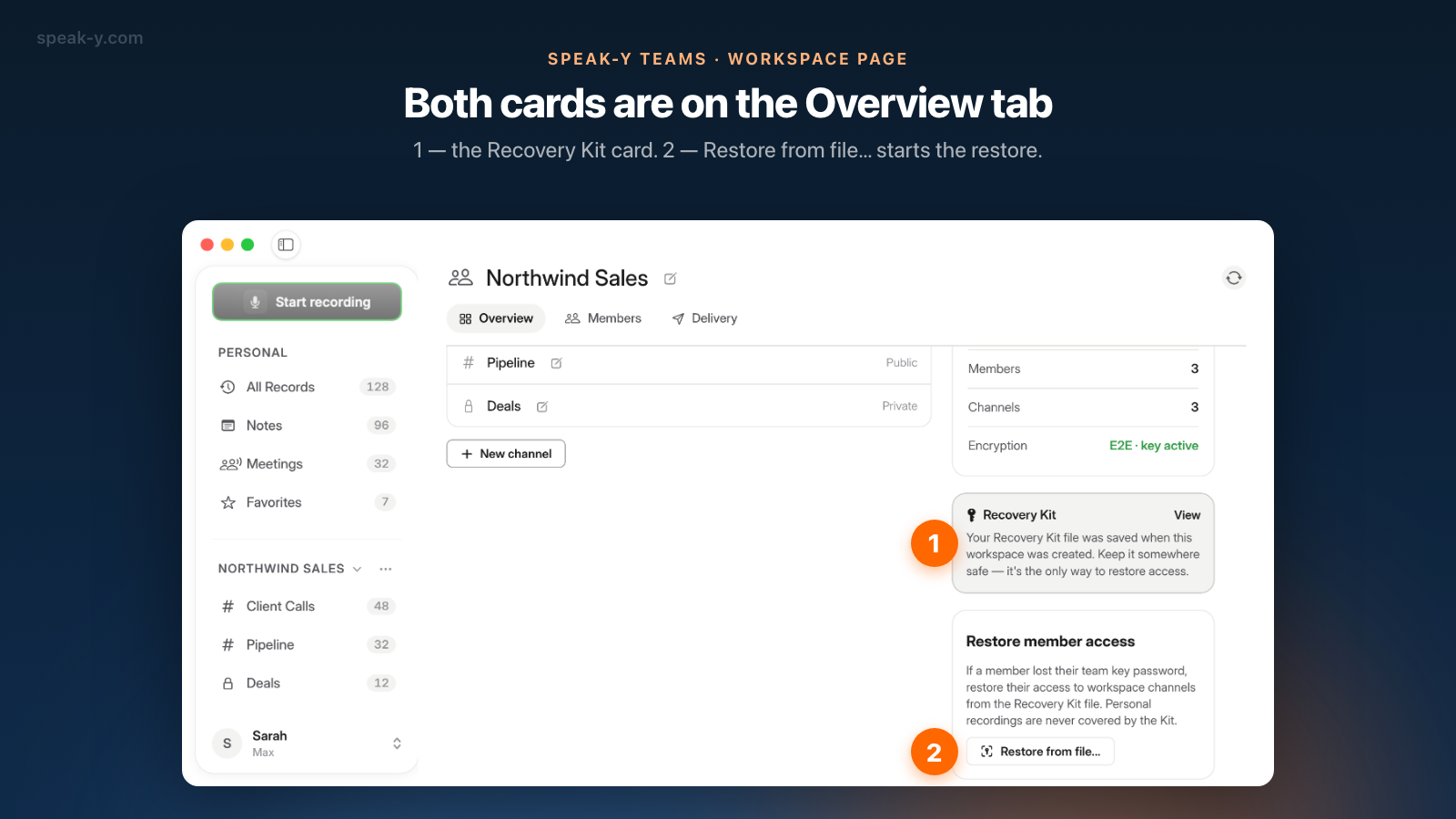
- The owner or an admin opens the workspace page. Click ⋯ next to the workspace name in the sidebar and choose Edit workspace. On the Overview tab, the right column has two cards: Recovery Kit and Restore member access.
- Click Restore from file… The Restore access sheet opens.
- Pick the person in the Member list.
- Click Choose Recovery Kit… and select the file. The app checks it on the spot and shows "The Kit matches this workspace." A wrong file is rejected with "This Recovery Kit belongs to a different workspace."
- Press Restore access. The result reads "Access restored: 3 channel(s)." with a line for each channel.
If the result says "Restored: 2, failed: 1 — retry later for the failed ones", run the restore again; a channel can fail when its key was being rotated at that moment. The recovery key from the file stays in memory only for the operation and is never shown on screen.
Both cards are visible to the owner and to admins, but the file is with whoever saved it — normally the owner. An admin can run a restore only if the owner hands them the Kit.
What exactly does a restore give back?
It re-issues the current key of every channel in the workspace to the member's new key, plus the workspace key that decrypts the workspace name. History is included: older records are readable with the current key.
Three details are worth knowing before you press the button:
- Private channels are included. The Kit holds a way into every channel, so the restore covers private channels as well — including ones the member was not in before. Look at the result list, and ask the creator of a private channel to remove the member where they do not belong.
- The workspace name may lag. If the sheet warns that "the workspace name is not" readable again, the member sees their records but a placeholder instead of the name until a teammate's app shares the workspace key.
- Personal recordings are out of scope. The app states it plainly: "Personal recordings are never covered by the Kit."
Where should you keep the Kit?
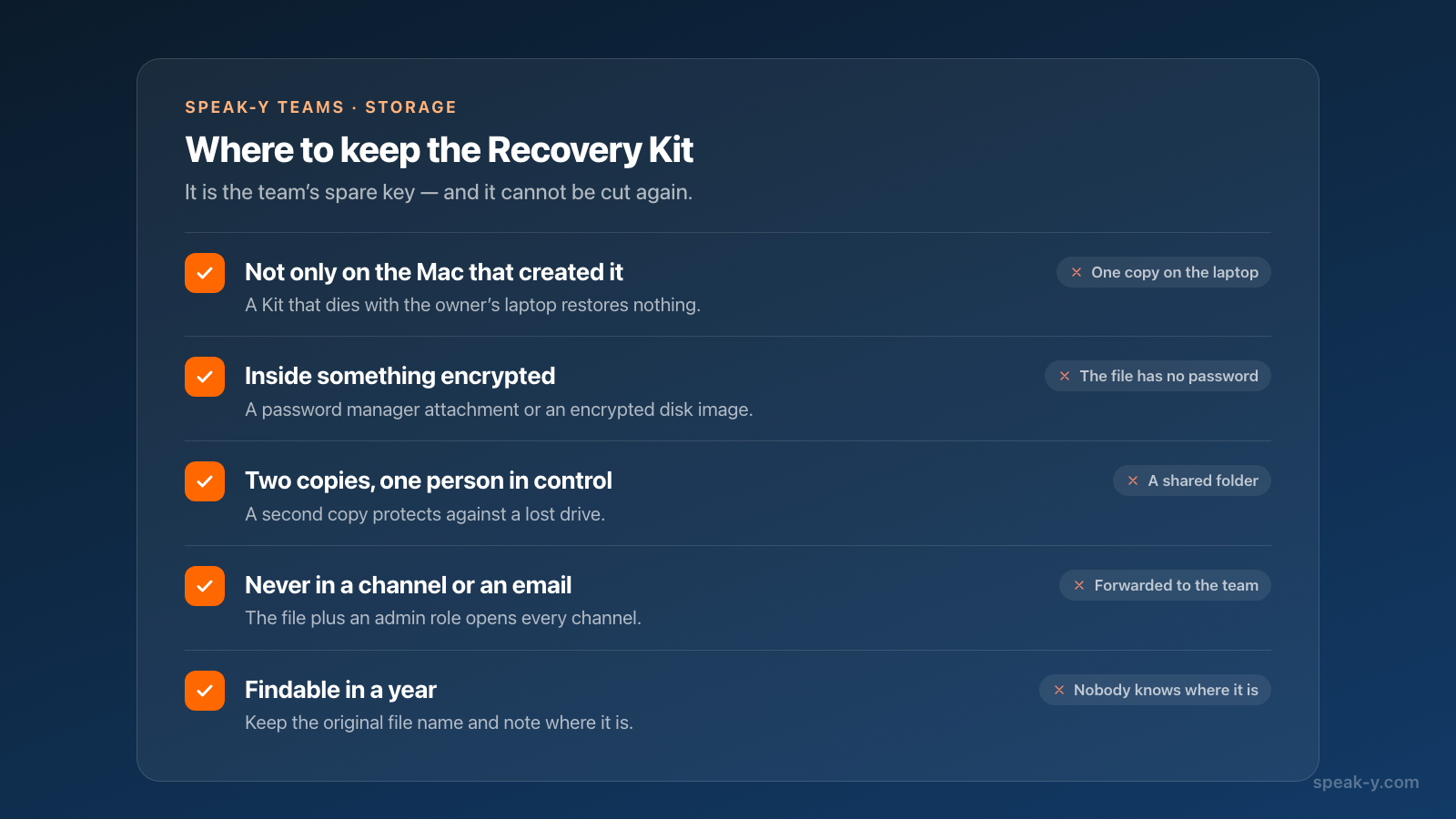
Treat it like the spare key to the office, with one difference: it cannot be cut again.
- Not only on the Mac that created it. A Kit that dies with the owner's laptop restores nothing.
- Inside something encrypted. A password manager's file attachment or an encrypted disk image. The file itself has no password.
- In two places, under one person's control. A second copy protects against a lost drive; a copy in a shared folder or a chat defeats the purpose.
- Never in a team channel or by email. Anyone who gets the file and an admin role can read every channel.
- Findable in a year. Keep the original file name, and note where it is in the same place as the company's other critical secrets.
What if the Kit is lost?
Day to day, nothing: channels work, members with working keys notice no difference. What you lose is the restore operation, and you cannot buy it back — the workspace page has no button to issue a new Kit.
If a member then forgets their password, the practical route is to remove them from the workspace and invite them again. A new invitation gives them the current keys of the public channels with their history; private channels stay closed until a member of each channel adds them.
The case with no way out is the combination: the Kit is lost and every member has forgotten their password. The app says it directly — "channel history cannot be recovered". Speak-Y support cannot help here, because the server never held the keys.
How do other encrypted tools handle this?
The same trade-off appears in every product where the provider cannot read your data. Checked on October 9, 2026:
- 1Password. Team administrators and owners can recover a member's account; the member then gets a new Secret Key and creates a new account password.
- Bitwarden. Account recovery is a feature of Enterprise organizations. It is switched on by a policy, and a member has to be enrolled before an administrator can reset their master password.
- Proton. After a password reset, encrypted data stays locked until the user applies a data recovery method set up in advance, such as a recovery phrase or a recovery file.
The pattern is the same everywhere: recovery works only if someone prepared for it beforehand, and the secret that makes it possible lives with the customer, not with the provider. Speak-Y puts that secret into one file and makes saving it a step you cannot skip.
Team workspaces are available in the Speak-Y macOS app: creating one starts on the Pro plan, and teammates join free on any plan. The Speak-Y Teams page shows how shared channels work, and the privacy policy describes what the server stores.
FAQ
What is the Speak-Y Recovery Kit?
It is a small file saved by the person who creates a team workspace. It holds the workspace recovery key, and every channel key is also encrypted for that key. With the file, an owner or admin can re-issue channel keys to a member who forgot their encryption password. Speak-Y does not keep a copy.
A teammate lost their Mac. Do we need the Recovery Kit?
Only if they also forgot their encryption password. The team key is derived from that password and the account email, so signing in on a new Mac and entering the same password brings back the same key and the same channels. The Kit is for the case when the password is gone.
How do I restore a member's access with the Recovery Kit?
The member first creates a new team key with a new encryption password on their Mac. Then the owner or an admin opens ⋯ → Edit workspace, clicks Restore from file… on the Overview tab, picks the member, chooses the Kit file and presses Restore access. The app reports how many channels were restored.
What happens if the Recovery Kit is lost?
Nothing changes day to day: members whose keys work keep working. But the Kit cannot be generated again from the workspace page, so a member who forgets their password can no longer be restored with it. If the Kit is lost and every member forgets their password, the channel history cannot be recovered.
Does the Recovery Kit cover personal recordings?
No. The Kit restores access to the channels of one team workspace only. Personal recordings, dictations and notes are never covered by it.