Missed a Meeting Across Time Zones? Catch Up in Five Minutes
A team spread over San Francisco, Berlin and Singapore has no good hour. Nine in the morning in San Francisco is six in the evening in Berlin and midnight in Singapore. Somebody always misses the meeting, and the usual fix — "I'll send you a summary" — arrives late, short and in someone else's words.
The routine that works: one person records the meeting in Speak-Y and shares it to the team's channel; the colleague who slept through it reads it next morning in about five minutes. The channel holds the transcript with names and timestamps, the AI summary with its action items, and the marks the recorder placed on the moments that matter. Nobody writes a recap, and nobody has to stay up past midnight.
This guide follows the Speak-Y macOS app as checked on 14 October 2026. It assumes the team already has a workspace and a channel; if not, set one up first.
Why "just join the call" fails across three time zones
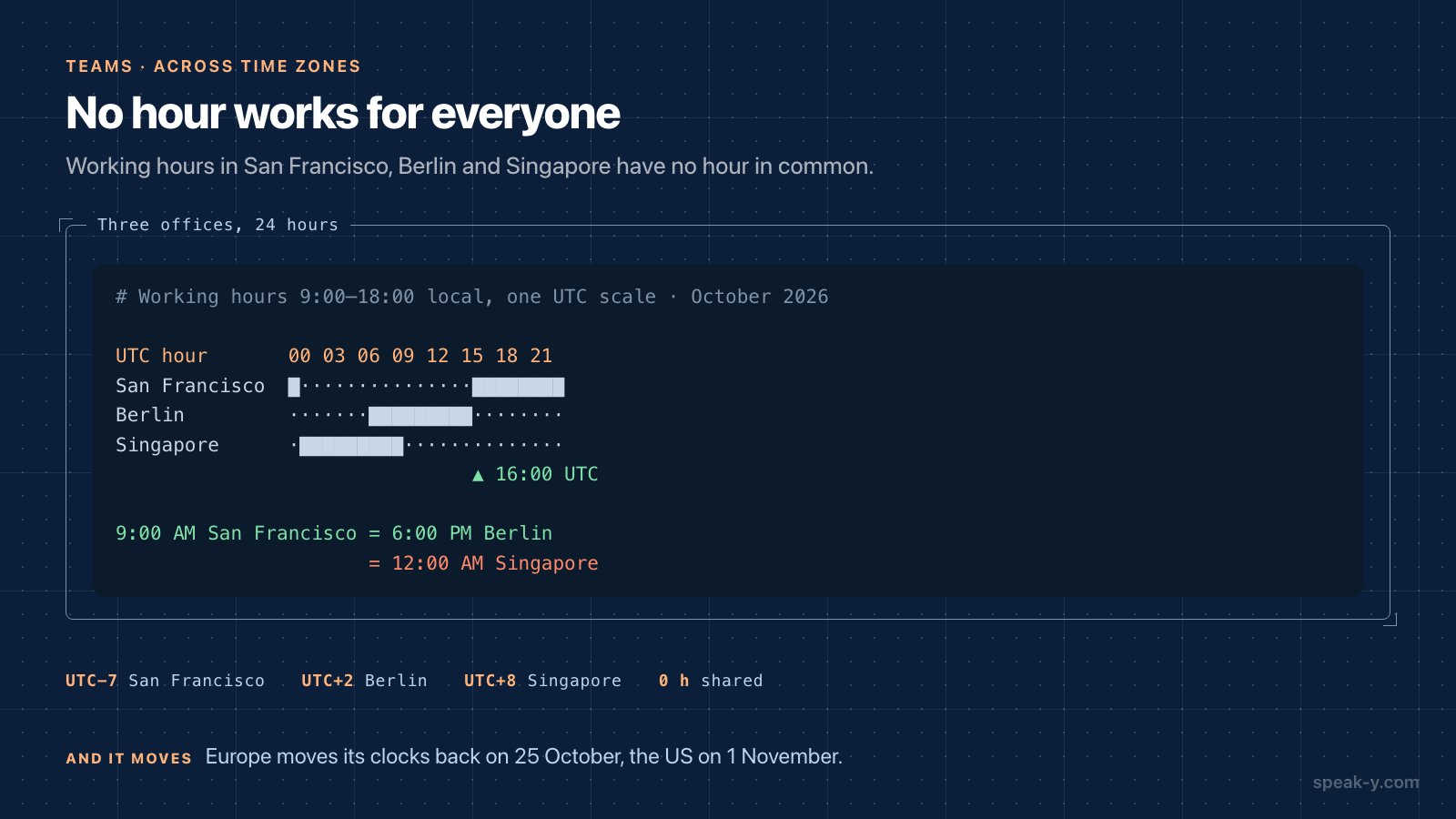
The overlap is smaller than it looks, and it moves twice a year:
- San Francisco (UTC−7 in October), Berlin (UTC+2), Singapore (UTC+8). There is no hour that is inside nine-to-six for all three. A 9:00 AM call in San Francisco lands at 6:00 PM in Berlin and midnight in Singapore.
- Daylight saving does not switch on the same day. Europe moves its clocks back on 25 October 2026, the United States on 1 November. For one week the gap between Berlin and San Francisco is eight hours instead of nine, and a recurring invite that "always" worked starts an hour off for someone. Singapore has no daylight saving at all.
So the question is not how to get everyone into the room. It is how the person who was not there gets the same information, the same morning, without asking anyone.
The recorder's two minutes
One person on the call records it — whoever is awake and in the meeting. Speak-Y records on their Mac; no bot joins the call. Tell people at the start that the meeting is recorded; the rules by place are in is it legal to record meetings.
During the call, one habit helps the absent reader more than anything else: press ⌥1 when something is decided, promised or argued about. The default note type, Mark the moment, pins a mark to the last 15 seconds of the transcript. Those marks become the reader's table of contents.
After the call, before sharing:
- Name the speakers. On By Speakers, click a Speaker 2 chip and type the name. "Tom agreed" is useful at 8 AM in Singapore; "Speaker 3 agreed" is not.
- Show the marks. Marks are private by default. Click the Private chip above the transcript and choose Show in # Platform — channel members will see them; the chip now reads In channel.
- Share it. Press To channel under the transcript and pick the team's channel. The transcript, the summary and the action items go into the channel, end-to-end encrypted. The audio stays on the recorder's Mac.
Name and show the marks before sharing: the channel receives the recording as it is at that moment. The details of what travels are in sharing a meeting to a team channel.
The five-minute morning read
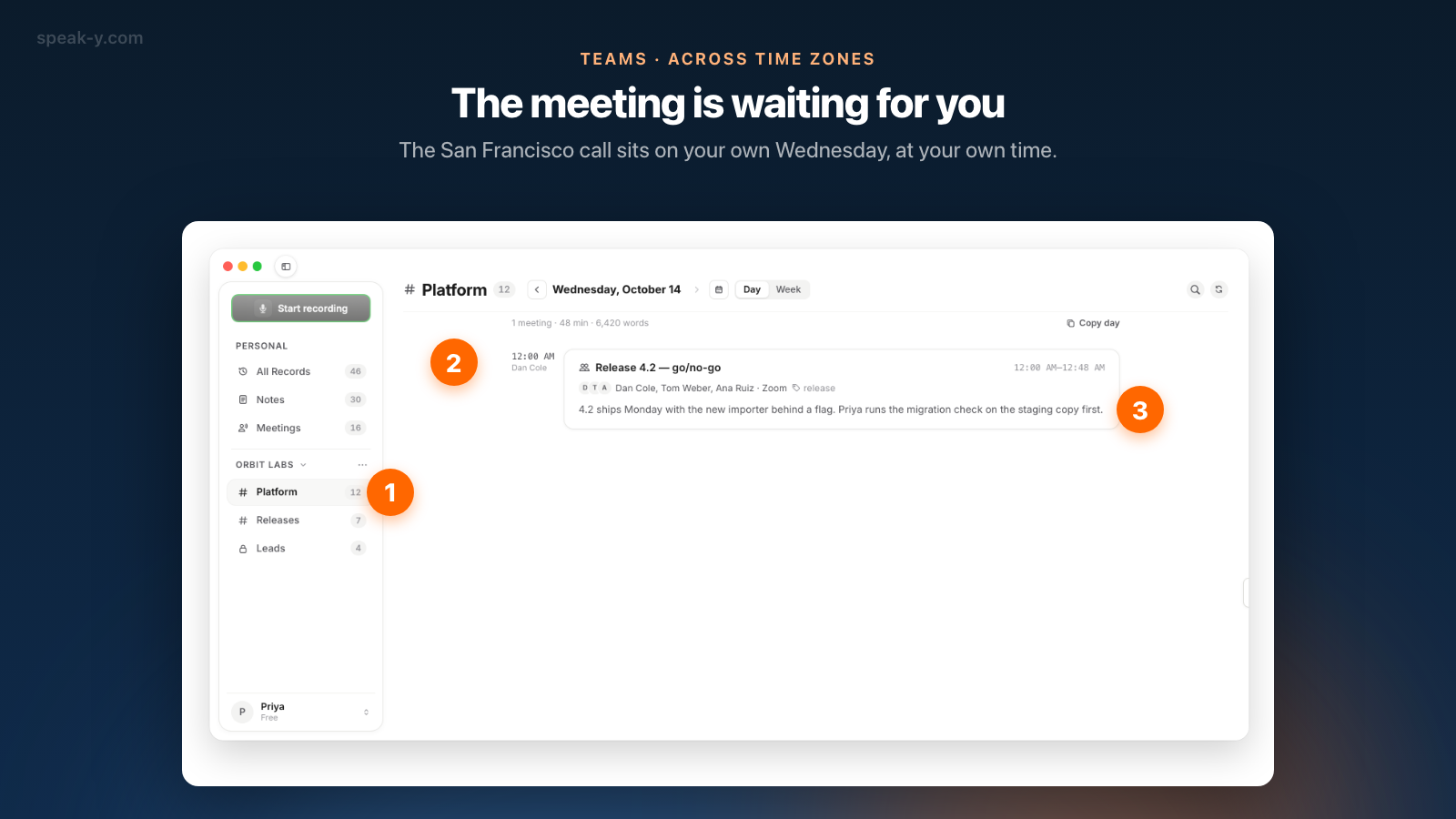
Next morning in Singapore, the meeting is waiting:
- Open the channel in the sidebar. The feed opens on the page with the most recent recording. Times are shown in your own time zone: the Tuesday 9:00 AM call from San Francisco sits on your Wednesday page at 12:00 AM, with the recorder's name under the time and the first lines of the summary on the card.
- Open the meeting. It opens read-only, with the channel and the person who shared it in the top bar.
- Read the Summary. It starts with Action Items — who agreed to do what, with the time it was said — and then what was discussed, by topic. Check your own name first.
- Jump to the marks. On By Speakers, the All notes chip counts the recorder's marks — the label Author's notes says whose they are — and the arrows next to it step from one mark to the next. Each mark sits on the exact lines, highlighted.
- Read around the disputed line. Transcript times are offsets from the start of the call, such as 23:40, so "the bit at 23 minutes" means the same thing to everyone.
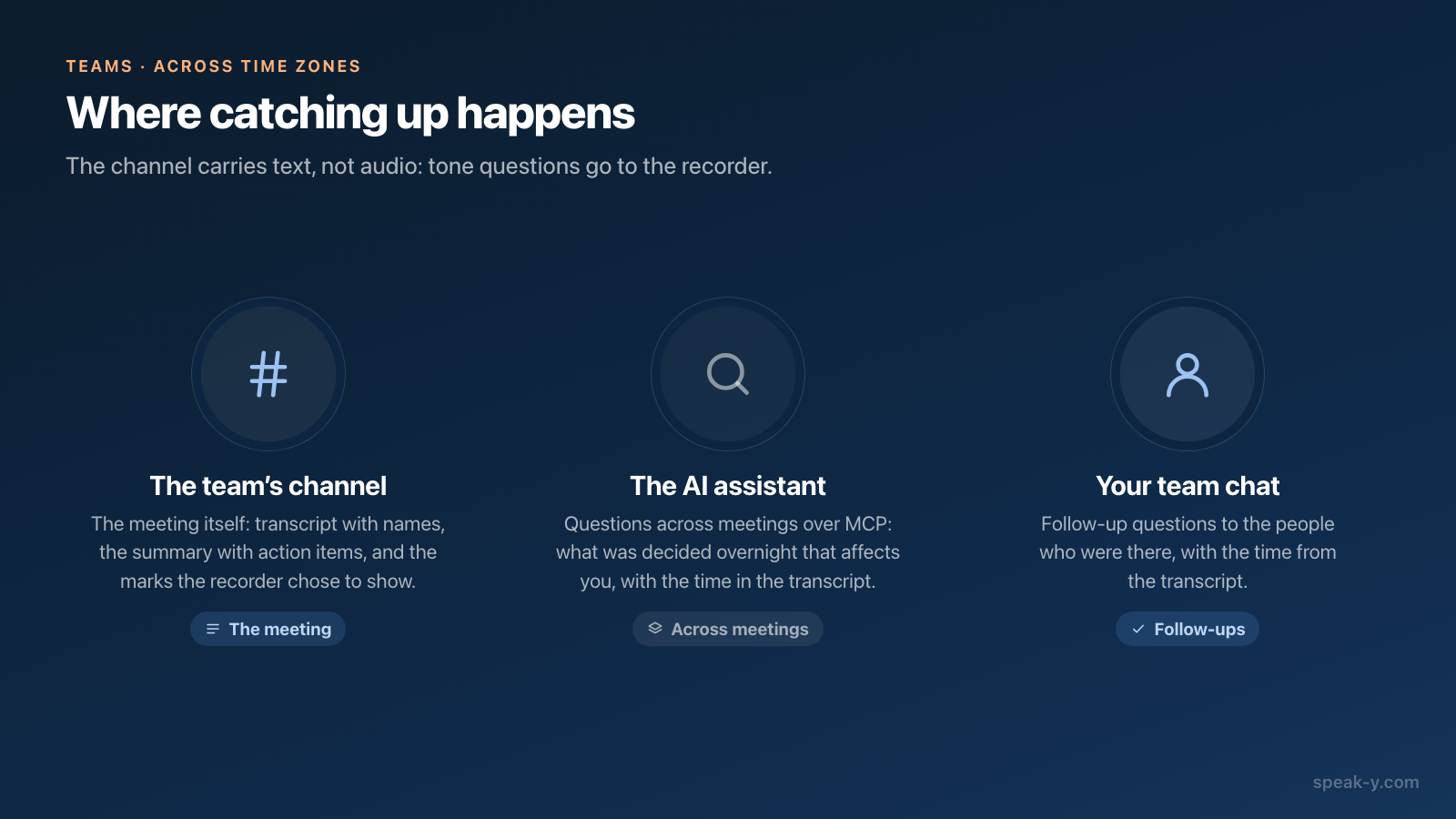
If the decision depends on how something was said, not what, the text has a limit: channels carry no audio. Ask the recorder — on their Mac, clicking the time range of a line plays the recording from that point.
Questions without opening every meeting
When three meetings happened overnight, an AI assistant is quicker than three summaries. Connect Claude, ChatGPT or Cursor to the Speak-Y MCP server — one click on Connect in Settings → Integrations, included on every plan — and ask:
What was decided in the Platform channel yesterday that affects me? For each item, the meeting, who said it, and the time in the transcript.
The assistant reads your own recordings and those of every channel you belong to, from the copy already on your Mac: transcripts, titles, summaries and action items. Channel recordings by other people are read-only to it. Its model runs in the cloud, so the text it reads goes to that vendor; local vs cloud MCP explains the difference.
When can you skip the meeting entirely?
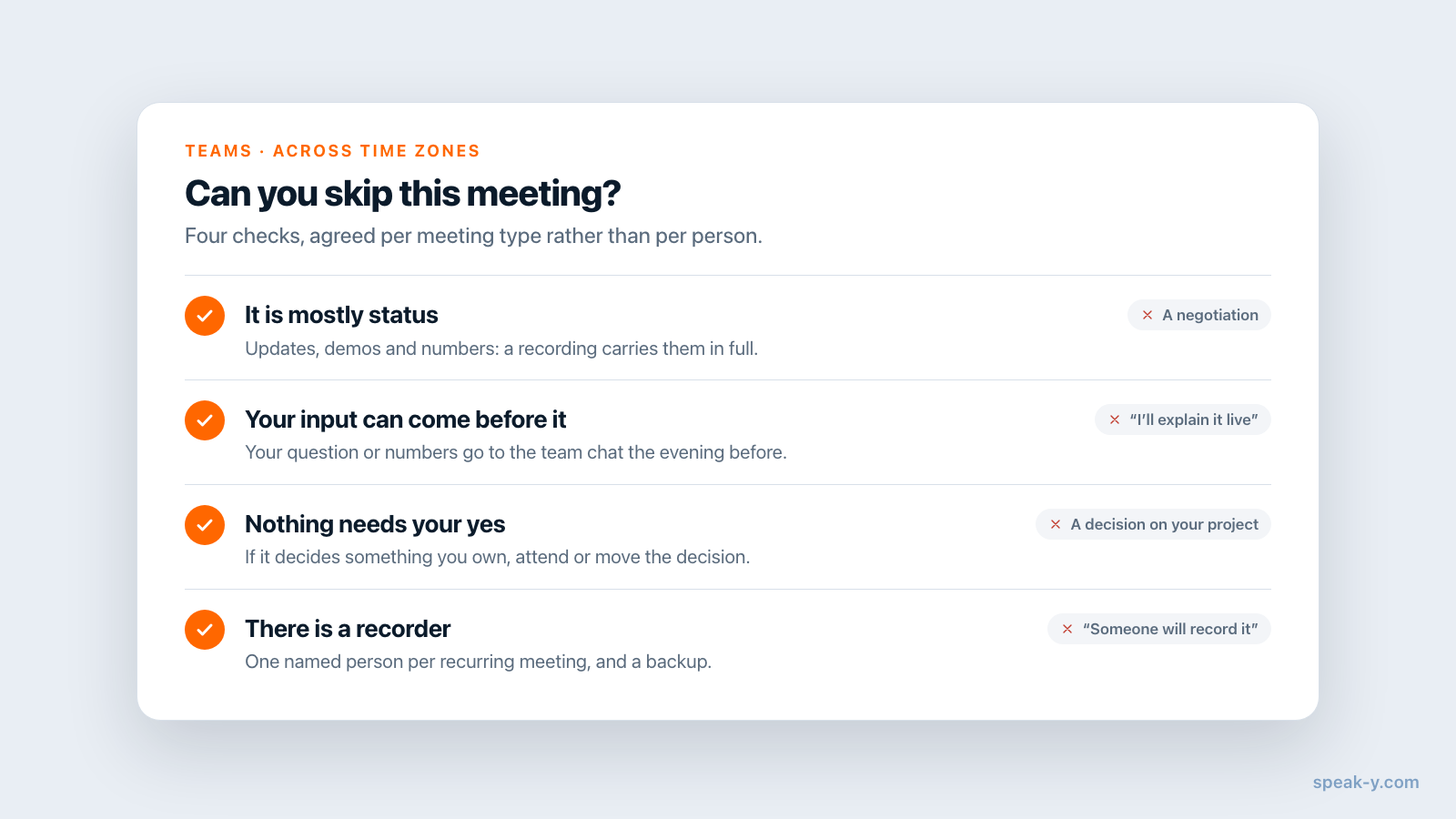
Recording the call does not make every meeting optional. Agree on it per meeting type, not per person. Four checks:
- It is mostly status. Updates, demos, numbers read out. A recording carries them fully.
- Your input can come before it. Post your question or your numbers in the team chat the evening before, and ask the facilitator to raise it.
- Nothing needs your yes. If the meeting decides something you own, attend or move the decision to a slot you can make.
- There is a recorder. Name one per recurring meeting, and a backup.
A meeting that fails the checks — a negotiation, a one-on-one, a decision on your own project — is worth the bad hour, or a different hour.
Telling people the meeting is in
The app does not push notifications and shows no unread badges, so the reader needs a habit or a signal. Two options:
- A habit: the channel is the first thing to open in the morning.
- Email delivery: A workspace owner opens the workspace, the Delivery tab, and fills in Email delivery: every new recording in any channel of the workspace triggers an email. The email says a meeting is in; the text stays in Speak-Y.
What your meeting platform already offers
If the whole team is on one platform, its built-in recap may be enough. As checked on 14 October 2026:
- Microsoft Teams intelligent recap — AI notes, tasks and markers after a recorded or transcribed meeting — needs a Teams Premium or Microsoft 365 Copilot license, according to Microsoft's answers on Microsoft Learn.
- Google Meet "Take notes for me" needs an eligible Workspace edition or Google AI plan; the organizer can share the notes with every invited guest, whether they attended or not, per Google's Meet help.
- Zoom includes meeting summaries with paid Zoom Workplace plans.
Speak-Y fits when the team mixes platforms, or when meetings with clients happen on their tools: it records from the Mac, whatever the call app. The limits are real too: workspaces and channels are in the macOS app, the channel carries text, not audio, and there are no comments under a shared meeting — follow-up questions go to the team chat, with the time from the transcript.
Costs. Creating the workspace needs Pro or higher; teammates join free on any plan and read every public channel. Whoever records needs meeting minutes: checked on speak-y.com on 14 October 2026, Free stops a meeting at 30 minutes, Pro ($10 a month) at 60, and Pro+ ($15) and Max ($30) at four hours.
The short version
The recorder presses ⌥1 on what matters, names the speakers, shows the marks and shares to the channel. The reader opens the channel in the morning: Summary, Action Items, marks, the lines around them. Skip status meetings that have a recorder; attend the ones that need your yes. The Teams page has the overview of workspaces and channels, and onboarding new hires with meeting history shows the same channels read from the other end — months later.
FAQ
How do I catch up on a meeting I missed because of my time zone?
Ask whoever records the meeting in Speak-Y to share it to the team's channel. Next morning, open the channel in the sidebar: the meeting is on the day page with its summary preview. Open it, read the Summary, which starts with Action Items, then jump to the marks the author chose to show. Five minutes for a one-hour call.
Can I listen to the audio of a meeting someone shared to a channel?
No. Only text is shared to a Speak-Y channel: the transcript with names and timestamps, the AI summary, the action items and, if the author chooses, their marks. The audio stays on the recorder's Mac. When tone matters, ask the recorder to click the time range of that line, which plays the audio from that point on their Mac.
Does the channel show meeting times in my own time zone?
Yes. The channel feed groups meetings by the day they were recorded and shows the start time in the time zone of your Mac. A 9:00 AM call in San Francisco on a Tuesday appears at 12:00 AM on Wednesday for a reader in Singapore. Transcript times are offsets from the start of the recording, such as 23:40.
Will Speak-Y notify me when a meeting is shared to a channel?
The app itself does not send notifications or show unread badges. A workspace owner can set up Email delivery on the workspace's Delivery tab: every new recording in any channel of the workspace then triggers an email. The text stays in Speak-Y.
What does it cost a distributed team?
Creating the workspace needs Pro or higher; teammates join free on any plan and read every public channel. Whoever records needs meeting minutes: checked on speak-y.com on 14 October 2026, Free stops a meeting at 30 minutes, Pro ($10 a month) at 60, and Pro+ ($15) and Max ($30) at four hours.