Change Order Draft From Client Calls, With Quotes and Times
The kitchen is half demolished, and the client has changed three things in three weeks: at the walkthrough she wanted the backsplash tile to run to the ceiling, on a video call she asked to move the island outlet, and last week she said yes to under-cabinet lights. Each change was clear when she said it. Now it has to become a change order with a description she recognizes, a price and a new date, and the details are spread across three conversations.
A shorter route: record client calls in Speak-Y, press a hotkey when the client asks for a change or agrees to one, and ask your AI assistant to collect the marks over MCP for the job tag and draft the change order descriptions. Each line comes back with who said it, in their words, the call date and the time in the recording. Pricing, the schedule and getting the signature before the work starts stay with you.
This guide follows the Speak-Y macOS app and its MCP server as checked on 20 November 2026, with one invented example: Dan Mercer runs Mercer Renovation, a four-person remodeling company, and is redoing Priya Shah's kitchen. Nothing here is legal advice.
What does a change order need from client calls?
The standard forms agree on the core. AIA's G701 Change Order records the change in the work, the adjustment to the contract sum and the adjustment to the contract time, and is signed by the owner, the contractor and, where there is one, the architect. California's Contractors State License Board tells contractors that any change to the price or scope of a home improvement contract must be a written change order signed by the customer and the contractor before the changed work starts — including changes that do not alter the price (both checked on 20 November 2026). Many contracts elsewhere carry the same rule, and courts generally enforce it.
The description comes from conversations, and four things get lost between the call and the form:
- The client's exact request. "Tile all the way up to the ceiling, on the window wall too" is a different job from "a bit higher".
- Whether it was a yes. "That sounds nice" and "Yes, go ahead with the lights" are different answers, and only one starts work.
- When it was asked. The date of the request shows how the change affects the schedule and orders already placed.
- What was discussed but not decided. A question about a second sink is not a change until the client asks for it.
Before the first call: two note types and a job tag
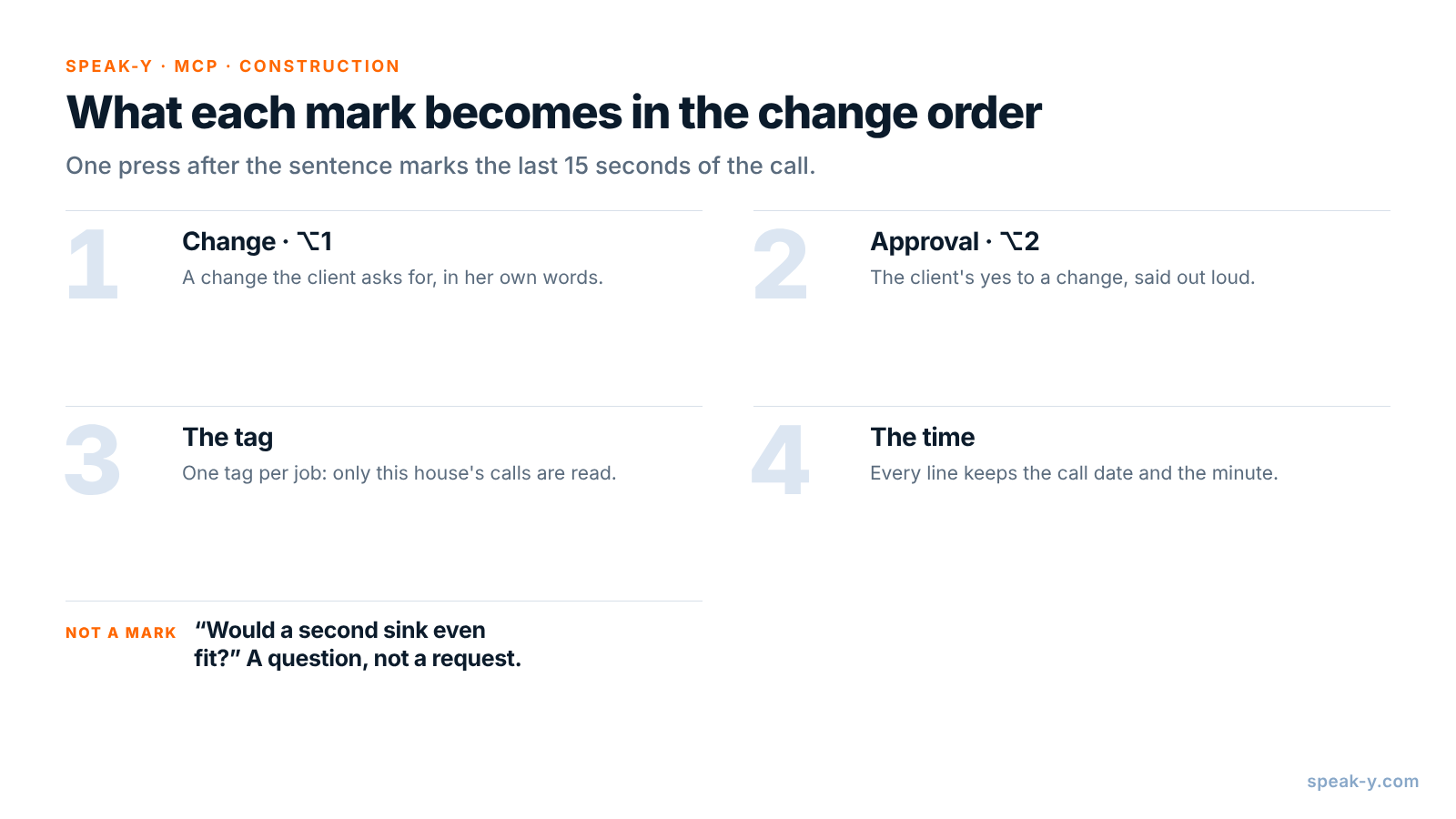
Open Settings → Notes. Under Note types, rename the default Mark the
moment to Change and keep it on ⌥1. Click Add note type, type
Approval into Type name, click Save, then Set hotkey and
press ⌥2.
Pick one tag for the job, such as shah-kitchen, and put it on every call and
walkthrough from the first estimate on. When you ask for the change order, the
assistant then reads exactly the conversations for this job, and nothing from
another client's house.
During the call: let the client say it, press the key
Record the call as a meeting. No bot joins: Speak-Y records your microphone and the call's sound on your Mac, so it works the same in Zoom, Google Meet or Microsoft Teams. For the talk at the end of a site walkthrough, start a recording with your Speak-Y hotkey in hands-free mode, hover the recording button and click the check mark on Record as Meeting?, then put the laptop on the table between you. Ask at the start whether you may record — see is it legal to record meetings for how consent rules differ.
Three habits make the marks useful:
- Press after the sentence. A mark covers the last 15 seconds of the call, so the request just said lands inside it.
- Ask for the detail in the same breath. "Which walls, and up to where?" gets a sentence with the whole change in it. Mark it on ⌥1.
- Repeat approvals back. "So I order the under-cabinet lights?" turns a nod into a sentence worth marking on ⌥2.
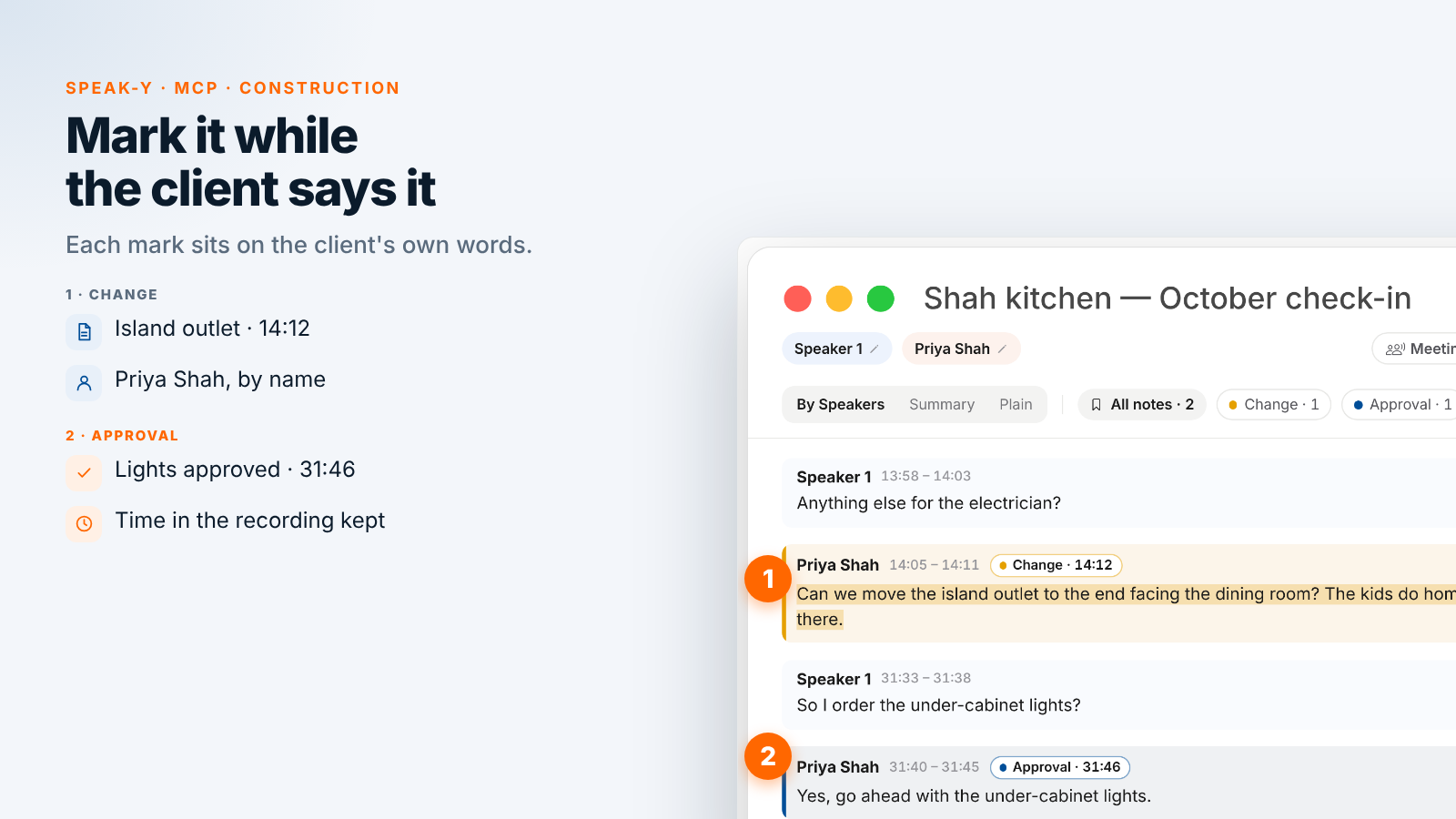
On the 20 October video call, Dan marks one change and one approval. At 14:05 Priya says, "Can we move the island outlet to the end facing the dining room? The kids do homework there." At 31:40, asked whether to order the lights, she answers, "Yes, go ahead with the under-cabinet lights." When her husband Arun wonders whether a second sink would fit, Dan does not mark it: it is a question, not a request.
After the call: name the speakers, add the tag
On By Speakers, click each speaker chip and type the name and role —
"Priya Shah, client" — so the draft quotes people, not numbers. Add the
shah-kitchen tag. The chips above the transcript count the marks by type,
and a click on a chip shows only those replies.
Ask your assistant for the change order draft
Connect your assistant to the Speak-Y MCP server once: Connect AI assistant in the account menu at the bottom of the sidebar, or Settings → Integrations, then Connect next to Claude, ChatGPT or Cursor. The steps are in how to connect meeting notes to AI assistants. The server is free on every plan and reads the library on your Mac.
Save standing instructions in a project in Claude or ChatGPT, so each time the request is one line:
Draft change order descriptions for the Shah
kitchen: conversations tagged "shah-kitchen".

Rules:
- Use only my Change and Approval marks.
- One item per change: what changes, in the
  client's words, the call date and the time,
  like (Oct 20, 14:05).
- Mark each item "Approved" only if an Approval
  mark covers it; otherwise "Requested".
- Leave Price and Schedule blank for me.
- List questions without a request separately.
- No prices, no dates, no contract language.
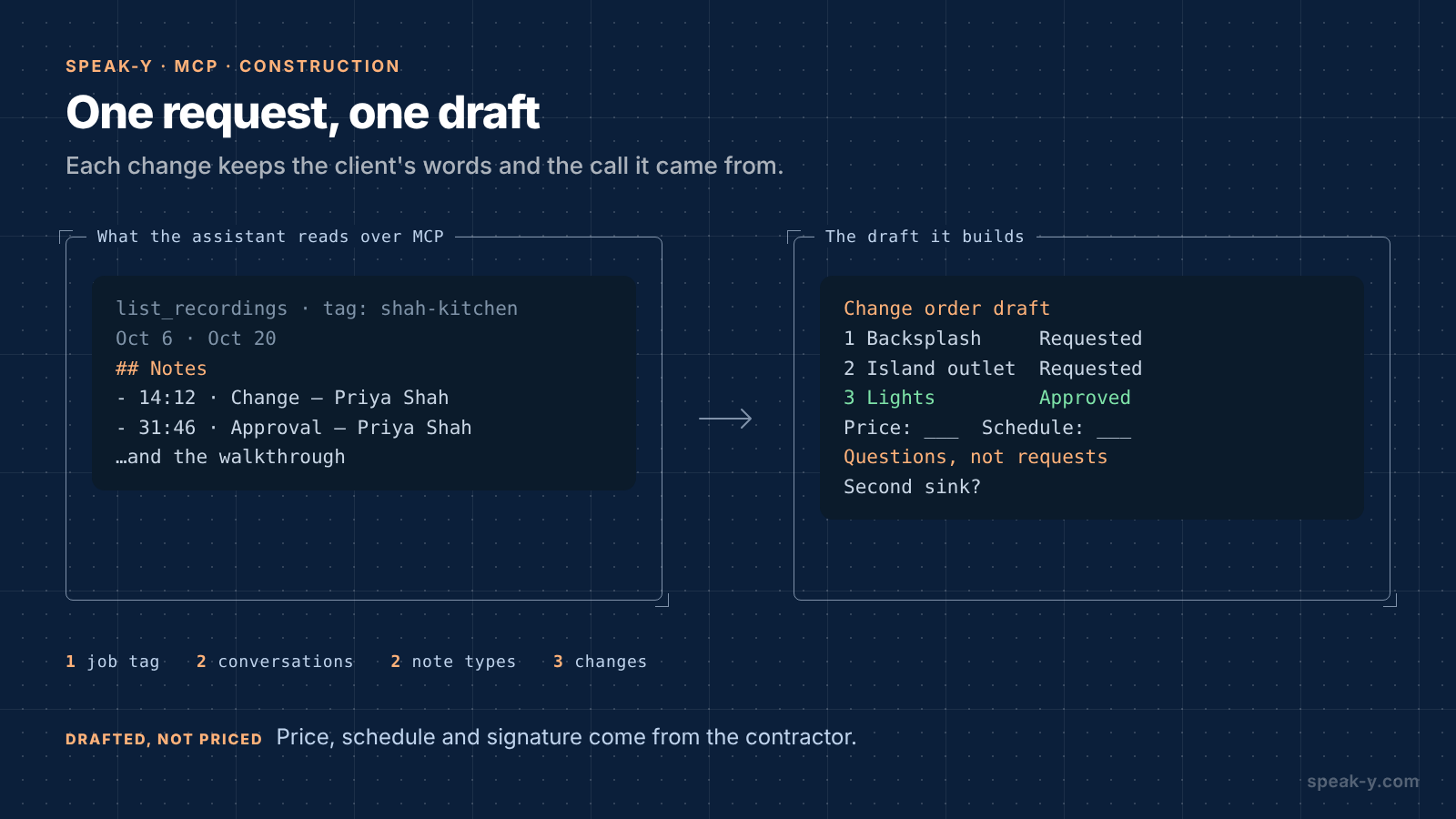
The assistant calls list_recordings with the tag and reads each
conversation. Alongside the transcript, Speak-Y hands it a Notes list —
each mark with its time, type, speaker and first words. A mark's time is the
moment you pressed the key, a few seconds after the reply began; the draft
cites the start of the reply:
Change order draft — Shah kitchen
1. Backsplash to the ceiling, window wall
   included. Priya Shah: "Tile all the way up to
   the ceiling, on the window wall too." (Oct 6,
   22:10) — Requested
   Price: ___  Schedule: ___
2. Island outlet moved to the dining room end.
   Priya Shah: "Can we move the island outlet to
   the end facing the dining room?" (Oct 20,
   14:05) — Requested
   Price: ___  Schedule: ___
3. Under-cabinet lights. Priya Shah: "Yes, go
   ahead with the under-cabinet lights." (Oct 20,
   31:40) — Approved
   Price: ___  Schedule: ___

Questions, not requests
- Arun Shah: "Would a second sink even fit?"
  (Oct 20, 22:30)
What stays with the contractor
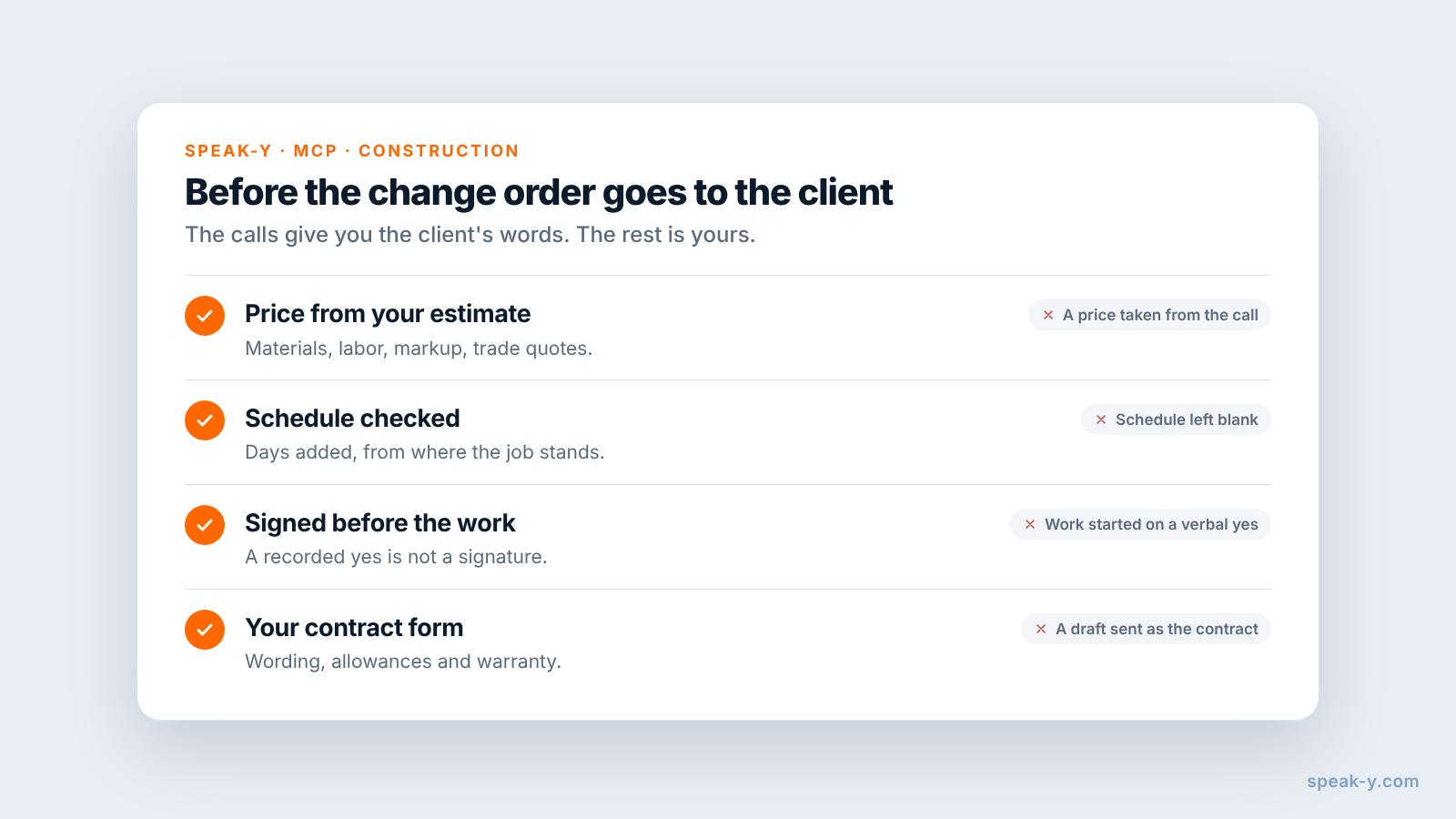
The draft knows what the client said. Four things it cannot do:
- The price. Materials, labor and markup come from your estimate, not from a conversation. Under-cabinet lights may also need an electrician's quote.
- The schedule. Whether moving the outlet adds two days or none depends on where the electrical rough-in stands, which only you know.
- The signature before the work. A recorded "yes, go ahead" is the reason to send the change order today, not permission to start. Under contracts and rules like California's, it is the signed paper that counts.
- The contract language. How the change order refers to the contract, allowances and warranty is your form's job, checked by whoever drafts your contracts.
Recording consent and the assistant you choose
Speak-Y's MCP server reads the library on your Mac. The assistant you connect is a different matter: Claude or ChatGPT receive the transcripts they read, and what happens to them next depends on that service's terms and your account settings.
Clients talk about more than tile on these calls: their budget, their schedule, sometimes their family. Ask once at the start of the job whether you may record, say who reads the transcripts, and keep the job tag on job conversations only. If the client prefers not to be recorded, take notes the old way; the change order still needs to be written either way.
Limits and costs
- Length. Checked on speak-y.com on 20 November 2026: Free stops a meeting recording at 30 minutes, Pro ($10 a month) at one hour, Pro+ ($15) and Max ($30) at four hours. A 45-minute client call needs Pro or higher. The MCP server is free on every plan.
- Audio only. A sketch on the wall or a photo of the tile is not in the recording. Say the measurement or the product name out loud, then send the photo.
- Mac for marks. Note types, marks and the MCP server are in the macOS app; the recordings stay in the library on your Mac.
- Not an estimating tool. Estimates, invoices, schedules and the signed contract stay in your construction or accounting software. Speak-Y keeps what was said.
The short version
Change on ⌥1, Approval on ⌥2, one tag per job. Ask for the detail with the request, repeat approvals back, press the key; then speaker names and the tag. One request gives the client's changes in their words, with the call and the time, and which ones were approved; the price, the schedule and the signature before the work are yours. To prepare for the next client call from what was said on the earlier ones, see a meeting prep brief from past calls.
FAQ
Can an AI assistant draft a change order from recorded client calls?
It can draft the description of each change from what the client said. Connected to the Speak-Y MCP server, Claude, ChatGPT or Cursor reads the calls with your job tag — the transcript by speaker and a Notes list of your marks with their times — and lists each requested change with the client's words, the call date and the time in the recording. Price, schedule and signatures are added by the contractor.
How do I mark change requests during a client call?
Create note types in Speak-Y under Settings → Notes: rename the default Mark the moment to Change on ⌥1 and add Approval on ⌥2. A press marks the last 15 seconds of the call with that type, so the sentence the client just said lands in the assistant's list sorted, with the speaker and the time.
Is a recorded verbal approval the same as a signed change order?
No. The recording shows what the client said, which helps when you write the change order, but many contracts require changes in writing, and California's contractors board says a home improvement change order must be written and signed by both sides before the changed work starts. Treat the marked approval as the reason to send the paper, not a replacement for it.
Can Speak-Y record a site walkthrough, not just a video call?
Yes, on a Mac. Start a recording with your Speak-Y hotkey in hands-free mode, hover the recording button and click the check mark on Record as Meeting?. Both voices reach the app through the Mac's microphone, so sit down with the client at the end of the walkthrough and put the laptop on the table between you.
Which Speak-Y plan do I need for 45-minute client calls?
Pro or higher. Checked on speak-y.com on 20 November 2026: Free stops a meeting recording at 30 minutes, Pro ($10 a month) at one hour, and Pro+ ($15) and Max ($30) at four hours. The MCP server is free on every plan.