Buyer Follow-Up From Showings and Calls, With Quotes and Times
Three showings on Saturday, a call on Tuesday, another on Thursday. Somewhere in there the buyer said the second bedroom has to fit a desk and a crib, that a north-facing backyard is a dealbreaker, and that the townhouse on Elm was "fine, but the stairs are steep for my mother". Each sentence was clear when it was said. Now it has to become a requirements list for the next search and a follow-up email that sounds like you listened, and the details are spread across five conversations.
A shorter route: record buyer calls and showing debriefs in Speak-Y, press a hotkey when the buyer names a must-have or an objection, and ask your AI assistant to collect the marks over MCP for the buyer's tag and draft the requirements and the follow-up. Each line comes back with who said it, in their words, the date and the time in the recording. Prices, offer terms and anything that reads like advice on the deal stay with you.
This guide follows the Speak-Y macOS app and its MCP server as checked on 22 November 2026, with one invented example: Elena Ruiz, a buyer's agent at a small brokerage, is helping Tom and Nina Becker find a three-bedroom house. Nothing here is legal advice.
What does a buyer follow-up need from the conversations?
Most of what a buyer wants is said out loud, in passing, while walking through a hallway. Four things get lost between the showing and the email:
- The exact words. "A yard the dog can actually run in" is a different search filter from "some outdoor space".
- Must-have or nice-to-have. "We need a second bathroom" and "a second bathroom would be nice" change which listings you send next.
- The objection and the house it belongs to. "The stairs are too steep for my mother" rules out a layout, not a neighborhood.
- What changed. A buyer who said "no townhouses" in October and "a townhouse could work" in November needs the newer answer, with the date.
The paperwork around the search is stricter than it used to be. Since 17 August 2024, NAR rules require MLS participants working with a buyer to sign a written agreement with the buyer before touring a home, in person or by live virtual tour; open houses the buyer visits alone are exempt (checked on 22 November 2026). That signing meeting is a natural moment to ask about recording, too.
Before the first showing: two note types and a buyer tag
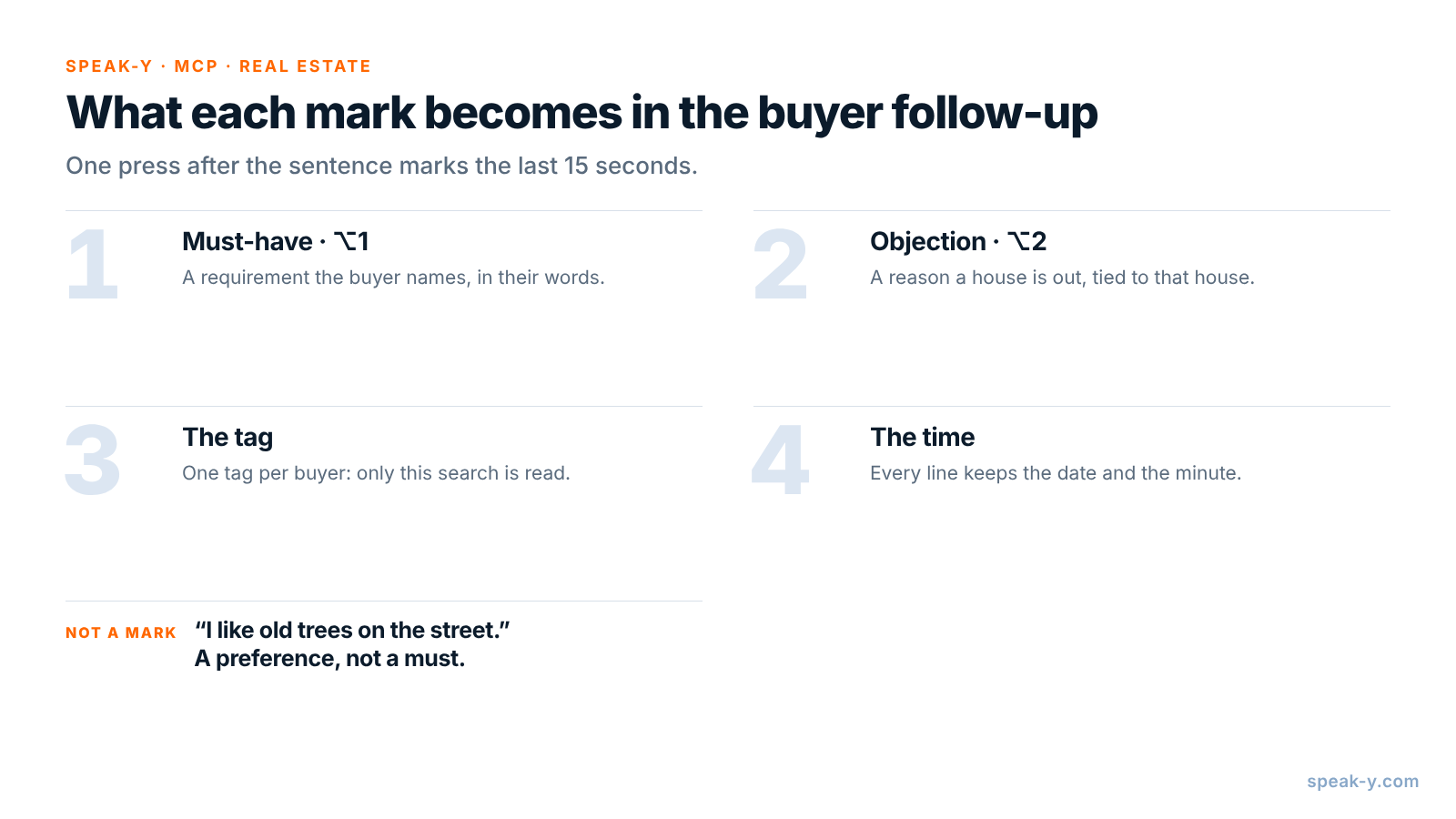
Open Settings → Notes. Under Note types, rename the default Mark the
moment to Must-have and keep it on ⌥1. Click Add note type, type
Objection into Type name, click Save, then Set hotkey and press
⌥2.
Pick one tag for the buyer, such as becker-search, and put it on every call
and showing debrief from the first consultation on. When you ask for the
follow-up, the assistant then reads exactly this buyer's conversations, and
nothing from another client's search.
During the call or showing: let the buyer say it, press the key
Record the call as a meeting. No bot joins: Speak-Y records your microphone and the call's sound on your Mac, so it works the same in Zoom, Google Meet or Microsoft Teams. For the talk at the end of a showing, start a recording with your Speak-Y hotkey in hands-free mode, hover the recording button and click the check mark on Record as Meeting?, then put the laptop on the kitchen counter between you. Ask at the start whether you may record — see is it legal to record meetings for how consent rules differ. California, for example, requires the consent of all parties to record a confidential conversation.
Three habits make the marks useful:
- Press after the sentence. A mark covers the last 15 seconds of the conversation, so the requirement just said lands inside it.
- Ask "need or nice?" "Is the second bathroom a must or a bonus?" gets a sentence that sorts itself. Mark the must on ⌥1.
- Ask why on a no. "What about the stairs?" turns a frown into a reason worth marking on ⌥2.
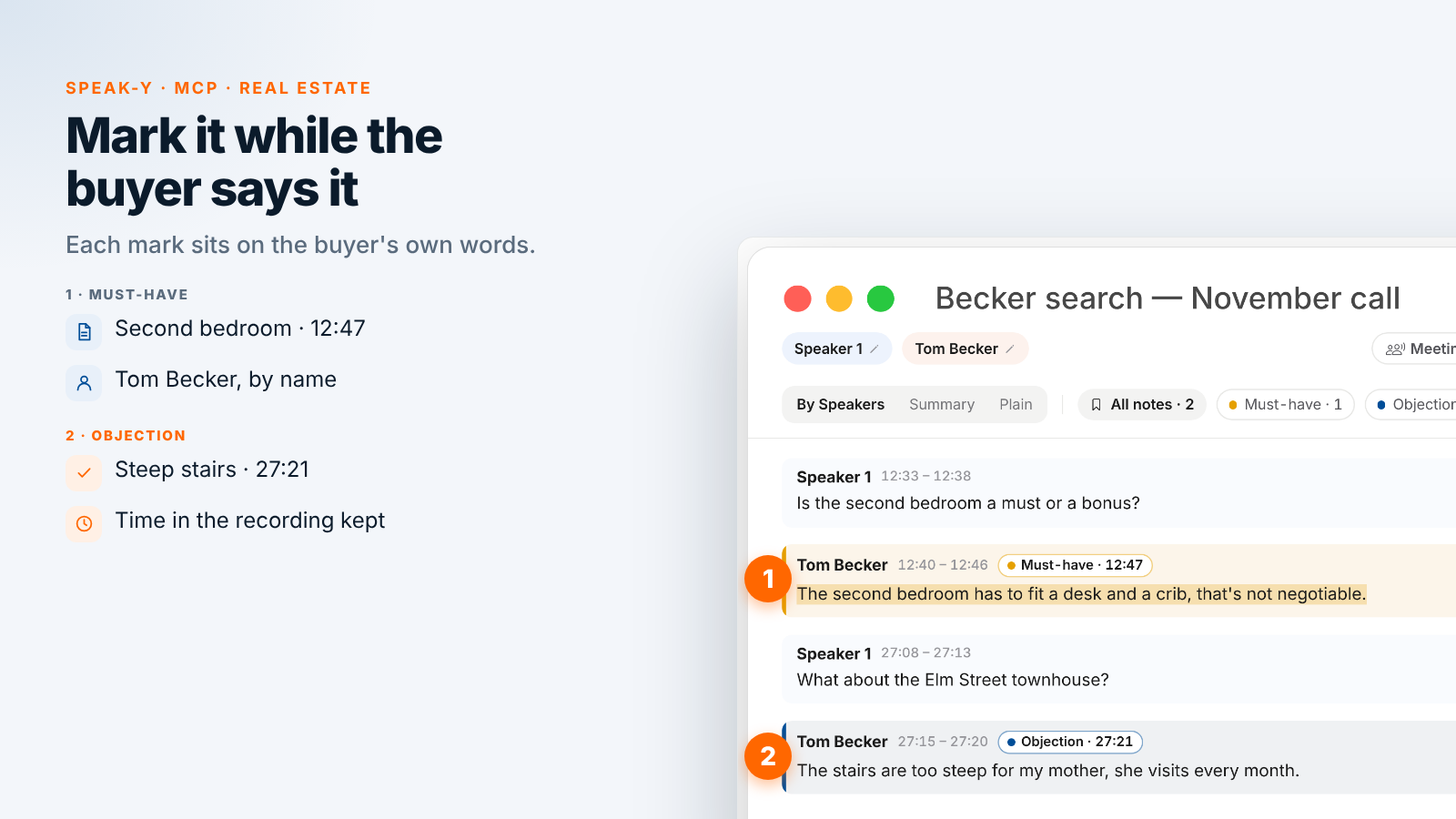
On the 17 November video call, Elena marks one must-have and one objection. At 12:40 Tom says, "The second bedroom has to fit a desk and a crib, that's not negotiable." At 27:15, asked about the Elm Street townhouse, he answers, "The stairs are too steep for my mother, she visits every month." When Tom mentions he likes old trees on the street, Elena does not mark it: it is a preference, not a requirement.
After the call: name the speakers, add the tag
On By Speakers, click each speaker chip and type the name and role —
"Tom Becker, buyer" — so the draft quotes people, not numbers. Add the
becker-search tag. The chips above the transcript count the marks by type,
and a click on a chip shows only those replies.
Ask your assistant for the requirements and the follow-up
Connect your assistant to the Speak-Y MCP server once: Connect AI assistant in the account menu at the bottom of the sidebar, or Settings → Integrations, then Connect next to Claude, ChatGPT or Cursor. The steps are in how to connect meeting notes to AI assistants. The server is free on every plan and reads the library on your Mac.
Save standing instructions in a project in Claude or ChatGPT, so each time the request is one line:
Draft the buyer follow-up for the Becker
search: conversations tagged "becker-search".

Rules:
- Use only my Must-have and Objection marks.
- Requirements: one line per must-have, in the
  buyer's words, with the date and the time,
  like (Nov 17, 12:40).
- Objections: name the house, quote the reason.
- If a later mark contradicts an earlier one,
  keep the later one and say what changed.
- A short email to the buyers: what I heard,
  what I will search for next.
- No prices, no offer advice, no legal terms.
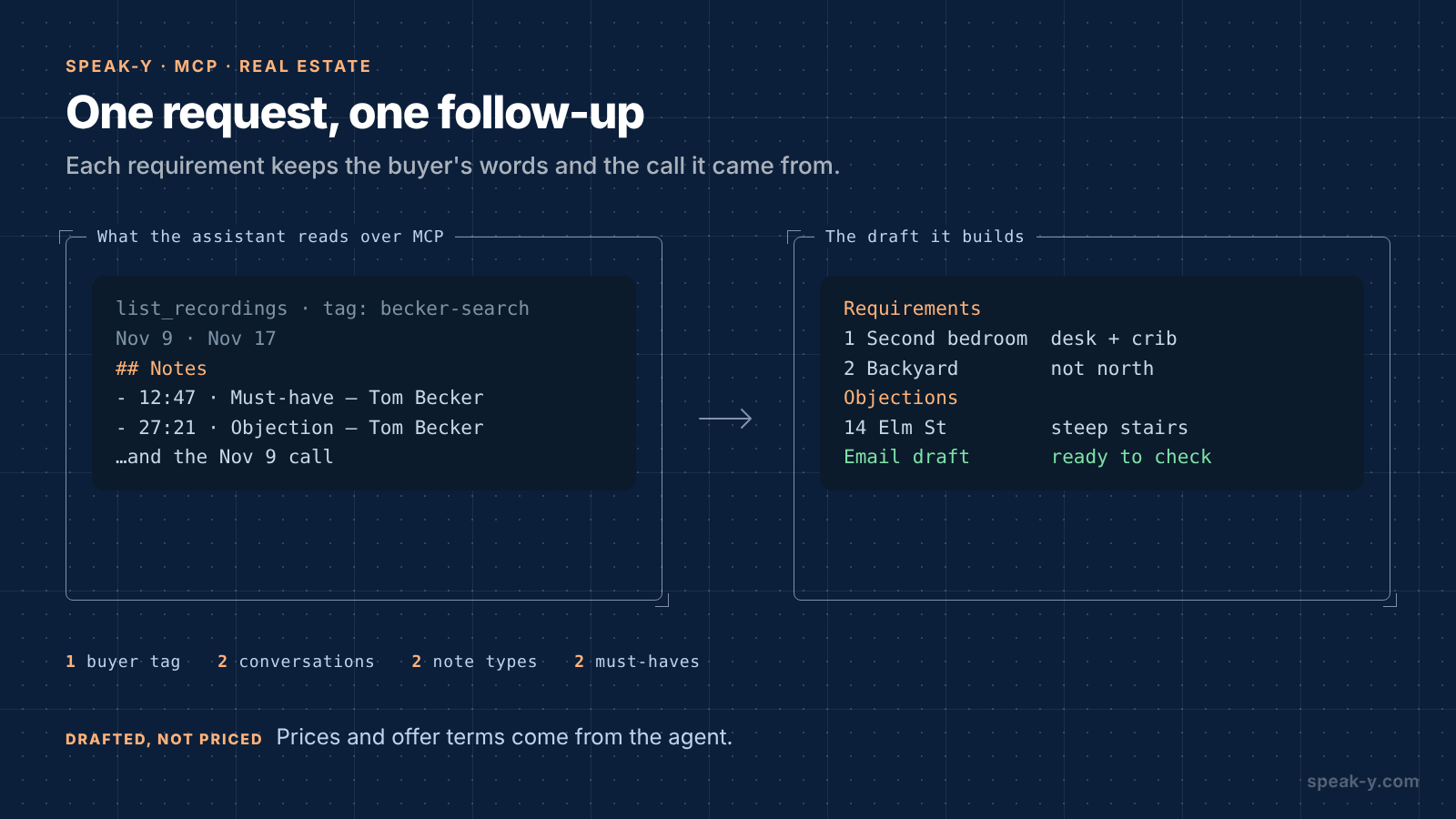
The assistant calls list_recordings with the tag and reads each
conversation. Alongside the transcript, Speak-Y hands it a Notes list —
each mark with its time, type, speaker and first words. A mark's time is the
moment you pressed the key, a few seconds after the reply began; the draft
cites the start of the reply:
Requirements — Becker search
1. Second bedroom fits a desk and a crib.
   Tom Becker: "The second bedroom has to fit a
   desk and a crib." (Nov 17, 12:40)
2. Backyard not facing north. Nina Becker: "A
   north yard is a dealbreaker." (Nov 9, 08:05)

Objections
- 14 Elm St townhouse: steep stairs. Tom
  Becker: "The stairs are too steep for my
  mother." (Nov 17, 27:15)

Email draft
Hi Tom and Nina, thanks for the call. I heard
two must-haves: a second bedroom that fits a
desk and a crib, and a yard that isn't facing
north. I'll skip layouts with steep stairs.
The conversations do not know your plan. Add it by voice: put the cursor in the assistant's message field, hold Right ⌘ — the default Speak-Y hold hotkey — say "Add: I'll send three new listings by Friday", release and send. The assistant puts your next step into the email and marks it as yours.
What stays with the agent
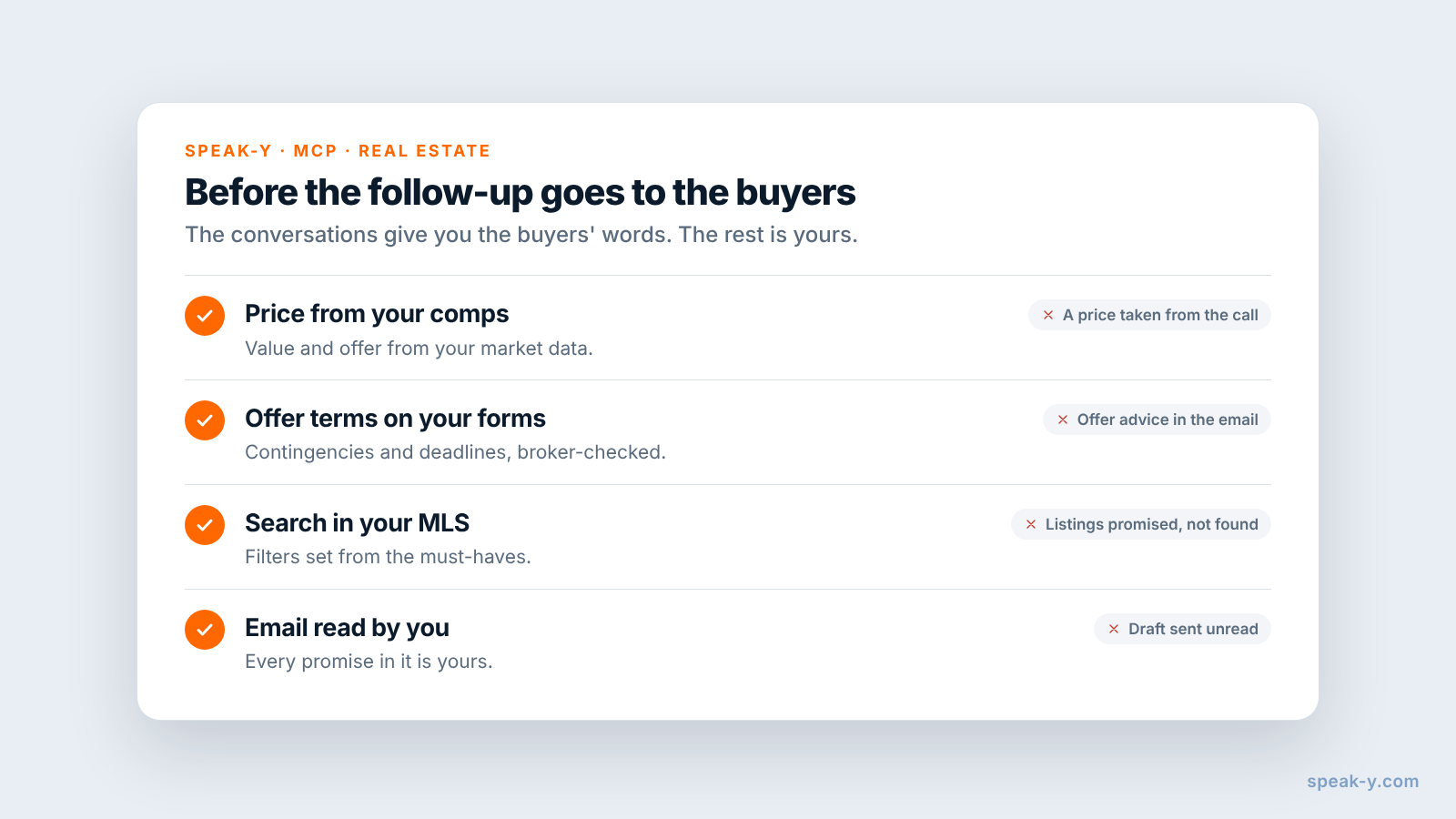
The draft knows what the buyers said. Four things it cannot do:
- The price. What to offer, what a house is worth and what the market allows come from your comparables and your judgment, not from a conversation.
- The offer terms. Contingencies, deadlines and earnest money belong in your state's forms, checked by your broker.
- The search itself. The requirements list tells you what to filter for; finding the listings and booking the showings stay in your MLS and calendar.
- Your voice. Read the email before it goes out. "I'll skip steep stairs" is a promise you make, not the assistant.
Recording consent and the assistant you choose
Speak-Y's MCP server reads the library on your Mac. The assistant you connect is a different matter: Claude or ChatGPT receive the transcripts they read, and what happens to them next depends on that service's terms and your account settings.
Buyers talk about more than square footage on these calls: their budget, their mortgage, sometimes their family. Ask at the start whether you may record, say who reads the transcripts, and keep the buyer tag on this buyer's conversations only. If a buyer prefers not to be recorded, take notes the old way; the follow-up still needs to be written either way.
Limits and costs
- Length. Checked on speak-y.com on 22 November 2026: Free stops a meeting recording at 30 minutes, Pro ($10 a month) at one hour, Pro+ ($15) and Max ($30) at four hours. A 45-minute buyer call needs Pro or higher. The MCP server is free on every plan.
- Audio only. A photo of the yard or a floor plan is not in the recording. Say the address and the room out loud when the buyer reacts to it.
- Mac for marks. Note types, marks and the MCP server are in the macOS app; the recordings stay in the library on your Mac.
- Not a CRM. Contacts, listings, showings and transaction files stay in your CRM and MLS. Speak-Y keeps what was said.
The short version
Must-have on ⌥1, Objection on ⌥2, one tag per buyer. Ask "need or nice", ask why on a no, press the key; then speaker names and the tag. One request gives the buyers' requirements in their words, with the conversation and the time, and a follow-up email to check and send; prices and offers are yours. For the email side on its own, see a client call follow-up email.
FAQ
Can an AI assistant write a buyer follow-up from recorded showings?
It can draft the requirements list and the follow-up email from what the buyer said. Connected to the Speak-Y MCP server, Claude, ChatGPT or Cursor reads the conversations with your buyer's tag — the transcript by speaker and a Notes list of your marks with their times — and lists each must-have and objection in the buyer's words, with the date and the time in the recording. Prices, offer terms and legal wording stay with the agent.
How do I mark a buyer's must-haves during a showing or call?
Create note types in Speak-Y under Settings → Notes: rename the default Mark the moment to Must-have on ⌥1 and add Objection on ⌥2. A press marks the last 15 seconds of the conversation with that type, so the sentence the buyer just said lands in the assistant's list sorted, with the speaker and the time.
Do I need the buyer's consent to record a showing debrief or call?
Ask every time, at the start. Some US states, California among them, require the consent of all parties to record a confidential conversation. A simple habit works everywhere: ask whether you may record, say who will read the transcript, and stop if the buyer says no.
Can Speak-Y record a conversation in person, not just a video call?
Yes, on a Mac. Start a recording with your Speak-Y hotkey in hands-free mode, hover the recording button and click the check mark on Record as Meeting?. Both voices reach the app through the Mac's microphone, so put the laptop on the table between you at the end of the tour.
Which Speak-Y plan do I need for 45-minute buyer calls?
Pro or higher. Checked on speak-y.com on 22 November 2026: Free stops a meeting recording at 30 minutes, Pro ($10 a month) at one hour, and Pro+ ($15) and Max ($30) at four hours. The MCP server is free on every plan.