Client Handover: Pass an Account to a Colleague in 30 Minutes
A client handover usually fails in one place: the departing account manager writes a two-page summary from memory, and the colleague who inherits the account learns the rest from the client — who notices. The details that matter, such as what was promised, in which words and on which call, are exactly the ones a summary written in a hurry leaves out.
If the calls with the client were recorded in Speak-Y, the handover is three steps: file every call in the client's channel, read the channel once as a stranger would, add your colleague to it. They open a feed where each call has a transcript with names, an AI summary and action items, and they are up to speed in about half an hour. Nothing has to be written from memory.
This guide follows the Speak-Y macOS app as checked on 3 October 2026. It assumes a workspace with a channel for the client; if you do not have that yet, start with one channel per client.
What a colleague needs from a handover
Whether it is a support engineer passing on an escalated customer or an account manager moving to another portfolio, the person taking over asks the same five questions:
- Who are the people on the client's side, and who decides?
- What have we promised, and by when?
- What went wrong before, and how was it settled?
- What is open right now?
- What does the client keep coming back to?
A handover document answers them in the author's words. A channel of recorded calls answers them in the client's words, with a date and a timestamp next to each. The work of a handover then shifts from writing to checking that the channel is complete.
Step 1. File what is still only on your Mac
A recording is personal until you share it. The usual gap at handover time is the last few calls: recorded, never sent to the channel.
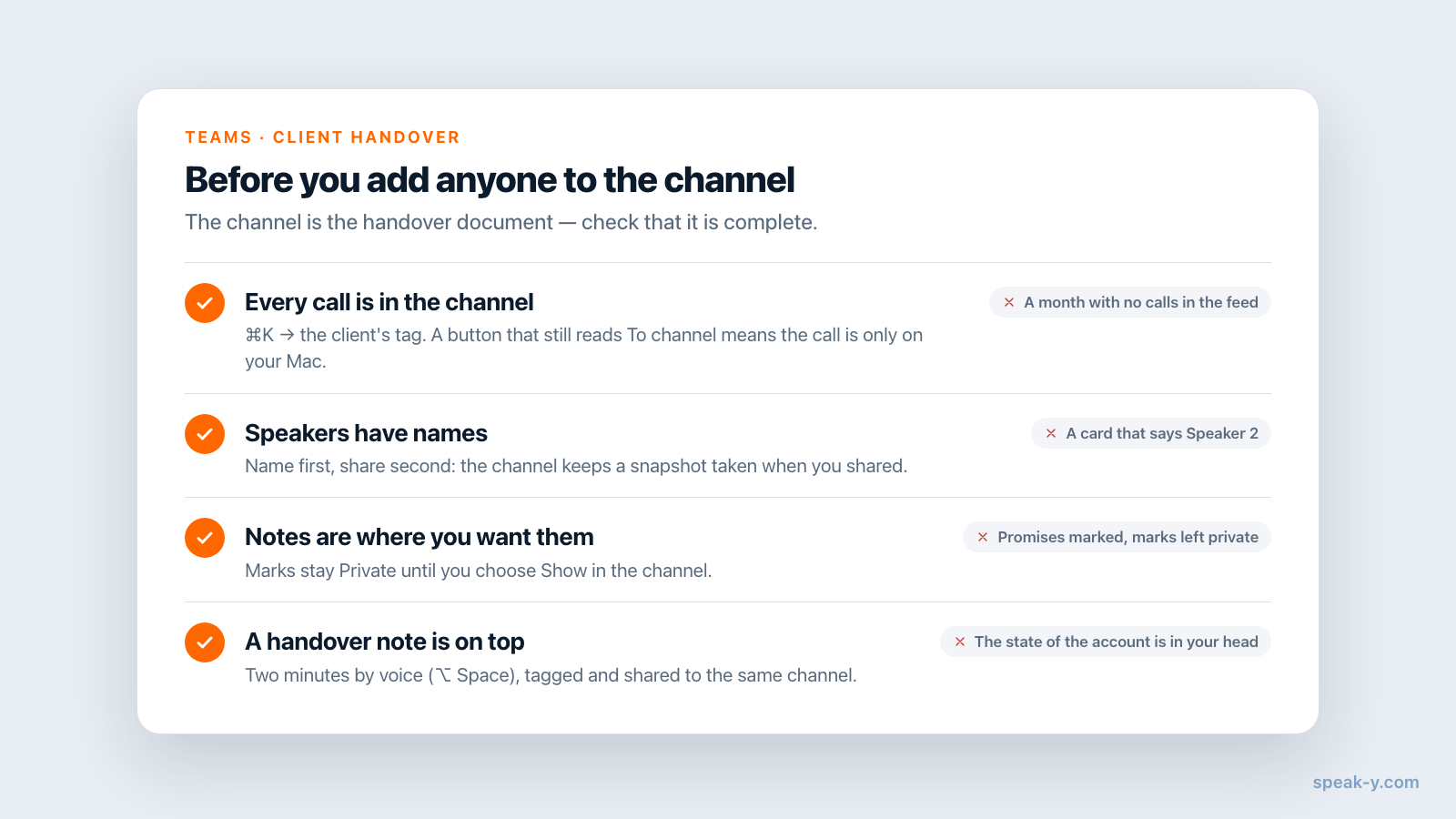
Find them. Press ⌘K, type the client's tag — acme — and pick it. The
feed keeps only your own recordings with that tag. Open each: if the button
under the transcript reads To channel, the call exists only on your Mac;
if it shows a channel's name, it is already there.
Tidy, then share. Click a chip such as Speaker 2 and type the name — "Priya (Acme)" tells your colleague which side she is on. Then press To channel and pick Brightside Agency / Client — Acme. Order matters: the channel keeps a snapshot of the recording as it was when you shared it, so a name fixed afterwards stays on your copy. If you corrected an older call after sharing, remove it from the channel and share it again.
Add a handover note by voice. Press ⌥ Space and talk for two minutes: the state of the account, the person to call first, the thing you would not say in writing to the client. The dictation is saved under Notes; give it the client's tag and share it to the same channel. It becomes the top card of the feed on the day you hand over.
What reaches the channel and what stays personal
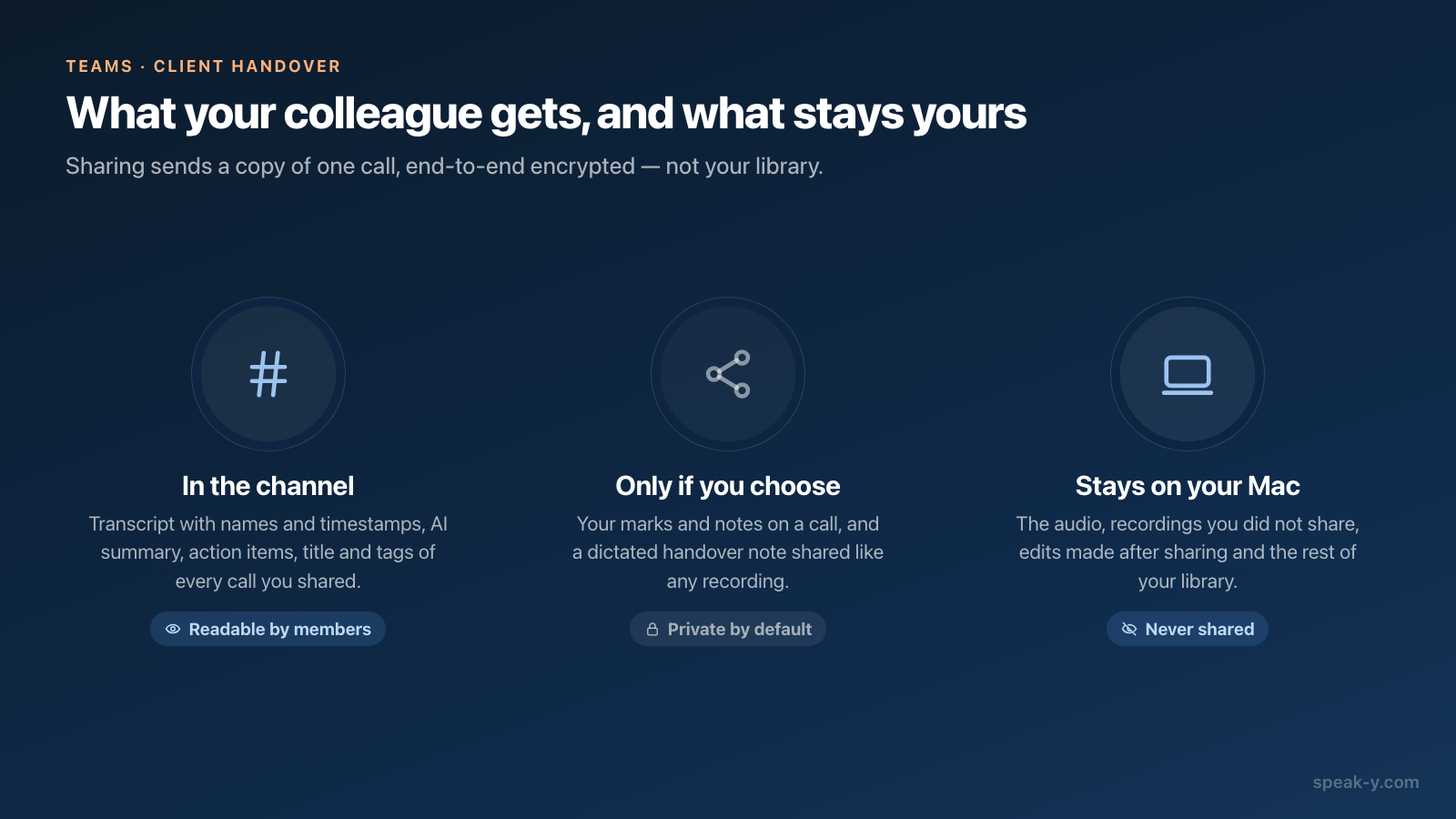
Sharing is not a sync of your library. The channel receives a readable copy of each call you chose to share, end-to-end encrypted, and nothing else.
| In the channel | Only if you choose | Stays with you |
|---|---|---|
| Transcript with speaker names and timestamps | Your marks and notes on the call: Private by default, In channel once you switch them | The audio — it is never shared |
| AI summary and action items | A dictated handover note, shared like any recording | Recordings you did not share |
| Title, tags, language, duration | Edits made after sharing | |
| Earlier versions of the text, AI rewrites included | The rest of your library, and its ⌘K search |
Two rows deserve attention before a handover. Marks: if you pressed ⌥1 on every promise during the calls, those marks are the fastest route through an hour-long transcript — and your colleague does not see them until you click the Private chip above the transcript and choose Show in 🔒 Client — Acme. Earlier versions: an AI rewrite you saved travels with the transcript, so delete a version you would not post before sharing. Sharing a meeting to a team channel lists every field.
Step 2. Read the channel the way a stranger would
Before you add anyone, spend five minutes in the channel yourself. Click Client — Acme in the sidebar and switch Day to Week: each week lists its calls as cards with a title, the speakers, tags and the first lines of the summary. Look for three things:
- Gaps. A month with no calls in the feed while you remember three is a month of recordings that are still personal.
- Anonymous speakers. A card that says "Speaker 2" is a call your colleague cannot attribute.
- The recurring word. Click the magnifier and type what the client keeps raising — "deadline", "invoice", "migration". The search runs over the transcripts of the whole channel, every month of it. If the calls where it was settled do not come up, they are missing.
The channel search reads transcript text only, not titles, summaries or tags, so search for words people said.
Step 3. Add your colleague to the channel
A public channel (#) needs nothing: every workspace member already sees it with its history. For a private client channel (the lock):
- If the colleague is not in the workspace yet, invite them: ⋯ next to the workspace → Edit workspace → Members → their email → Invite. Joining is free on any plan.
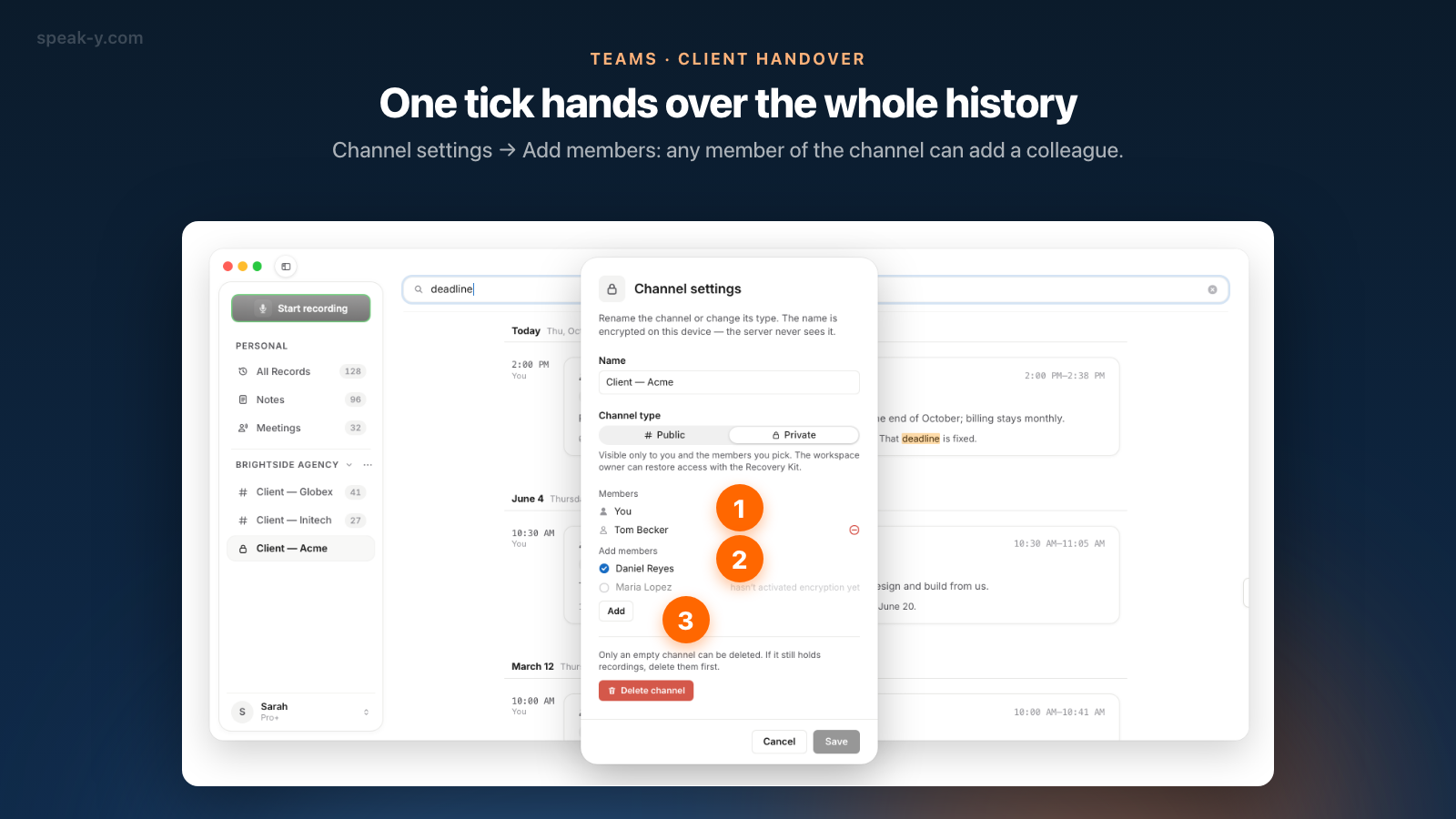
- Right-click Client — Acme → Channel settings.
- Under Add members, tick their name and press Add. Any member of the channel can do this, not only its creator.
The whole history opens to them, not only calls shared from now on. A name greyed out with "hasn't activated encryption yet" belongs to someone who has not opened Speak-Y and set their encryption password: they cannot receive the channel key until they do.
The colleague's half hour
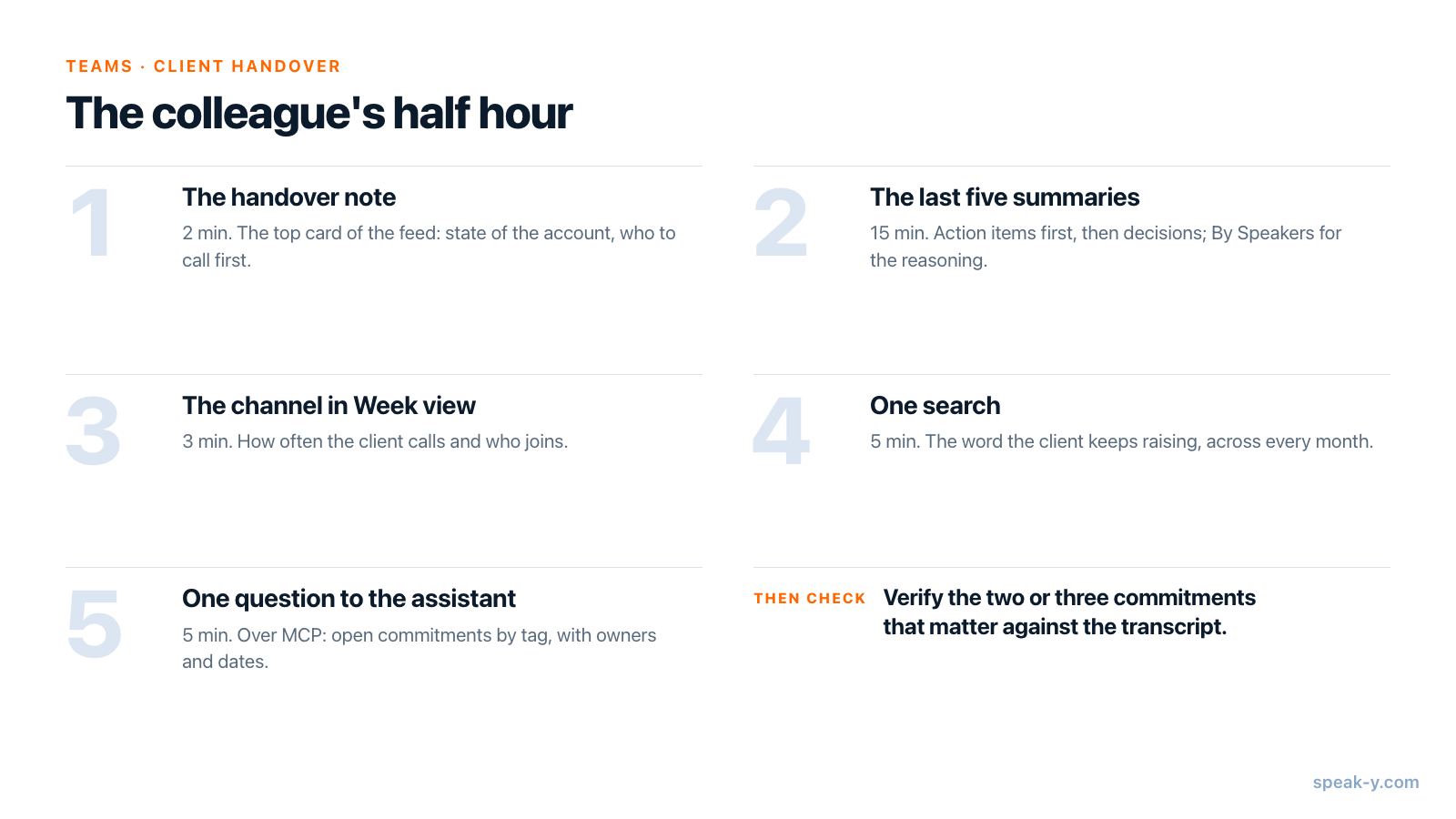
For an account with a call or two a week, thirty minutes in this order is enough to pick up the phone without asking the client to repeat themselves:
- The handover note — two minutes, the top card of the feed.
- The last five summaries — fifteen minutes. Each shared call opens read-only; Summary begins with the action items, then the decisions. By Speakers has the reasoning when a decision looks odd.
- The channel in Week view — three minutes of scrolling back for the rhythm: how often the client calls and who joins.
- One search — five minutes on the word the client keeps raising.
- One question to an assistant — the last five minutes. With the Speak-Y MCP server connected to Claude, ChatGPT or Cursor: "List open commitments to Acme from recordings tagged acme since July, with owners and dates." The assistant reads the colleague's own recordings and those of every channel they belong to, from the copy on their Mac. It filters by tag and date, not by channel, which is why every call carries the client's tag.
The assistant's list is a reading of what was said, not a tracker: Speak-Y does not record whether a commitment was kept. Check the two or three items that matter against the transcript before repeating them to the client.
After the handover: who keeps access?
You move to other accounts. You stay in the channel until you leave it — Leave channel; only a member can add you back — or the channel's creator removes you. The creator cannot leave their own channel. Your own copies of the calls you recorded stay in your library either way.
You leave the company. The owner or an admin removes you from the workspace; the keys are rotated and nothing shared afterwards reaches you. The calls you shared stay in the channel, so the account does not lose its history with you. What removal cannot take back is spelled out in removing a teammate: what they lose.
Costs. The colleague joins free on any plan and reads the whole channel. A paid plan matters only for whoever records the next calls: checked on speak-y.com on 3 October 2026, Free stops a meeting at 30 minutes, Pro ($10 a month) at 60, Pro+ ($15) and Max ($30) at four hours.
The short version
File the calls that are still personal, name the speakers, decide which notes go In channel, dictate a two-minute handover note, read the channel once as a stranger, add the colleague. They read five summaries and ask the assistant one question. The Teams page has the overview of workspaces and channels, and onboarding new hires with meeting history shows the same reading routine for someone joining the whole team.
FAQ
How do I hand a client over to a colleague in Speak-Y?
Three steps. Share every call with the client into the client's channel with To channel, read the channel once the way a stranger would, then add the colleague to the channel under Channel settings → Add members. They get the channel's whole history at once: transcripts with speaker names, AI summaries and action items.
What does my colleague see after the handover, and what stays private?
They see what was shared into the channel: each call's transcript with names and timestamps, its AI summary, action items, title and tags. They never get the audio, your private notes and marks unless you switch them to In channel, edits you made after sharing, or any recording you did not share.
How do I find the client calls I never shared to the channel?
Press ⌘K, type the client's tag and pick it: the feed shows only your own recordings with that tag. Open each one — if the button under the transcript still reads To channel, it is only on your Mac. An AI assistant connected over the Speak-Y MCP server can list them too, because it sees which channel each recording is in.
How long does it take a colleague to get up to speed on a client?
About half an hour for an account with a call or two a week: the summaries of the last five calls, the channel in Week view for the rhythm, one search for the word the client keeps repeating, and one question to an AI assistant about open commitments.
Do I lose access to the client's calls after I hand the account over?
Not automatically. You stay in the channel until you leave it or the channel's creator removes you, and your own copies of the calls you recorded stay in your library either way. The calls you shared stay in the channel for the new owner of the account.