Client Calls as an Agency Knowledge Base: One Channel per Client
An agency's memory of a client lives in the account manager's head. When that person moves to another account or leaves, the question "what did we promise Acme about the deadline last spring?" gets answered by scrolling a year of email. If every call with the client is recorded in Speak-Y and shared into that client's channel, the answer is a search away — and the whole account can be handed to a colleague in an afternoon.
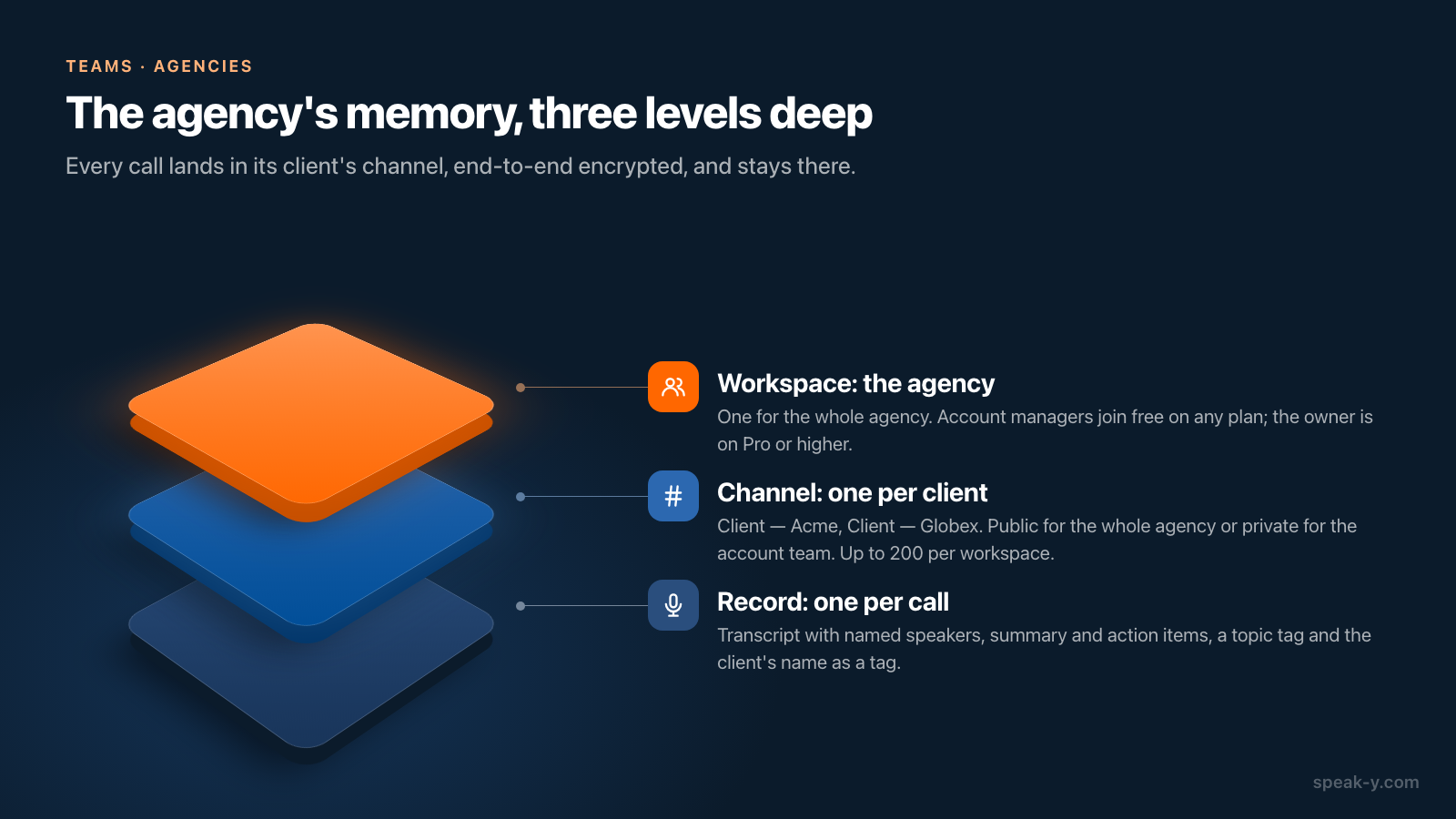
The structure is one line long: one workspace for the agency, one channel per client, every call into its channel. A year later you read the channel by week, search it for a word someone said, or ask an AI assistant across all of it. A new account manager gets the same history on day one; a departing one loses access the moment you remove them.
This guide describes the routine in the Speak-Y macOS app, checked on 1 October 2026. It assumes the workspace exists; if not, set one up first.
What the agency needs
- A workspace owner on Pro or higher. Creating a workspace needs Pro, Pro+, Max or the trial. Checked on speak-y.com on 1 October 2026: Pro is $10 a month or $100 a year, Pro+ $15 or $150, Max $30 or $300.
- Account managers on any plan, Free included: joining by invitation is free, so the cost does not grow with headcount.
- Meeting minutes for whoever records, on their own plan: Free stops a call at 30 minutes and allows 2 hours a month, Pro 60 minutes and 10 hours, Pro+ 240 minutes and 40 hours, Max 240 minutes and 100 hours. Hour-long client calls every week make the account manager a Pro+ user.
- Macs. Workspaces and channels are in the macOS app; the Windows and iOS apps do not have them yet.
One channel per client
Open the workspace's ⋯ menu in the sidebar and choose New channel. Name it so every client sorts together: Client — Acme, Client — Globex, Client — Initech. A workspace holds up to 200 channels, so one per client is fine for an agency with twenty accounts or two hundred.
The type decides who reads it, and it is worth deciding per client:
- Public (#) — everyone in the workspace sees it, including people who join later. Right for an agency where any colleague may pick up any account.
- Private (lock) — "visible only to you and the members you pick". Right for a client under NDA or an account that only its team should see. The owner cannot see a private channel they are not in; what the owner holds is the Recovery Kit, which restores a member's access after a forgotten password.
Decide before the first call lands there: a public channel can never be made private. Who can create and change channels is in who sees what in team channels.
After every call: name, tag, share
Record the call as a meeting on your Mac — no bot joins, so say at the start that you are recording. When the transcript is ready, two minutes make the archive readable a year later:
- Name the speakers. On By Speakers, click a chip such as Speaker 2, type the name — "Priya (Acme)" tells a colleague which side of the table she sat on — and press Return.
- Tag the topic. Press Tags in the recording's header and create or pick a short tag: scope, billing, escalation. Add the client's name as a tag too — acme — because tags are the one filter an AI assistant can apply, and a channel is not.
- Share it. Press To channel under the transcript and pick Brightside Agency / Client — Acme. The transcript with names and timestamps, the AI summary and the action items go into the channel's feed, end-to-end encrypted; the audio stays on your Mac.
Order matters. The channel keeps a snapshot of the recording as it was when you shared it, so a speaker renamed or a tag added afterwards stays on your copy only. Name and tag first, share second — or remove the recording from the channel and share it again. What exactly travels is in sharing a meeting to a team channel.
A year later: open, search, ask
Read the channel by week
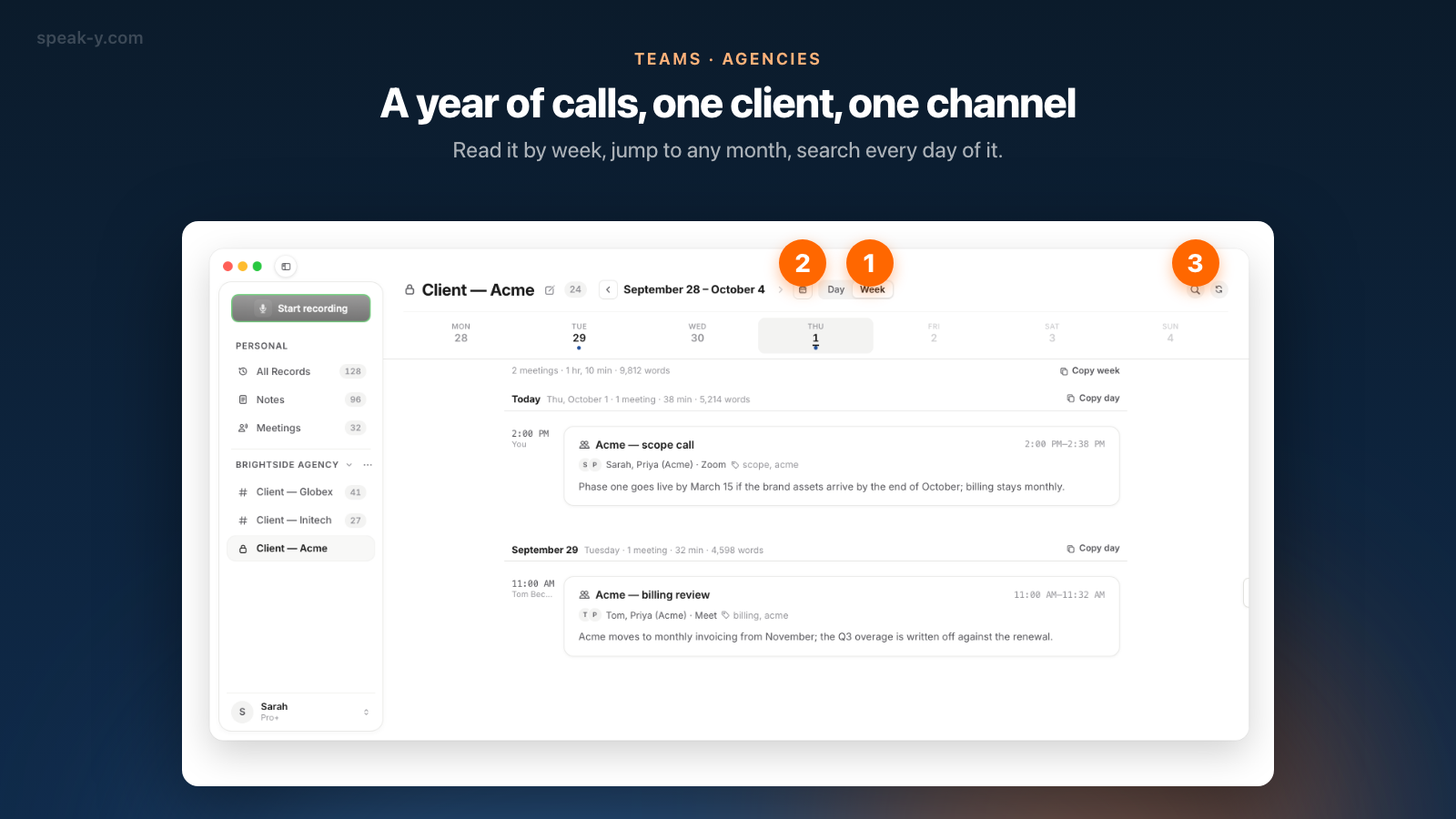
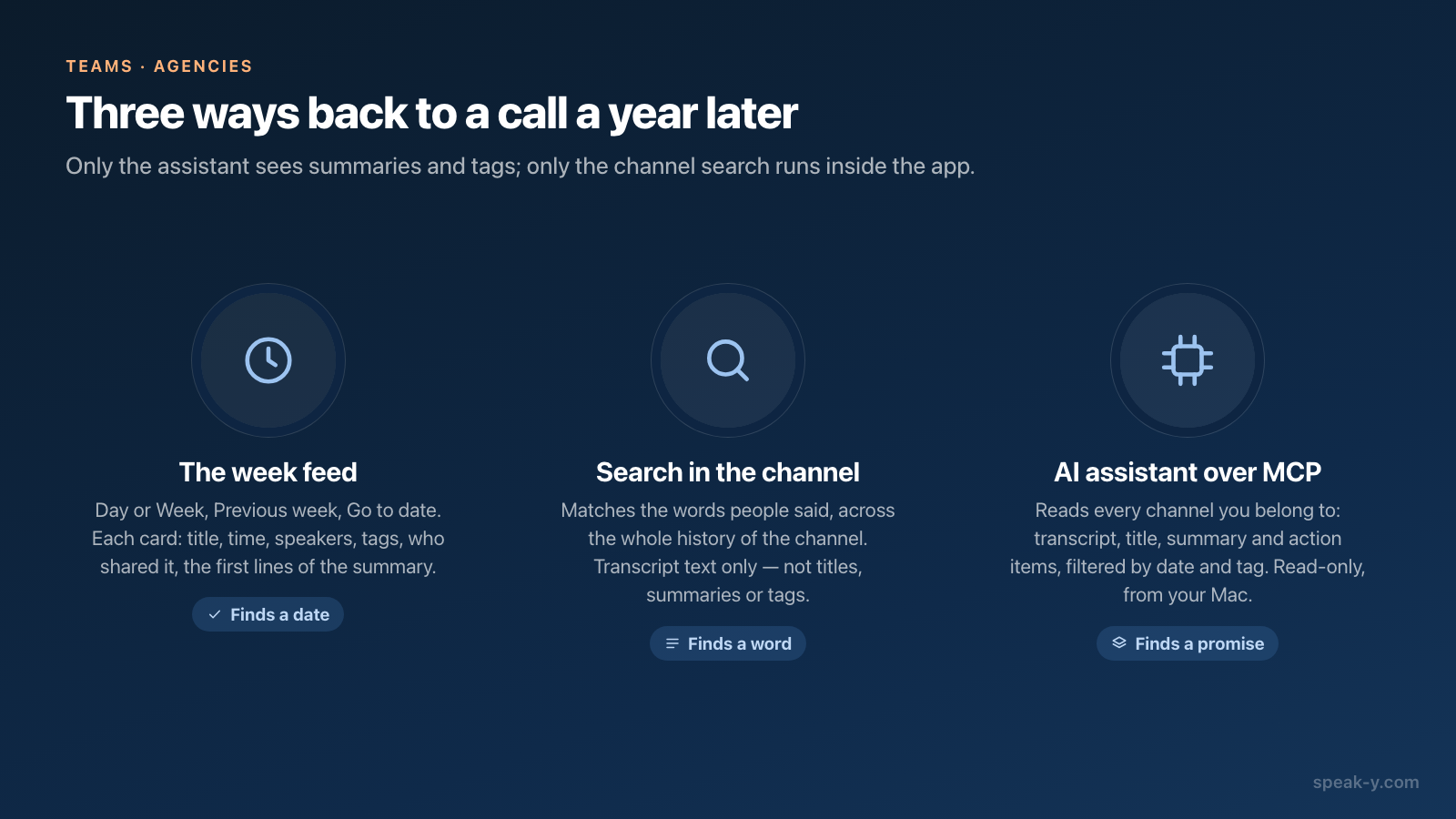
Click Client — Acme in the sidebar. The feed opens on the most recent call. Switch Day to Week in the header: each week lists its days under their own headings, with a strip of weekdays on top and one line of totals — "4 meetings · 2 hr, 51 min · 21,480 words". Previous week goes back a week at a time; the calendar button, Go to date, jumps to any month, with dots on the days that have calls. Each card shows the call's title, time, speakers, tags, who shared it and the first lines of its summary.
Search for the words that were said
The magnifier in the channel's header searches that channel's transcripts across its whole history, not just the open week: a case-insensitive match on the words people said. Results come grouped by day, each day's heading says how many calls match, and each card shows the lines where the word was said.
Two honest limits. The channel search reads only transcript text — not titles, summaries or tags — so search for "deadline" or "March", not for the tag "scope". And the global search on ⌘K covers only your own recordings, not channels.
Ask an assistant across the whole account
For "what did we promise Acme about timelines in the last year, with dates", connect Claude, ChatGPT or Cursor to the Speak-Y MCP server, free on every plan. It reads your own recordings plus every recording shared into the channels you belong to, read-only, from the copy already on your Mac — and, unlike the channel search, it searches transcript text, title, summary and action items. It filters by date range and by tag, which is why the acme tag earns its keep: "every meeting tagged acme since January" is a precise question, and the answer comes with each call's date.
What it cannot do: filter by channel (the tag is the key, not the channel name), or see a private channel you are not a member of, because your Mac cannot decrypt it. If a call shared an hour ago is missing, ask the assistant to sync first. Setup is in connecting meeting notes to AI assistants.
Handing a client to a colleague in half an hour
A new account manager takes over Acme. Three steps for you, one afternoon for them:
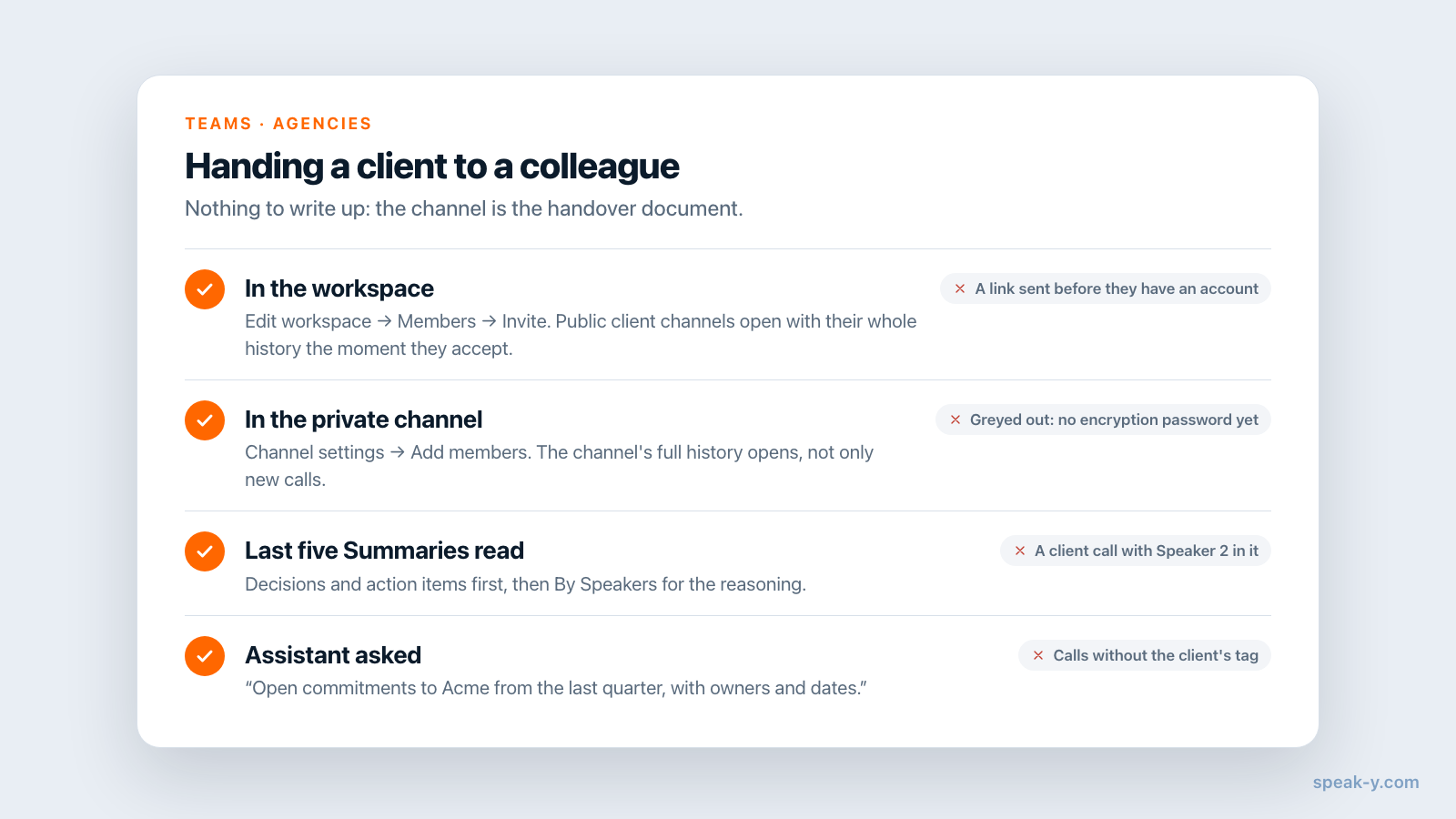
- Invite them to the workspace if they are not in it: ⋯ next to the workspace → Edit workspace → Members → type their email → Invite, and send the link yourself. Public client channels open to them with their full history the moment they accept.
- Add them to the private channel. Right-click Client — Acme → Channel settings → Add members → tick their name → Add. Any member who holds the channel key can do this. The whole history of the channel opens to them, not only new calls. Someone who has not set their encryption password yet is greyed out as "hasn't activated encryption yet" — invite first, add second.
- Point them at the last five calls. Each opens read-only, with the channel and the author in the top bar; Summary has the decisions and the action items first, By Speakers has the reasoning with names. Then they ask the assistant: "Summarise open commitments to Acme from the last quarter, with owners and dates."
Onboarding new hires with meeting history walks through the newcomer's side in detail. What is specific to a client handover is that nothing has to be written up: the channel is the handover document, written one call at a time.
When an account manager leaves
Remove them from the workspace: ⋯ → Edit workspace → Members → the remove icon in their row → Remove member. The server drops their copies of the channel keys at once, your app issues new key versions for the remaining members, and nothing shared from that moment reaches them. To take them out of one private channel only, the channel's creator removes them in Channel settings, and the channel key is rotated.
What removal cannot take back is what their Mac already downloaded and what they copied out — the limit of every end-to-end encrypted system, spelled out in removing a teammate: what they lose. The calls they shared stay in the client's channel; the owner or an admin can delete any that should not.
Rules to agree before the first recording
- Consent. Put recording in the contract or statement of work and say it at the start of every call; in some places one party's consent is not enough. Is it legal to record meetings covers the rules by jurisdiction.
- Keys. Channels are end-to-end encrypted: the server stores ciphertext and cannot read a transcript or a channel name. The owner's Recovery Kit, saved once when the workspace was created, restores a colleague's access after a forgotten encryption password — keep it with the agency's other master secrets. How end-to-end team sharing works explains the model.
- Retention. Speak-Y keeps a shared call until someone deletes it, so how long a client's calls stay is the agency's policy, not the app's. A channel can be deleted only once it is empty.
- A copy outside the app. If the agency's wiki is Confluence, Settings → Integrations can publish a channel's records there from your Mac — one page per channel, a page per call. That copy lives outside the encryption, under Confluence's own permissions.
The short version
One workspace, one channel per client, every call shared with named speakers and a topic tag. A year later: the week feed for a date, the channel search for a word, the assistant for a promise. A new account manager is added to the channel and reads it; a departing one is removed and the keys rotate. The Teams page has the overview, and weekly meeting notes nobody has to write shows the same habit for the agency's internal meetings.
FAQ
How should an agency organise client calls in Speak-Y?
One workspace for the agency and one channel per client, named so it sorts together — Client — Acme, Client — Globex. Every call with that client is shared into its channel with the speakers named and a topic tag. A workspace holds up to 200 channels, so one per client is the right grain even for a large agency.
Can a new account manager read a client's calls from before they joined?
Yes. A public channel opens with its whole history the moment the person accepts the workspace invite. A private client channel opens after any member of it adds them under Channel settings — again with every call ever shared into it, not only new ones.
What does the search inside a Speak-Y channel actually search?
The transcript text of the recordings in that channel, across every day of its history, as a case-insensitive substring. It does not search titles, summaries or tags. For those, ask an AI assistant connected over the Speak-Y MCP server: its search covers transcript, title, summary and action items.
Does the AI assistant see team channels or only my own recordings?
Both. The Speak-Y MCP server reads your own recordings plus the recordings shared into every channel you belong to, read-only, from the copy already on your Mac. It can filter by date range and by tag, so a question like what was promised to Acme since January works when the calls carry an acme tag.
Which Speak-Y plan does an agency need for client channels?
Creating the workspace needs Pro or higher: as of 1 October 2026 that is Pro at $10 a month, Pro+ at $15 or Max at $30, or the trial. Account managers join free on any plan, but the person who records a call needs meeting minutes on their own plan — Pro records up to 60 minutes per call, Pro+ and Max up to 240.