Kickoff Call to Creative Brief: Draft It in the Client's Own Words
A client kickoff gives the account team an hour of the client explaining what they want, and then the creative brief is written from somebody's notes. By the time it reaches the studio, "people in work clothes, not racers" has become "aspirational lifestyle imagery", and the thing the client said never to do sits nowhere in the document.
A shorter route: record the kickoff in Speak-Y, press a hotkey when the client names a goal, a constraint or something to avoid, and after the call ask your AI assistant to draft the brief from the recording over MCP. The draft keeps the client's wording and puts the time of each line next to it, so the client can confirm it by replaying their own words. The budget, the dates and the proposition stay with people: the assistant leaves them as placeholders on purpose.
This guide follows the Speak-Y macOS app and its MCP server as checked on 3 November 2026, with one example: the kickoff for a spring e-bike campaign for a client called Halden Cycles.
What gets lost between the kickoff and the brief?
Briefs are where agencies and clients disagree most quietly. In the BetterBriefs global study, presented with the IPA in October 2021, about 80% of marketers said they write good briefs and only about 10% of agency people agreed; 78% of marketers said their briefs give clear strategic direction, against 5% of agencies (checked on 3 November 2026). A kickoff call is where the agency hears the missing direction out loud. What usually goes missing on the way to the document:
- The words. The client's concrete phrase is replaced with the house vocabulary of the brief template.
- The "don'ts". What the client rules out is said once, early, and rarely makes it into a section of its own.
- Who said it. A constraint from the client's legal team and a preference of the brand director end up in the same list.
- What was not agreed. A budget said "pending procurement" is written down as if it were approved.
Before the call: three note types and a tag
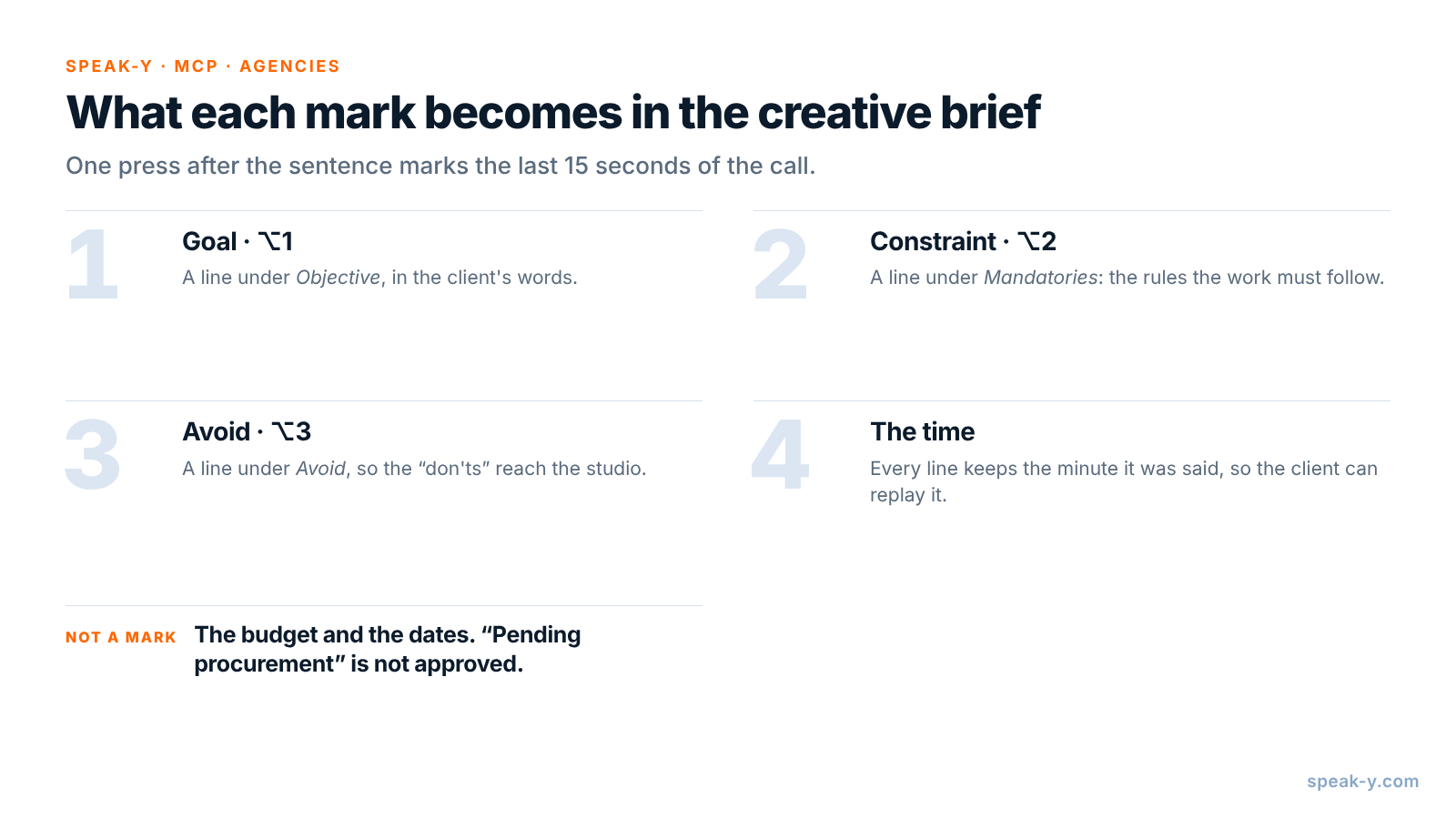
Open Settings → Notes. Under Note types, rename the default Mark the
moment to Goal and keep it on ⌥1. Click Add note type, type
Constraint into Type name, click Save, then Set hotkey and press
⌥2. Repeat for Avoid on ⌥3.
Pick a tag for the project as well, such as brief-halden-spring. The
kickoff, the brief review with the client and the creative presentation all
get the same tag, and that is what the assistant searches by.
During the kickoff: ask, let the client say it, press the key
Record the call as a meeting. No bot joins: Speak-Y records your microphone and the call's sound on your Mac, so it works the same in Zoom, Google Meet or Microsoft Teams. Tell the client you are recording, and why — see is it legal to record meetings for how consent rules differ.
Three habits make the marks useful:
- Press after the sentence. A mark covers the last 15 seconds of the call, so the goal just said lands inside it.
- Ask for the "don't" directly. "Is there anything you never want to see in this campaign?" gets the most useful answer of the call. Mark it on ⌥3.
- Ask who owns a constraint. "Is that brand or legal?" tells the creative team which rules they can argue with.
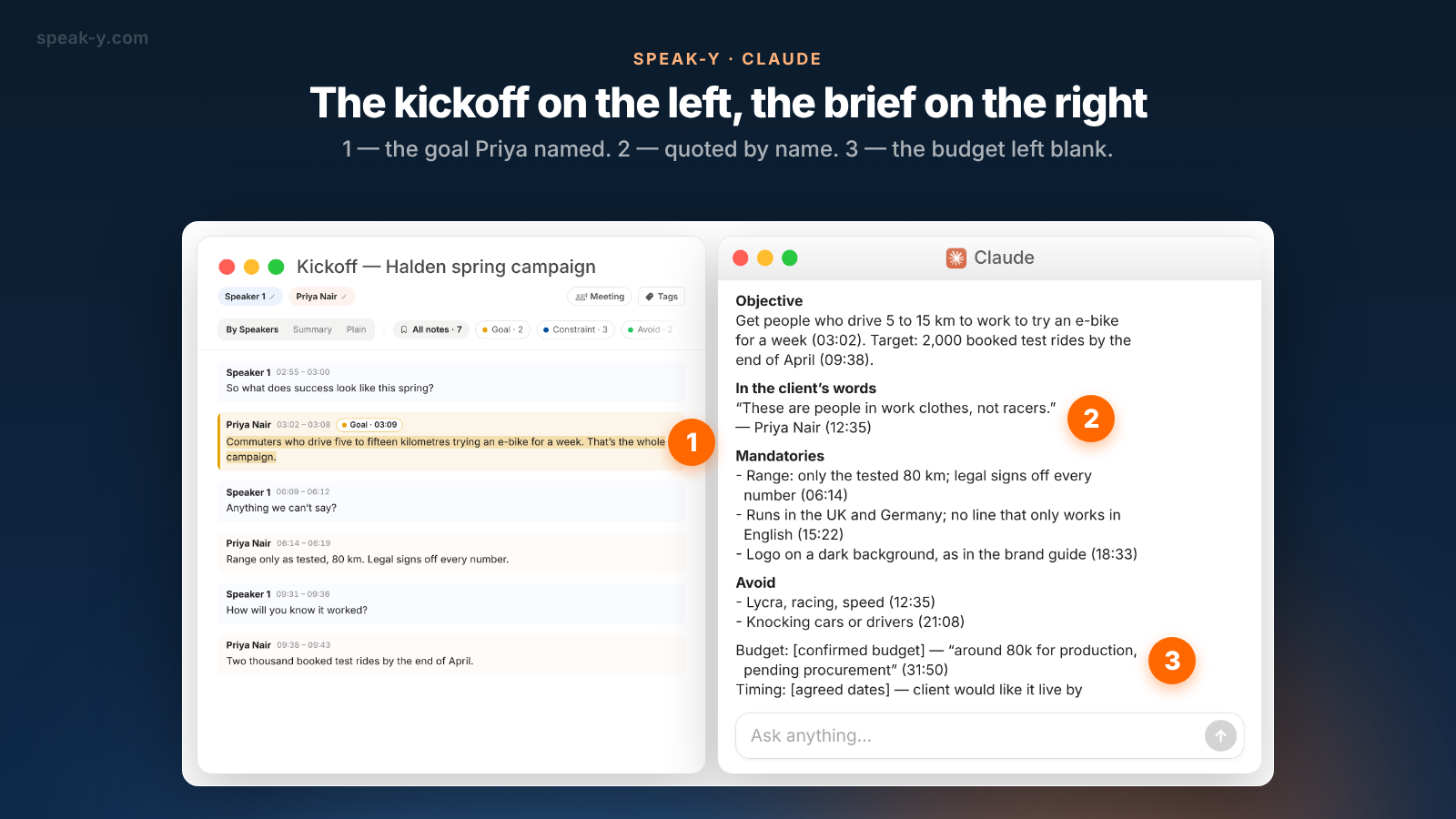
In the Halden kickoff, Priya Nair, Brand Director, names two goals (03:02, 09:38), three constraints (06:14, 15:22, 18:33) and two things to avoid (12:35, 21:08). At 31:50 she says production has "around 80k, pending procurement", and at 33:10 that she would like the campaign live by mid-March. Neither is marked: they are not the client's brief, they are the agency's next conversation.
After the call: name the speaker, add the tag
Two minutes in the recording's window. On By Speakers, click Speaker 2 and type "Priya Nair", so the draft quotes her by name, not by number. Add the tag. The chips above the transcript count the marks by type — All notes · 7, Goal · 2, Constraint · 3, Avoid · 2 — and a click on a chip shows only those replies.
Draft the brief with your assistant
Connect your assistant to the Speak-Y MCP server once: Connect AI assistant in the account menu at the bottom of the sidebar, or Settings → Integrations, then Connect next to Claude, ChatGPT or Cursor. The steps are in how to connect meeting notes to AI assistants. The server is free on every plan and reads the library on your Mac.
Then save standing instructions where your assistant keeps them — a project in Claude or ChatGPT — so that after each kickoff the request is one line:
Draft a creative brief from the kickoff recording.

Sections: Objective, In the client's words, Mandatories,
Avoid, Budget, Timing, Approvals, Proposition.

Rules:
- Objective, Mandatories and Avoid come only from my marks
  of those types, in the client's words.
- After every line, put the time of the reply it comes
  from, like (06:14).
- Quote the client once, verbatim, with the time.
- Budget and Timing: write "[confirmed budget]" and
  "[agreed dates]", then what was said, with the time.
- Proposition: leave it for the creative team.
- If a section was not discussed, say so.
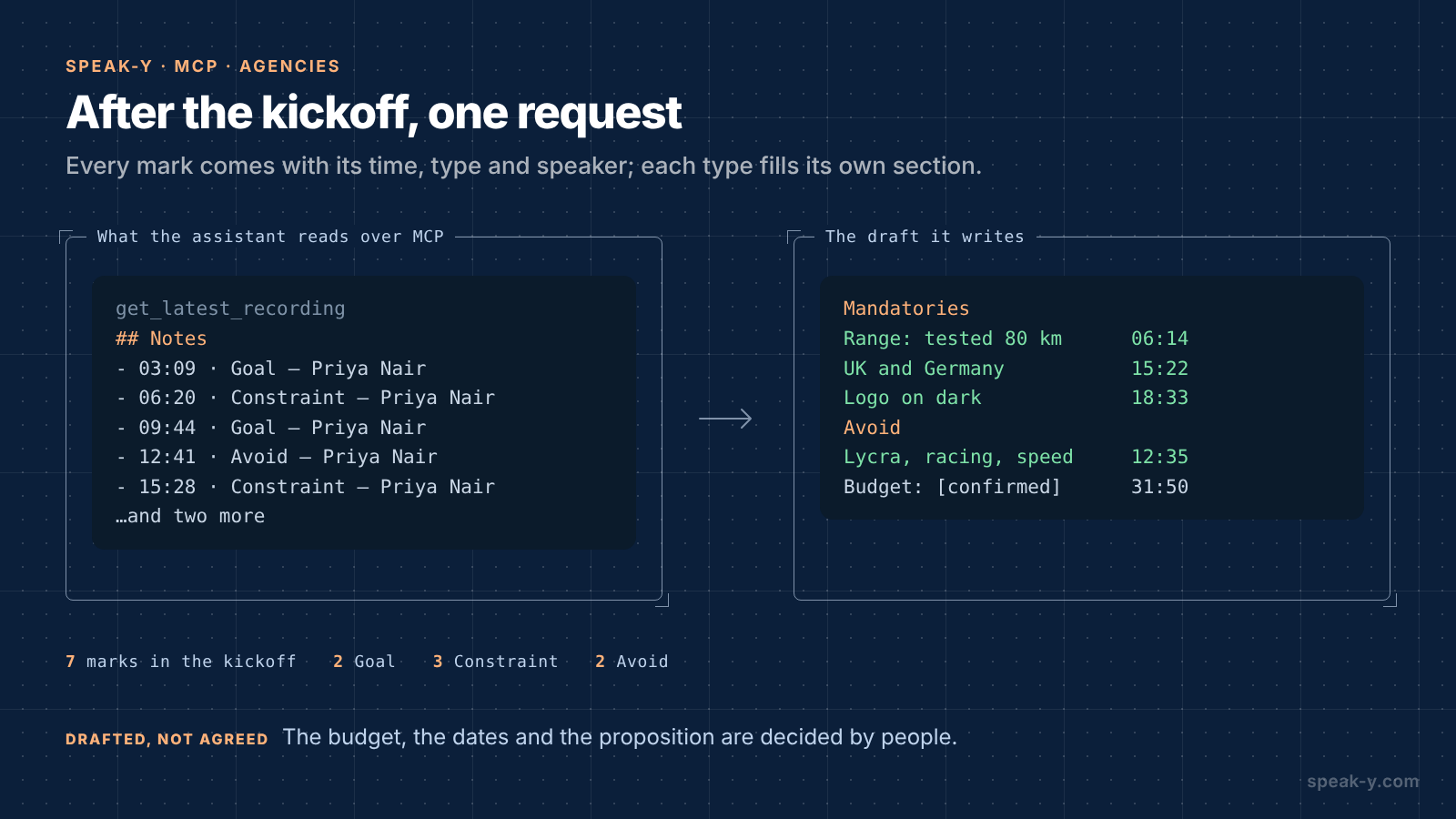
The assistant calls get_latest_recording, or search_recordings with the
project's tag. Alongside the transcript, Speak-Y hands it a Notes list —
each mark with its time, type, speaker and first words — so the draft comes
back sorted the way the client sorted it in the call. A mark's time is the
moment you pressed the key, a few seconds after the reply began; the draft
cites the start of the reply:
Objective
Get people who drive 5 to 15 km to work to try an e-bike
for a week (03:02). Target: 2,000 booked test rides by the
end of April (09:38).

In the client's words
"These are people in work clothes, not racers."
— Priya Nair (12:35)

Mandatories
- Range: only the tested 80 km; legal signs off every
  number (06:14)
- Runs in the UK and Germany; no line that only works in
  English (15:22)
- Logo on a dark background, as in the brand guide (18:33)

Avoid
- Lycra, racing, speed (12:35)
- Knocking cars or drivers (21:08)

Budget: [confirmed budget] — "around 80k for production,
  pending procurement" (31:50)
Timing: [agreed dates] — client would like it live by
  mid-March (33:10)
Approvals: not discussed in the call
Proposition: left for the creative team
Fill the gaps by voice
Nobody discussed approvals, and you know the client's process better than the transcript does. Put the cursor in the assistant's message field, hold Right ⌘ — the default Speak-Y hold hotkey — and say it:
Add approvals: Priya signs off the creative, Halden legal signs off every range and price claim, two rounds of feedback before production.
Release the key and the text is typed where the cursor is. Send it, and the assistant adds the section. More on dictating long passages in from voice notes to a structured draft.
What stays with the account manager
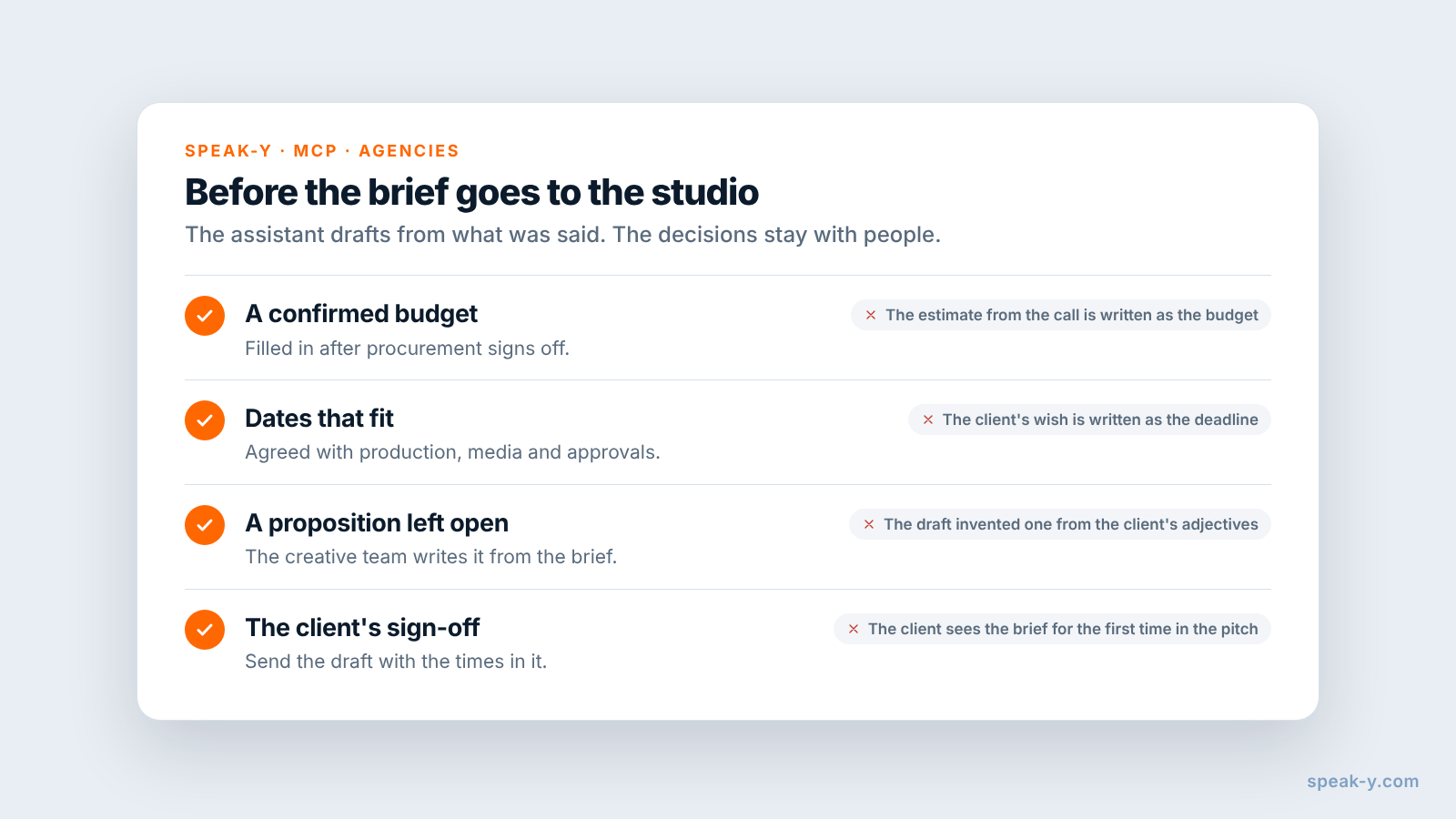
The assistant drafts from what was said. Four things are decisions:
- The budget. "Around 80k, pending procurement" is an estimate. A brief that states it as a budget commits the agency to a scope nobody has costed. Fill it in when procurement confirms it.
- The dates. "Live by mid-March" is a wish until production, media and the client's approvals fit into it. The account manager agrees the schedule and writes the dates.
- The proposition. The single thing the campaign says is the creative team's work. A draft that invents one from the client's adjectives closes the brief before the team has read it.
- The client's sign-off. Send the draft with the times in it. Priya can confirm a mandatory by replaying her own words on By Speakers, and a quote the assistant tidied is caught before it reaches the studio.
When does a brief template in your project tool fit better?
When the brief has to be approved, versioned and tracked against the job in one place. Agencies often keep the brief as a form in their project or resource-planning tool, with fields the finance and traffic teams rely on. The recording does not replace that form; it fills it faster and with the client's words. A practical split: draft from the recording in your assistant, check it with the client, then paste the approved text into the template. For the history of a client across many calls, see a client call knowledge base for agencies.
Limits and costs
- Length. Checked on speak-y.com on 3 November 2026: Free stops a meeting recording at 30 minutes, Pro ($10 a month) at 60, Pro+ ($15) and Max ($30) at four hours. The MCP server is free on every plan.
- Audio only. Mood boards and the brand guide shared on screen are not in the recording. Ask the client to say the rules out loud, or attach the files to the brief yourself.
- Mac for marks. Note types, marks and the MCP server are in the macOS app; the recordings stay in the library on your Mac.
The short version
Goal, Constraint and Avoid on ⌥1, ⌥2 and ⌥3, one tag per project. Ask for the "don'ts", let the client say it, press the key; then the speaker's name and the tag. One request gives a brief in the client's words with times; the budget, the dates and the proposition are written by people. To turn the same kind of call into a quote for the client, see a proposal from a discovery call.
FAQ
Can an AI assistant write a creative brief from a kickoff call?
It can write a draft. Connected to the Speak-Y MCP server, Claude, ChatGPT or Cursor reads the kickoff recording — the transcript by speaker, the AI summary and a Notes list of your marks with their times — and drafts the objective, the mandatories and what to avoid in the client's words. The account manager confirms the budget, the dates and the final brief.
How do I capture what the client does not want?
Give it its own note type in Speak-Y. Rename the default Mark the moment to Goal on ⌥1 and add Constraint on ⌥2 and Avoid on ⌥3 in Settings → Notes. A press marks the last 15 seconds of the call with that type, so the line about what the client does not want arrives in the draft as its own section, with the time it was said.
Should the assistant put the budget and deadlines into the brief?
No. A figure said in a kickoff is usually an estimate waiting for procurement, and a date is a wish until the account manager agrees the schedule. Ask the assistant to leave placeholders and quote what was said with the time; the account manager fills in the confirmed budget and dates.
Do I need the client's consent to record a kickoff call?
Tell them before you start and record only if they agree. Speak-Y does not join the call as a bot, so nobody announces the recording for you. Whether telling them is enough or you need explicit consent depends on where you both are.
Which Speak-Y plan do I need for kickoff calls?
The MCP server is free on every plan. Checked on speak-y.com on 3 November 2026: Free stops a meeting recording at 30 minutes, Pro ($10 a month) at 60, and Pro+ ($15) and Max ($30) at four hours. A kickoff that runs past an hour needs Pro+ or Max.