Interim Grant Report From Funder Calls, With Quotes and Times
An interim grant report is due in two weeks, and half of what it should say was said out loud: on the kickoff call the foundation asked for student stories, in June the program officer wanted retention up front and agreed to move money between budget lines "as long as the report explains why", and in September you promised the attendance breakdown by school. None of it is in the grant agreement, and most of it is in nobody's notes.
A shorter route: record your funder calls in Speak-Y, press a hotkey when the program officer says what they want to see or when someone makes a promise, and at report time ask your AI assistant to collect the marks over MCP for the grant tag and the reporting period. The list comes back with who said it, in their words, the call date and the time in the recording. The outcome numbers come from your program data, and the report and anything you promise the funder are written by people.
This guide follows the Speak-Y macOS app and its MCP server as checked on 15 November 2026, with one example: Maya Chen, grants manager at Harborview Youth Music, an after-school music program, writing the interim report for a two-year grant from the Lindqvist Family Foundation.
What do funder calls add to an interim report?
More than they used to. The Trust-Based Philanthropy Project lists simplifying paperwork among its grantmaking practices and suggests conversations — in person, by phone or video — in place of some applications and reports. Houston Endowment has described a pilot of oral reporting in which grantee interviews are recorded, transcribed and summarised. Report guides from Instrumentl and Submittable give the same two pieces of advice: read the grant agreement before you write, and keep a running log through the grant period instead of reconstructing it at the deadline (all searched on 15 November 2026).
What usually goes missing between the calls and the report:
- What the funder asked to see. "Our board will want retention up front" shapes the whole report, and it was said once, eight months ago.
- What the foundation agreed to. A budget change approved on a call still has to be explained in writing, in the foundation's own terms.
- What you promised. "We'll send the breakdown by school" is easy to forget and awkward to be reminded of.
- Who said it. The program officer, their evaluation lead and your program director make three different kinds of statements.
Before the first call: two note types and a grant tag
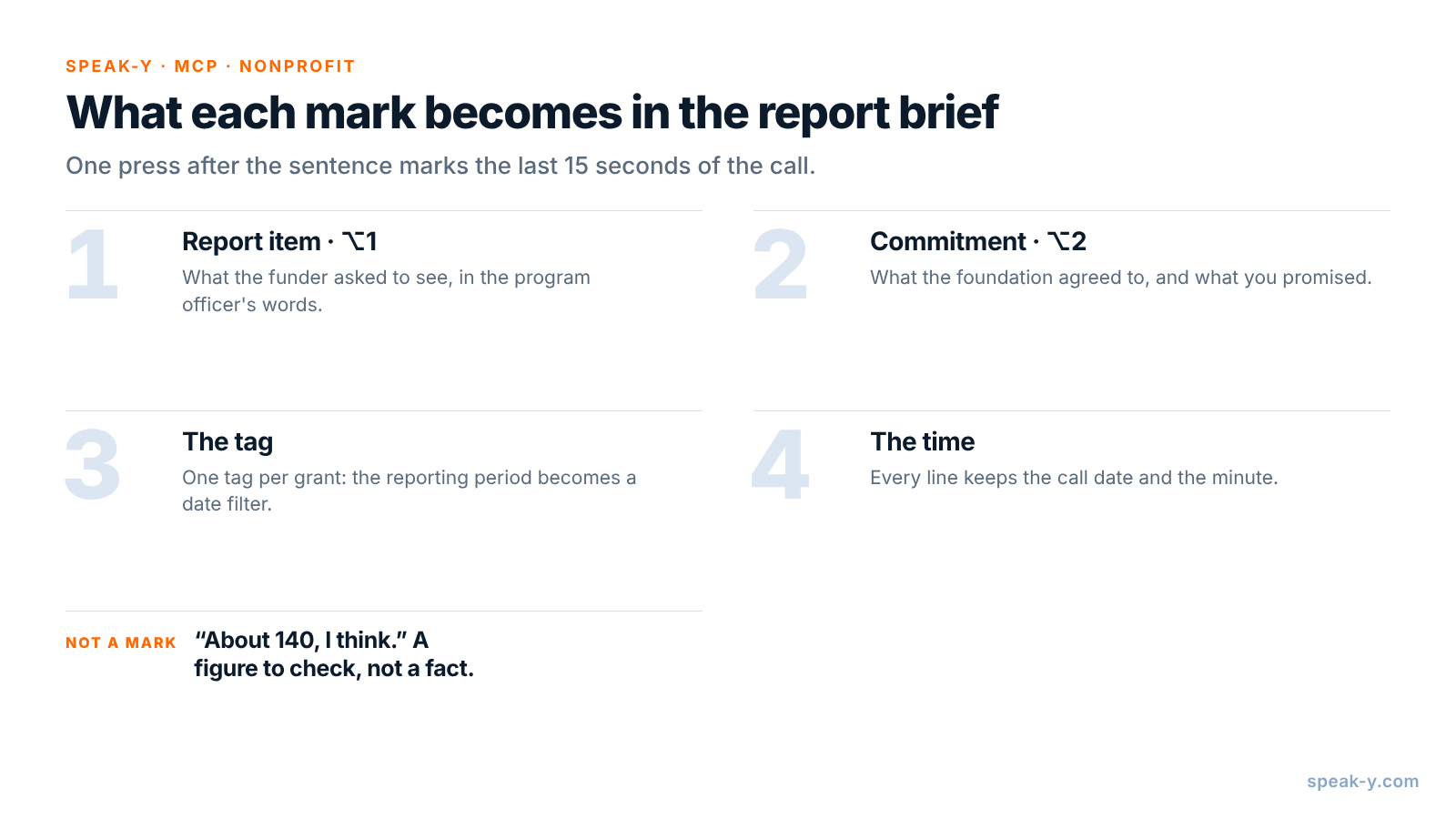
Open Settings → Notes. Under Note types, rename the default Mark the
moment to Report item and keep it on ⌥1. Click Add note type, type
Commitment into Type name, click Save, then Set hotkey and press
⌥2.
Pick one tag for the grant, such as lindqvist-2026, and put it on every call
with this funder from the kickoff on. At report time the assistant then reads
exactly the calls for this grant, and the reporting period becomes a date
filter, not a hunt through the recordings list.
During the call: let the program officer talk, press the key
Record the call as a meeting. No bot joins: Speak-Y records your microphone and the call's sound on your Mac, so it works the same in Zoom, Google Meet or Microsoft Teams. Ask at the start whether you may record, and say who will read the transcript and why — see is it legal to record meetings for how consent rules differ.
Three habits make the marks useful:
- Press after the sentence. A mark covers the last 15 seconds of the call, so the request just said lands inside it.
- Ask what the report should cover. "What will your board look for in the interim report?" gets the answer the report is organised around. Mark it on ⌥1.
- Repeat promises back. "So we send the breakdown by school by the end of October?" turns a vague yes into a sentence worth marking on ⌥2.
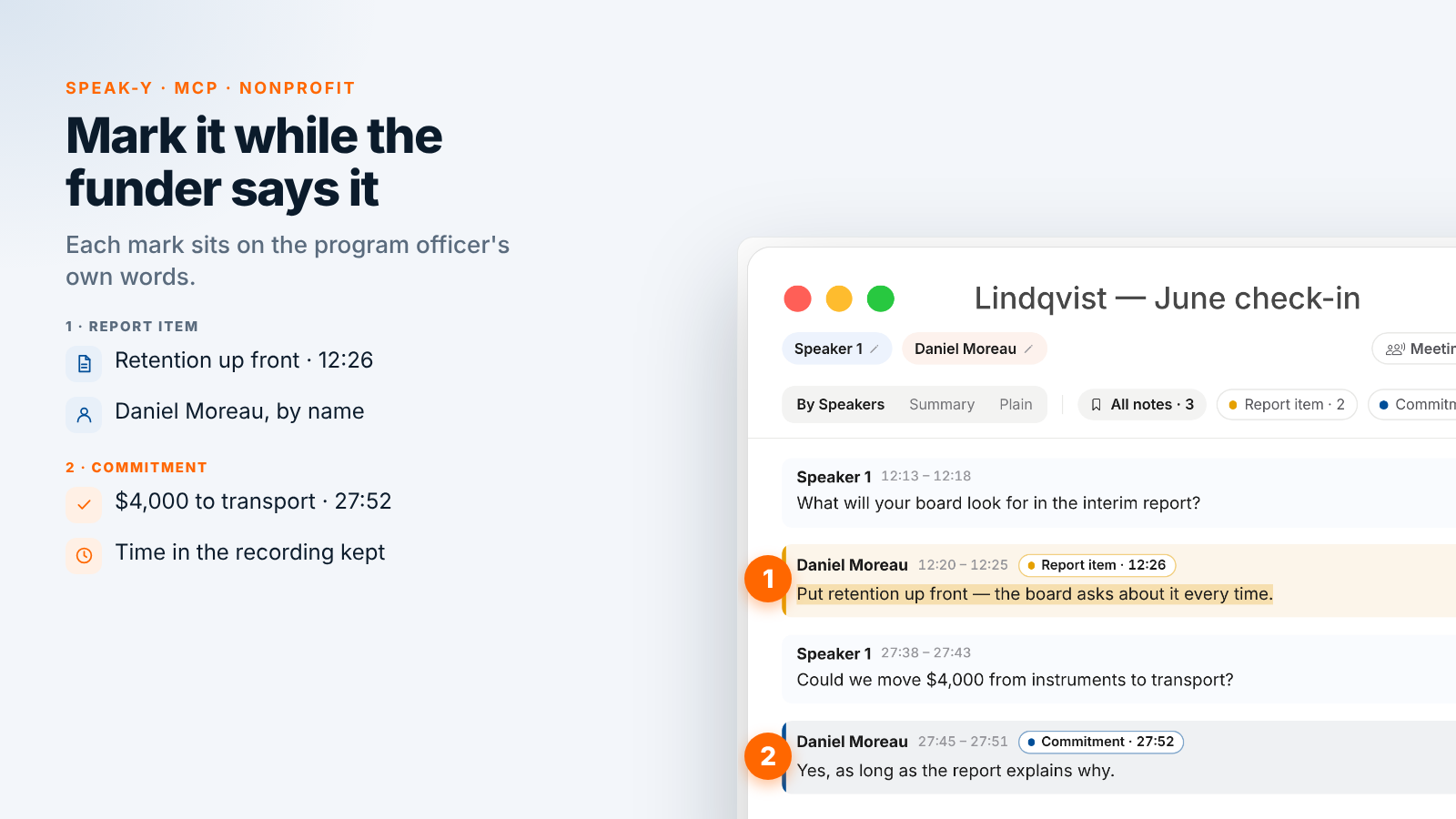
On the June check-in, Maya marks two report items and one commitment. At 12:20 program officer Daniel Moreau says, "Put retention up front — the board asks about it every time." At 27:45 he agrees to move $4,000 from instruments to transport "as long as the report explains why"; Maya marks it as a commitment. When Daniel asks how many students are enrolled, program director Sam Ortiz says, "About 140, I think." Maya does not mark it: it is a number to check, not a fact for the report.
After the call: name the speakers, add the tag
On By Speakers, click each speaker chip and type the name and role —
"Daniel Moreau, Lindqvist Foundation" — so the brief quotes people, not
numbers. Add the lindqvist-2026 tag. The chips above the transcript count
the marks by type, and a click on a chip shows only those replies.
Ask your assistant for the report brief
Connect your assistant to the Speak-Y MCP server once: Connect AI assistant in the account menu at the bottom of the sidebar, or Settings → Integrations, then Connect next to Claude, ChatGPT or Cursor. The steps are in how to connect meeting notes to AI assistants. The server is free on every plan and reads the library on your Mac.
Save standing instructions in a project in Claude or ChatGPT, so at report time the request is one line:
Collect the brief for the interim report to the
Lindqvist Foundation: calls tagged "lindqvist-2026",
from April 1 to October 31.

Rules:
- Use only my Report item and Commitment marks.
- For each item: who said it, their words, the call
  date and the time, like (Jun 18, 12:20).
- Group by: what the funder asked to see, what the
  foundation agreed to, what we promised.
- Where a number belongs, write [from program data].
  Quote any number said on a call only as a quote.
- Do not write report text and do not add promises.
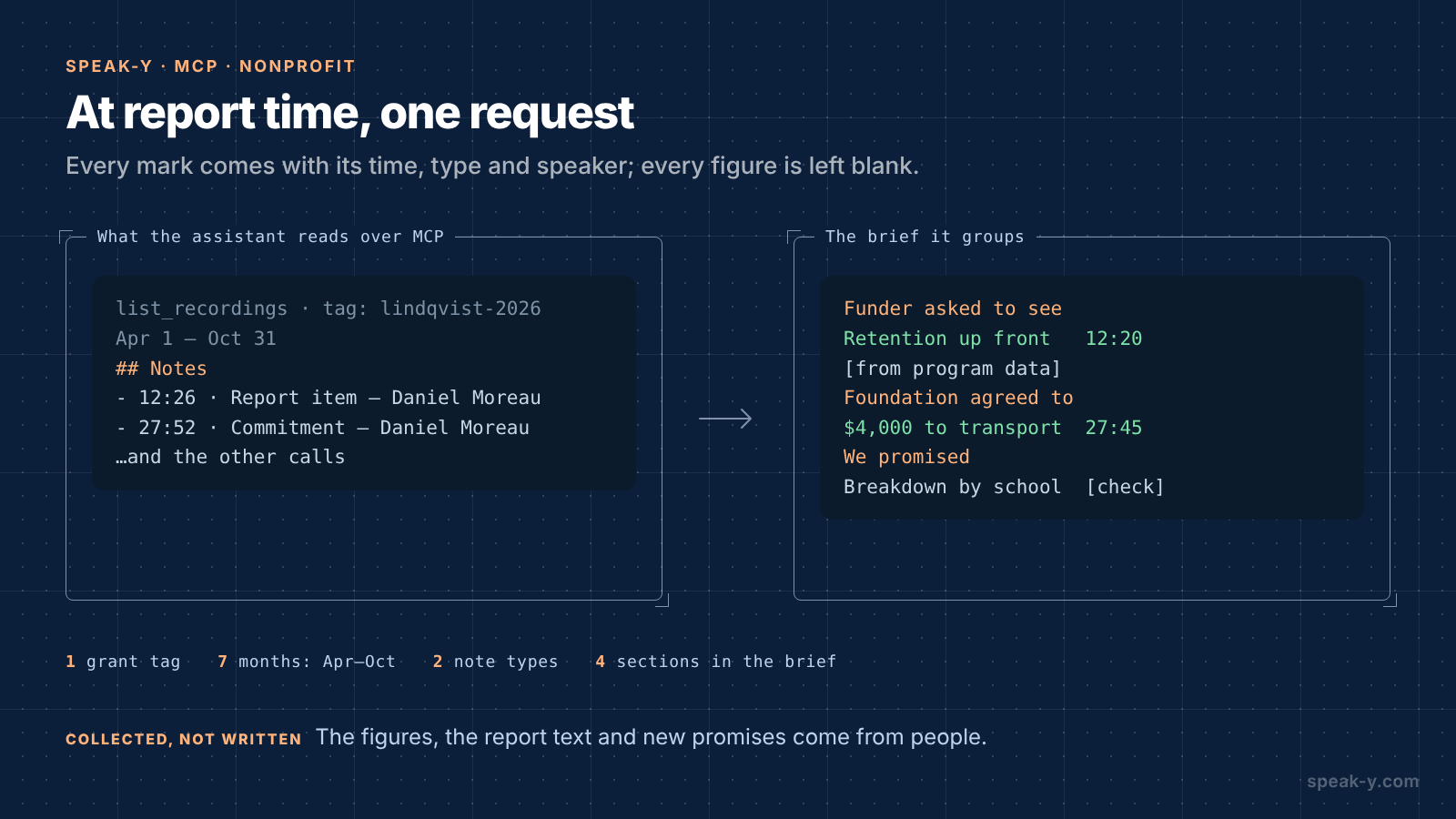
The assistant calls list_recordings with the tag and the dates and reads
each call. Alongside the transcript, Speak-Y hands it a Notes list — each
mark with its time, type, speaker and first words. A mark's time is the moment
you pressed the key, a few seconds after the reply began; the brief cites the
start of the reply:
What the funder asked to see
- Daniel Moreau: "Put retention up front — the board
  asks about it every time." (Jun 18, 12:20)
  Retention, April–October: [from program data]
- Priya Nair, evaluation lead: "Two or three student
  stories, with consent, not a highlight reel."
  (Apr 9, 33:10)

What the foundation agreed to
- Daniel Moreau: $4,000 from instruments to
  transport, "as long as the report explains why."
  (Jun 18, 27:45)

What we promised
- Maya Chen: attendance breakdown by school by the
  end of October. (Sep 24, 18:05) Sent? [check]

Numbers said on calls — check before use
- Sam Ortiz: "About 140, I think." (Jun 18, 21:30)
If you already keep the program's calls in a shared channel, the setup from donor call notes for nonprofit teams works with the same tag: the program team reads the calls, and the person writing the report asks the assistant.
What stays with the grants team
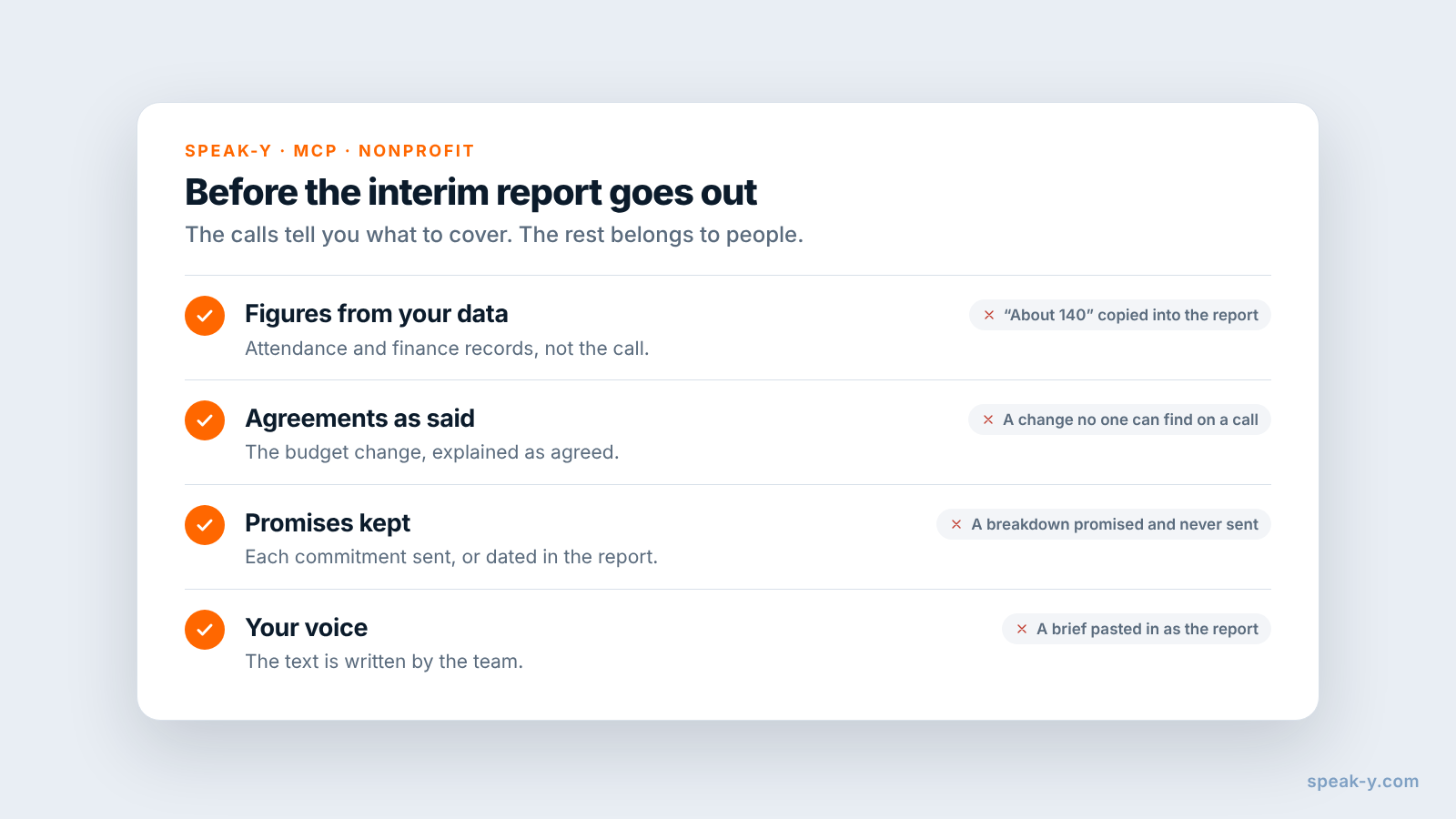
The brief knows what was said on the calls. Four things it cannot do:
- The numbers. Enrollment, retention, outcomes and spending come from your attendance records and finance system. "About 140" on a call is a reason to check, not a figure to report.
- The report text. The funder reads your voice and your judgement about what worked. The brief tells you what to cover and whose words to quote.
- New promises. The assistant lists what was already promised. What the report commits to next — dates, targets, a renewal ask — is decided by your executive director, not drafted by a model.
- Open commitments. If the brief shows a promise with no follow-up, send it before the report, or say in the report when it will come.
Limits and costs
- Length. Checked on speak-y.com on 15 November 2026: Free stops a meeting recording at 30 minutes, Pro ($10 a month) at one hour, Pro+ ($15) and Max ($30) at four hours. A 45-minute check-in needs Pro or higher. The MCP server is free on every plan.
- Audio only. A budget table or dashboard shared on screen is not in the recording. Say the line and the amount out loud, so they land in the transcript.
- Mac for marks. Note types, marks and the MCP server are in the macOS app; the recordings stay in the library on your Mac.
- Cloud assistants. Claude or ChatGPT receive the transcripts they read. If calls touch participants' personal details or your grant agreement limits what you share, check that the assistant's terms fit before you ask.
The short version
Report item on ⌥1, Commitment on ⌥2, one tag per grant. Ask what the report should cover, repeat promises back, press the key; then speaker names and the tag. At report time one request gives what the funder asked for, what was agreed and what you promised, with quotes and times; the figures, the text and the next commitments are yours. To keep the same discipline for promises across all your meetings, see action items that actually get done.
FAQ
Can an AI assistant draft an interim grant report from funder calls?
It can draft the brief the report is written from. Connected to the Speak-Y MCP server, Claude, ChatGPT or Cursor reads the calls with your grant tag for the reporting period — the transcript by speaker and a Notes list of your marks with their times — and lists what the program officer asked to see and what each side promised, with quotes and times. The numbers and the report itself stay with your team.
How do I mark report items during a call with a funder?
Create note types in Speak-Y under Settings → Notes: rename the default Mark the moment to Report item on ⌥1 and add Commitment on ⌥2. A press marks the last 15 seconds of the call with that type, so the program officer's request lands in the assistant's list sorted, with the speaker and the time.
Should the assistant fill in the outcome numbers for the report?
No. A call holds what people said about the numbers, not the numbers. Ask the assistant to leave a placeholder wherever a figure belongs and to quote any number said on a call only as a quote. Attendance, outcomes and spending come from your program data and your finance records.
Do I need consent to record a call with a program officer?
Ask at the start and record only if they agree. Speak-Y does not join the call as a bot, so nobody announces the recording for you. Say who will read the transcript and that you use it to write the report; whether telling them is enough or you need explicit consent depends on where you both are.
Which Speak-Y plan do I need for 45-minute funder calls?
Pro or higher. Checked on speak-y.com on 15 November 2026: Free stops a meeting recording at 30 minutes, Pro ($10 a month) at one hour, and Pro+ ($15) and Max ($30) at four hours. The MCP server is free on every plan.