Performance Review From Six Months of 1:1s, Not the Last Two Weeks
A fair half-year review needs the whole half year, and your 1:1s already hold it. If every 1:1 is recorded in Speak-Y and carries the person's tag, an AI assistant connected over MCP can read all of them — say 24 meetings from April to September — and list what the person raised, what the two of you agreed, what happened to each agreement, and the date behind every line. That list is the evidence. The judgement, the rating and the words of the review stay with you.
This guide follows one case: a manager writing the review of Anna, an engineer with a weekly 30-minute 1:1, for April 1 – September 30, 2026. It assumes the 1:1 habit from one-on-one meeting notes and shows what changes when you read six months at once. Product details were checked against the macOS app and vendors' documentation on October 17, 2026.
Why do reviews drift toward the last two weeks?
Because memory is weighted by date. The incident Anna handled in September is vivid; the migration she proposed in April is not, unless something reminds you. Performance-management research calls this recency bias, and the usual advice — keep notes all year — fails for the same reason 1:1 notes do: nobody writes them down consistently.
A recorded 1:1 is the note you did not have to write. Each one in Speak-Y has a transcript by speaker, an AI summary that opens with action items, and the moments you marked with ⌥1 when you agreed on something. Twenty-four of them are too many to re-read before a review. They are not too many for an assistant, as long as it reads all of them and not just the newest.
What has to be in place before review season?
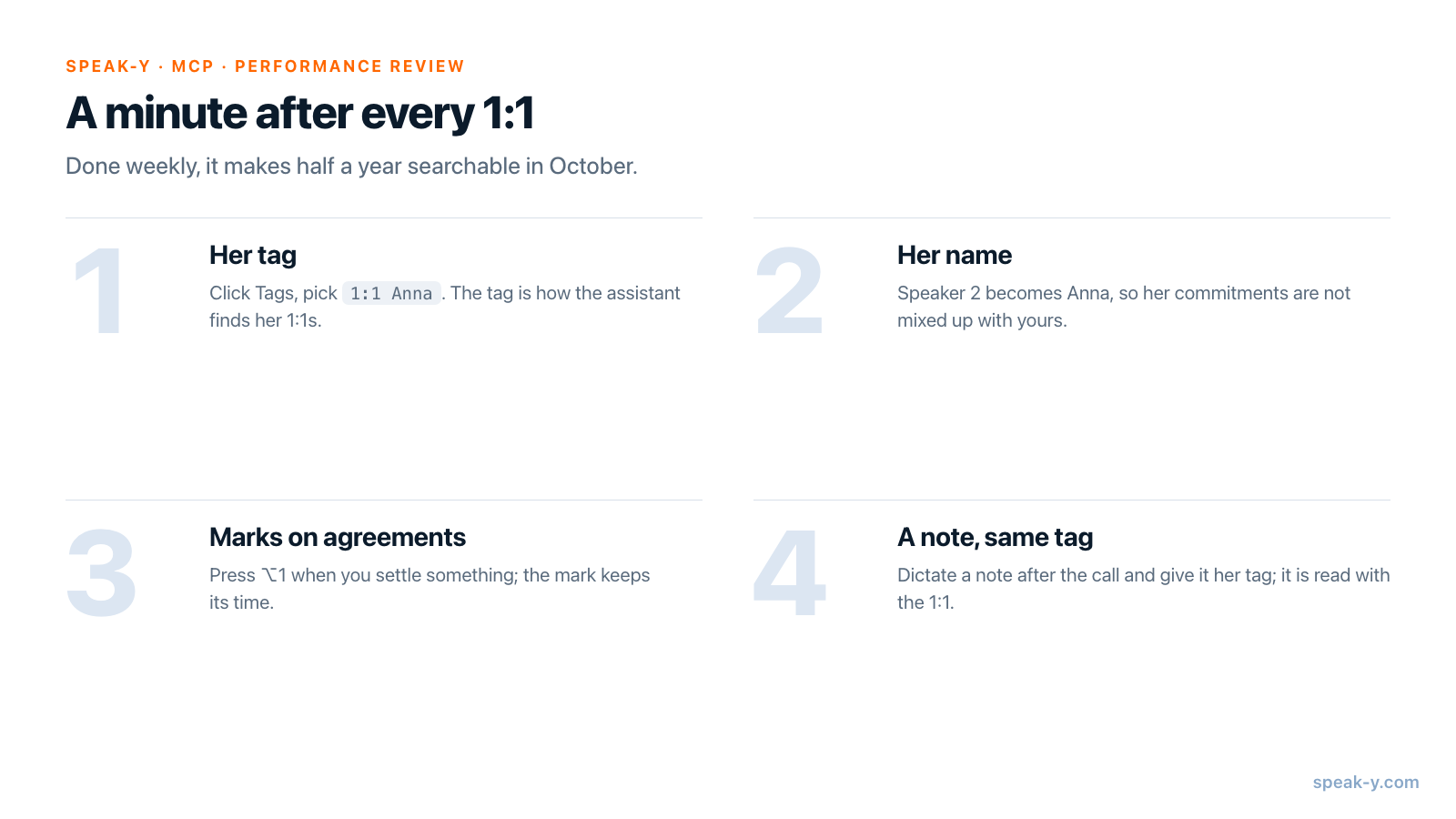
The work is done during the half year, a minute per 1:1. Three habits decide whether the evidence can be collected later:
- One tag per person, put on right after each 1:1: click Tags in the recording and pick 1:1 Anna. The tag is how the assistant finds her 1:1s; a call titled "Meeting" that nobody tagged is invisible to it.
- Her name on her speaker. Click the Speaker 2 chip and type
Anna. Without it, "I'll take the billing migration" belongs to nobody in particular, and the assistant cannot tell her commitments from yours. - Marks on agreements. Press ⌥1 when you settle something. A mark keeps its time, and the assistant reads it with the transcript, so agreements are easy to find among half an hour of talk.
A note to yourself works too: dictate it after the call and give the dictation the same tag. It sits next to the 1:1 and is read along with it.
How do you ask for evidence instead of a verdict?
Connect Claude, ChatGPT, Cursor or another MCP client once: Connect on the Integrations page (account menu → Connect AI assistant), also reachable from Settings → Integrations. Connecting meeting notes to AI assistants walks through it. The Speak-Y MCP server is included in every plan, Free too, and reads the recordings locally on your Mac.
Then ask for facts with dates, and say what not to do:
Collect evidence for Anna's half-year review from my 1:1s
tagged "1:1 Anna", April 1 to September 30, 2026.
Read every recording in that range, not only the newest.
List: topics she raised (with how often), agreements and what
happened to each, promises I made and whether I came back to them.
Put the 1:1 date after every line. No ratings, no adjectives
about her personality, no comparison with anyone.
Two details in that request do real work:
- The period.
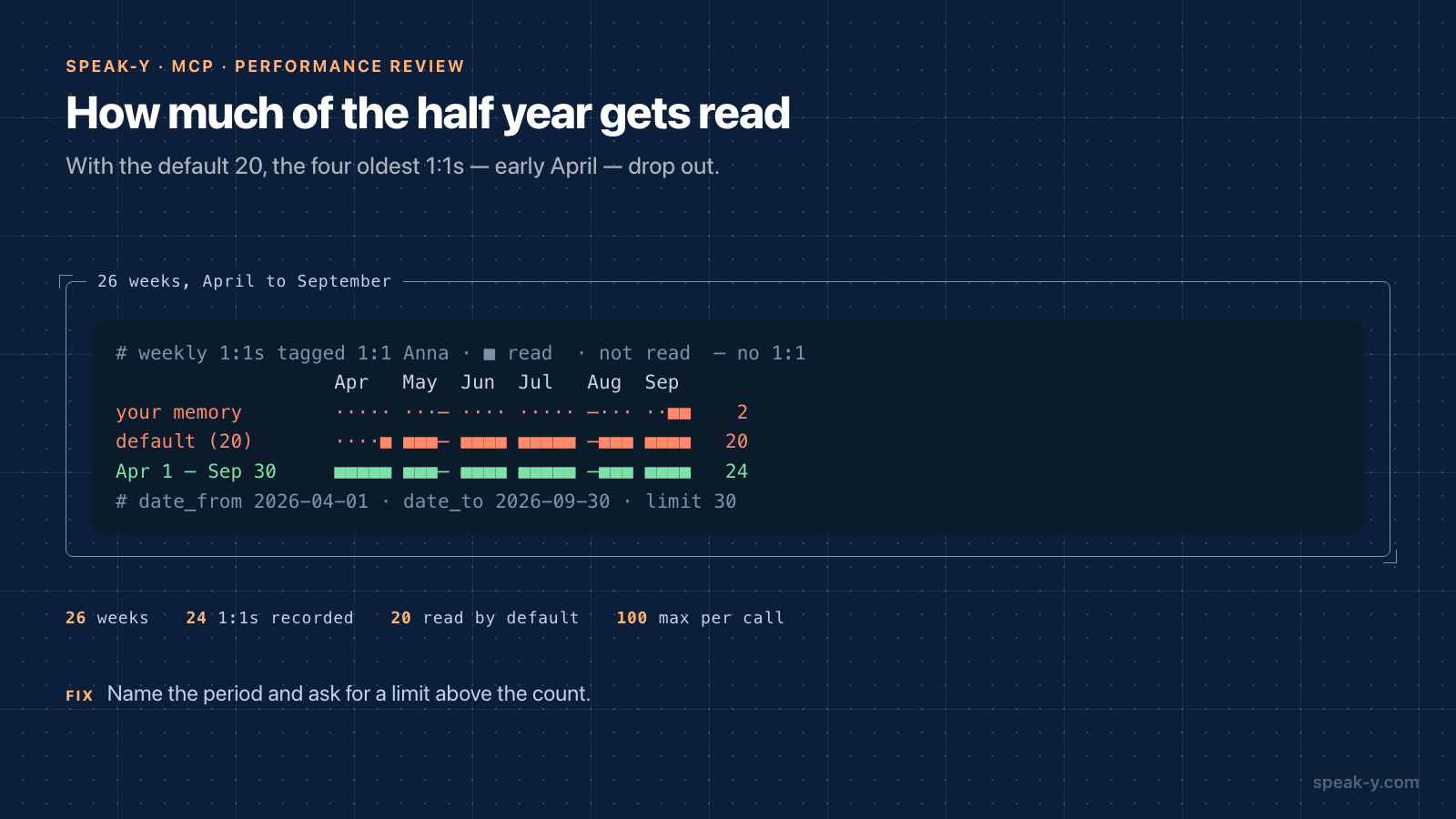
list_recordingsreturns the 20 newest recordings by default. Twenty-four weekly 1:1s minus the default leaves out the four oldest — all of early April, including the first time Anna raised on-call load. That is recency bias again, now inside a tool call. With the period named, the assistant passesdate_fromanddate_toand alimitabove the count; the tool takes up to 100 per call. - Summaries first. Twenty-four half-hour transcripts are a lot of text for
one conversation. Ask the assistant to read each 1:1's summary and marks
first and open the full transcript only for lines it needs to quote.
get_transcripthas asummaryformat for exactly that.
What does the evidence list look like?
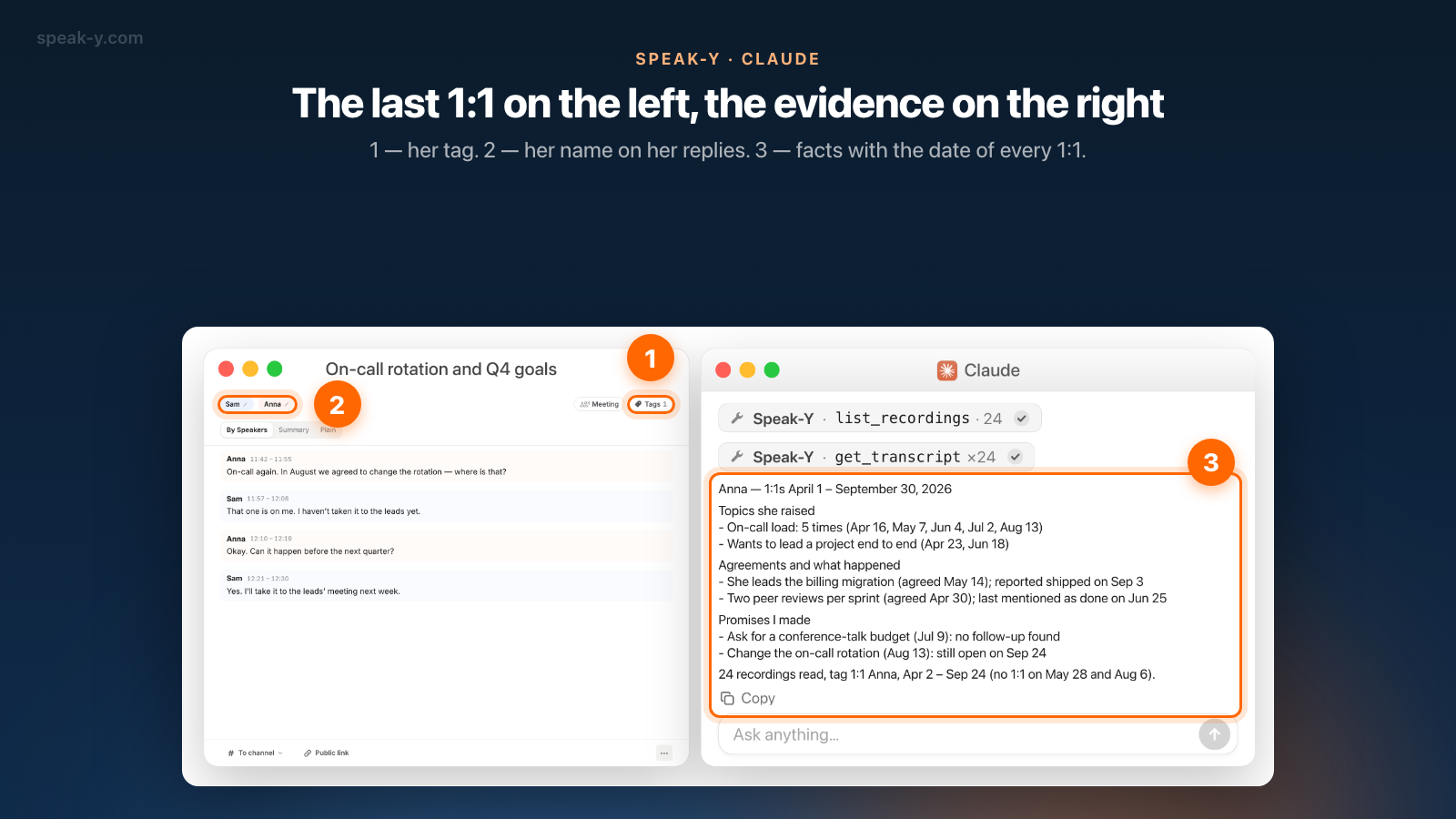
For Anna, the answer looked like this:
Anna — 1:1s April 1 – September 30, 2026
Topics she raised
- On-call load: 5 times (Apr 16, May 7, Jun 4, Jul 2, Aug 13)
- Wants to lead a project end to end (Apr 23, Jun 18)
Agreements and what happened
- She leads the billing migration (agreed May 14);
  reported shipped on Sep 3
- Two peer reviews per sprint (agreed Apr 30);
  last mentioned as done on Jun 25
Promises I made
- Ask for a conference-talk budget (Jul 9): no follow-up found
- Change the on-call rotation (Aug 13): still open on Sep 24
24 recordings read, tag 1:1 Anna, Apr 2 – Sep 24
(no 1:1 on May 28 and Aug 6).
Read it as a map, not a draft. Every line points to a 1:1 you can open, and the last line tells you what the list stands on. Two things in it are about you, not Anna: two of your own promises went nowhere. A review that mentions on-call load five times and leaves out that the rotation change was yours to make would not be fair.
"Reported shipped on Sep 3" means Anna said so in a 1:1. Speak-Y does not track whether an action item is done; "what happened" is the assistant's reading of later 1:1s. Before a line goes into the review, open that 1:1 and read the reply on the By Speakers tab or the Summary.
What should the assistant not do in a review?
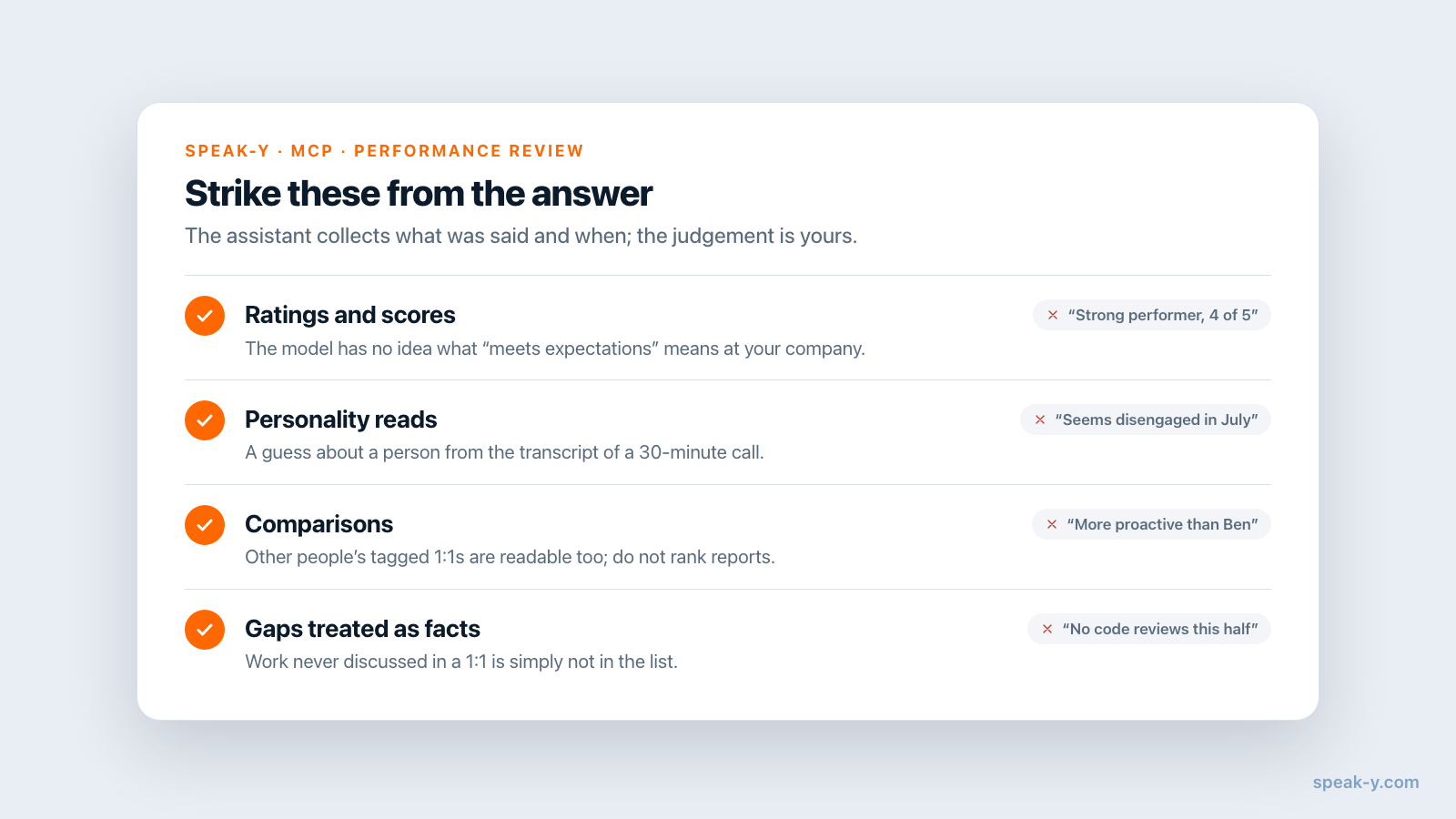
Anything that turns evidence into judgement. The request above rules it out, and it is worth checking the answer for it anyway:
- Ratings and scores. A model that read 24 summaries has no idea what "meets expectations" means at your company.
- Personality reads. "Seems disengaged in July" is a guess about a person from a transcript of a 30-minute call. Strike it.
- Comparisons. The assistant can read other people's 1:1s too if they are tagged; do not let it rank one report against another.
- Gaps treated as facts. Work that was never discussed in a 1:1 is not in the list. Code review, incident channels and peer feedback live elsewhere.
There is a regulatory reason as well. The EU AI Act lists AI systems intended to "monitor and evaluate the performance and behaviour" of workers as high-risk (Annex III, point 4(b)); after the 2026 Digital Omnibus those obligations apply from December 2, 2027. Whether a particular setup falls under it is for your legal team. The safe pattern is the same either way: the assistant gathers, a person evaluates.
Who sees the 1:1s, and should Anna know?
1:1 recordings are personal in Speak-Y: only you see them unless you press To channel and publish one to a team channel, and a 1:1 has no business in one. The MCP server reads them on your Mac without uploading anything for it to do so. What the assistant reads, though, becomes part of your conversation with its vendor's model — the same decision as for any AI writing tool, and for a review it is personal data about an employee. Local vs cloud MCP shows where exactly the text goes.
Anna should know. Speak-Y records without a bot joining the call, so nobody is notified automatically; say at the start of the cycle that 1:1s are recorded for both of your notes, and check your company policy and the law on recording meetings where you work. The fairest use of the evidence list is to give Anna a copy before the review conversation: she will see the same dates and can add what the 1:1s missed.
When does a performance-management tool fit better?
When the review itself lives in one. Lattice, for example, announced evidence-based review drafts on July 15, 2026, built from 1:1s, feedback, goals and updates kept in Lattice, and since June 2026 its AI agent can join 1:1s on Zoom, Google Meet and Microsoft Teams to take notes, at no extra cost for Lattice customers. If your company runs reviews there, that route keeps the evidence next to the form, the calibration and the HR process.
The route in this guide suits a manager whose 1:1s are recorded on a Mac without a bot, whose company has no such tool or uses a different one, and who wants the evidence in their own format before writing anywhere. The same habit pays off weekly as well — a brief before the next 1:1 comes from the same tagged recordings — and the agreements that matter to the whole team belong in a shared channel on the Speak-Y Teams side, not in a 1:1.
FAQ
Can an AI assistant help me write a performance review from my 1:1 notes?
Yes, as a researcher rather than a judge. If your 1:1s are recorded in Speak-Y with the person's tag and an MCP client such as Claude, ChatGPT or Cursor is connected, the assistant can read every 1:1 in the review period and list topics, agreements and what happened to them, each with the date of the meeting. The rating and the wording of the review stay with you.
Why did the assistant only read part of the half year?
Because list_recordings returns the 20 newest recordings unless asked for more. Weekly 1:1s over six months are 24 to 26 recordings, so the oldest weeks drop out silently. Name the period in your request (from April 1 to September 30) and ask for a limit above the count; the tool accepts up to 100 per call.
Should the employee know that our 1:1s are recorded and used for the review?
Yes. Speak-Y records without a bot, so nobody in the call is notified automatically; tell the person at the start of the cycle that 1:1s are recorded for both of your notes, and check your company's policy and local law. Sharing the evidence list with them before the review conversation is the fairest use of it.
Who can see my 1:1 recordings in Speak-Y?
Only you, unless you press To channel and publish one to a team channel; 1:1s should stay personal. The assistant reads recordings locally from your Mac, but its model runs in the vendor's cloud, so what it reads becomes part of that conversation.
Do I need a paid Speak-Y plan for this?
Not for the assistant: the MCP server is included in every plan, Free too. Recording is the limit: as of October 17, 2026, Free records meetings up to 30 minutes and 2 hours a month, Pro up to 60 minutes and 10 hours a month. Four weekly 30-minute 1:1s come to about 9 hours a month, which fits Pro.