Intake Call to Job Description: Draft It in the Hiring Manager's Words
An intake call gives a recruiter the hiring manager's real requirements for about thirty minutes, and then the job description is written from memory. By the time it reaches the careers page, "Airflow or Dagster in production, not a course project" has become "experience with modern data tooling", and a requirement the manager called non-negotiable sits in the same list as one they said they could teach.
A shorter route: record the intake in Speak-Y, press a hotkey when the manager names a must-have, a nice-to-have or a reason to join, and after the call ask your AI assistant to draft the job description from the recording over MCP. The draft keeps the manager's wording and puts the time of each requirement next to it, so the manager can check it in minutes. The salary range and the final text stay with people: the assistant leaves the range blank on purpose.
This guide follows the Speak-Y macOS app and its MCP server as checked on 26 October 2026, with one example: an intake for a Senior Data Engineer at a company called Fernway.
What gets lost between the intake call and the job post?
SHRM's advice to recruiters (checked on 26 October 2026) is to narrow a hiring manager's wish list to the three or four things that matter most, and to ask for minimum requirements, deal breakers and soft skills. The intake call is where that sorting happens. What usually goes missing afterwards:
- The priority. Must-haves and nice-to-haves end up in one bulleted list, and the posting filters out people the manager would have interviewed.
- The wording. Concrete phrases turn into generic ones that every other posting for the role also uses.
- The reason to join. The manager spends two minutes on why the job is interesting, and it rarely survives into the first paragraph.
- What was not decided. A salary figure said "pending finance" gets written down as if it were approved.
Before the call: three note types and a tag
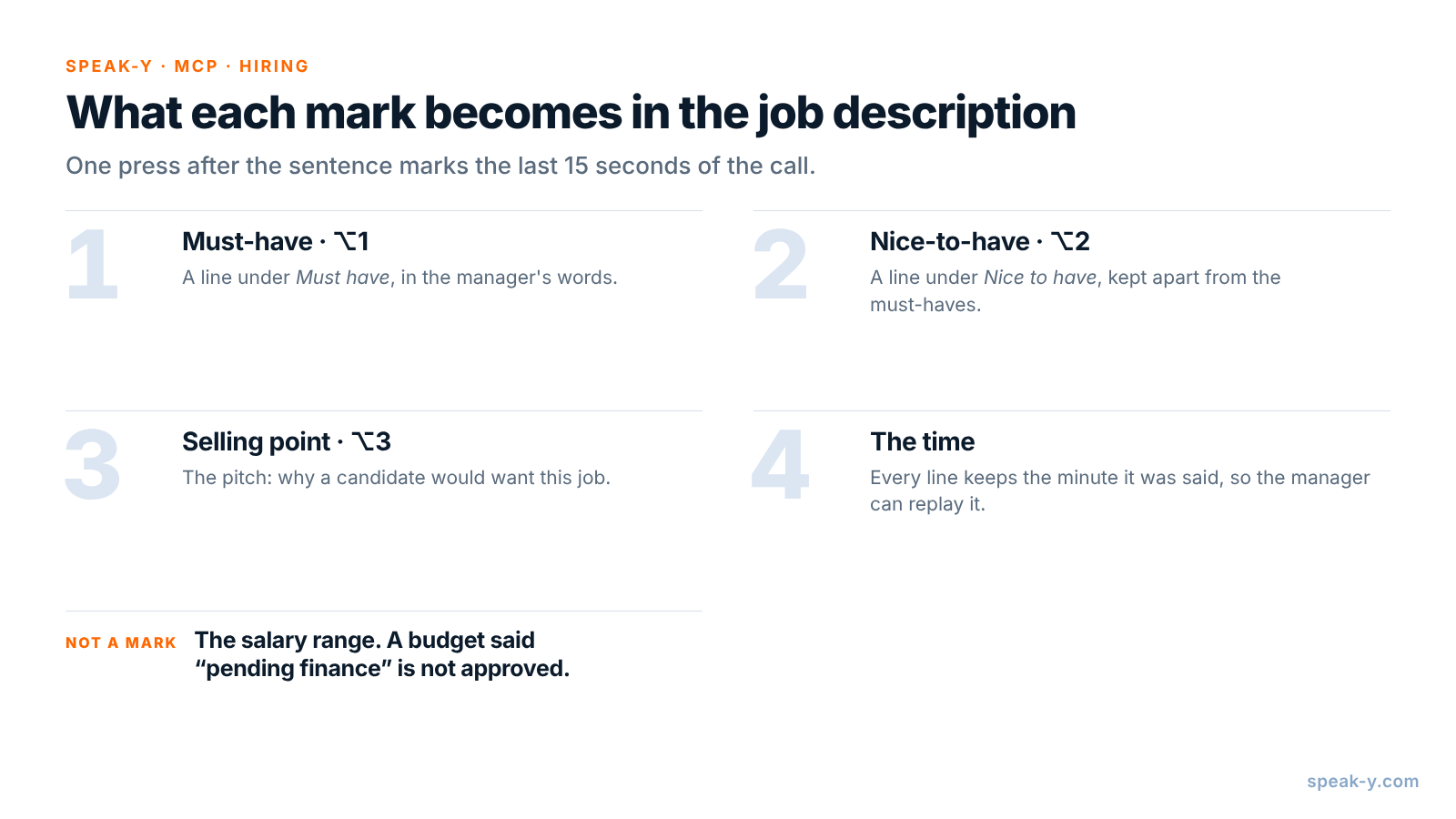
Open Settings → Notes. Under Note types, rename the default Mark the
moment to Must-have and keep it on ⌥1. Click Add note type, type
Nice-to-have into Type name, click Save, then Set hotkey and
press ⌥2. Repeat for Selling point on ⌥3.
Pick a tag for the role as well, such as req-senior-data-engineer. The
intake, the calibration call after the first candidates and the debriefs all
get the same tag, and that is what the assistant searches by.
During the intake: let the manager say it, then press the key
Record the call as a meeting. No bot joins: Speak-Y records your microphone and the call's sound on your Mac, so it works the same in Zoom, Google Meet or Microsoft Teams. Tell the hiring manager you are recording, and why — see is it legal to record meetings for how consent rules differ.
Three habits make the marks useful:
- Press after the sentence. A mark covers the last 15 seconds of the call, so the requirement just said lands inside it.
- Ask "must or nice?" out loud. When the manager lists five tools, ask which one is a deal breaker. The answer is the sentence to mark.
- Mark the pitch. "They will design the new platform" is the line a candidate reads first. Selling point on ⌥3 keeps it.
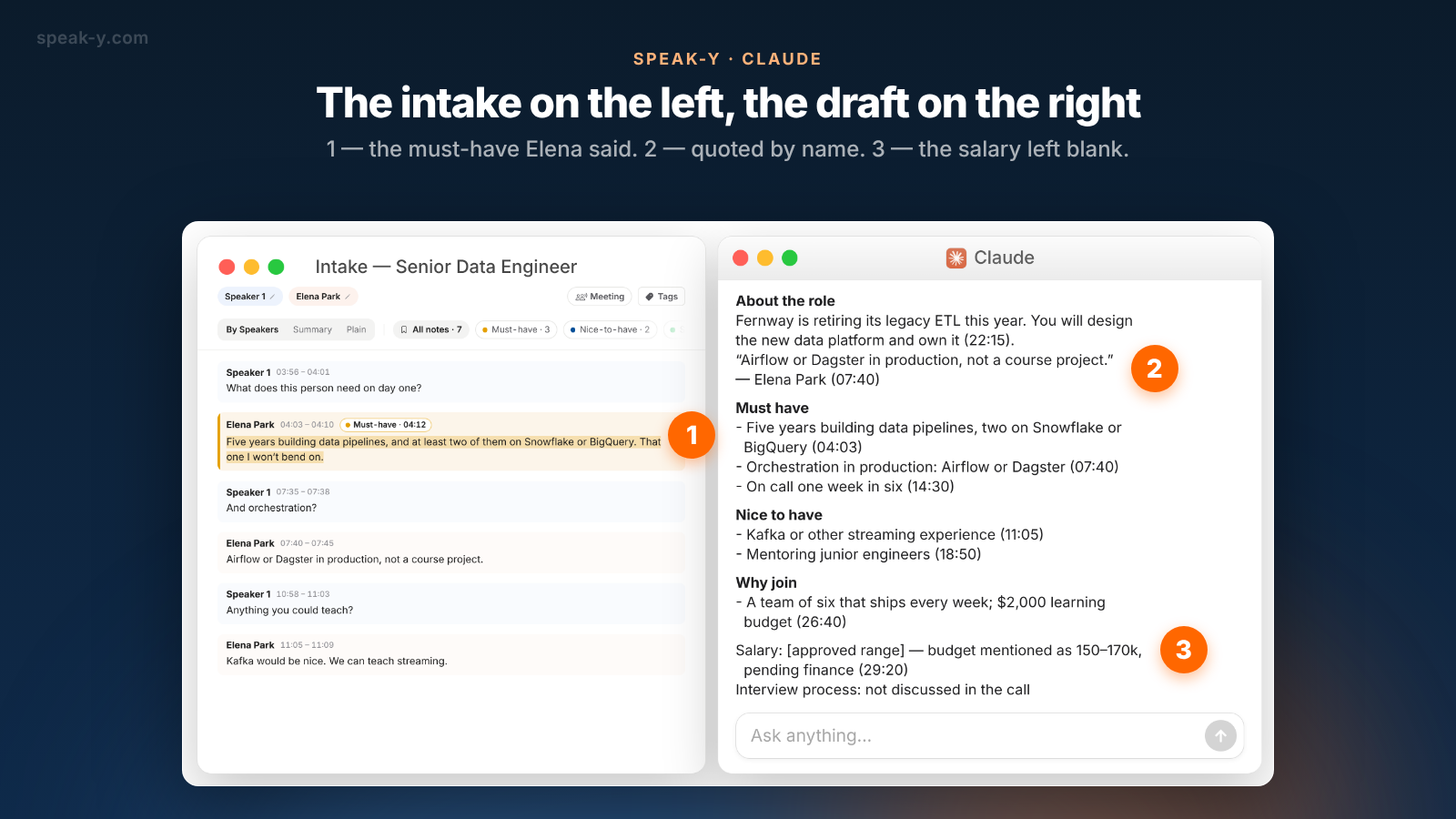
In the Fernway intake, Elena Park, Head of Data, names three must-haves (04:03, 07:40, 14:30), two nice-to-haves (11:05, 18:50) and two selling points (22:15, 26:40). At 29:20 she says the budget is "around 150 to 170, pending finance". That one is not marked: it is not a requirement.
After the call: name the speaker, add the tag
Two minutes in the recording's window. On By Speakers, click Speaker 2 and type "Elena Park", so the draft quotes her by name, not by number. Add the tag. The chips above the transcript count the marks by type — All notes · 7, Must-have · 3, Nice-to-have · 2, Selling point · 2 — and a click on a chip shows only those replies.
Draft the job description with your assistant
Connect your assistant to the Speak-Y MCP server once: Connect AI assistant in the account menu at the bottom of the sidebar, or Settings → Integrations, then Connect next to Claude, ChatGPT or Cursor. The steps are in how to connect meeting notes to AI assistants. The server is free on every plan and reads the library on your Mac.
Then save standing instructions where your assistant keeps them — a project in Claude or ChatGPT — so that after each intake the request is one line:
Draft a job description from the intake recording.

Sections: About the role, Must have, Nice to have, Why join,
Salary, Interview process.

Rules:
- Must have and Nice to have come only from my marks of
  those types, in the hiring manager's words.
- After every requirement, put the time of the reply it
  comes from, like (07:40).
- Quote the manager once, verbatim, with the time.
- Salary: do not write a range. Write "[approved range]"
  and what was said about budget, with the time.
- If a section was not discussed, say so.
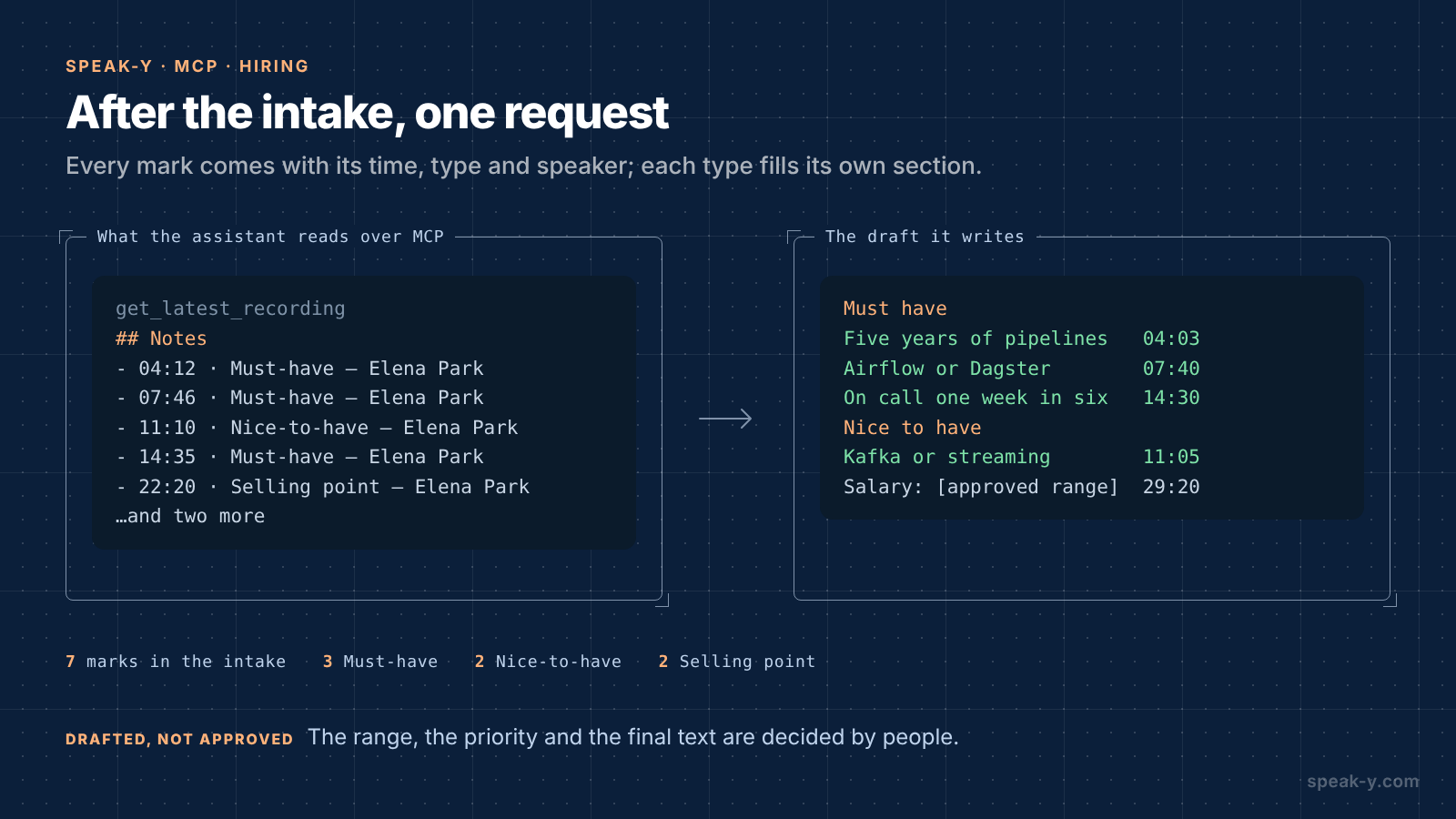
The assistant calls get_latest_recording, or search_recordings with the
role's tag. Alongside the transcript, Speak-Y hands it a Notes list —
each mark with its time, type, speaker and first words — so the draft comes
back sorted the way the manager sorted it in the call. A mark's time is the
moment you pressed the key, a few seconds after the reply began; the draft
cites the start of the reply:
About the role
Fernway is retiring its legacy ETL this year. You will design
the new data platform and own it (22:15).
"Airflow or Dagster in production, not a course project."
— Elena Park (07:40)

Must have
- Five years building data pipelines, two on Snowflake or
  BigQuery (04:03)
- Orchestration in production: Airflow or Dagster (07:40)
- On call one week in six (14:30)

Nice to have
- Kafka or other streaming experience (11:05)
- Mentoring junior engineers (18:50)

Why join
- A team of six that ships every week; $2,000 learning
  budget (26:40)

Salary: [approved range] — budget mentioned as 150–170k,
  pending finance (29:20)
Interview process: not discussed in the call
Fill the gaps by voice
Nobody discussed the interview process, and you know it better than the transcript does. Put the cursor in the assistant's message field, hold Right ⌘ — the default Speak-Y hold hotkey — and say it:
Add an interview process: a 30-minute screen with me, a take-home pipeline review, then a panel with Elena and two engineers.
Release the key and the text is typed where the cursor is. Send it, and the assistant adds the section. More on dictating long passages in from voice notes to a structured draft.
What stays with people
The assistant drafts from what was said. Four things are decisions:
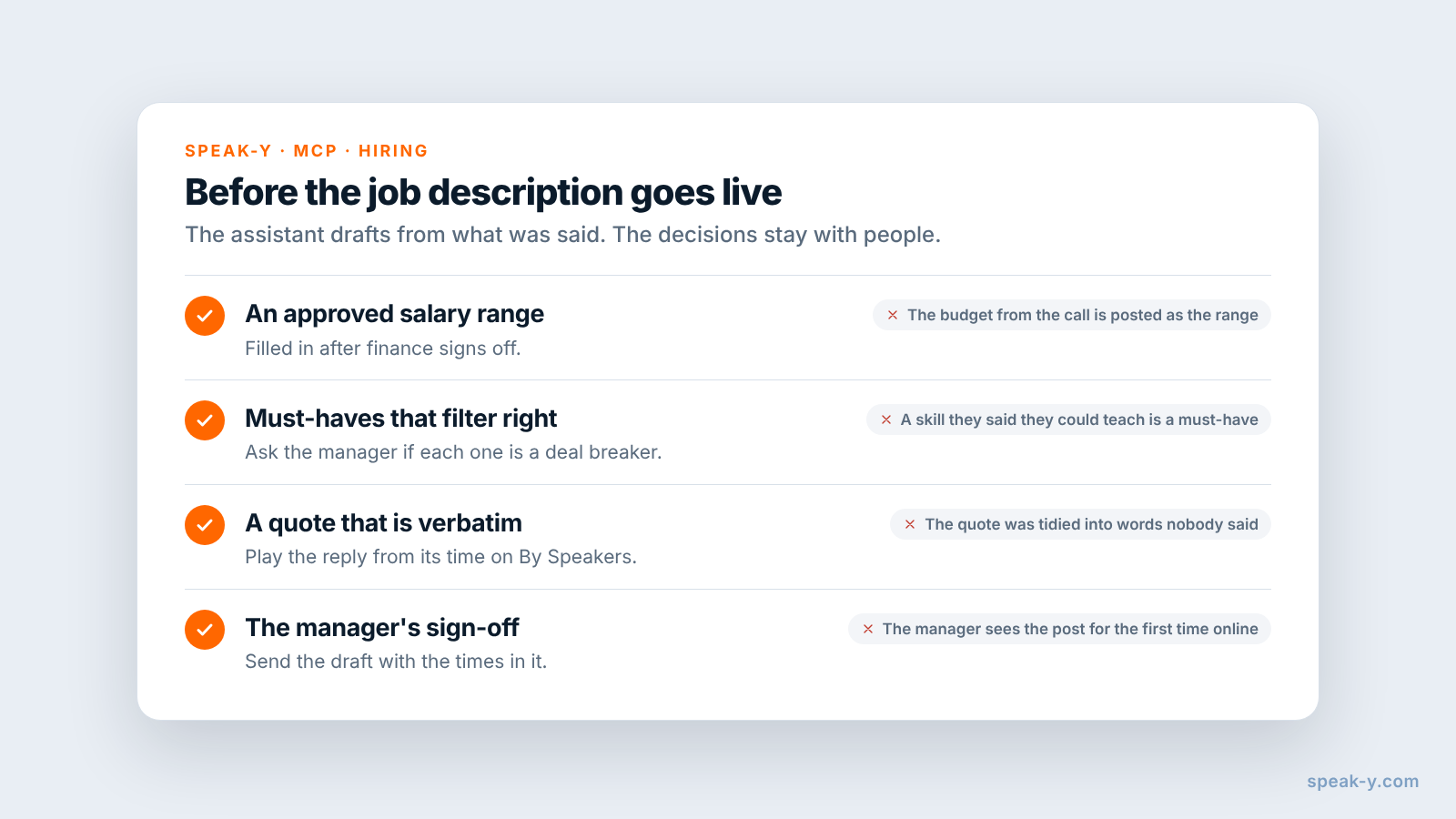
- The salary range. The manager's "around 150 to 170, pending finance" is a budget, not an approved range. Under the EU Pay Transparency Directive, whose transposition deadline was 7 June 2026, a candidate is entitled to the pay or its range before the interview, and employers may not ask about pay history. California, Colorado, New York and Washington are among the US states that require a range in the posting itself (checked on 26 October 2026; check the rules where you hire). Fill it in after finance approves it.
- Which must-haves survive. Five must-haves narrow the pool; ask the manager whether all of them filter out people they would hire.
- The final wording. Check the quote against the recording: click the reply's time on By Speakers to play it. Assistants tidy spoken language, and a tidied sentence is no longer a quote.
- Sign-off. Send the draft to the manager with the times in it. They can confirm a requirement by replaying their own words instead of rereading yours.
When does your ATS fit better?
When the post has to be published, tracked and reported on in one place. Applicant tracking systems write drafts too. As of 26 October 2026, Greenhouse documents a job post generator that drafts a description from a short brief of titles and qualifications, and Ashby's AI content assistant drafts job descriptions from your previous postings inside its editor. Both start from a brief or from older posts, not from the intake call. A practical split: draft from the recording in your assistant, then paste the approved text into the ATS.
Limits and costs
- Length. Checked on speak-y.com on 26 October 2026: Free stops a meeting recording at 30 minutes, Pro ($10 a month) at 60, Pro+ ($15) and Max ($30) at four hours. The MCP server is free on every plan.
- Audio only. A requirements doc shared on screen is not in the recording. Ask the manager to say the key points out loud.
- Mac for marks. Note types, marks and the MCP server are in the macOS app; the recordings stay in the library on your Mac.
The short version
Must-have, Nice-to-have and Selling point on ⌥1, ⌥2 and ⌥3, one tag per role. Let the manager say it, press the key; then the speaker's name and the tag. One request gives a draft in the manager's words with times; the salary range and the final text are approved by people. For what happens after the post goes live, see hiring panel interview notes.
FAQ
Can an AI assistant write a job description from an intake call?
It can write a draft. Connected to the Speak-Y MCP server, Claude, ChatGPT or Cursor reads the intake recording — the transcript by speaker, the AI summary and a Notes list of your marks with their times — and drafts the role, the must-haves, the nice-to-haves and why to join in the hiring manager's words. A person approves the requirements, the salary range and the final text.
How do I separate must-haves from nice-to-haves during the call?
Give each its own note type in Speak-Y. Rename the default Mark the moment to Must-have on ⌥1 and add Nice-to-have on ⌥2 and Selling point on ⌥3 in Settings → Notes. A press marks the last 15 seconds of the call with that type, so the assistant later gets the requirement already sorted, with the time it was said.
Should the assistant write the salary range?
No. The range is a decision for the hiring manager and finance, and in many places a legal disclosure: the EU Pay Transparency Directive requires the pay or its range before the interview, and states such as California, Colorado, New York and Washington require it in the job posting. Ask the assistant to leave a placeholder and fill in the approved range yourself.
Do I need the hiring manager's consent to record an intake call?
Tell them before you start and record only if they agree. Speak-Y does not join the call as a bot, so nobody announces the recording for you. Whether telling them is enough or you need explicit consent depends on where you both are.
Which Speak-Y plan do I need for intake calls?
The MCP server is free on every plan. Checked on speak-y.com on 26 October 2026: Free stops a meeting recording at 30 minutes, Pro ($10 a month) at 60, and Pro+ ($15) and Max ($30) at four hours. Most intake calls fit into Free or Pro.